



In this blog post, we cover Terraform variable types of input, and output variables, and how to define them in terraform configuration.
If you want to know more about Terraform certification please go through our previous blog on Terraform Associate.
Index:
- Terraform Input Variables
- Types of Input Variables in Terraform
- Use Input Variables
- Assign Values to Input Variables
- Define Terraform Output Variables
Terraform Input Variables
Terraform input variables are used as parameters to input values at run time to customize our deployments. Input terraform variables can be defined in the main.tf configuration file but it is a best practice to define them in a separate variable.tf file to provide better readability and organization.
A variable is defined by using a variable block with a label. The label is the name of the variable and must be unique among all the variables in the same configuration.
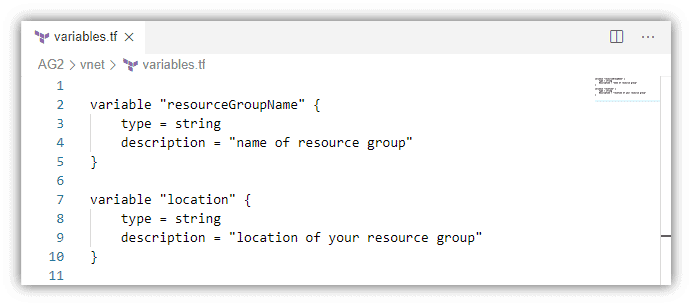
The variable declaration can optionally include three arguments:
- description: briefly explain the purpose of the variable and what kind of value is expected.
- type: specifies the type of value such as string, number, bool, map, list, etc.
- default: If present, the variable is considered to be optional and if no value is set, the default value is used.
Check out: How to Install Terraform in Linux, Mac, Windows
Terraform Input Variables Types
The type argument in a variable block allows you to enforce type constraints on the variables a user passes in. Terraform supports several types, including string, number, bool, list, map, set, object, tuple, and any.
If a type isn’t specified, then Terraform assumes the type is any. Now, let’s have a look at some of these terraform variables types and their classification.
Primitive Types
A primitive type is a simple type that isn’t made from any other type. The available primitive types are:
- string: a sequence of characters representing some text, such as “hello”.
- number: a numeric value. The number type can represent both whole numbers like 15 and fractional values such as 6.28318.
- bool: either true or false.
Also Read: Terraform Workflow.
Complex Types
A complex type is a type that groups multiple values into a single value. These values could be of a similar type or different types.
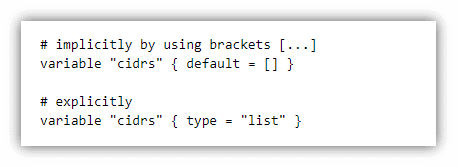
- List: A Terraform list variable is a sequence of similar values indexed by numbers (starting with 0). It accepts any type of value as long as they are all of the same types. Lists can be defined either implicitly or explicitly.
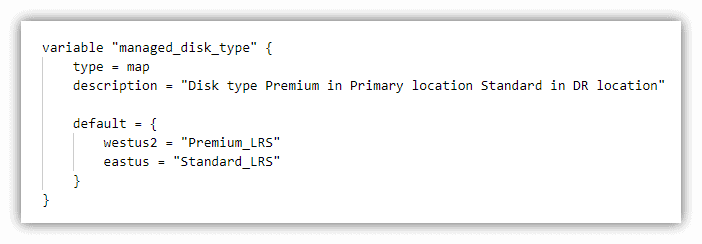
- Map: A map is a collection of values where each value is identified by a string label.
In the example below is a map variable named managed_disk_type to define the type of storage we want to use based on the region in Azure. In the default block, there are two string values, “Premium_LRS” and “Standard_LRS” with a named label to identify each one westus2 and eastus.
- Object: An object is a structural type that can contain different types of values, unlike a map, or list. It is a collection of named attributes that each have their type.
In the below example, we have declared an object type variable os for the os image that can be used to deploy a VM.
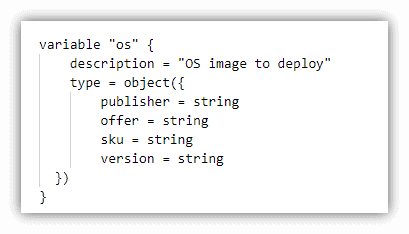
Lists, maps, and objects are the three most common complex variable types. They all can be used for their specific use cases.
Also read: Step-by-step guide on Terraform Certification
Use Input Variables
After declaration, we can use the variables in our main.tf file by calling that variable in the var.<name> format. The value to the variables is assigned during terraform apply.
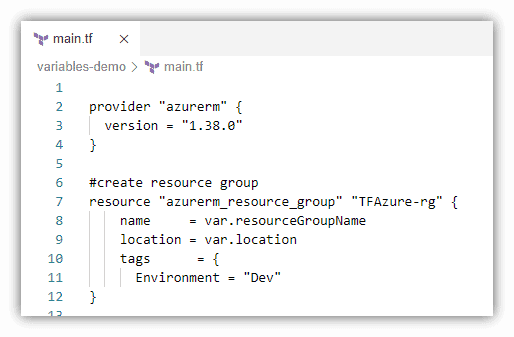
Also, Check Our blog post on Terraform Cheat Sheet. Click here
Assign Values To Input Variables
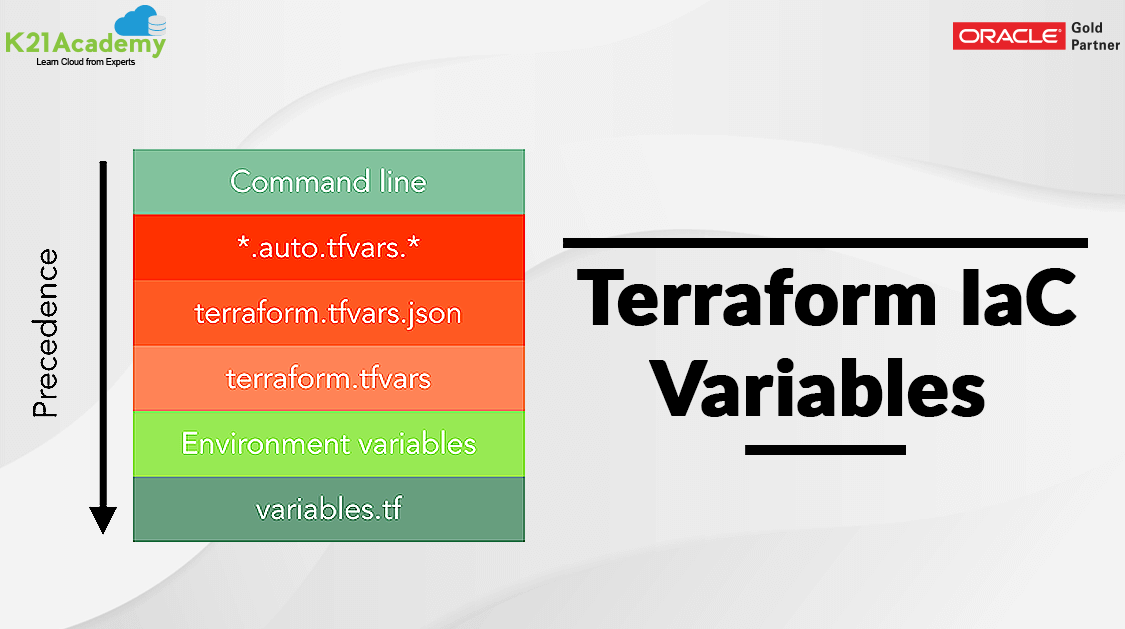
There are multiple ways to assign values to variables. The following is the descending order of precedence in which variables are considered.
1. Command-line flags
The most simple way to assign value to a variable is using the -var option in the command line when running the terraform plan and terraform apply commands.
$ terraform apply -var="resourceGroupName=terraformdemo-rg" -var="location=eastus"
2. Variable Definition (.tfvars) Files
If there are many variable values to input, we can define them in a variable definition file. Terraform also automatically loads several variable definitions files if they are present:
- Files named exactly terraform.tfvars or terraform.tfvars.json
- Any files with names ending in .auto.tfvars or .auto.tfvars.json
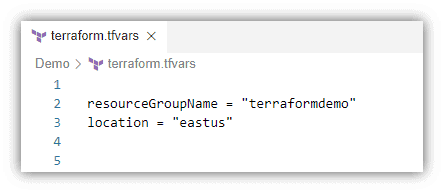
If the file is named something else, then use the -var-file flag directly to specify a file.
$ terraform apply -var-file="testing.tfvars"
3. Terraform Environment Variables
Terraform searches the environment of its process for environment variables named TF_VAR_<var-name> followed by the name of a declared variable. Terraform scans all variables starting with TF_VAR and uses those as variable values for Terraform.
$ export TF_VAR_location=eastus
This can be useful when running Terraform in automation, or when running a sequence of Terraform commands in succession with the same Terraform variables.
Read More: About Hashicorp Terraform. Click here
Define Output Variables
Outputs allow us to define values in the configuration that we want to share with other resources or modules. For example, we could pass on the output information for the public IP address of a server to another process.
An output variable is defined by using an output block with a label. The label must be unique as it can be used to reference the output’s value. Let’s define an output to show us the public IP address of the server. Add this to any of the *.tf files.
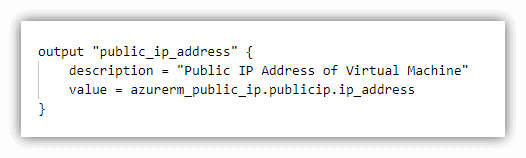 Multiple output blocks can be defined to specify multiple output variables. Outputs are only shown when Terraform applies your plan, running a Terraform plan will not render any outputs.
Uses of Terraform Variables
Now that we’ve covered the types let’s explore how these variables are used in practice.
Configuration Reusability
Terraform variables enable you to reuse configurations across different environments or projects. By changing input variables, you can deploy the same infrastructure with slight variations, making your code highly adaptable.
Dynamic Resource Creation
Input variables allow you to dynamically create resources based on user input. For instance, you can use variables to specify the number of virtual machines or the size of a database server during deployment.
Collaboration and Sharing
Output variables enable you to share critical information with other configurations. This promotes collaboration between different Terraform projects and simplifies the integration of your infrastructure with external systems.
Enhanced Maintainability
Local variables help maintain clean and organized configuration files. They prevent a repetition of code and make it easier to update values consistently across your project.
Frequently Asked Questions
How do I define variables in Terraform?
Variables in Terraform can be defined in several ways. You can define them in a separate variables file, within the Terraform configuration file itself, or through environment variables. The method you choose depends on your preference and the level of sensitivity of the variable values.
How do I use variables in my Terraform configurations?
To use variables in your Terraform configurations, you can reference them by using the syntax var.variable_name. For example, if you have a variable named region, you can use it as var.region in resource blocks or other parts of your configuration.
Can I assign default values to Terraform variables?
Yes, you can assign default values to Terraform variables. By specifying a default value in the variable declaration, Terraform will use that value if no other value is provided when running Terraform commands. This allows you to make certain variables optional.
How can I input sensitive information, such as passwords or API keys, as variables?
Sensitive information should not be stored directly in your Terraform configurations. Instead, you can use sensitive input mechanisms, such as environment variables or a secret management system, to input and retrieve sensitive values for your variables.
Can I use complex data types as Terraform variables?
Yes, Terraform supports complex data types as variables, including lists, maps, and objects. This allows you to pass structured data to your configurations and use them in resource blocks or other parts of your code.
Are there any naming conventions for Terraform variables?
There are no strict naming conventions for Terraform variables, but it is recommended to use descriptive and meaningful names that convey the purpose of the variable. It is also advisable to follow a consistent naming convention across your Terraform project for better maintainability.
Can I define variable dependencies in Terraform?
Terraform does not have direct variable dependencies. However, you can use outputs in conjunction with variables to create dependencies between resources and retrieve values from one resource to use as input for another.
Related/References
- Terraform Installation Overview
- HashiCorp Infrastructure Automation Certification: Terraform Associate
- 1Z0-1072-20 | Oracle Cloud Infrastructure 2020 Architect Associate
- [AZ-400] Microsoft Azure DevOps Certification Exam: Everything You Need To Know
- [AZ-104] Microsoft Azure Administrator Certification Exam: Everything You Need To Know
- Automate AWS Virtual Machine using Terraform – Creation Demo
- Why Terraform Provisioners Are The Last Resort?
- How to Provision AWS Infrastructure with Terraform?
- HashiCorp Certified Terraform Associate-Step By Step Activity Guides
Join FREE Class
🚀 Master Terraform & DevOps to get High-Paying Jobs!
🔥 Join our EXCLUSIVE Free class! 🚀
Get your hands dirty with lots of projects and labs based on Terraform and DevOps in our Program.
Click on the below image to Register for Our FREE Class Now!


![Microsoft Agentic AI Business Solutions Architect [AB-100] | K21 Academy](https://test.k21academy.com/wp-content/uploads/2025/11/Microsoft-Agentic-AI-Business-Solutions-Architect-AB-100-Exam-Overview1.png)


