



What Is Terraform | Terraform Command Line Interface (CLI) | Terraform Cheat Sheet
No more terror of commands!
Terraform has quickly become popular across the world to develop and change infrastructure. Terraform provides a command-line interface called Terraform CLI. However, for most people, terraform commands seem intimidating at first if you are not used to using the terminal. Of course, you won’t know all commands by heart as it takes hours of practice. Cheat sheets come in handy while you are still working on memorizing these commands.
If you are a beginner in Terraform and confused about where to start? Check out our blog : Terraform Beginner’s Guide
What Is Terraform?
Terraform is one of the most popular Infrastructure-as-code (IaC) tool, used by DevOps teams to automate infrastructure tasks. It is used to automate the provisioning of your cloud resources. Terraform is an open-source, cloud-agnostic provisioning tool developed by HashiCorp and written in GO language.
If you want to know more about Terraform certification please go through our previous blog on Terraform Certification
Terraform Command Line Interface (CLI)
Terraform command-line interface is via the terraform command which accepts a variety of subcommands such as terraform init or terraform plan and it is commonly referred to as “Terraform CLI”.
Terraform CLI Help
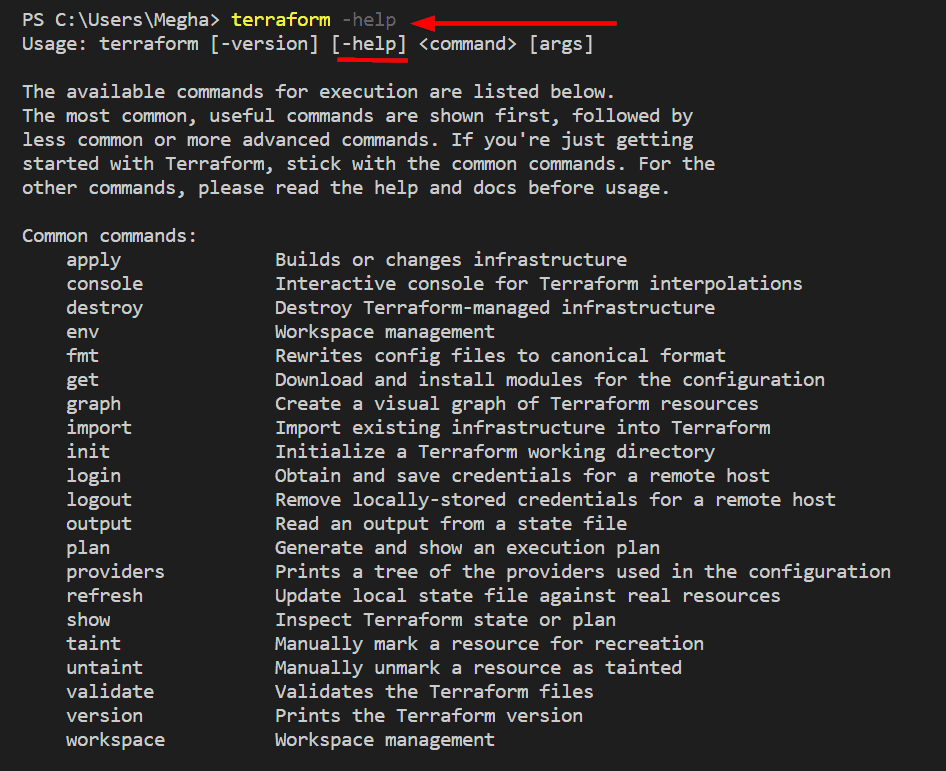
Terraform has a built-in help system that can be accessed from the command line for commands that you are not familiar with, or want to learn more about. You can get specific help for any specific command, use the -help option with the relevant subcommand. For example, to see help about the “state” subcommand you can run terraform state -help.
terraform <commandName> -help
Also Check: How to Install Terraform. Click here
Terraform Cheat Sheet
Terraform command accepts a variety of subcommands such as terraform init or terraform plan. Some of the widely used commands and subcommands I have listed below.
Show version |
|
| terraform –version | Shows terraform version installed |
Initialize infrastructure |
|
| terraform init | Initialize a working directory |
| terraform init -input=true | Ask for input if necessary |
| terraform init -lock=false | Disable locking of state files during state-related operations |
Get |
|
| terraform get | downloads and update modules mentioned in the root module |
| terraform get -update=true | modules already downloaded will be checked for updates and updated |
Provision infrastructure |
|
| terraform plan | Creates an execution plan (dry run) |
| terraform plan -out=path | save generated plan output as a file |
| terraform plan -destroy | Outputs a destroy plan |
| terraform apply | Executes changes to the actual environment |
| terraform apply –auto-approve | Apply changes without being prompted to enter ”yes” |
| terraform apply -refresh=true | Update the state for each resource prior to planning and applying |
| terraform apply -input=false | Ask for input for variables if not directly set |
| terraform apply -var ‘foo=bar’ | Set a variable in the Terraform configuration, can be used multiple times |
| terraform apply -var-file=foo | Specify a file that contains key/value pairs for variable values |
| terraform apply -target | Only apply/deploy changes to the targeted resource |
| terraform destroy –auto-approve | Destroy/cleanup without being prompted to enter ”yes” |
| terraform destroy -target | Only destroy the targeted resource and its dependencies |
Terraform Workspaces |
|
| terraform workspace new | Create a new workspace and select it |
| terraform workspace select | Select an existing workspace |
| terraform workspace list | List the existing workspaces |
| terraform workspace show | Show the name of the current workspace |
| terraform workspace delete | Delete an empty workspace |
Format and validate Terraform Code |
|
| terraform fmt | Format code as per HCL canonical standard |
| terraform validate | validate configuration files for syntax |
Inspect Infrastructure |
|
| terraform graph | creates a resource graph listing all resources in your configuration and their dependencies. |
| terraform output | List all the outputs for the root module |
| terraform output instance_public_ip | List only the specified output |
| terraform output -json | List all the outputs in JSON format |
| terraform show | provide human-readable output from a state or plan file |
Terraform Import |
|
| terraform import aws_instance.foo i-abcd1234 | import an AWS instance with ID i-abcd1234 into aws_instance resource named “foo” |
Terraform State Manipulation |
|
| terraform state list | list all resources in the state file |
| terraform state list aws_instance.my_ec2 | Only list resource with the given name |
| terraform state mv | move an item in the state file |
| terraform state rm | Remove items from the state file |
| terraform state pull | Pull current state and output to stdout |
| terraform state push | Update remote state from a local state file |
| terraform state show aws_instance.my_ec2 | Show the attributes of a single resource |
| terraform state refresh | |
Terraform miscellaneous commands |
|
| echo “1 + 5” | terraform console | Display expected result of an expression as output |
| terraform taint aws_instance.my_ec2 | marks a Terraform-managed resource as tainted, forcing it to be destroyed and recreated on the next apply |
| terraform untaint aws_instance.my_ec2 | unmarks a Terraform-managed resource as tainted |
| terraform force-unlock LOCK_ID | removes the lock on the state for the current configuration |
| terraform login | obtain and save an API token for Terraform Cloud |
| terraform logout | remove credentials stored by terraform login |
Also Read: Our blog post on Terraform Create VM. Click here
Conclusion
In this blog, I have tried to cover most of the widely used Terraform commands in a cheat sheet. I must say that Terraform official docs are amazing and I, myself would like to prefer them most of the time but sometimes all you need is a simple, handy reference to get the work done.
Also Check: Terraform Interview Questions.
Frequently Asked Questions (FAQs)
By now, you must have a brief understanding of Terraform CLI commands. Let’s take a look at some frequently asked questions, asked by trainees in our HashiCorp Infrastructure Automation Certification: Terraform Associate training.
What is command fmt?
The terraform fmt command is used to rewrite Terraform configuration files to a canonical format and style. This command applies a subset of the Terraform language style conventions, along with other minor adjustments for readability.
What is the command taint?
The terraform taint command manually marks a Terraform-managed resource as tainted, forcing it to be destroyed and recreated on the next apply. This command will not modify infrastructure but does modify the state file in order to mark a resource as tainted. Once a resource is marked as tainted, the next plan will show that the resource will be destroyed and recreated and the next apply will implement this change.
Can you delete the default workspace?
No. You can't ever delete the default workspace.
Related/References
- HashiCorp Infrastructure Automation Certification: Terraform Associate
- Terraform Beginner’s Guide: Everything You Should Know
- HashiCorp Certified Terraform Associate-Step By Step Activity Guides
- Hashicorp: Terraform Certified Associate – 2020 – Tricks & Tips Of Terraform
- Install Terraform in Linux, Mac, Windows
- Why Terraform? Not Chef, Ansible, Puppet, CloudFormation?
- Terraform Providers Overview
Join FREE Class
🚀 Master Terraform & DevOps to get High-Paying Jobs!
🔥 Join our EXCLUSIVE Free class! 🚀
Get your hands dirty with lots of projects and labs based on Terraform and DevOps in our Program.
Click on the below image to Register for Our FREE Class Now!


![Microsoft Agentic AI Business Solutions Architect [AB-100] | K21 Academy](https://test.k21academy.com/wp-content/uploads/2025/11/Microsoft-Agentic-AI-Business-Solutions-Architect-AB-100-Exam-Overview1.png)


