



In this blog post, I am going to share the questions and answers that were covered in the Terraform FREE Live Session
What is Terraform?
Terraform is an open-source Infrastructure as Code (IaC) that allows you to build, change, and version control Infrastructure (VM, Network, Storage, Databases..) on both On-premise & Cloud.
If you are a beginner, check/read more about Terraform.
Also Read: Terraform Interview Questions and Answers
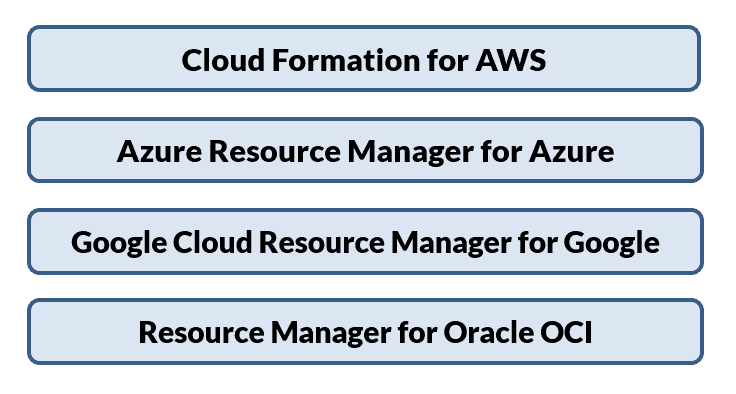
Cloud Vendor: Automation Tools
All the leading cloud vendor have their automation tools which are as follows:

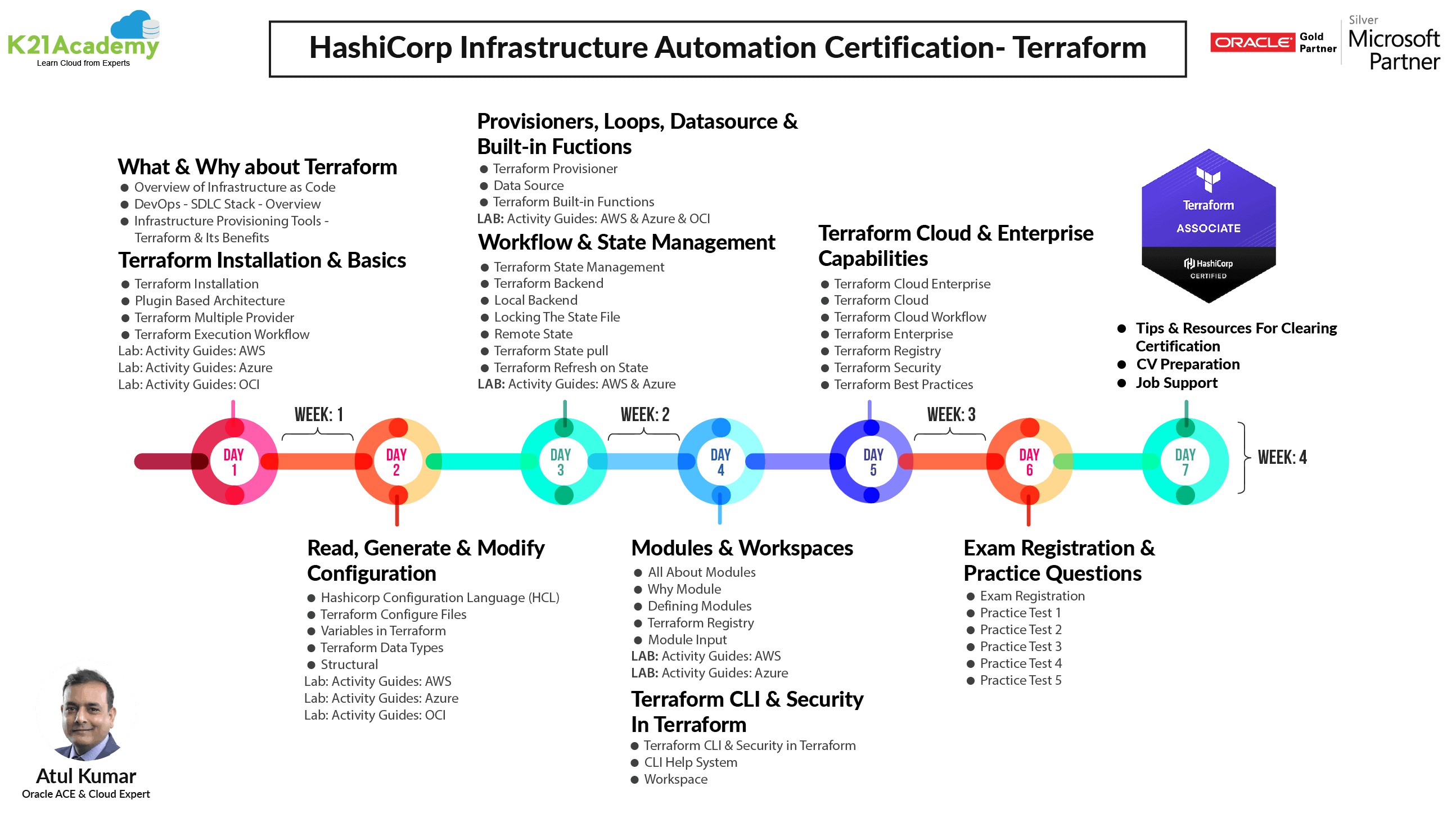
Roadmap For Terraform:
To know what more interesting things await while learning terraform, check out the terraform roadmap for more:
Question & Answers That Are Discussed In Live Session
In the Live session, we discussed the following questions:
Q1. What is Terraform used for?
Ans. A lot of companies are working with multiple cloud providers and in today’s era where time is money, terraform will convert your whole infrastructure to code. It supports all the leading cloud providers and it works on both on-prem and cloud.
Q2. What does Infrastructure as Code means?
Ans. Infrastructure as code is the process of managing and provisioning the complete IT infrastructure (comprising both physical and virtual machines) using machine-readable definition files. It helps in automating the complete data center by using programming scripts.
To learn more about Infrastructure as Code,
Q3. Who should learn Terraform? Can freshers learn to terraform?
Ans. Terraform can be learned by any IT professional with a basic knowledge of a particular cloud. It will be like an add-on skill.
For freshers, it is preferable to learn at least one cloud vendor and then you can learn the automation side of the cloud vendor.
Q4. Why should I learn Terraform? Any pre-requisite for Learning Terraform?
Ans. Terraform has gained a lot of attraction from the last year and currently is at the 4th Number on the Forbes Cloud 100 2021 list. The pre-requisite for learning Terraform is to have the basic knowledge of any cloud vendor then you can learn Terraform effectively and efficiently.
Q5. What are other DevOps tools similar to Terraform?
Ans. A few other DevOps tools which are similar to Terraform are Chef, Puppet, Ansible and Saltstack but among all only Terraform has Immutable Infrastructure.
Q6. How Chef, Ansible is different from Terraform?
Ans. Terraform is a proper infrastructure provisioning tool which means your only focus will be to provision the infrastructure whereas Ansible and Chef were developed keeping configuration management in mind. To get the best result you can use Terraform to provision the infrastructure and Ansible or Chef for configuration management.
Q7. Do we need any coding experience in any language before we jump on Terraform?
Ans. No, you don’t need any coding experience prior to learning Terraform. You can start coding with Terraform as it is very easy to learn and you don’t need to learn any language for that but in case you have worked on JSON that would be a bonus skill as Terraform codes can also be written in JSON.
Q8. Which one is the most popular tool in the industry with the most demand: Terraform / Chef / Ansible/ Puppet?
Ans. The most popular tool among the above-mentioned tools is Terraform where you can provision your infrastructure and then the next will be Ansible for the configuration management of the provisioned infrastructure. Chef and Puppet are considerably old and their popularity has come down since the launch of Ansible and Terraform as these tools offer more features and are pretty lightweight tools.
To know/read more about Why Terraform? Not Chef, Ansible, Puppet, CloudFormation.
Q9. How does terraform handles variables?
Ans. Reusability is one of the major benefits of Infrastructure as Code. In Terraform, we can use variables to make our configurations more dynamic. This means we are no longer hard-coding every value into the configuration.
To know/read more about Terraform Variables.
Q10. What are modules and workspaces in Terraform?
Ans. Terraform has code reusability, suppose we want to create multiple virtual machines so what we can do is we can create one virtual machine module in Terraform and then call that module multiple times and as many times as we want.
In organizations, we have an instance strategy in which we have test, development, and production instances. Now, similar to this we have workspaces in terraform in which we can use the same code and have different state files for each instance.
Q11. What are state files? What all it stored and where we can store it? Any best practices?
Ans. A state file is created in Terraform while executing the Terraform script. It stores the metadata of the resources that are created and updated via Terraform. Any change in the resources via terraform will be recorded and changes will be made in the state file as well.
The best practice is to store the terraform state file over to cloud so that it can be shared with multiple members of the same team.
Q12. My organization is on Cloud already and we have created a lot of infrastructure resources already, how can we bring them to terraform? Any specific tool you suggest?
Ans. In this case, we can use Terraform Import which we can import the whole infrastructure codify it, and then further start managing it via Terraform. There are also multiple third-party tools like Terraformer which can covert the infrastructure into code and bring it to Terraform.
We have covered all of the above questions in a Live Session along with a brief introduction of Terraform which you can watch by clicking here.
Related/References
- HashiCorp Infrastructure Automation Certification: Terraform Associate
- HashiCorp Certified Terraform Associate-Step By Step Activity Guides
- Hashicorp: Terraform Certified Associate – Tricks & Tips Of Terraform
- Install Terraform in Linux, Mac, Windows
- Why Terraform? Not Chef, Ansible, Puppet, CloudFormation?
- Terraform Variables – Terraform Variable Types
Join FREE Class
🚀 Master Terraform & DevOps to get High-Paying Jobs! 🔥 Join our EXCLUSIVE Free class! 🚀
Get your hands dirty with lots of projects and labs based on Terraform and DevOps in our Program. Click on the below image to Register for Our FREE Class Now!


![Microsoft Agentic AI Business Solutions Architect [AB-100] | K21 Academy](https://test.k21academy.com/wp-content/uploads/2025/11/Microsoft-Agentic-AI-Business-Solutions-Architect-AB-100-Exam-Overview1.png)


