





In this blog post, we are going to cover What is Machine in Weblogic Server, Node Manager, Why Node Manager is required, How to Start/Stop Node Manager & How to configure the Node Manager.
Things you should know :
- A Node Manager is a program that is used to control WebLogic Server instances. A single Node Manager instance is used to control all of the server instances running on the same physical machine or different machine. These instances can reside in different clusters, domains, and such. You must configure each machine in your domain to communicate with Node Manager.
- The Machine is used by the Node Manager to re-start a failed Server.
Read our blog to know more about Weblogic Data Sources (JDBC) & JMS.
Check the Video Below to know more about Weblogic Machine & Node Manager:
What is a Node Manager?
- A Node Manager is a program that is used to control WebLogic Server instances.
- A single Node Manager instance is used to control all of the server instances running on the same physical machine or different machine. These instances can reside in different clusters, domains, and such.
- You must configure each machine in your domain to communicate with Node Manager.
- It can be associated with more than one domain on the server.
How to Start & Stop the Node Manager?
- To Start Node Manager: $WL_HOME\server\bin\startNodeManager.sh
- To Stop Node Manager: There is no script to stop NodeManager, you need to find the process ID of Node Manager and kill it. Kill – 9 <PID>
Why the Node Manager is Required?
- A Node Manager process is not associated with a specific WebLogic domain but with a machine.
- You can use the same Node Manager process to control server instances in any WebLogic Server domain, as long as the server instances reside on the same machine as the Node Manager process.
- Node Manager must run on each computer that hosts WebLogic Server instances. whether Administration Server or Managed Server that you want to control with Node Manager.
What is the Work of the Node Manager and how do you Configure it?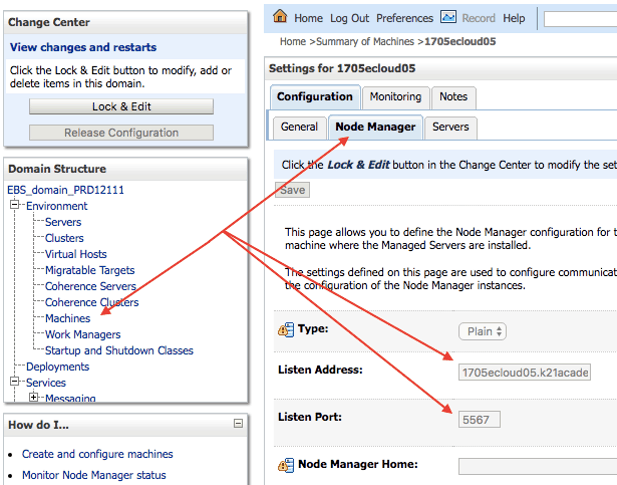
- Node manager is especially used for remotely managed server startup.
- We require a logical machine created from Weblogic Admin console. Go to Domain —> Machines –> NewMachine –> Node Manager
- We need to provide the host and the port on which node manager is running, by default it will be localhost and 5556 Port.
What is Machine in WebLogic server?
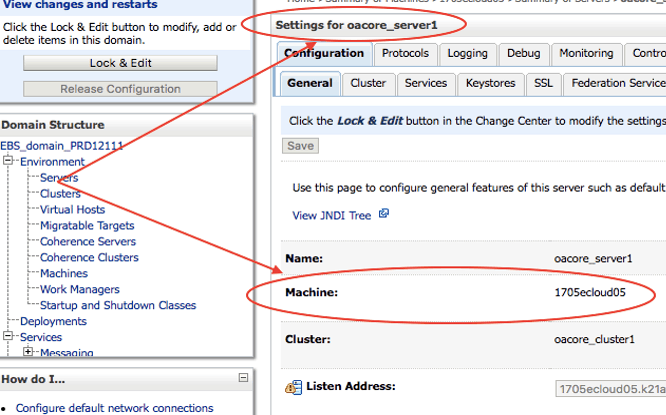
- The Main purpose of a machine is to administratively manage servers. Machine Identifies as physical host.
- The machine is used to associate a WebLogic Server with Host on which it runs
- A Machine is Used by a Node Manager to re-start a failed Server.
- Machines are optionally used clusters, it is a logical description, not a physical entity.
- A Machine is Used by Clustered Managed Server in selecting the location for replicated data.
Stay tuned for my next blog where we will cover What is Weblogic Security Realm?
We have Oracle WebLogic Training, where we cover these such modules in detail like Architecture, File System, JDBC, JMS, HA, Clustering, Security, Patching, Upgrade, Backup, and Recovery etc.
Related Posts
- Oracle Weblogic Server Administration
- Oracle Weblogic Server Administration: Self Study
- Oracle Weblogic Server (12C/11g) Administration: Step By Step Activity Guide/ Hands-on Lab Exercise
- [Video] Oracle Weblogic Server: Weblogic Admin Tasks & Tools
- Troubleshooting Oracle Weblogic Server: Startup Issue: OutOfMemoryError PermGen Space
- [Video] Oracle WebLogic Administration: Weblogic Domain Topology
- [Video] Oracle WebLogic Administration: Weblogic Domain Home and Server
- Oracle Weblogic Administration: Introduction to Multitenancy
- [Video-Blog] Oracle WebLogic Administration: Admin Server and Managed Server
- [Video] Oracle WebLogic Administration: Clusters and Dynamic Cluster
Next Task For You
Want to move ahead in your career and want to get a higher Earning Job?
Get 7+ Courses for DBAs & Apps DBA in a bundle program and learn from the Industry’s best Experts.


![Microsoft Agentic AI Business Solutions Architect [AB-100] | K21 Academy](https://test.k21academy.com/wp-content/uploads/2025/11/Microsoft-Agentic-AI-Business-Solutions-Architect-AB-100-Exam-Overview1.png)



