



This post is the fifth in a Multi-Part Video Series on “Oracle Exadata Cloud Service for DBAs & APPS DBAs”. In this post, I’ll be discussing the Exadata Cloud Service (ExaCS) Storage Options which are Flash Storage and 3 ASM Disk Groups namely Data, Reco and Sparse Storage.
(To be the first to receive updates on Oracle Exadata Database, On-premise and On-Cloud, Subscribe to Our Newsletters)
Storage Options in ExaCS
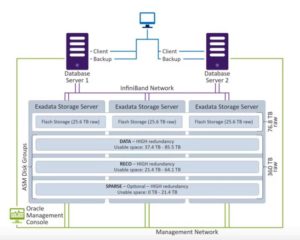
Depending on the configuration, there are 3, 6 and 12 Storage Servers in Exadata Cloud Service. In each Storage Server, there are four types of storage:
- Flash Storage
- 3 ASM Disk Groups: Data, Reco and Sparse
Flash Storage
Exadata’s Flash Storage has a special feature called Smart Flash Cache. All the frequently accessed data files are stored here.
ASM Disk Groups
Automatic Storage Management or ASM disk groups is Oracle’s storage management unit. It has 3 disk groups and all of them have high redundancy. These disk groups are:
- Data Disk Group
- Reco Disk Group
- Sparse Disk Group
Data Disk Group
In the Data Disk Group, all the less frequently accessed data and other data files are stored.
Reco Disk Group
Reco or Recovery Disk Group is known for Fast Recovery Area (FRA) i.e. it is used for backup and recovery. All the backup files like RMAN backup and Archive Redo logs are stored here.
Sparse Disk Group
Sparse Disk Group is an optional disk group. Unlike other disk groups, the client can choose whether they wish to create it or not. This disk group is used to store the snapshots of the Exadata Server, which are quick and memory-efficient clones of Exadata Database Server and are easy to create and destroy. These snapshots are mainly used in Development and Testing environment.
Note: The creation of Sparse Disk Group is advisable.
Also read: The difference between Oracle Exadata and Oracle database appliance.
Other Options While Provisioning Exadata
Normally, Exadata gives 60% and 40% of the usable disk storage to Data Disk and Reco Disk, respectively. However, these can vary when we customize our Exadata Database. There are two options available while creating an Exadata Database:
- Create Sparse Disk Group
- Database Backup on Exadata Storage
Choosing any of these or both of these options changes the percentage of memory allocation of each storage type in the following manner
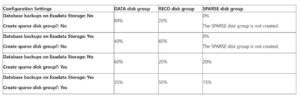
Note: The actual usable disk space is less than what is provisioned.
Related/References
- Check out the Overview of Oracle Exadata Cloud Service
- Read about Oracle Exadata Cloud Service Architecture
- Learn more about Oracle Exadata Deployment Options
- Read about the Oracle Exadata Cloud Service Offerings
Next Task for You
Begin your journey towards becoming a Cloud DBA Expert by joining the FREE MasterClass.
Click on the below image to Register for the FREE Masterclass Now!


![Microsoft Agentic AI Business Solutions Architect [AB-100] | K21 Academy](https://test.k21academy.com/wp-content/uploads/2025/11/Microsoft-Agentic-AI-Business-Solutions-Architect-AB-100-Exam-Overview1.png)


