




This post is the first video of a multi-part video series on “Oracle Exadata Cloud Service for DBAs & APPS DBAs“.
In this post, we will be covering the high-level Overview of Exadata Cloud Service. If you are a beginner wants to know more about Exadata cloud check our previous post on https://k21academy.com/exadata11
Note: If you want to know more about the Roles & Tasks of DBA’s in Cloud, check the previous post on https://k21academy.com/clouddba12
Overview of Exadata Cloud Service
(To be the first one to receive Updates on Oracle Cloud, Subscribe to Our Youtube channel)
Oracle Exadata Cloud Service is a combination of the powerful Exadata and Oracle Cloud. It is versatile enough to process all the database workloads including OLTP, Data Warehousing, OLAP, and Hybrid workloads on a single Exadata platform in the Cloud.
Note: To know more about the OLTP, OLAP, Autonomous Database click here https://k21academy.com/clouddba31
Exadata on Cloud and Related Cloud Services
The Exadata on Cloud and related Services are:
- Exadata Cloud Service Instance
- Cloud Control Plane
- Oracle Cloud Operations Console & Team
- Oracle Object Storage Cloud Service
- Client Applications
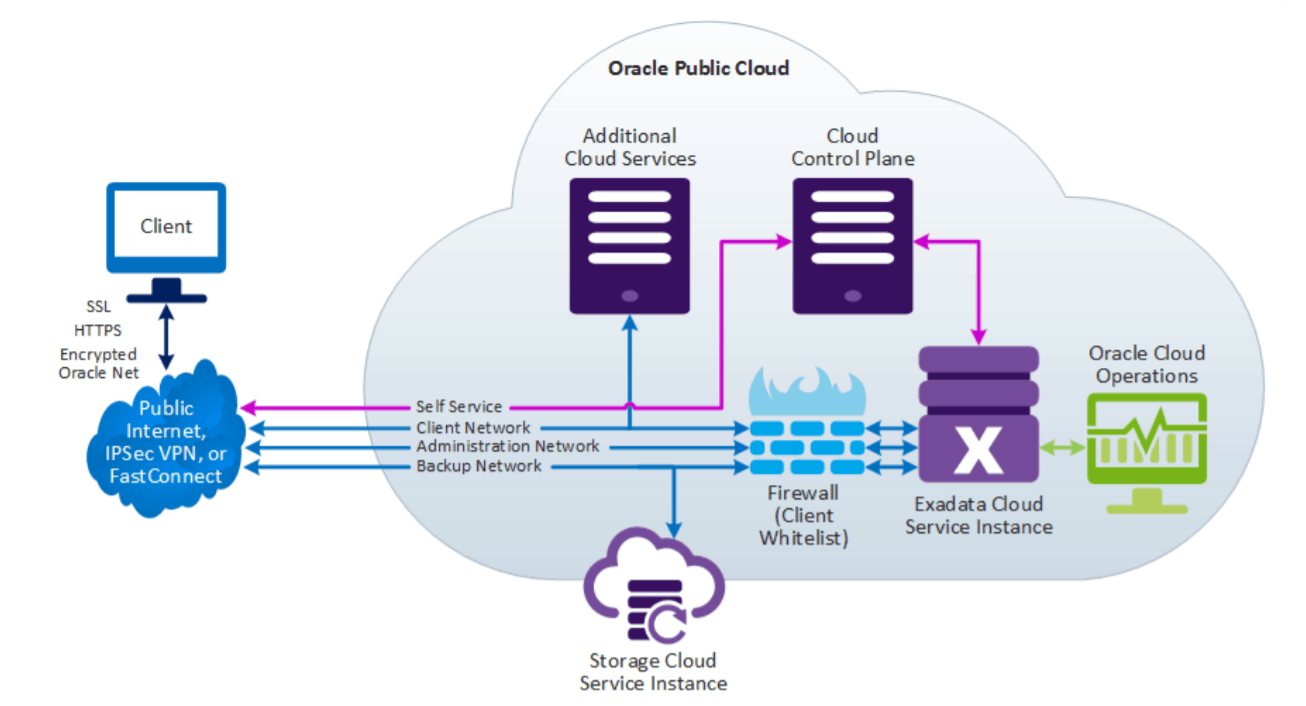
1. Exadata Cloud Service Instance
Each Exadata Cloud Service Instance has a predefined number of Exadata Database Server Nodes and a predefined number of Exadata Storage Server Nodes. Exadata Cloud Service is available in 3 configurations:
- Quarter Rack: Contains 2 Exadata Database nodes and 3 Exadata Storage Servers.
- Half Rack: Contains 4 Exadata Database nodes and 6 Exadata Storage Servers.
- Full Rack: Contains 8 Exadata Database nodes and 12 Exadata Storage Servers.
Note: To know more about the Quarter Rack, Half Rack, Full Rack click here https://k21academy.com/clouddba65
2. Cloud Control Plane
Cloud Control Plane which provides a web-based self-service interface to manage Exadata Cloud Service. In addition to that, you also get REST APIs which also provide programmatic access to the service administration functions.
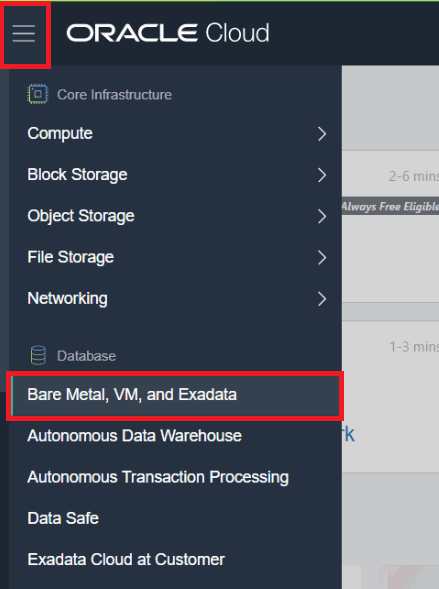
3. Oracle Cloud Operations Console & Team
All hardware, firmware, and the Exadata Storage Server software are managed by Oracle with the help of Oracle Cloud Operations which is integrated with the Exadata Cloud Instance using a management network.
Note: To know more about Oracle Exadata Cloud Service Architecture (Dom0, DomU) click here https://k21academy.com/clouddba63
4. Oracle Object Storage Cloud Service
The Oracle Exadata instance consists of an Oracle Object Storage Cloud Service which contains the Exadata backups. Additionally, Oracle Exadata Database Server can be backed up here.
Note: Apart from backup on Oracle Cloud Storage, a local backup can be created on the Exadata Storage Server.
Note: To know more about Object storage and Local storage click here https://k21academy.com/oci67
Note: To know more about Exadata Cloud Service(ExaCS) Storage Options click here https://k21academy.com/clouddba66
5. Client Applications
In order to access the Exadata Cloud Service, one first needs to establish a connection between the Client Applications like EBS, Java Applications, etc and Oracle Exadata Instance by one of these 3 ways:
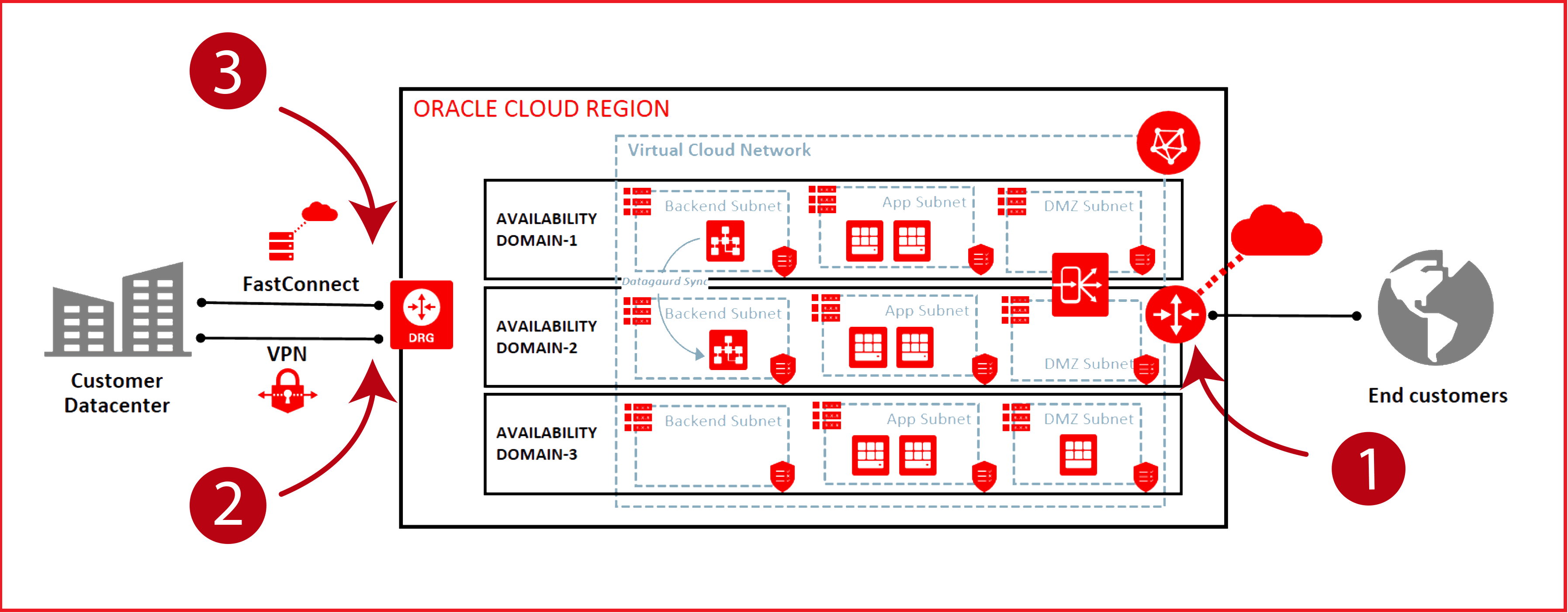
- Public Internet. Using the public Internet and Secure Protocols, such as SSH on Port 22 and Oracle Net on Port 1521. A private IP is assigned to the client which connects to the Exadata Instance.
- IPSec VPN. Configuring an IPSec VPN to provide a secure connection between your network and Oracle Cloud over the Internet. Here, a Private IP is assigned.
- FastConnect. FastConnect provides higher-bandwidth options, more reliable and consistent networking experience compared to the Internet-based connections.
Note: To know more about networking in Exadata click here https://k21academy.com/clouddba67
Related Post
- [Second video] Oracle Exadata Cloud Service(ExaCS) Architecture
- [Third video] Exadata Deployment Options: Cloud Service (ExaCS) vs Cloud at Customer (ExaCC) vs Exadata Machine
- [Fourth video] Oracle Exadata Cloud Service(ExaCS) Offerings
- [Fifth video] Oracle Exadata Cloud Service(ExaCS) Storage Options
- [Sixth Video] Oracle Exadata Cloud Service (ExaCS) Networking
- Database Deployment Option in Oracle cloud
Begin Your Cloud Journey
Begin your journey towards becoming an Oracle Cloud Expert and earn a lot more in 2024 by joining our FREE CLASS. You will also know more about the Roles and Responsibilities, Job opportunities for OCI Architects, Admins in the market, and what to study Including Hands-On labs you must perform to get the Higher Paying jobs.
Click on the below image to Register for Our FREE Class on MASTERING ORACLE CLOUD FOR DBAs, APPs DBAs, ARCHITECTS & SYS ADMINS

![Microsoft Agentic AI Business Solutions Architect [AB-100] | K21 Academy](https://test.k21academy.com/wp-content/uploads/2025/11/Microsoft-Agentic-AI-Business-Solutions-Architect-AB-100-Exam-Overview1.png)


