



This post covers things you must know in order to connect to the Autonomous Database on Oracle Cloud. If you don’t know what is Autonomous Database, then I would suggest you check my previous post on [Video] Oracle Autonomous Data Warehouse Cloud Service 18c Now on OCI
Database Service In Oracle Cloud Infrastructure
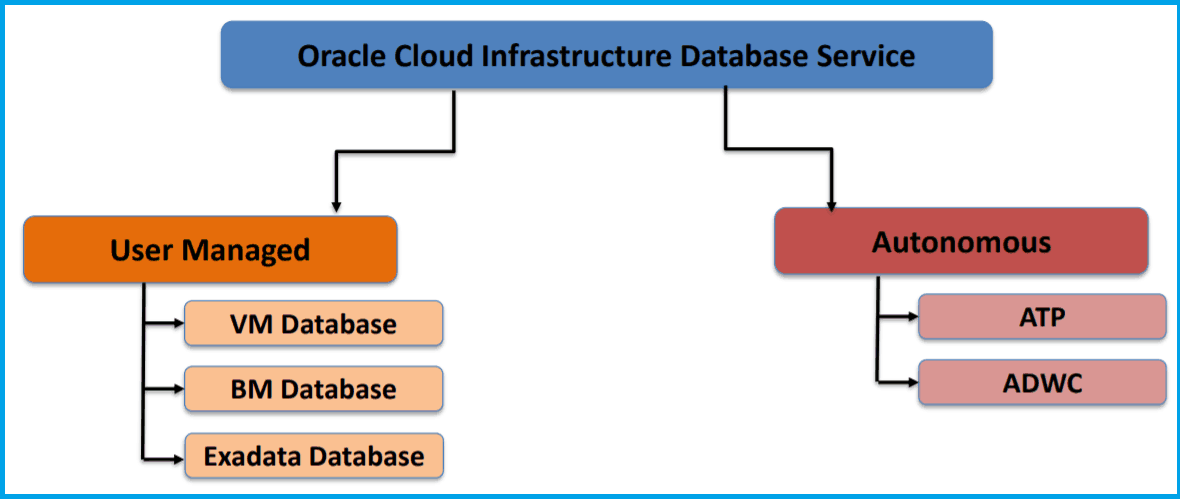
Databases in Oracle Cloud Infrastructure can be put in Two main categories:
- Autonomous Database: Autonomous Database includes
– Autonomous Transaction Processing (ATP)
– Autonomous Data Warehouse (ADW)
Autonomous databases are preconfigured, fully-managed environments that are suitable for either transaction processing or for data warehouse workloads, ie it is serverless, you don’t have access to servers where it is running, Well so connecting to Autonomous Database is quite simple and you can connect from various tools like SQL Developer, Oracle Data Integrator (ODI), Goldengate, any Oracle TNS Client or JDBC, etc.
NOTE: To know more about ADW & ATP click here - User-Managed Database: User-managed Database is Databases on bare metal, virtual machine, and Exadata DB systems that enable you to customize with the resources and settings that meet your requirement.
Steps To Connect Autonomous Database
Note: Make sure you have provisioned the Autonomous Database Instance in Oracle Cloud if you don’t know then check our previous Video Blog where we have given a live demo how to provisioned Autonomous Database in Oracle Cloud Infrastructure.
1. Download & Install the SQL Developer (Version 18.2 or above).
(Links at the end to Download SQL Developer)
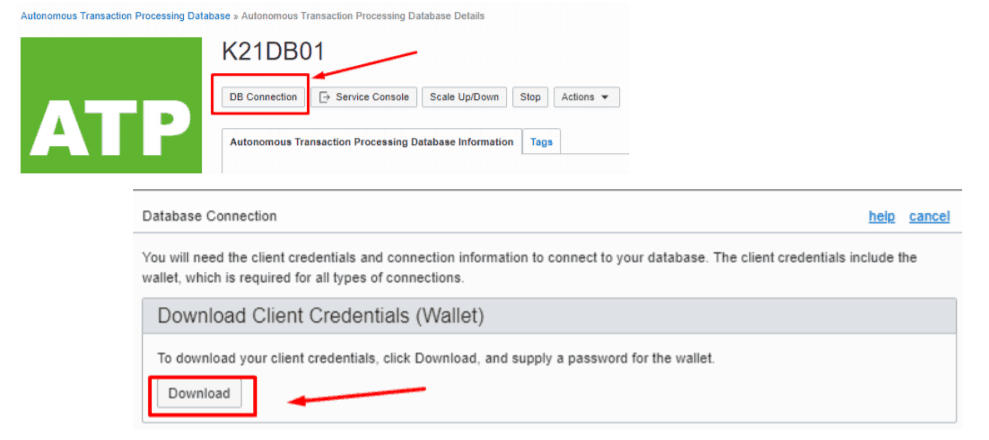
2. Download the Client Credentials (Wallet) from the OCI Console, which we will be using while connecting to Autonomous Database Instance via SQL Developer.
Note: Make sure you have downloaded the SQL Developer version 18.2 or a higher one, else these features not supported on it.
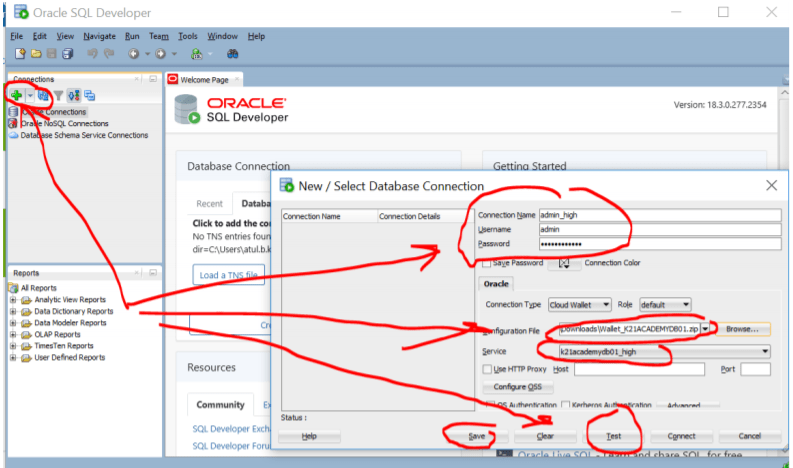
4. Once you filled above details click on Test if the status changed to successful then you can click on connect to your Autonomous Database Instance
Now you are ready to perform your administrative task on Autonomous Database Instance.
(Now it’s your turn to post your doubts in the comment section and let us know where you are facing challenges while connecting to Autonomous Database Instance using SQL Developer.
Next Task For You:
You can start learning Oracle Cloud for DBA by registering for our FREE Masterclass. By Clicking the image below.
 FREE Community
![Microsoft Agentic AI Business Solutions Architect [AB-100] | K21 Academy](https://test.k21academy.com/wp-content/uploads/2025/11/Microsoft-Agentic-AI-Business-Solutions-Architect-AB-100-Exam-Overview1.png)


