



This post is the second video of a multi-part video series on “Oracle Exadata Cloud Service for DBAs & APPS DBAs“.
In this post, I’ll be discussing the Architecture of Exadata Cloud Service (ExaCS).
Note: Also check the previous post on Oracle Exadata Cloud Service (ExaCS) – Overview for Beginners.
Note: Read our blog to learn about the Roles & Tasks of DBA’s in Cloud.
(To be the first one to receive Updates on Oracle Cloud, Subscribe to Our Youtube channel)
Architecture of Exadata Cloud Service
The major components of an Exadata Cloud Service include:
- Database Servers
- Storage Servers
- InfiniBand
- Networks
- Oracle Management Console
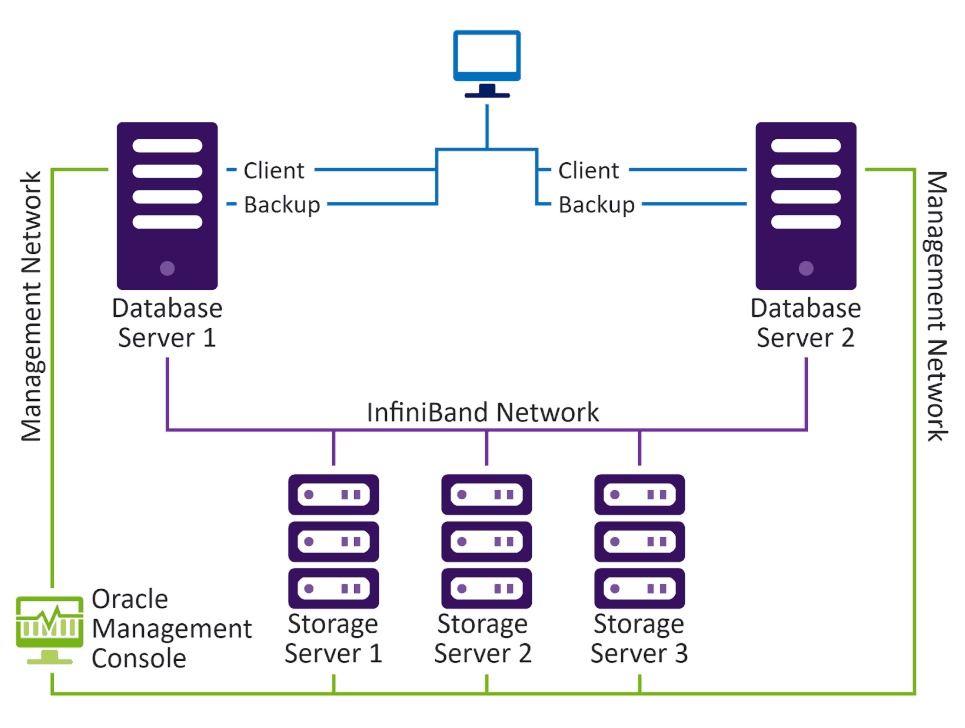
Note: Depending on the configuration of the Exadata Cloud Service, the number of Database Nodes and Storage Nodes vary. In this post, we’ll be referring to Quarter Rack configuration.
Note: To know more read our blog on Exadata Cloud Service
1. Database Servers
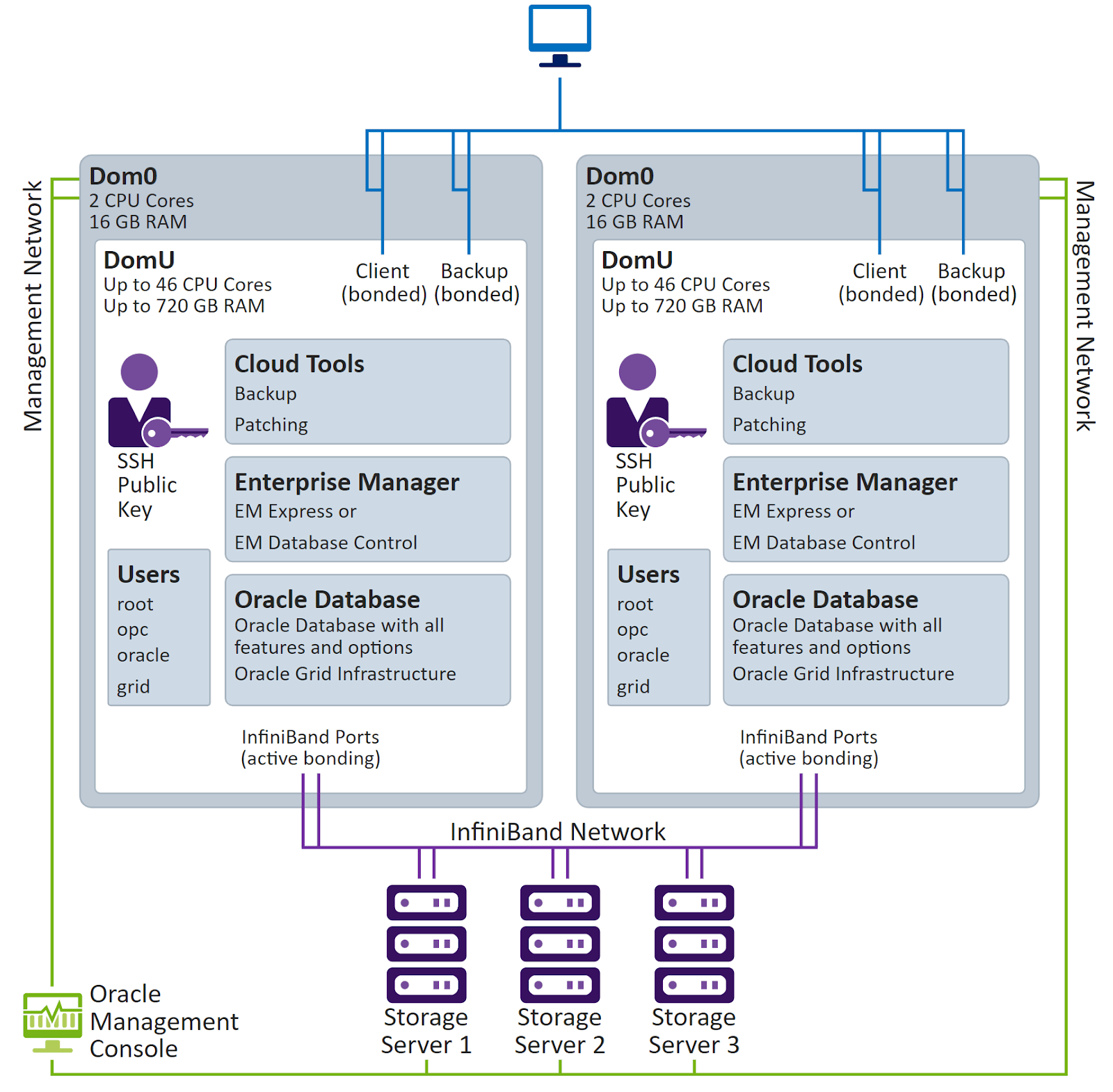
Database Servers are the servers where the Oracle Database Instances run. The client has full root access on these Linux Servers. An Exadata Database Server contains at least one Virtual Machine (VM), known as DomU, running on a VM hypervisor or virtual machine monitor(VMM), known as Dom0.
- Dom0. Dom0 is can only be accessed by the Oracle Team. The resource allocated to Dom0 is minimal. Therefore, it runs on 2 CPUs and 16GB RAM. Oracle uses the Integrated Lights Out Manager (ILOM) which is a highly specialized tool created to manage and monitor servers. ILOM controls the hardware and firmware of the Dom0 Database Server.
- DomU. Users have secure access to DomU. Each DomU is provisioned with a complete Oracle Database installation including all the features of Oracle Database Enterprise Edition, Oracle Grid Infrastructure with Cloud Tools. In DomU, the client patches and maintains the operating system, grid, Exadata, etc.
The four default operating system users are:
- OPC
- Oracle
- grid
- root
2. Storage Servers
There can be 3,6 or 12 Storage Nodes in an Oracle Exadata Cloud Service Instance. Each Oracle Exadata environment has a storage space inside the Exadata Storage Servers which is used by Oracle Automatic Storage Management (ASM). ASM has multiple disk groups which are:
- Data. The Data disk group is used for storing Oracle Database data files.
- Recovery. The Recovery disk group which is used for storing the Fast Recovery Area (FRA). Here, Oracle Database creates and manages backup and recovery, such as RMAN backups and archived redo log files.
- Sparse. The client can optionally create the Sparse disk group. The Sparse disk group is used for Fast Clone.
Note: To understand better checkout our blog on Exadata Cloud Service(ExaCS) Storage Options.
3. InfiniBand
Database Servers and Storage Servers are connected to each other by a network of high-bandwidth or high-speed, low-latency, InfiniBands. These InfiniBands are also used for intra-server connections so that the Instances can communicate with each other efficiently.
Also read: Oracle Exadata and it’s difference with Oracle database appliance.
4. Networks
There are three types of networks in an Oracle Exadata Cloud Service Instance:
- Client Network. This network is used by the Client Applications to securely connect to the Exadata Cloud Servers using either SSH on port 22 or SQLNet on port 1521.
- Backup Network. This network is used to backup or restore Exadata on Oracle’s Object Storage Service. The Client and Backup Networks use bonded network interfaces to maximize performance and availability.
- Management Network. This network is used by the Oracle Team to manage the hardware, firmware, and the Exadata Storage Servers through Oracle Management Console.
Note: Read our blog on Networking in Exadata to understand better.
5. Oracle Management Console
All hardware, firmware, and the Exadata Storage Servers are managed by the Oracle Team from the back-end using Oracle Management Console and the management network.
Related Post
- [First video] Oracle Exadata Cloud Service (ExaCS): Overview for Beginners
- [Third video] Exadata Deployment Options: Cloud Service (ExaCS) vs Cloud at Customer (ExaCC) vs Exadata Machine
- [Fourth video] Oracle Exadata Cloud Service(ExaCS) Offerings
- [Fifth video] Oracle Exadata Cloud Service(ExaCS) Storage Options
- [Sixth Video] Oracle Exadata Cloud Service (ExaCS) Networking
- Database Deployment Option in Oracle cloud
Next Task For You
If you want to upgrade your career from an Oracle DBA to Oracle Cloud DBA, and wants to clear Oracle Cloud Database Service Specialist[1Z0-1093-21] & Oracle Cloud Autonomous Database Certification[1Z0-931-21] with 18 Hands-On labs, then register for a FREE class, and don’t miss an opportunity to gain a plethora of insights on becoming a certified Oracle Cloud DBA.


![Microsoft Agentic AI Business Solutions Architect [AB-100] | K21 Academy](https://test.k21academy.com/wp-content/uploads/2025/11/Microsoft-Agentic-AI-Business-Solutions-Architect-AB-100-Exam-Overview1.png)


