






This post covers issue encountered during Startup of Oracle Fusion Middleware component “Weblogic Server”(This issue/fix is also applicable to any other Fusion Middleware product like WebCenter, OBIEE, ODI etc). If you are new to Oracle SOA Fusion Middleware then I highly recommend checking Atul’s Post about Oracle SOA/BPM 12c Architecture Every Apps DBA Must Know
Error Message
If you are hitting the issue “java.lang.OutOfMemoryError: PermGen space” while starting the AdminServer on your server then follow the below steps to fix the issue.
In AdminServer log file $DOMAIN_HOME/servers/AdminServer/logs, it shows below error messages
java.lang.OutOfMemoryError: PermGen space
at java.lang.ClassLoader.defineClass1(Native Method)
at java.lang.ClassLoader.defineClass(ClassLoader.java:800)
at java.security.SecureClassLoader.defineClass(SecureClassLoader.java:142)
at java.net.URLClassLoader.defineClass(URLClassLoader.java:449)
at java.net.URLClassLoader.access$100(URLClassLoader.java:71
JVM & PermGen:
- JVM stands for Java Virtual Machine and is an area in Memory divided in 5 parts, Heap, Method (non heap), JVM Stack, Native Stack, PC Registers
- Each Managed Server or Admin Server in WebLogic represents a JVM.
- PermGen is part of Method (non-heap) stores class related data from class definitions, structures, methods, field, method (data and code) and constants.
- If this area runs out of space then you get an error like java.lang.OutOfMemoryError: PermGen space
- This area can be regulated using -XX:PermSize and -XX:MaxPermSize
- PermGen in Java 8 is replaced by MetaSpace
For further reading on JVM and Memory Structure check here 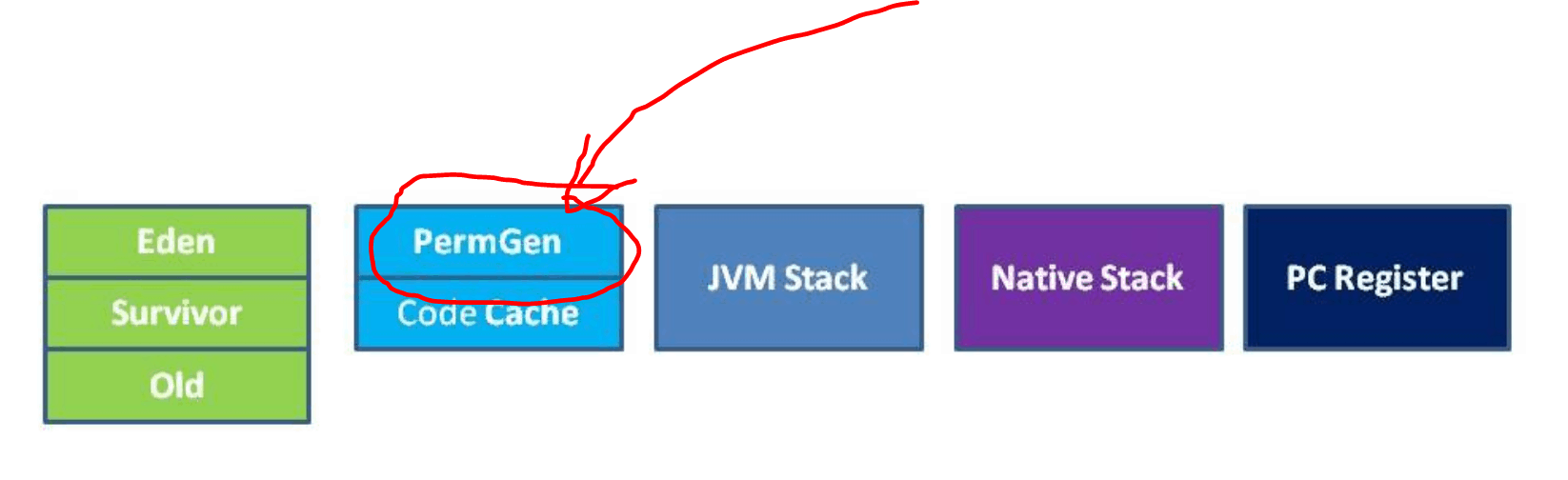
Cause:
The JVM size at the moment is 500 MB for Admin Server (including low value for PermSize & MaxPermSize), it should be in between 1Gb to 2GB.
Fix:
1. Ensure your both servers (AdminServer and Managed server) are not running. Check with below commands
netstat -an | grep 7001 (AdminServer port)
netstat -an | grep 7011 (WLS_Managed1 (managed server) port)
2. Change the admin server jvm settings as below in setDomainEnv.sh, located under $DOAMIN_HOME/bin
Note: If you are hitting the same issue “java.lang.OutOfMemoryError: PermGen space” on Managed server (WLS_Managed1) then change the managed server jvm settings as below in setDomainEnv.sh, located under $DOAMIN_HOME/bin
3. Start both Admin and Managed server
4. Verify the URL: http://hostname:port/console
Now servers should be up and be running fine
Next Task For You
Want to move ahead in your career and want to get a higher Earning Job?
Get 7+ Courses for DBAs & Apps DBA in a bundle program and learn from the Industry’s best Experts.


![Microsoft Agentic AI Business Solutions Architect [AB-100] | K21 Academy](https://test.k21academy.com/wp-content/uploads/2025/11/Microsoft-Agentic-AI-Business-Solutions-Architect-AB-100-Exam-Overview1.png)



