



In this blog, I am going to give you a walkthrough on changing the Oracle Visual Builder Cloud Service VBCS Tenant Database from Business Object (BO) to Autonomous Transaction Process (ATP) and What are the advantages of switching to ATP.
By changing the Oracle Visual Builder Cloud Service VBCS tenant database to Autonomous Transaction Process ATP, you can store more data in VBCS compared to Business Object (BO). Also, you can have multiple VBCS connected to the same DB so that data could move easily between them.
The Autonomous Transaction Processing (ATP) workload type configures the database for a transactional workload, with a bias towards high volumes of random data access. eg: Transactions, Batch, Reporting, Machine Learning, etc.
Autonomous Transaction Processing has a high capacity to handle a large amount of data at an instance and is capable of handling a larger number of requests.
Why Change Tenant DB To ATP?
- Autonomous Transaction Process ATP with VBCS provides higher storage capacity then BO of up to 20GBs.
- Oracle Visual Builder Cloud Service VBCS automatically manages the schema and tables in ATP.
- Data can be exported or imported directly from ATP to another target without opening VBCS.
- ATP is capable of using Machine learning to automate database elimination of manual, error-prone management tasks through automation.
- It reduced costs and improved productivity by automating routine tasks.
- Automatic backup supported in Autonomous database so no data loss.
Read this to know more about what is Web service, API and the difference between SOAP Vs REST API (Simple Object Access Protocol & REST Representational State Transfer) and how are they related.
How To Change Tenant DB In VBCS
The schemas for the dev and test instances will be re-created with different names with every new version of the app that you will create. The schema name for the published application can be kept the same if the data is not changed in the new version.
Also, you need to have a backup of the data in Business Object BO, if you have live applications already on the instance before migration. In this way, you will be able to import them back from your backup.
Read this blog if you are a beginner who has started to learn Oracle Integration Cloud (OIC) and want to get familiar with Process Cloud Service (PCS).
1. Open “Settings” of VBCS application.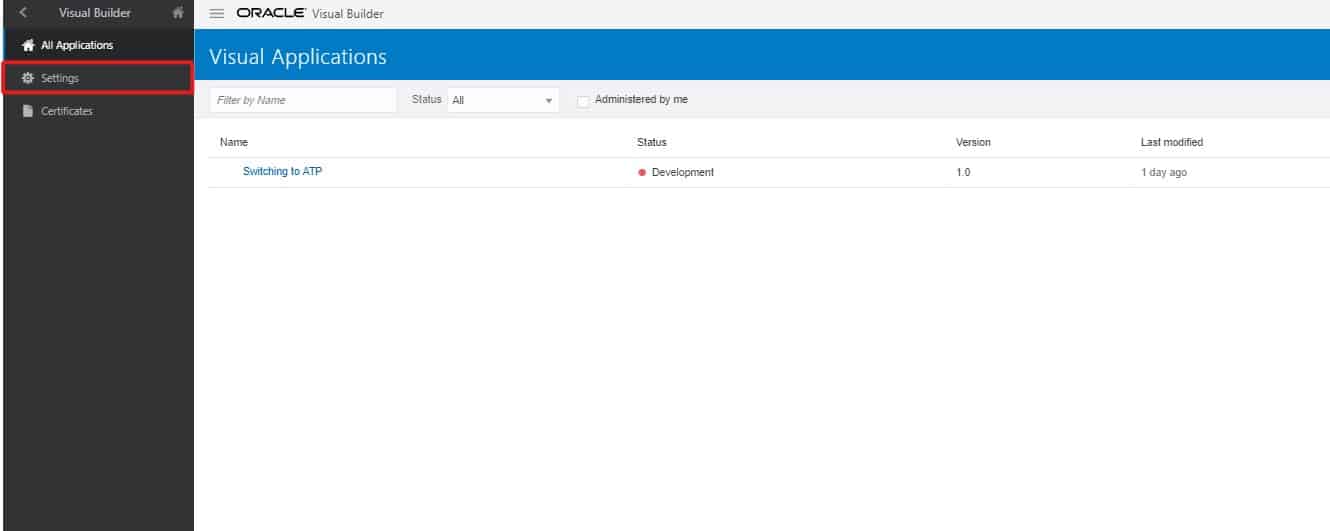
Also Check: Our blog post on Oracle Integration Cloud.
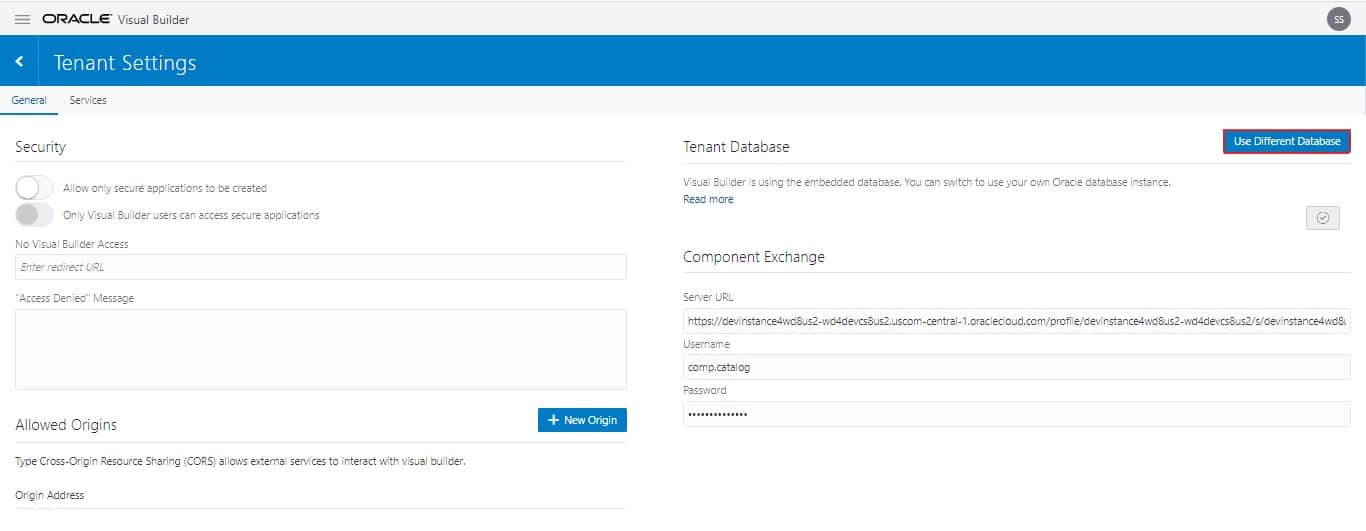
2. On the right side of the new window, click on Use Different Database.
To Know More About The Difference Between ADF vs VBCS
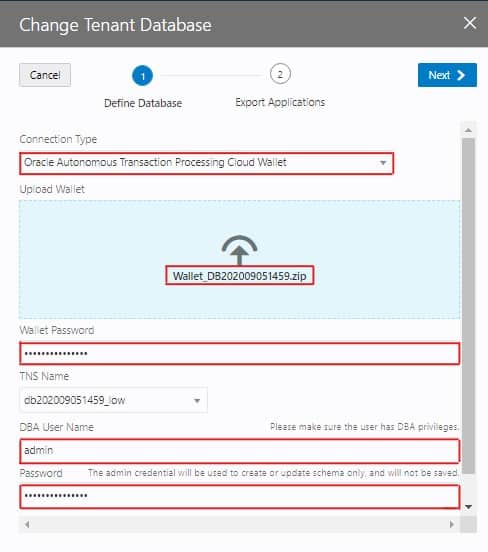
3. In Connection Type provide the following details:
- Select Oracle Autonomous Transaction Wallet.
- Upload Wallet (upload the zip file associated with your ATP)
- Give the Wallet password.
- Give the DBA Username.
- Give the Password.
Also Check : Our Previous Blog on Advantages Of HDL For HCM Data Integration
4. Check the applications that you wish to take the backup of then Click on “Finish”.
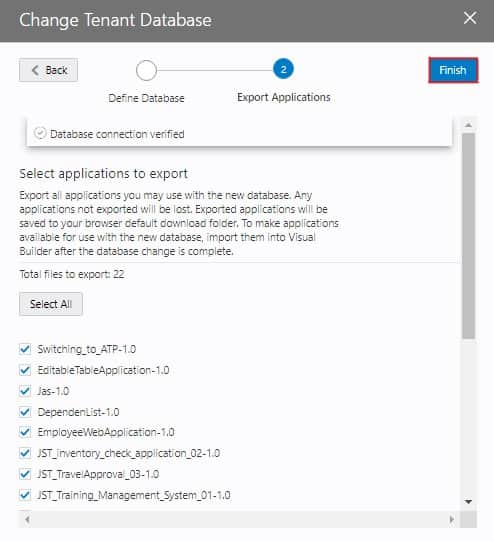 Note: Only selected applications will be backed up and the zip file will be downloaded
Check Out: Our blog post on OIC Notification Activity.
5. Click on “Reload”.
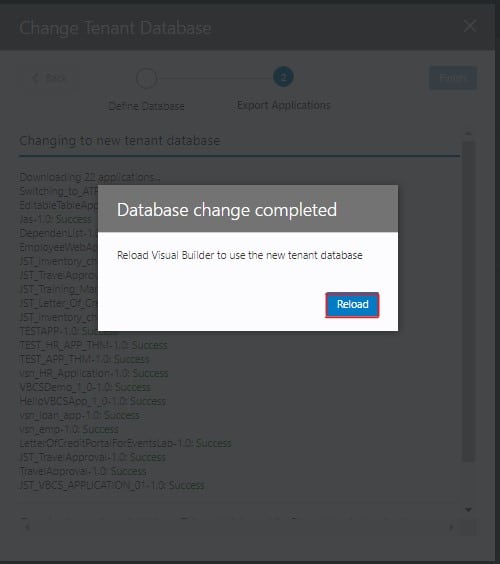
6. Now you successfully switched your VBCS tenant DB to ATP.
Also Read: OIC vs SOA, Know their major differences!
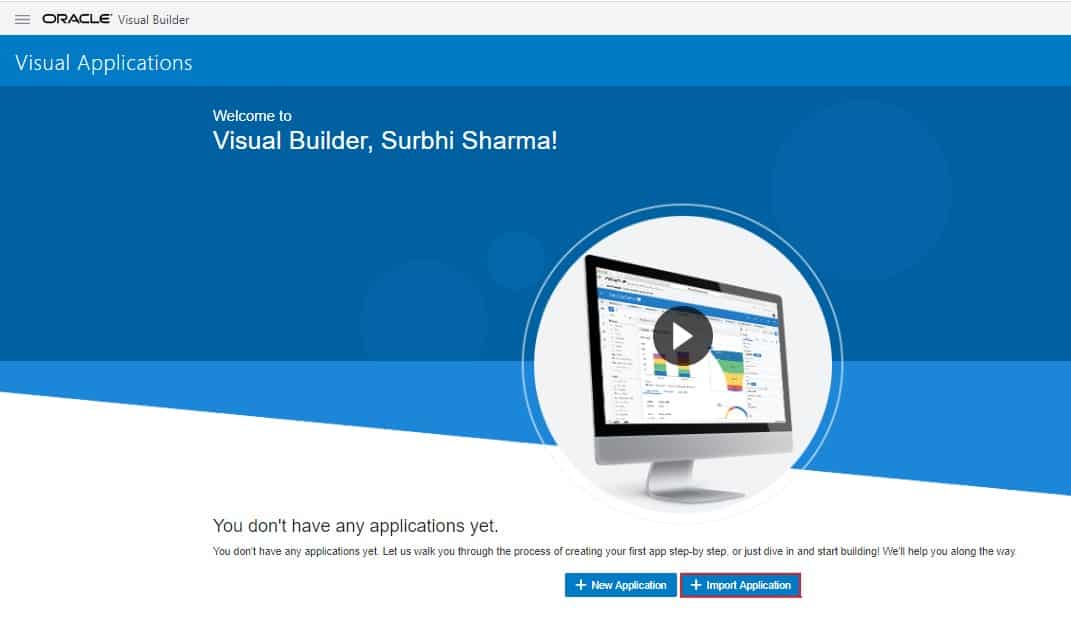
7. You will be taken back to the Oracle Visual Builder Cloud Service home page.
8. Click on the Import Application.
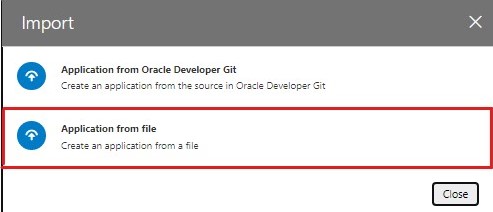
9. Click on the Application from the file.
 Read More: About ICS to OIC Migration.
10. Now use the back zip file downloaded in the 4th step by click on Import.
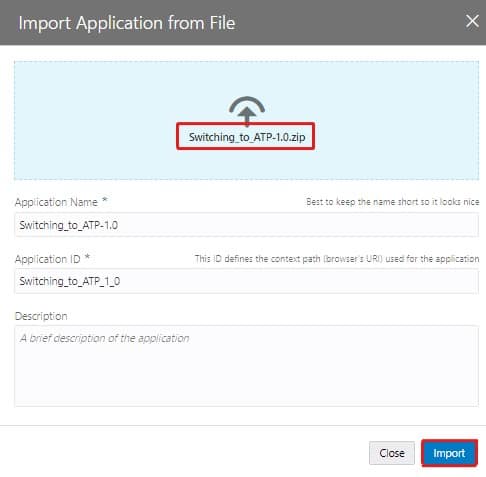
11. Now your VBCS tenant DB has been successfully changed to DB.

To know more about Oracle cpq and ebs integration.
12. Now let’s check-in ATP DB if data of this application has been successfully imported.
13. Connect to ATP DB using SQL Developer. Learn how to connect Autonomous Database with SQL Developer Web.
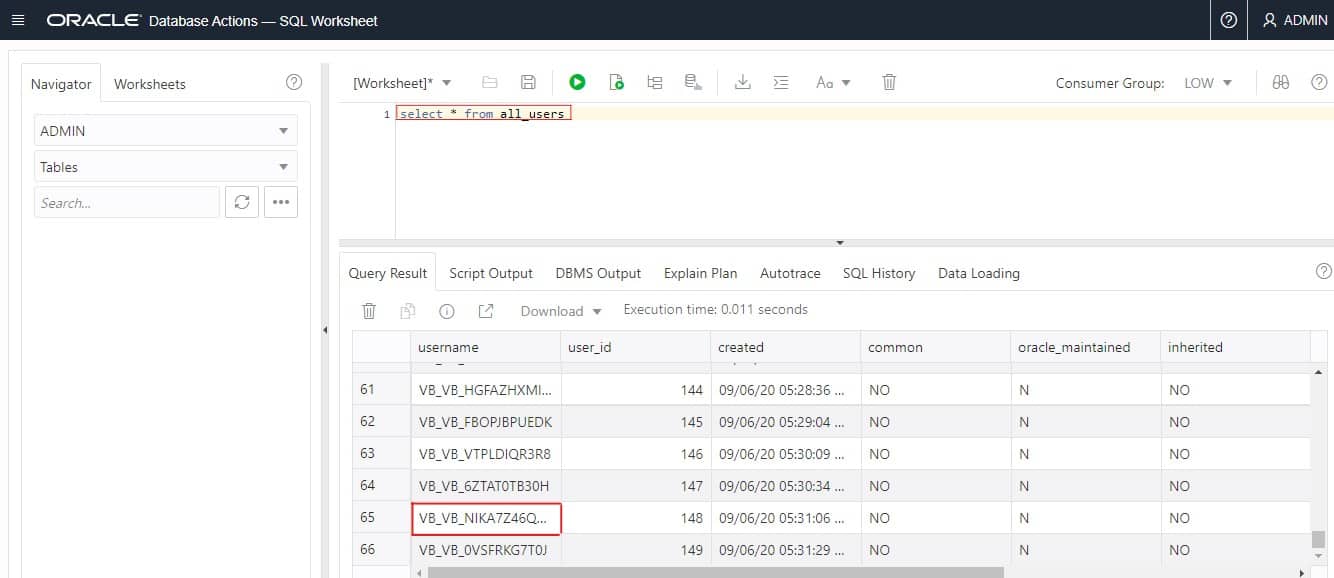
14. Now search for the newly created tables in ATP by sorting it with the owner with the following command.
select * from all_users
Check Out: What is Oracle Integration Cloud.
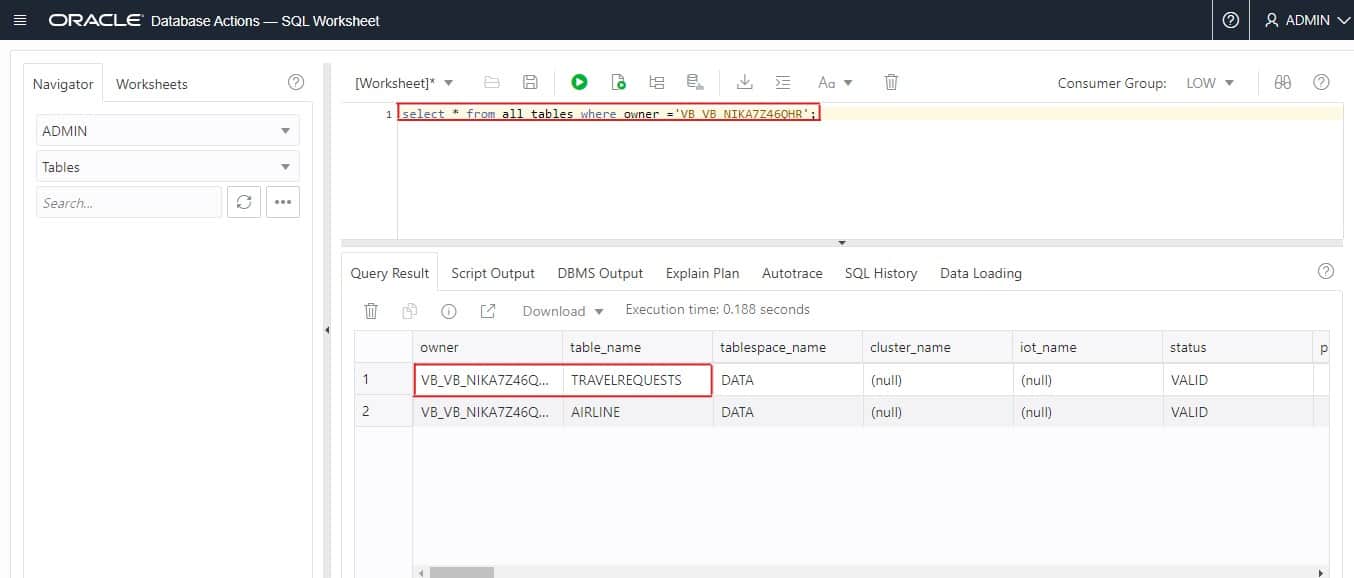
15. Now let’s check what tables belong to the user with the following command.
select * from all_tables where owner =’owner_name’;
Also Check: Our blog post on the Oracle API Platform Cloud Service.
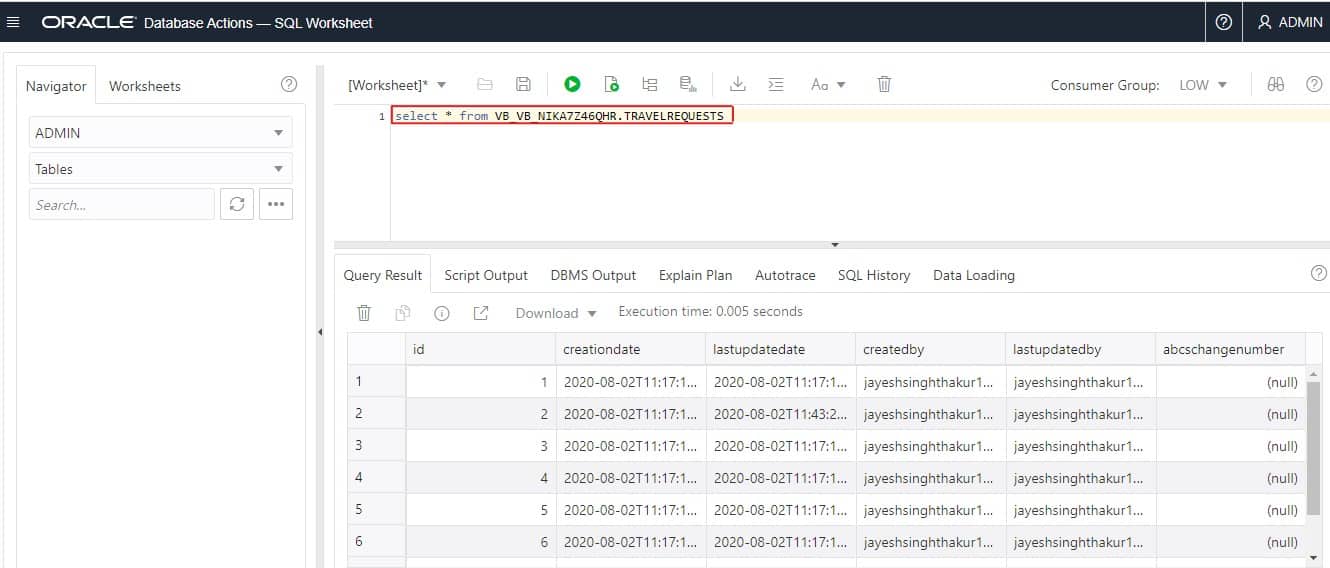
16. Finally type the following statement Statement: select * from owner_name.table_name
This is how you can change Business Object (BO) with Autonomous Transaction Process Database in Oracle Visual Builder Cloud Service VBCS.
If you have any doubts then you can watch the steps for how to change the Business Object BO with Autonomous Transaction Database ATP database in Oracle Visual Builder Cloud Service VBCS.
Related Links/References:
- Oracle Integration Cloud (OIC) For Beginners Overview
- Oracle Integration Cloud (OIC) ADW/ATP Adapter
- Oracle Integration Cloud (OIC) Notification Activity
- Our best blogs for Oracle Integration Cloud – OIC
- Managing & Monitoring Integration Errors in Oracle Integration Cloud (OIC)
- 6 Docs Every Oracle Cloud Integrator Must Read
- How to exporting Business Data and Visual Builder Cloud Service (VBCS)
- SOAP Vs REST APIs In Oracle Integration Cloud (OIC)
Next Task For You
Do you want to learn more about Oracle and confuse where to start or which certification is right for you? Then, click on the register now button below to register for a Free Masterclass on Oracle [1Z0-1042] Certified Cloud Integration Expert, which will help you better understand and choose the right path and clear the certification exam.


![Microsoft Agentic AI Business Solutions Architect [AB-100] | K21 Academy](https://test.k21academy.com/wp-content/uploads/2025/11/Microsoft-Agentic-AI-Business-Solutions-Architect-AB-100-Exam-Overview1.png)


