



This post covers one of the encountered issues “ORA 29283 Invalid File Operation” while running an American English Upgrade patch driver, when upgrading to Oracle EBS R12.2.
If you are new to EBS, please check our previous posts:
- Steps to Download Oracle EBS R12 Software from edelivery site
- Oracle E-Business Suite (EBS) 12.2.9 Now Available & Its Upgrade Steps
- [1Z0-238] Oracle EBS R12 Certified Specialist Everything You Must Know About
Issue:
1. Running the merged driver on the administration server node on Release 12.2 APPL_TOP using the following commands:
cd $ORACLE_BASE/fs1/EBSapps/appl/au/12.0.0/patch/115/driver
adpatch options=nocopyportion,nogenerateportion
Note: Merged driver must be applied using adpatch options=nocopyportion,nogenerateportion on RUN File System.
2. But Patch got failed with below error messages.
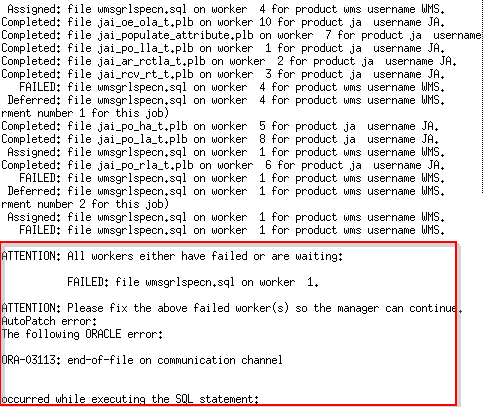
As it was showing issue on worker1 so we looked into log file of worker 1 located at
Also Read : Our Next Blog On Oracle E-Business Suite R12.2 Installation.
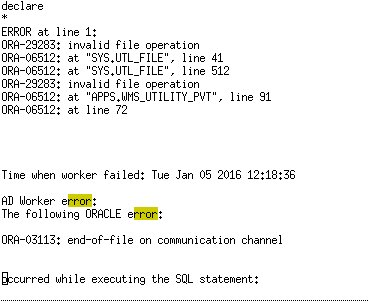
$ORACLE_BASE/fs1/EBSapps/appl/admin/PRD122/log and it was showing below issue
Also Read: Our previous blog post on Oracle EBS 12.2 Architecture. Click here
Cause:
Issue with the write permissions in $APPLPTMP/UTL_FILE_DIR. wmsgrlspecn.sql creates a file under $APPLPTMP/ UTL_FILE_DIR with the name GenRulepkgs.log.
The error will occur if this file exists under a different user (If you have multiple environments owned by different O.S. users on a server then you could run into issues like this).
Also read: Upgrading your EBS base version to R12.2 can be quite a complicated task. Make it simpler with the free diagnostic tool called analyzers for Oracle E-Business Suite 12.2, 12.1, 12.0, and 11i.
Fix:
To resolve this issue follow the steps as given below:
1. Ensure that the user running the patch or the script has write permissions to the $APPLPTMP/UTL_FILE_DIR location. To find the value for utl_file_dir
sqlplus apps/<apps password>
SELECT name, value FROM v$parameter WHERE name LIKE ‘utl_file_dir’;
2. If $APPLPTMP/GenRulepkgs.log exists under a different user, then change permissions to 755 on the file so that the current user can write to it.
chmod 755 $APPLPTMP/GenRulepkgs.log
3. Restart adpatch again as
cd $ORACLE_BASE/fs1/EBSapps/appl/au/12.0.0/patch/115/driver
adpatch options=nocopyportion,nogenerateportion
And this time adpatch completed successfully.
Related Further Readings
- [1Z0-238] Oracle EBS R12 Certified Specialist Everything You Must Know About
- 19c Database In Oracle EBS R12: Everything You Must Know
- Steps to Download Oracle EBS R12 Software from edelivery site
- Oracle E-Business Suite (EBS) 12.2.9 Now Available & Its Upgrade Steps
- Script Wmsgrlspecn.sql Fails With ORA-29283: Invalid File Operation (Doc ID 314293.1)
Next Task For You
We cover Oracle E-Business R12.2 Architecture & concepts in our Oracle Apps DBA For Beginners Training along with the Installation, Patching, Cloning, and Troubleshooting and also, Database upgrade to 19c and much more including the hands-on labs you must perform to upgrade your skills and get a good job with a high package.
Begin your journey towards becoming an Apps DBA by joining our FREE Masterclass on How To Learn Oracle Apps DBA (R12) & It’s New Features.


![Microsoft Agentic AI Business Solutions Architect [AB-100] | K21 Academy](https://test.k21academy.com/wp-content/uploads/2025/11/Microsoft-Agentic-AI-Business-Solutions-Architect-AB-100-Exam-Overview1.png)


