
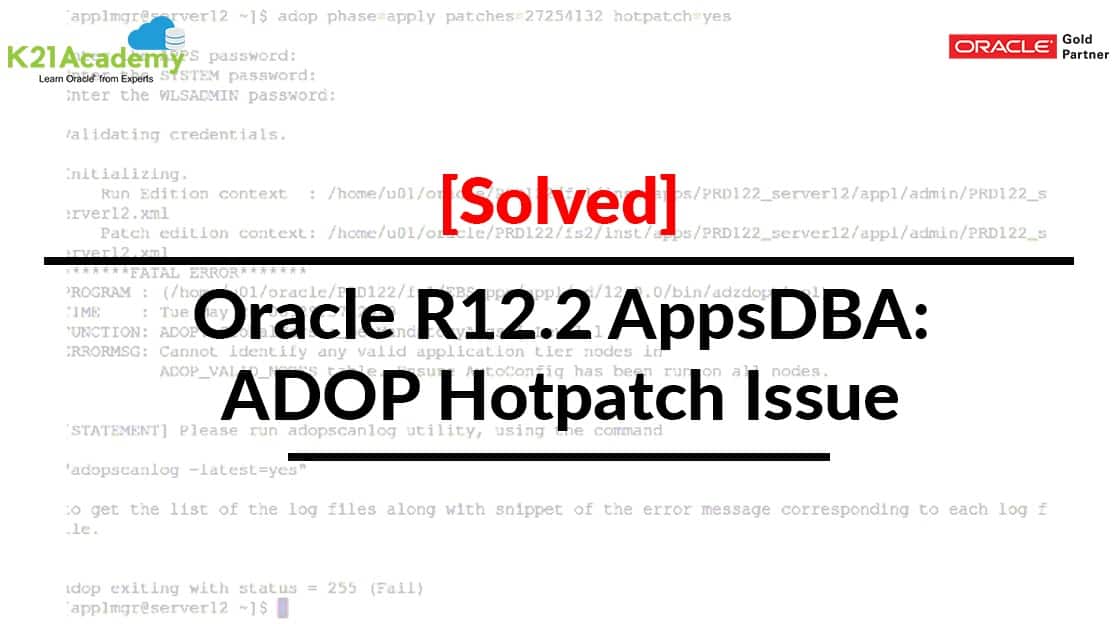



This post covers an issue that one of our trainees from Oracle AppsDBA (R12.2): Install | Patch | Clone | Maintain training (For FREE Master Class, Click here) was facing while applying the patch 27254132 & also includes the fixes of the Issue.
If you are new to Oracle E-Business Suite, then I would suggest you check our previous post where we have covered in detail Oracle AppsDBA (R12.2)Architecture. & Oracle AppsDBA (R12.2) Installation: Free Training
Before looking on to the issue let us discuss the overview of ADOP
ADOP Overview
ADOP stands for Application DBA Online Patching, introduced in EBS R12.2 to patching Oracle Applications while the system is available for users during Patching.
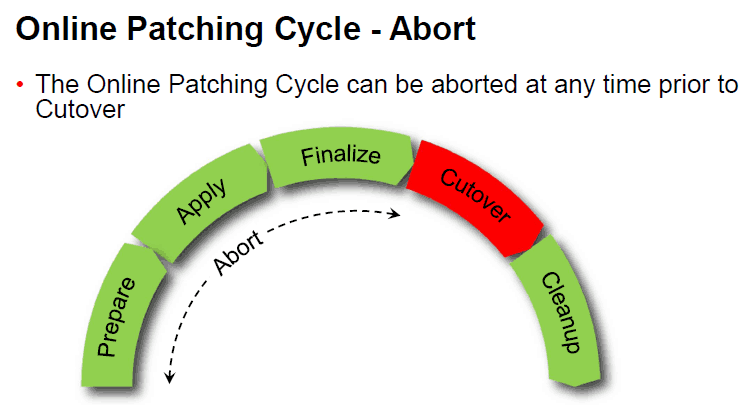
In an Online Patching, there are five phases PREPARE -> APPLY -> FINALIZE -> CUTOVER -> CLEANUP
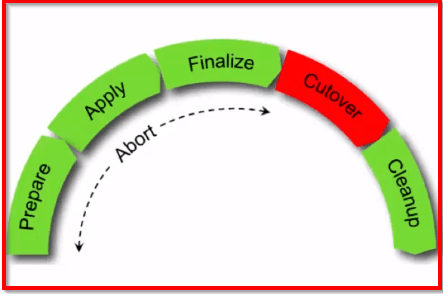
ADOP is the most important new feature introduced in Oracle EBS R12.2. It is the ability to patch a running system without having to take the system down for a significant period of time while the patches are applied.
ADOP uses a dual file system (a feature introduced in R12.2) to support online patching.
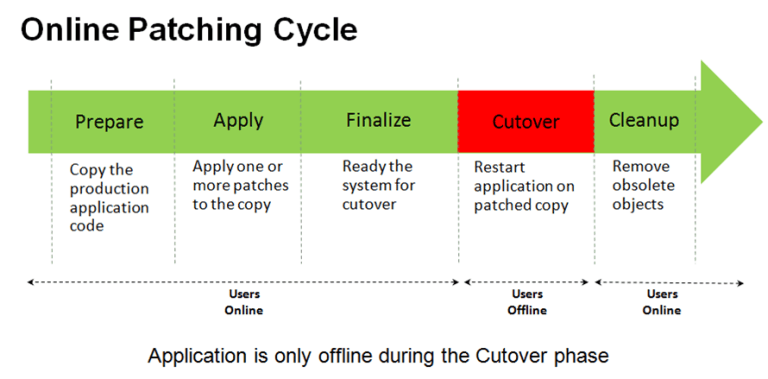
- adop phase=prepare -> copies the application code
- adop phase=apply -> apply patches to PATCH Environment
- adop phase=finalize -> makes ready the system for cutover
- adop phase=cutover -> bounce the system and does filesystem switchover. fs2 becomes RUN environment.
- adop phase=cleanup -> remove obsolete objects.
- adop phase=fs_clone -> synchronize filesystems
Note: that after cutover the command line environment should be re-loaded as the run edition file system has changed.
In a multi-node deployment, ADOP commands are only executed from the Primary Node. The primary ADOP session uses remote execution to automatically perform the required actions on any secondary node.
Also Read: Our blog post on Oracle EBS File System. Click here
What Is ADOP Hotpatch?
Online patching has been introduced in EBS 12.2. So An EBS 12.2 patch is normally applied using an ADOP online patching cycle, which is the only case tested internally before 12.2 patches are released (unless documented otherwise).
We can use Hotpatch mode only for certain patches, such as NLS and Online Help, or when it is specifically documented in the patch readme. In EBS release 12.2, certain kinds of patches are even less stable for use with “ADOP hotpatch” than they were in EBS 12.1!
Issue
adop phase=apply patches=27254132 hotpatch=yes
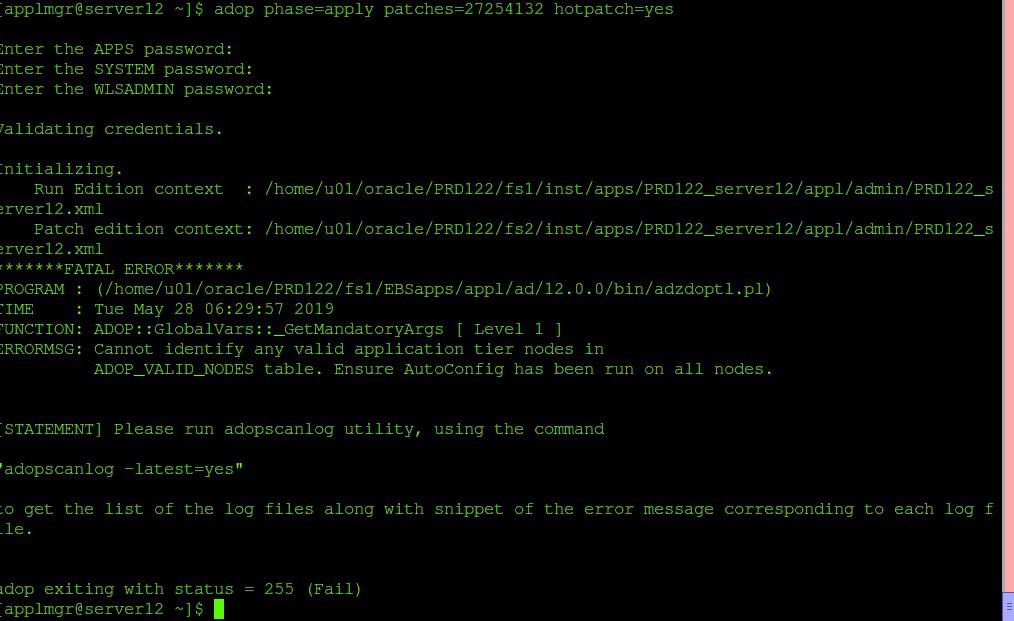
Run Edition context : /home/u01/oracle/PRD122/fs1/inst/apps/PRD122_server12/appl/admin/PRD122_server12.xml
Patch edition context: /home/u01/oracle/PRD122/fs2/inst/apps/PRD122_server12/appl/admin/PRD122_server12.xml
*******FATAL ERROR*******
PROGRAM : (/home/u01/oracle/PRD122/fs1/EBSapps/appl/ad/12.0.0/bin/adzdoptl.pl)
TIME : Tue May 28 06:29:57 2019
FUNCTION: ADOP::GlobalVars::_GetMandatoryArgs [ Level 1 ] ERRORMSG: Cannot identify any valid application tier nodes in
ADOP_VALID_NODES table.
Fix: After Running Autoconfig Issue Resolved
select bug_number from ad_bugs where bug_number=27254132;
BUG_NUMBER
——————————
27254132
If you like the blog don’t forget to share with your friends, colleagues who are working on Oracle E-Business Suite R12 & post your comments if you have any doubts regarding Oracle E-Business Suite R12
Also Check: Our previous blog post on EBS 12.2 Upgrade. Click here
Related/Further Readings
- Recommended Browsers for Oracle E-Business Suite Release 12 [Doc ID 389422.1]
- Oracle E-Business Suite Release 12.2 Information Center (Doc ID 1581299.1)
- Oracle E-Business Suite Release 12.2.9 Readme (Doc ID 2495027.1)
- Oracle E-Business Suite 12.2.9 Now Available
- [Troubleshooting] Forms Issue: FRM-92050 failed to connect to server:forms/servlet
- Oracle E-Business Suite (EBS) 12.2.9 Now Available & Its Upgrade Steps
- Oracle AppsDBA (R12.2) Training: Step by Step Activity Guides/Hands-On Lab Exercise
- Oracle AppsDBA (R12.2): Install | Patch | Clone | Maintain
Next Task For You
We cover Oracle E-Business R12.2 Architecture & concepts in our Oracle Apps DBA For Beginners Training along with the Installation, Patching, Cloning, and Troubleshooting and also, Database upgrade to 19c and much more including the hands-on labs you must perform to upgrade your skills and get a good job with a high package.
Begin your journey towards becoming an Apps DBA by joining our FREE Masterclass on How To Learn Oracle Apps DBA (R12) & It’s New Features.


![Microsoft Agentic AI Business Solutions Architect [AB-100] | K21 Academy](https://test.k21academy.com/wp-content/uploads/2025/11/Microsoft-Agentic-AI-Business-Solutions-Architect-AB-100-Exam-Overview1.png)


