



Before deploying the application in Oracle Cloud, a customer may want to know what services will be provided by the Oracle Cloud and for this, there is an agreement between the provider(Oracle) and customer. A cloud SLA ensures that cloud providers meet some enterprise-level requirements and provide customers with a clearly defined set of deliverables.
In this blog post, we’ll cover :
- Overview of SLA in Oracle Cloud
- Oracle SLA Key Points
- Control Plane and Data Plane in OCI
- Oracle Support Service
- Severity Level in SR
Overview Of SLA In Oracle Cloud
Financially-backed commitment to provide a minimum level of service to customers. SLAs are an essential part of an IT vendor contract.
- A cloud SLA (cloud service-level agreement) is an agreement between a cloud service provider and a customer that guarantees a minimum level of service is maintained.
- It promises levels of reliability, availability, and responsiveness to systems and applications, while also agreeing who will govern when there is a service disruption. Every service provided by OCI has SLA.
- In OCI availability is defined as any valid API call that performs a cryptographic operation and returns a response.
- Monthly uptime percentage is calculated by subtracting the number of minutes in a month during which the service was unavailable from a total number of minutes in a month.
- “Unavailable” or “Unavailability” means any time during which a problem with the Oracle PaaS and IaaS Public Cloud Service prevents external connectivity to any of Your instances of such Service.
Note: We can check Service Limit, Quotas & Usage report from the OCI console
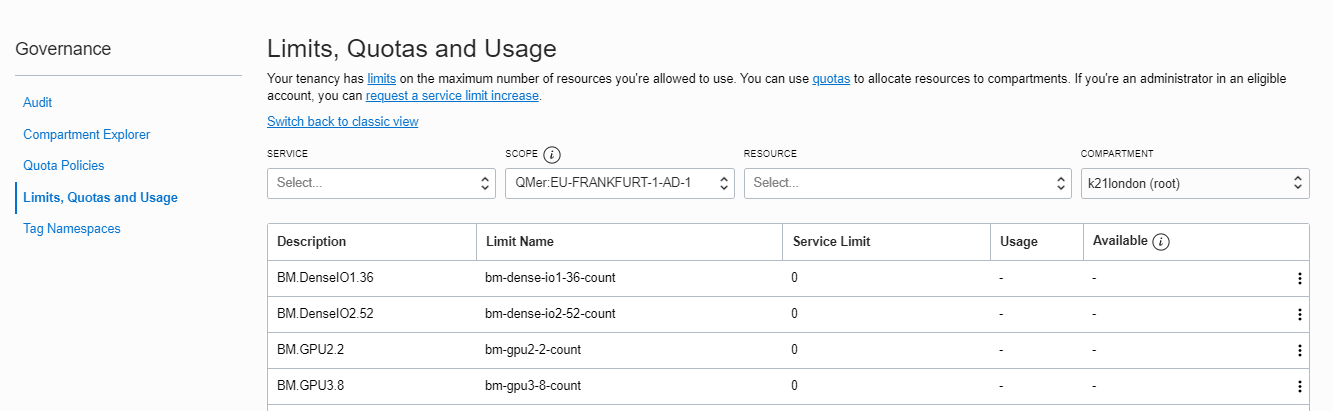
To read more about Limits, Quotas, and Usage click here.
Oracle Cloud SLA Key Points
Oracle SLA covers end to end performance, Availability, and manageability offer SLAs in all three dimensions.
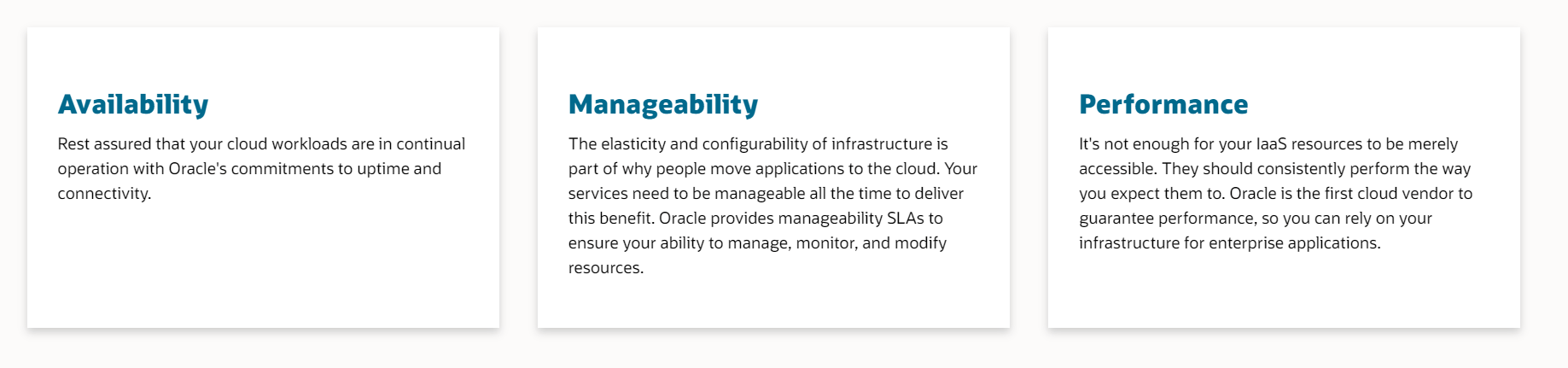
- Performance: Keeps track of various services available are performing as expected.
- Availability: Refers to how much time the service provider guarantees that your data and services are available.
- Manageability: The ability to manage, monitor, and modify resources of OCI.
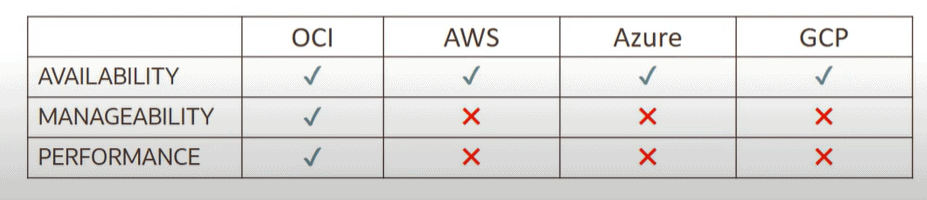
Comparison Of OCI SLA With Other Cloud Providers
Control Plane & Data Plane In OCI
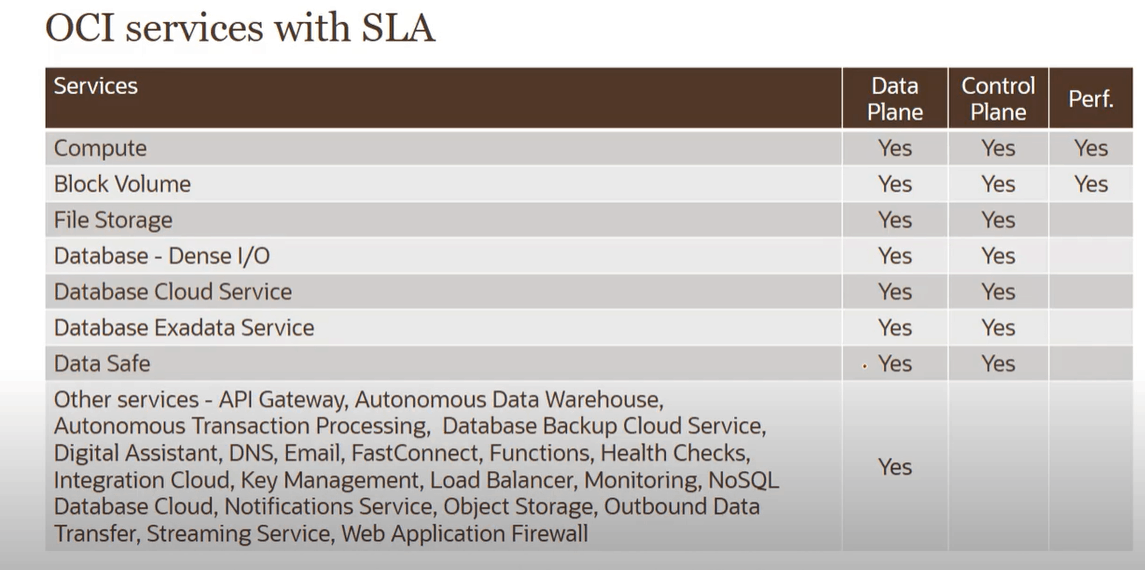
In OCI control plane is in regard to the Administration of resources and the data plane is in regard to usage of resources.
For example: creating an API function in the OCI part of the control plane and invoking API is part of the data plane.
The picture shows different types of SLAs associated with a different type of services
Oracle Support Service
Support service is available for all paid accounts associated with oracle and it is part of SLA. Access to forum and support documentation is also provided to all OCI users.
To sign up for support services following steps are to be followed
1) Navigate to http://www.oracle.com/ and create a user if already not created.
2) Enter the following URL in a browser then sign in to My Oracle Support: http://support.oracle.com/
3) Enter your Support Identifier (SI) then add an optional note to the approver and click Next.
4) Enter the required fields then select Submit.
The status of your request is pending until you receive approval from the CUA.
Note: To know more about Oracle Support Service click here
To know about how to register for free Oracle Cloud trial account click here
Paid accounts can request for following services to Oracle support
- Resolving technical issues
- Resetting password
- Requesting the service limit
- Changing admin
Free trial accounts can request for following services to Oracle support
- Reset password or unlock the account for the tenancy administrator.
- Add or change a tenancy administrator.
- Request a service limit increase.
To know more about Contacting support click here
Severity Level In-Service Requests (SR)
There are various level severity that defines the priority of Service Request
- Severity 1: The operation is mission-critical and an emergency situation (high priority) Like: Data corrupted, a critical documented function unavailable.
- Severity 2: Experiencing a Severe loss of service (low priority than Severity 1)
- Severity 3: Experiencing a minor loss of service (low priority than Severity 2)
- Severity 4: Request for clarification in documentation or enhancement in services. (least priority)
Related/References
- SLA Oracle Cloud
- 1Z0-1085-20 | Oracle Cloud Infrastructure Foundations
- 1Z0-1072 | Oracle Cloud Infrastructure Architect Associate
- 1Z0-932 V/S 1Z0-1072: Oracle Cloud Infra Architect Associate Certification
- 1Z0-997 | Oracle Cloud Infrastructure 2019 Architect Professional
Next Task For You
Begin your journey towards becoming an Oracle Cloud Infrastructure Foundations 2020 Certified Associate by joining our Training on [1Z0-1085] Oracle Cloud Infrastructure Foundations.
Click on the image below to join FREE Masterclass on [1Z0-1085] OCI Foundations:![[1z0-1085] Free Masterclass](https://k21academy.com/wp-content/uploads/2020/04/1085.gif)

![Microsoft Agentic AI Business Solutions Architect [AB-100] | K21 Academy](https://test.k21academy.com/wp-content/uploads/2025/11/Microsoft-Agentic-AI-Business-Solutions-Architect-AB-100-Exam-Overview1.png)


