





Oracle Cloud Infrastructure integration services integrate any application and data source to automate and simplify end-to-end operations.
Oracle Integration 3 is a fully managed, preconfigured environment that allows you to link your cloud and on-premises apps, get insight into your business processes, and store and retrieve data using an SFTP-compliant file server. To connect with Oracle and third-party apps, can choose our array of hundreds of adapters and recipes.
This blog provides information on Oracle Integration 3, including what’s new in Oracle Integration 3, an overview, and an introduction.
What’s New in Oracle Integration 3
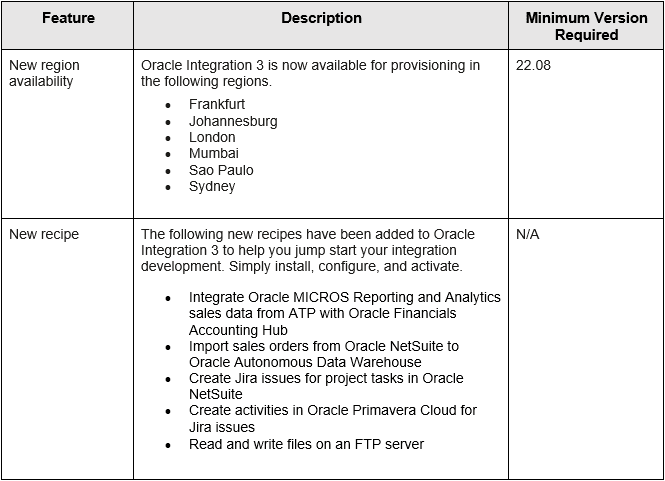
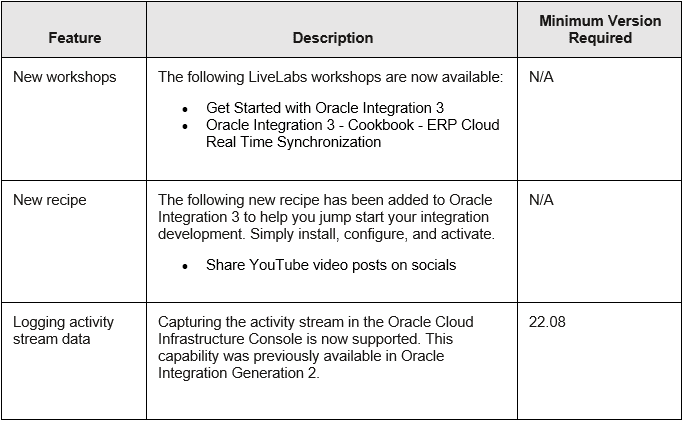
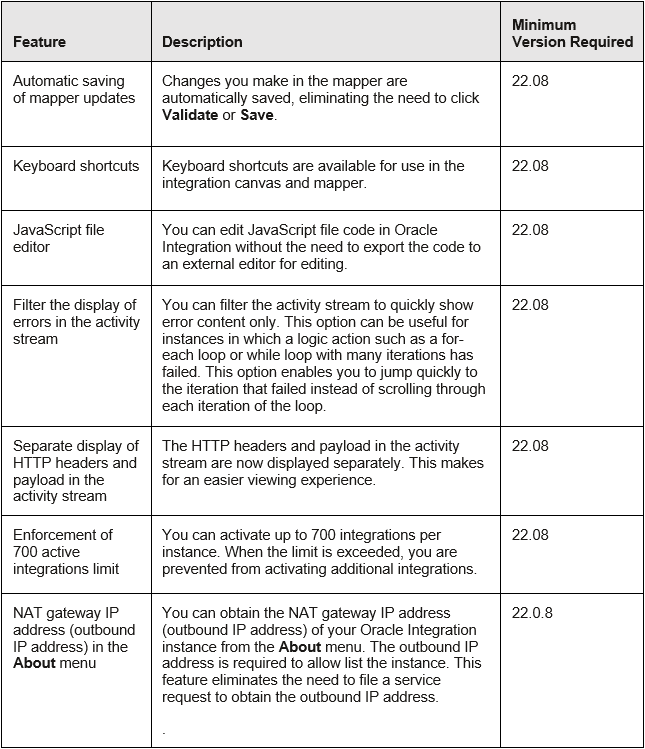
Oracle Integration 3 has revealed the new common features from the latest releases of oracle integration, October 2022 and September 2022
October 2022
September 2022
Integration and Connectivity Features
Overview of Oracle Integration 3
What you can do with Oracle Integration 3
- Create integrations to monitor and manage connections across your applications, choosing from hundreds of prebuilt adapters and recipes to connect with Oracle and third-party apps.
- Model and obtain valuable statistics for your business operations to get real-time visibility and respond rapidly to changing needs.
- Using the inbuilt SFTP-compliant file server, you may save and retrieve files in Oracle Integration.
Availability
Oracle Integration 3 is now available for provisioning.
The list of the Regions where it is available:
| Geography | Region Location | Region Key |
|---|---|---|
| APAC | Australia East (Sydney) | SYD |
| APAC | Australia Southeast (Melbourne) | MEL |
| APAC | India South (Hyderabad) | HYD |
| APAC | India West (Mumbai) | BOM |
| APAC | Japan Central (Osaka) | KIX |
| APAC | Japan East (Tokyo) | NRT |
| APAC | Singapore | SIN |
| APAC | South Korea Central (Seoul) | ICN |
| APAC | South Korea North (Chuncheon) | YNY |
| EMEA | Abu Dhabi | AUH |
| EMEA | France Central (Paris) | CDG |
| EMEA | France South (Marseille) | MRS |
| EMEA | Germany Central (Frankfurt) | FRA |
| EMEA | Israel (Jerusalem) | MTZ |
| EMEA | Italy (Milan) | LIN |
| EMEA | Netherlands Northwest (Amsterdam) | AMS |
| EMEA | Saudi Arabia West (Jeddah) | JED |
| EMEA | South Africa Central (Johannesburg) | JNB |
| EMEA | Sweden (Stockholm) | ARN |
| EMEA | Switzerland North (Zurich) | ZRH |
| EMEA | UAE East (Dubai) | DBX |
| EMEA | UK West (Cardiff) | CWL |
| EMEA | UK South (London) | LHR |
| LAD | Brazil East (Sao Paulo) | GRU |
| LAD | Brazil Southeast (Vinhedo) | VCP |
| LAD | Chile Central (Santiago) | SCL |
| North America | Canada Southeast (Montreal) | YUL |
| North America | Canada Southeast (Toronto) | YYZ |
| North America | US West (Phoenix) | PHX |
| North America | US West (San Jose) | SJC |
Oracle Integration Editions
Oracle Integration is offered in two editions:
- Standard Edition
- Enterprise Edition
Both the editions gives you the ability to integrate your Software as a Service (SaaS) applications and on-premises applications.
Enterprise edition additional features such as enterprise adapters and Integration Insight to achieve real-time visibility into your business processes.
First Look of Oracle Integration 3
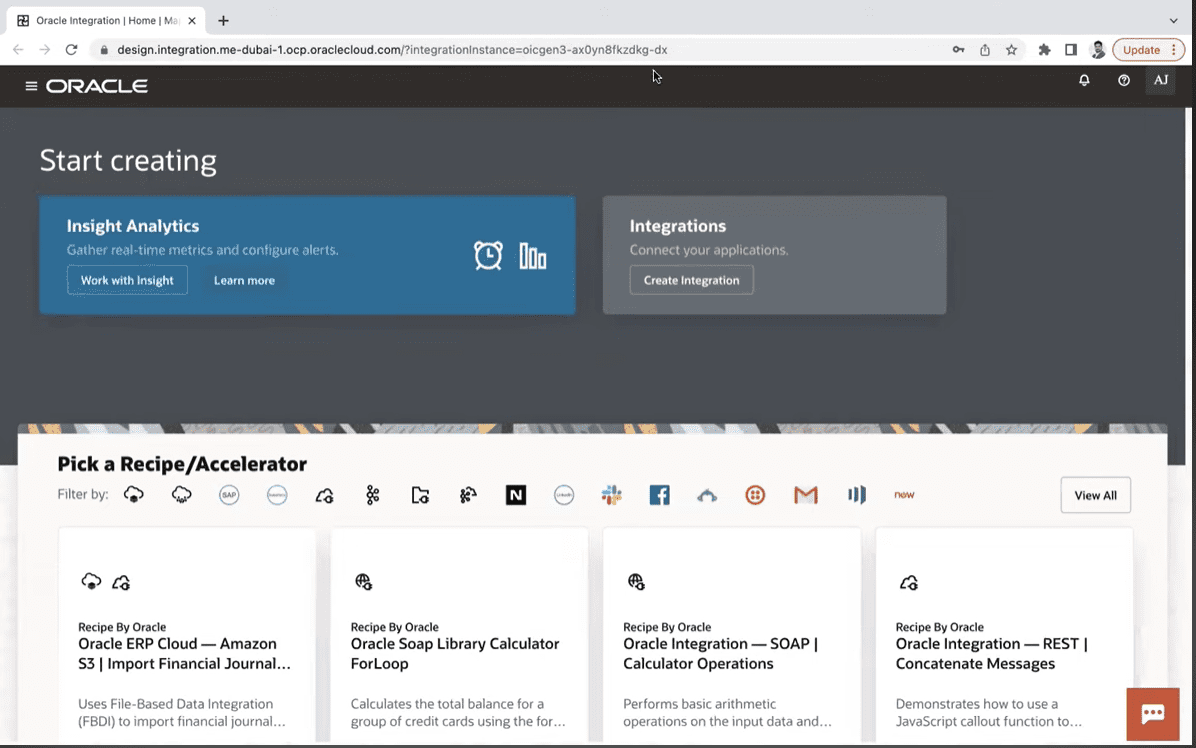
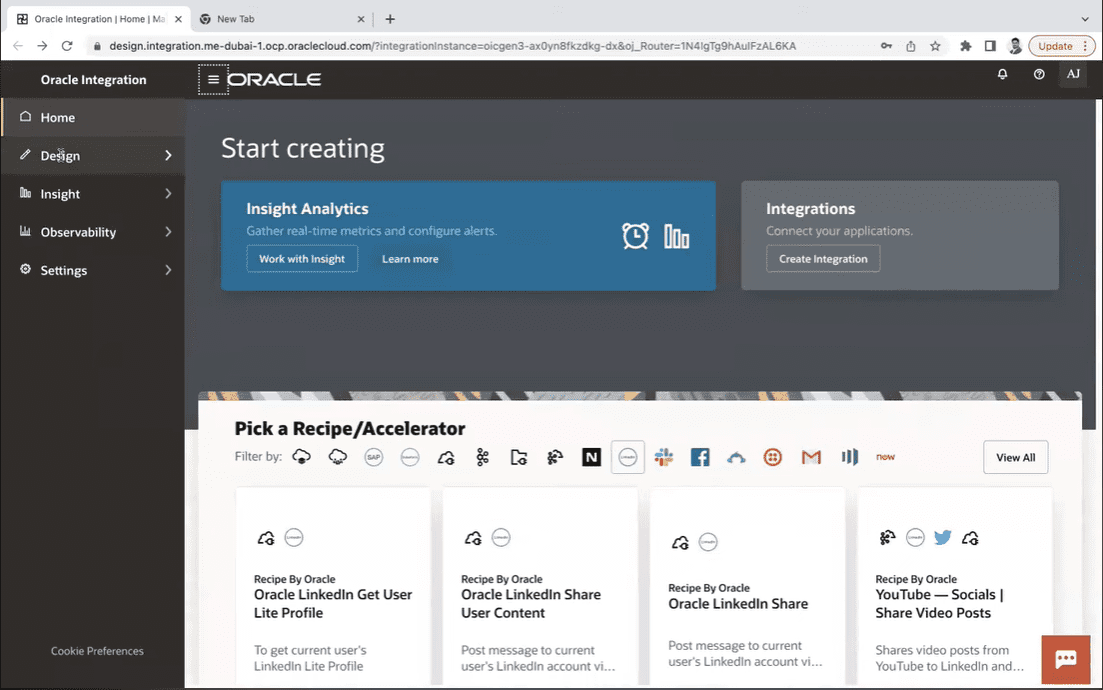
This is the Home Page of Oracle Integration 3 which has been significantly changed, with new features and the options.
When you login into Oracle Integration page you give a run time URL as soon as you login it changes the URL into the design time.
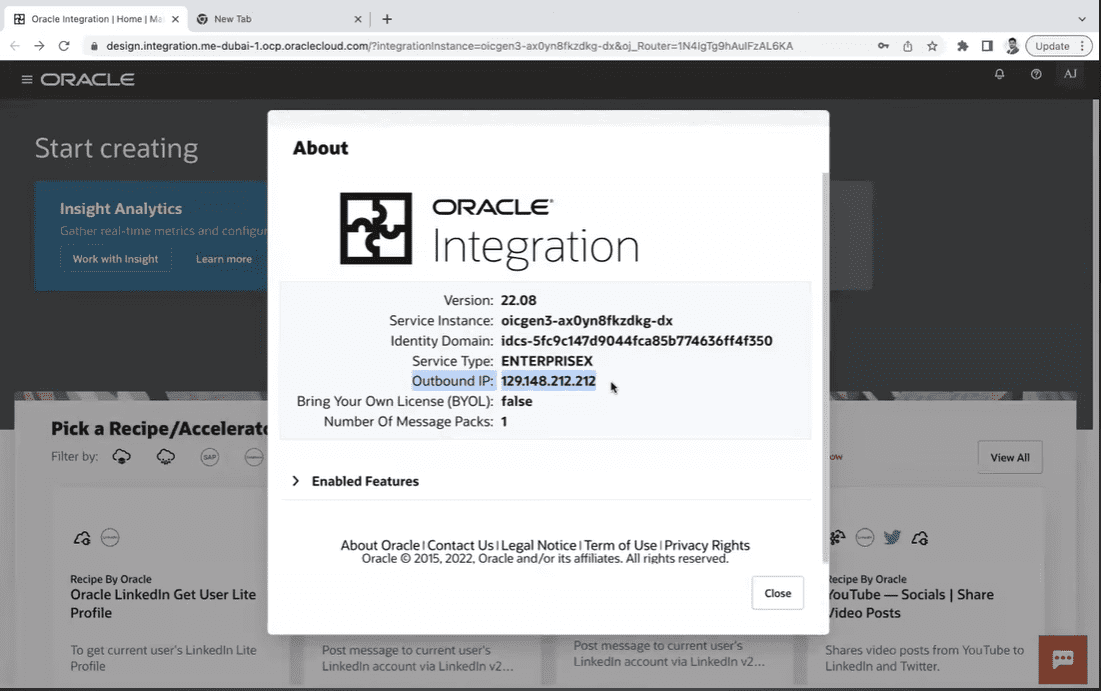
About Menu of Oracle Integration 3
The About menu is not available in the Oracle Cloud Infrastructure (OCI) Console.
The NAT Gateway IP address (outbound IP address) of your Oracle Integration instance can be found in the About menu. To allowlist the instance, the outbound IP address is required. This feature removes the need to submit a service request in order to obtain the outbound IP address.
Menu on Home Page
The ☰ Menu (Hamburger menu) has got slightly changed with new options which are Design, Insight, Observability and Settings.
The Design and Observability are the new , earlier in the design place there use to be integration now renamed as Design. If you click on design you will be able to see all the options were available earlier, but all the User Interface is based on the Redwood theme.
Design
- Integrations
- Connections
- Lookups
- Libraries
- Packages
- Agents
- Adapters.
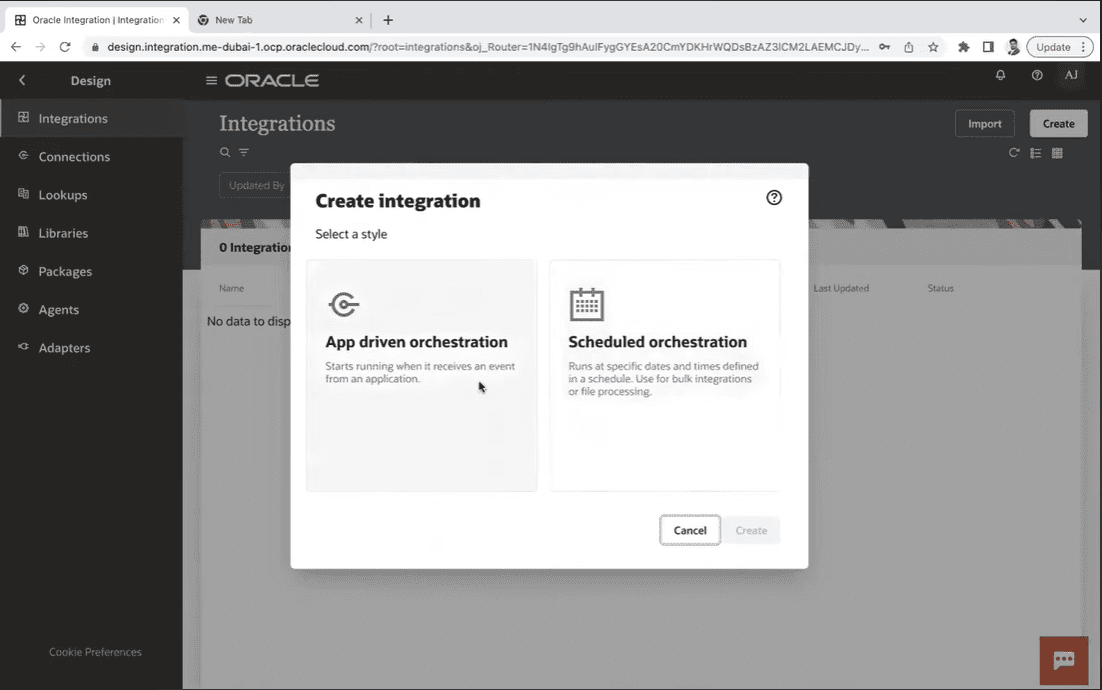
Styles of Integration Gen 3
When you click on Create Integration to create a new integration, we have only two patterns / styles in Gen 3 Integration. they are:
- App driven orchestration.
- Scheduled orchestration.
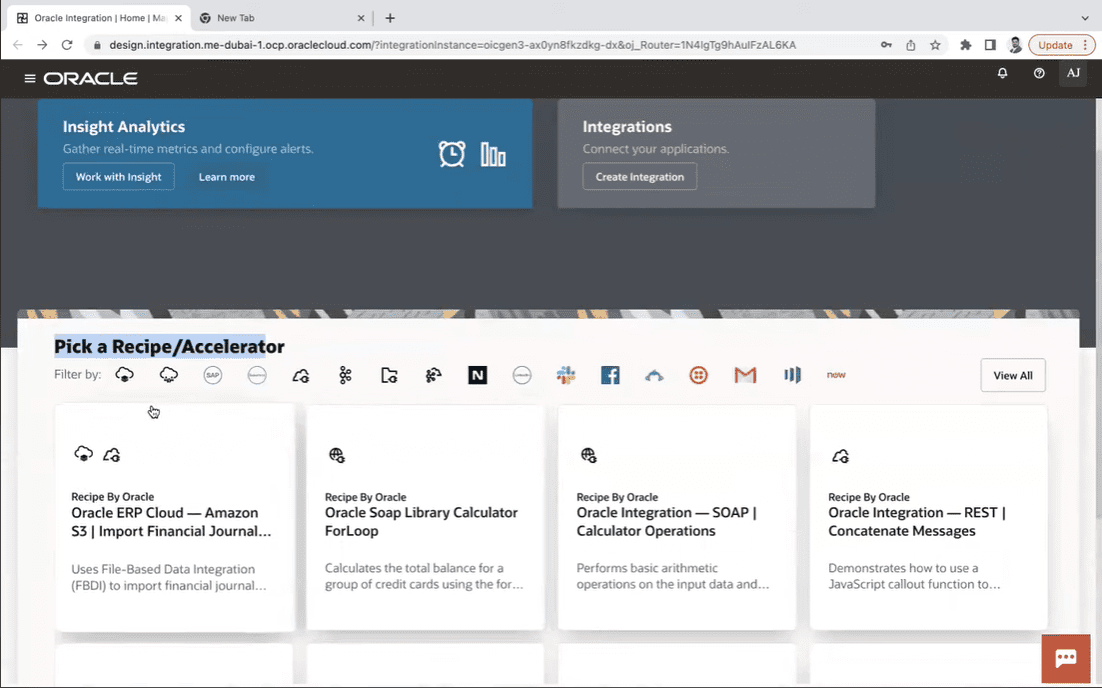
Recipe and Accelerator in Oracle Integration 3
Recipes are examples or templates that help you get started.
Accelerators are pre-configured and ready-to-use business integrations or technical patterns.
We have an option to pick a recipe or accelerator from the homepage itself, and there is also a feature to filter all you recipes adapter-wise on the home page.
Related Links/References:
- Oracle Integration Cloud Create Instance: Step-by-Step
- Oracle Integration Cloud (OIC) For Beginners Overview
- Autonomous Transaction Processing (ATP) Adapter in OIC
- SOAP Vs REST API | Soap vs Rest Web Services
- Difference Between OIC And OCI
Next Task For You
Do you want to learn more about Oracle and confuse where to start or which certification is right for you? Then, click on the register now button below to register for a Free Masterclass on Oracle [1Z0-1042] Certified Cloud Integration Expert, which will help you better understand and choose the right path and clear the certification exam.


![Microsoft Agentic AI Business Solutions Architect [AB-100] | K21 Academy](https://test.k21academy.com/wp-content/uploads/2025/11/Microsoft-Agentic-AI-Business-Solutions-Architect-AB-100-Exam-Overview1.png)



