





Updated on 15th November 2018 with the latest changes for deploying Oracle EBS (R12) on Cloud (OCI).
This post covers the 15 Things every Oracle Apps DBAs or Technical Architects must know when deploying/migrating Oracle EBS (R12) on Oracle Cloud (OCI).
If you want to look at the tasks performed by Oracle Apps DBAs in Cloud or the new role for Oracle Cloud Apps DBA, then look at my previous post here.
15 Things Oracle Apps DBAs must know for Oracle Cloud
1. Cloud has three Service Models mainly.
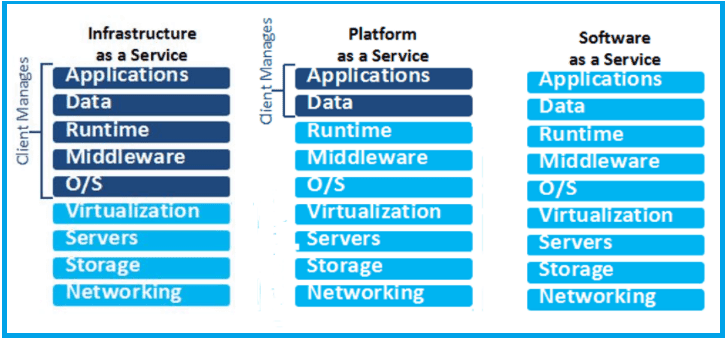
- Infrastructure as a Service (IaaS)
- Platform as a Service (PaaS)
- Software as a Service (SaaS)
To know more about Cloud Service Models, Check my previous video post Here.
Note: As an Oracle Cloud Apps DBA, you’ll be working on IaaS & PaaS Service Model.
2. Under IaaS, Oracle has two main offerings (OCI & OCI-C). For EBS (R12), you can also have dedicated compute on Sparc Model.
- Oracle Cloud Infrastructure (OCI) Compute — This was Bare Metal Cloud Service (BMCS) earlier.
- Oracle Cloud Infrastructure Classic (OCI-C) Compute (Compute Classic) — This was the original Compute earlier.
- Oracle Cloud Infrastructure Compute Classic — Dedicated Compute Capacity — SPARC Model 300
Note: To know more about OCI (click Here) & differences between OCI & OCI-C refer Here.
3. Oracle Database Cloud Service’s (DBCS) offering is from PaaS and has two main common options (apart from Schema as a Service)
- Database as a Service (DBaaS)
- Exadata Cloud Service (ExaCS)
Note: Autonomous Database on OCI is not certified with EBS R12 on Cloud yet.
4. Oracle EBS (R12) has two main tiers (Third is Client Tier i.e.Java-enabled Browser).
- Database Tier: Oracle EBS Database is deployed in this tier.
- Application Tier: Oracle EBS Middle Tier (like Fusion Middleware, OHS, WebLogic, etc).
5. You can deploy EBS on a Cloud in three ways:
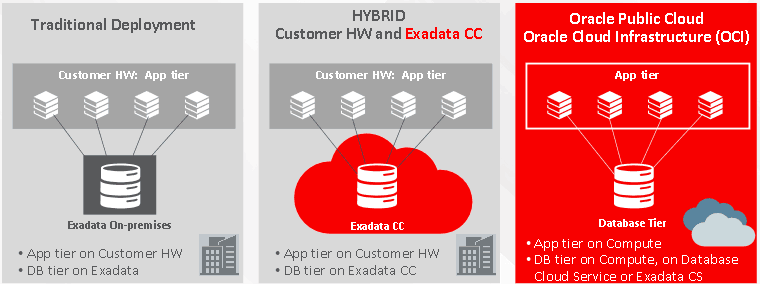
- Traditional Deployment: In a traditional deployment, we deploy everything on the customer hardware.
- Hybrid Deployment: In a hybrid deployment, we deploy Apps tier on Customer hardware and database tier on Cloud.
- Oracle Public Cloud: In this deployment, apps tier will be deployed on IaaS and Database tier can be deployed on IaaS or PaaS (DBCS or Exadata CS).
6. EBS (R12) Application Tier must be deployed on IaaS and is supported on all the three IaaS offerings from Oracle (OCI Compute, OCI Compute Classic, OCI Compute Classic SPARC).
7. EBS R12 (Database) can be deployed on either IaaS or PaaS (DBCS offering). EBS R12 Database Tier on PaaS can be configured with either DBaaS or ExaCS
8. Oracle Database Cloud Service (DBCS) has four options for Software Editions ( More on this at my previous post Here).
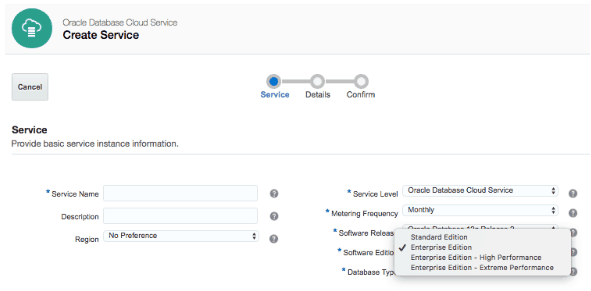
- Standard Edition (SE)
- Enterprise Edition (EE)
- Enterprise Edition High Performance (EE-HP)
- Enterprise Edition Extreme Performance (EE-EP)
9. If Oracle EBS (R12) Database Tier is using Oracle Database Cloud Service, then Software Edition should be either EE-HP or EE-EP.
10. If EBS (R12) Application Tier is on IaaS and Database Tier is on PaaS (DBCS or ExaCS), then these two services must be co-located in the same Identity Domain. (More on Identity Domain, Here and Here )
11. You can run Oracle EBS(R12) with RAC on Oracle Cloud but in that case, Database Tier must be on PaaS Offering (DBCS or ExaCS)
12. You can create new Oracle EBS (R12) – Vision or Fresh Database using:
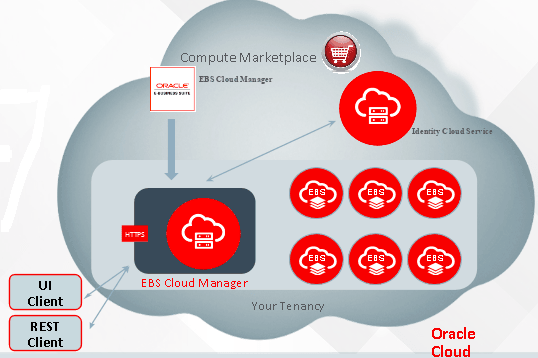
- Template from Oracle Cloud Marketplace
- Using EBS Cloud Manager tool.
Note: EBS Cloud Manager is used to deploy EBS on OCI wherein EBS Cloud Admin Tool is used to deploy EBS on OCI-C
Note: EBS Cloud Manager Tool is a recommended approach for provisioning Oracle EBS (R12) Instance in Oracle Cloud Infrastructure (OCI).
13. You can Lift & Shift (Migrate) an On-Premise EBS (R12) Instance to Oracle Cloud using Automated Method. For things to consider before EBS (R12) migration to Oracle Cloud, Check our blog post 10 Things to Consider before Migration to Cloud.
14. Oracle Cloud at Customer (OCC) is a service where Customer can keep Oracle Cloud Machines (On Subscription Basis) at their own data centers and run EBS on Cloud similar to Oracle Public Cloud.
15. Oracle EBS R12 is NOT certified on Amazon AWS (IaaS).
Finally, if you want to learn all this quickly using our Step-by-Step Training program with the Hands-On Activity Guides for Apps DBAs & Architects to Build, Manage & Migrate Oracle EBS (R12) on Cloud, then check our EBS on Cloud Advanced Training Program.
Related/Further Readings
If you are just a beginner to Oracle cloud, then check our below posts to start your journey:
- Oracle EBS (R12) on Cloud: Architects Perspective: What and Why?
- [Video] Oracle EBS (R12) On Cloud Deployment Architecture
- Cloud Service Models (SaaS | PaaS | IaaS )
- Amazon AWS or Oracle Cloud (Confused?): Right Choice for DBAs
- Role of Oracle Apps DBA in Cloud
- Oracle EBS(R12) on Cloud for Apps DBAs & Architects Training Program: Step-By-Step Activity Guides/Hands-On Lab Exercise
Begin Your Cloud Journey
Begin your journey towards becoming a Certified Oracle Cloud Infrastructure Architect and earning a lot more in 2024 by joining our FREE CLASS. You will also know more about the Roles and Responsibilities, Job opportunities for OCI Architects in the market, and what to study Including Hands-On labs you must perform to clear the Oracle Cloud Architect Associate Certification (OCI) certification exam by registering for our FREE Masterclass.
Click on the below image to Register Our FREE Class on Master Oracle Cloud (OCI) and Get a Higher paying Job!


![Microsoft Agentic AI Business Solutions Architect [AB-100] | K21 Academy](https://test.k21academy.com/wp-content/uploads/2025/11/Microsoft-Agentic-AI-Business-Solutions-Architect-AB-100-Exam-Overview1.png)



