





This post covers an issue & fix reported in our training while creating Oracle EBS R12 instance on Cloud using Oracle EBS Cloud Admin Tool where error reported was FATAL: Failed to connect to Oracle Cloud storage endpoint
Note: EBS Cloud Admin Utility is used to provision, manage & integrate Oracle E-Business Suite R12 on Oracle Cloud (OCI-c) & EBS Cloud Manager is the utility used to provisioned EBS On OCI, to know more click here
If you are new to Oracle EBS (R12) on Cloud then check Atul’s post on Role of Oracle AppsDBA (EBS) R12 in Cloud
Things Good to Know About EBS Cloud Admin Tool (EBS ON OCI-C)
- It can provision a new EBS instance (including using Database Cloud Service or RAC on Cloud for Database Tier of EBS) on Oracle Public Cloud (OCI-C)
- You can use it to add an additional node for an Oracle EBS (R12) instance.
- To Backup & Restore an EBS instance on the Cloud.
- To Integrate Oracle EBS R12 with Oracle third-party software like Oracle SOA Suite, Oracle Identity, and Access Management Suite etc.
- You also use this Oracle EBS Cloud Admin utility to Manage Oracle EBS (R12) Environment.
Issue:
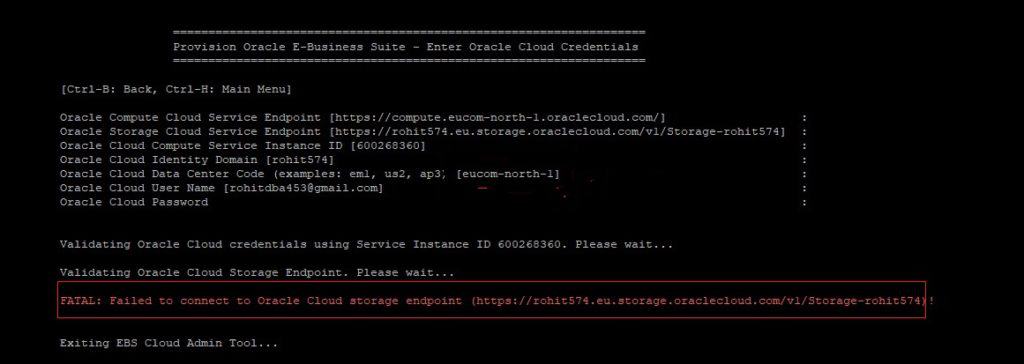
When you provision Oracle EBS Environment on Cloud using EBS Cloud Admin Tool (by running ProvisionEBS.pl), it expects Compute & Storage Service Endpoints. You can get both these details from respective Cloud Storage & Compute Console.
After entering the values it gives an error like FATAL: Failed to connect to Oracle Cloud Storage Endpoint
Analysis:
The Above error is mainly due to two reasons:
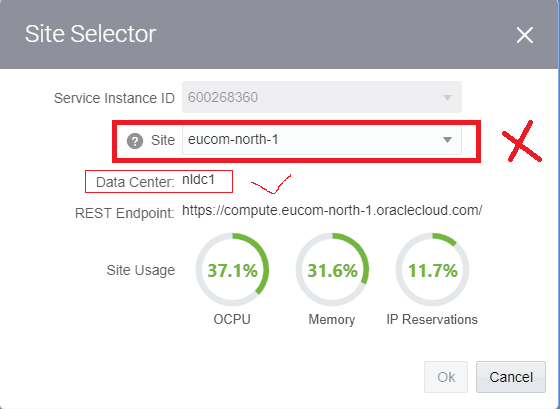
1) You have given the wrong Site/ Data Center Code for Storage Cloud Service Endpoint when prompted (Note: An Account can have multiple Site inside Data Center)
There are two things you can see in your cloud dashboard, one is Site and another is Data Center, so we have to use Data Center code not Site
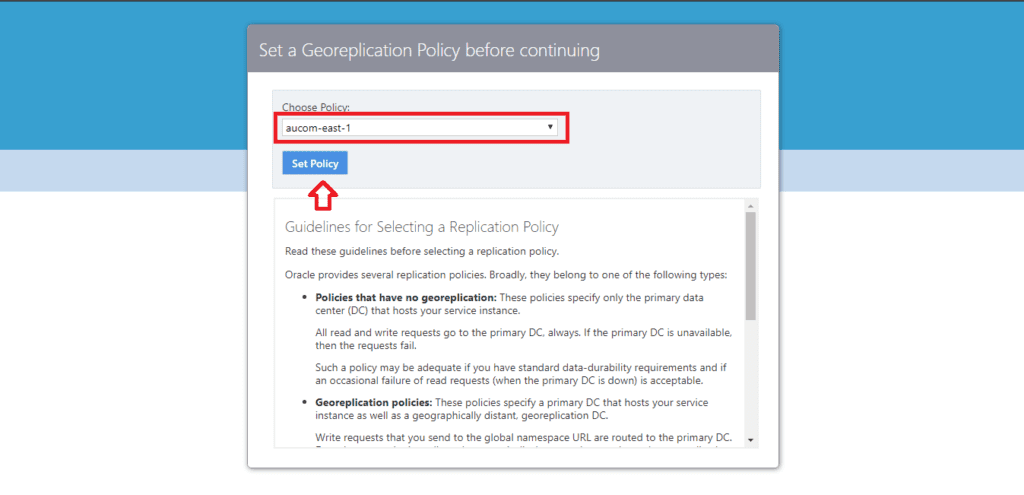
2) Geo-Replication policy for your Object Storage Classic is not set (More on setting Geo Replication Policy at Replication Policy for Your Account)
Note: If your Cloud Account was created after March 2018, then once your Oracle Cloud Infrastructure Classic (OCI-C) Object Storage (For the difference between OCI & OCI-C refer here), the replication policy for your account is set by default (This is as per Oracle Doc).
However we have seen that once you open your Storage Classic console for the first time you will get a below screen and you just need to select your site and then click on Set policy, it is one time activity.
Once these are two settings are done, this should fix error “Failed to connect to Oracle Cloud storage endpoint”. Run EBS Cloud Admin Tool one more time to provision Oracle EBS (R12) on Cloud
Now it’s your turn to post your answers in the comment section and let us know where you are facing challenges in EBS on Cloud
This post is from our Course “Build, Manage & Migrate (Lift & Shift) EBS (R12) on Cloud Expert” with 1 Year On-Job Support and 1 year Unlimited FREE Retakes (If you need to know more about this program then reach out to our team at contact@k21academy.com )
Related/Further Readings
If you are just a beginner to Oracle cloud, then check our below posts to start your journey:
- Oracle EBS (R12) on Cloud: Architects Perspective: What and Why?
- [Video] Oracle EBS (R12) On Cloud Deployment Architecture
- Cloud Service Models (SaaS | PaaS | IaaS )
- Amazon AWS or Oracle Cloud (Confused ?): Right Choice for DBA’s
- To check tasks performed by Apps DBAs in Cloud here
- Role of Oracle Apps DBA in Cloud
- EBS on Cloud Advanced Training
- Oracle EBS(R12) on Cloud for Apps DBAs & Architects Training: Step By Step Activity Guides/Hands-On Lab Exercise
Begin Your Cloud Journey
Begin your journey towards becoming a Certified Oracle Cloud Infrastructure Architect and earning a lot more in 2024 by joining our FREE CLASS. You will also know more about the Roles and Responsibilities, Job opportunities for OCI Architects in the market, and what to study Including Hands-On labs you must perform to clear the Oracle Cloud Architect Associate Certification (OCI) certification exam by registering for our FREE Masterclass.
Click on the below image to Register Our FREE Class on Master Oracle Cloud (OCI) and Get a Higher paying Job!


![Microsoft Agentic AI Business Solutions Architect [AB-100] | K21 Academy](https://test.k21academy.com/wp-content/uploads/2025/11/Microsoft-Agentic-AI-Business-Solutions-Architect-AB-100-Exam-Overview1.png)



