



As an Apps DBA, you would have worked on the Installation, Patching, and Cloning of different Oracle E-business Suite Releases. Even though you are familiar with R 12.2 and R12.1, it’s quite difficult to understand the difference between these two. In this blog, we are going to cover Oracle E-Business Suite R12.1 vs R12.2.
If you are new to Oracle E-business Suite, we suggest you go through our previous blogs:
- Oracle EBS (R12.2) Architecture
- Oracle E-Business Suite R12.2 Installation.
- Oracle Apps DBA Patching in R12.2
Overview of Oracle E-Business Suite (EBS)
Oracle E-Business Suite is a set of integrated business applications provided by Oracle. It comprises several oracle applications that help businesses with a wide variety of their processes like Customer relationship management, Enterprise resource planning, Supply chain management.
EBS R12.1 v/s EBS R12.2:
Let’s see some points on which we are going to discuss the difference between oracle EBS R12.2 and R12.1.
- Architectural difference
- File system
- Weblogic server
- Online Patching(adpatch & adop)
- Extended support
- FAQs
- Conclusion
Architectural Differences ^
Let’s first understand the architectural differences between Oracle EBS R12.2 and R12.1
- In Oracle EBS R12.2 we have dual filesystems i.e., fs1(run filesystem) and fs2(patch filesystem) whereas In Oracle EBS R12.1. we deal with only one application filesystem.
- In Oracle EBS R12.2 we have the Application servers replaced by a Weblogic server to manage the technology stack.
- Oracle EBS R12.2 will replace Oracle containers for java(OC4J) log with WebLogic server 11g.
- In Oracle EBS R12.2 an additional feature available called Edition-Based Redefinition. Whereas in Oracle EBS R12.1 only a global single data model and RAC & ASM available. Oracle EBS R12.2 will use the 11gR2 database’s Edition-Based Redefinition features to provide support for online patching.
- When we install Oracle E-Business Suite R12.1 we get an 11g database by default. But in Oracle E-Business Suite R12.2 we get a 12c database by default.

- The adpatch(patching) in R12.1 is replaced by adop(online patching) in R12.2.
- Apps user Password change involves 3 steps in R12.2.4 where in R12.1.3 involves only 2 steps.
- In Oracle E-Business Suite R12.1, OHS, OAFM, Forms, OACORE are managed by OPMN alone. Whereas in Oracle EBS R12.2, oracle HTTP server(OHS) is managed by OPMN, and Forms, OACORE, OAFM are managed by WebLogic admin manager and WebLogic node manager.
To know more about operating systems supported by r12.1 vs r12.2, click here.
File Systems ^
Oracle introduced a new concept called Dual File System in Oracle EBS Release 12.2 to support Online Patching(ADOP). Whereas in R12.1 Oracle had only one application file system where patching was done using the ADPATCH utility. Dual file systems help organizations to have less downtime during patching. By introducing a duplicate file system, Oracle has reduced patching downtime and improved the availability of the system.
Oracle EBS R12.2 has 3 file systems.
- filesystem1(fs1)
- filesystem2(fs2)
- Non-editioned file system(fs_ne)
Fs1 and fs2 are identical and together known as dual file systems.
Whereas in Oracle E-Business Suite R12.1 we have only a single application file system.
A new EBSenv.env is found in R12.2 to select the RUN/PATCH file system.

To know more, check our blog on File Systems in Oracle E-Business suite R12.2
WebLogic Server^
In Oracle E-Business Suite R12.2 the Application server is replaced by a WebLogic server to manage the technology stack. which means, the 10.1.3 Home is replaced by Fusion MiddleWare Home($FMW_HOME) in R12.2.
In Oracle E-Business Suite R12.2 Application Server 10.1.3 had to manage the Web Home or Java Home. In Oracle E-Business Suite R12.2 WebLogic Server manages all the forms and core services. The below figure shows the replacement of Application Server 10.1.3 by the Oracle Fusion MiddleWare in Oracle E-Business Suite R12.2

Online Patching^
The patching in Oracle E-Business Suite R12.1 i.e., ADPATCH is replaced by Online Patching in Oracle E-Business Suite R12.2 i.e., ADOP. online patching necessitates 5 phases to apply a standard patch in Oracle EBS R12.2.
ADOP Utility Phases:
- prepare: Run and Patch file systems are needed to be synchronized.
- apply: All the patches must be applied in this phase. Applied patches need to be copied in fs_ne (non-editioned filesystems)
- finalize: Getting ready for the cutover phase.
- cutover: The filesystems interchange occurs. i.e., the Patch file system becomes the Run file system and vice versa.
- cleanup: All the obsolete objects gets compiled and cleanup old edition & objects.
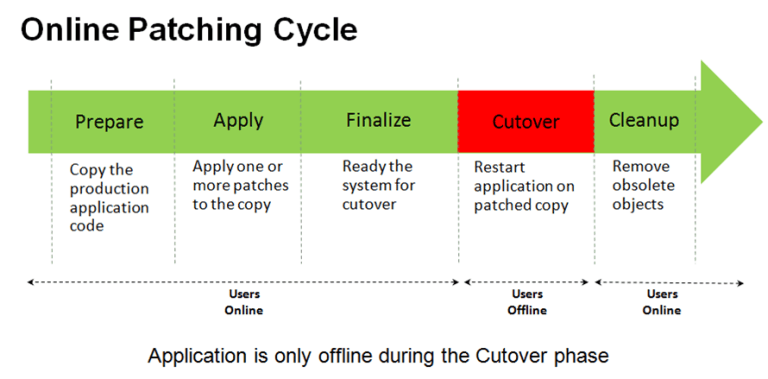
Check our blog on ADOP ( R12.2 Online Patching ) in Oracle EBS (R12) to know more about online patching.
Extended Support ^
Premier Support for E-Business Suite Release 12.1 is available till December 2021. Whereas Premier Support for Oracle E-Business Suite 12.2 extended through at least 2031.

Please check Our blog on EBS R12.2 Upgrade High level overview.
FAQs ^
Q1. Is there a direct upgrade path from EBS 12.2.x to 12.2.10?
A. Yes. Release 12.2.x customers can apply 12.2.10 directly to their environments. EBS 12.2.10 is an online patch, so it can be applied while an existing Release 12.2.x system is running.
Q2. Is there a direct upgrade path from Release 12.1 to Release 12.2.10?
A. No. Release 12.1 customers must first upgrade to Release 12.2 before applying 12.2.10.
Q3. Is there a direct upgrade path from Release 12.0 to Release 12.2.10?
A. No. Release 12.0 customers must first upgrade to Release 12.2 before applying 12.2.10.
Q4. Is there a direct upgrade path from EBS 11i to 12.2.10?
A. No. Release 11i customers must first upgrade to Release 12.2 before applying 12.2.10.
Conclusion ^
That was all in a nutshell about Oracle E-Business Suite R12.2 vs R12.1. We covered the main Architectural differences, changes related to File Systems, and new features available in Oracle EBS R12.2 such as WebLogic Server and Online Patching and also a brief explanation on Extended Support. Read the below references to enhance your knowledge.
Related/Further Readings
- ADOP ( R12.2 Online Patching ) in Oracle EBS (R12)
- Oracle E-Business Suite (EBS) R12.2 Supported O.S. & Version
- File System in Oracle E-Business Suite R12.2
- Update on EBS Certifications
- Phases for ADOP in detail
- Oracle EBS R12.2 Upgrade Frequently Asked Questions Part – III
Next Task For You
We cover the Overview of Oracle E-Business R12.2 & new features in our Oracle EBS Upgrade R12.2 AppsDBA Training along with the FMW Concepts, Upgrade Path & Flow, Upgrade preparation tasks, post Upgrade tasks, Database upgrade to 19c, Troubleshooting & Utilities, and much more including the hands-on labs you must perform to upgrade your skills and get a good job with a high package.
Begin your journey towards becoming an Oracle EBS Upgrade R12.2 AppsDBA by joining our Training on Upgrade EBS R12/11i To R12.2
Click on the image below to join FREE Masterclass on Upgrade EBS R12/11i To R12.2:

![Microsoft Agentic AI Business Solutions Architect [AB-100] | K21 Academy](https://test.k21academy.com/wp-content/uploads/2025/11/Microsoft-Agentic-AI-Business-Solutions-Architect-AB-100-Exam-Overview1.png)


