






DataGuard & RAC are two most important topic for Oracle DBAs & Apps DBA’s managing EBS R12, and both these are still applicable in Cloud (in fact more important now)
In this post, We are going to look at High Availability (HA) and Disaster Recovery (DR) on Cloud and I’ll be focusing on Standby Databases also known as DataGuard. The same is covered in the 60 mins Live Show I did on Facebook.
Note: First let’s look at basic concepts related to RAC or Extended RAC & for DR Standby/DataGuard: Three Types. If you know this all then scroll down at the end, for points specific to HA & DR in Oracle Cloud.
High Availability (RAC)
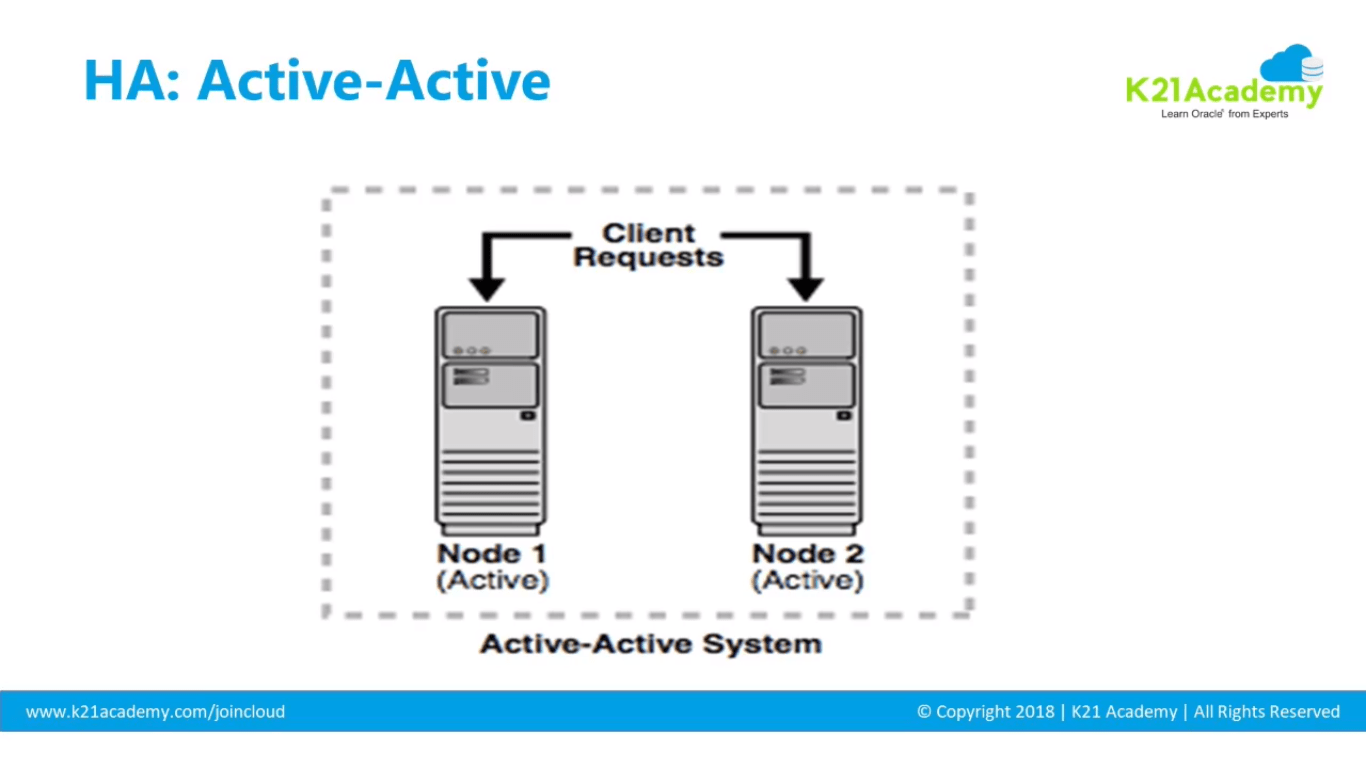
- High Availability (HA) stands for Active-Active where clients can connect to more than one node. It helps in Scalability and avoid a single point of Failover.
- RAC stands for that provides HA for Database Tier (as shown in the bottom layer of the picture below). For Application Tier, you configure multiple app/web servers (as shown in the top layer of the picture below)
If you don’t have the time to look at the entire 60 mins video, but still want to know about HA: Active-Active, you can start from 17 min 25 sec.
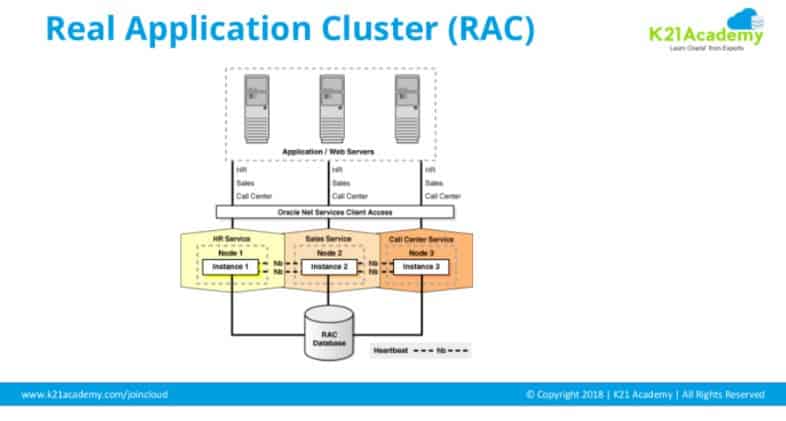
In RAC you will have multiple machines each running database instance(memory & database processes) but all instances talking to a single database on a cluster file system (data files where data is stored).
In RAC, Session Replication between nodes occurs so that the data in Instance 1 can be accessed by data in the memory of Instance 2 and so on using private interconnect. Check all networking requirements HERE.
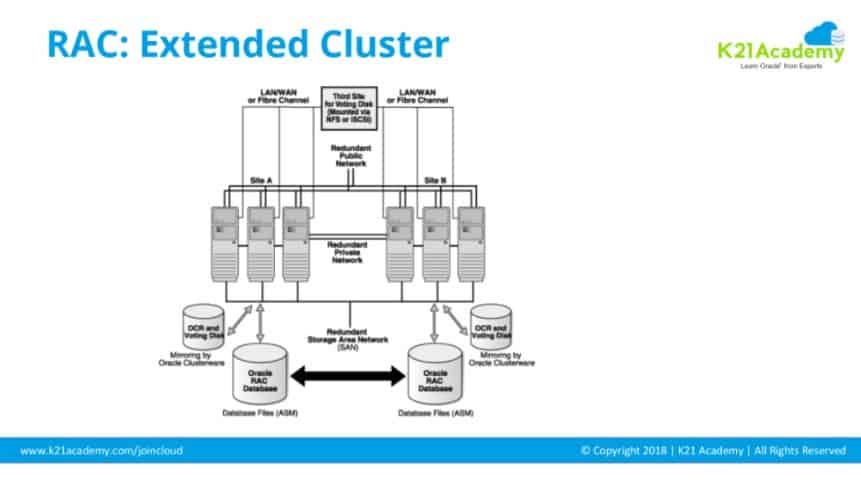
RAC provides HA within datacenter but doesn’t provide failure against entire datacenter. Extended/Stretched RAC is an option for extending RAC across the datacenter. Get more information on stretched cluster HERE.
Disaster Recovery (DataGuard)
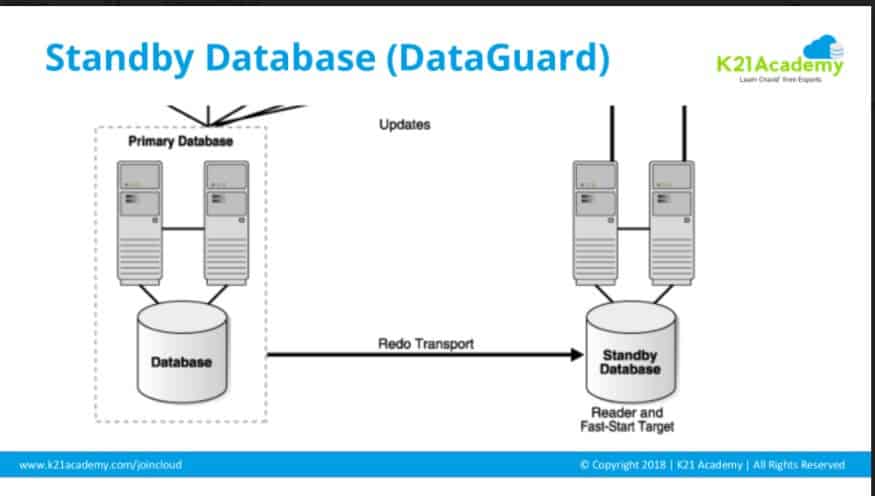
RAC license could be costly and doesn’t cover failure against entire datacenter and you still want a Disaster Recovery (DR) solution and that’s where Standby Database (aka Dataguard) comes into the picture.
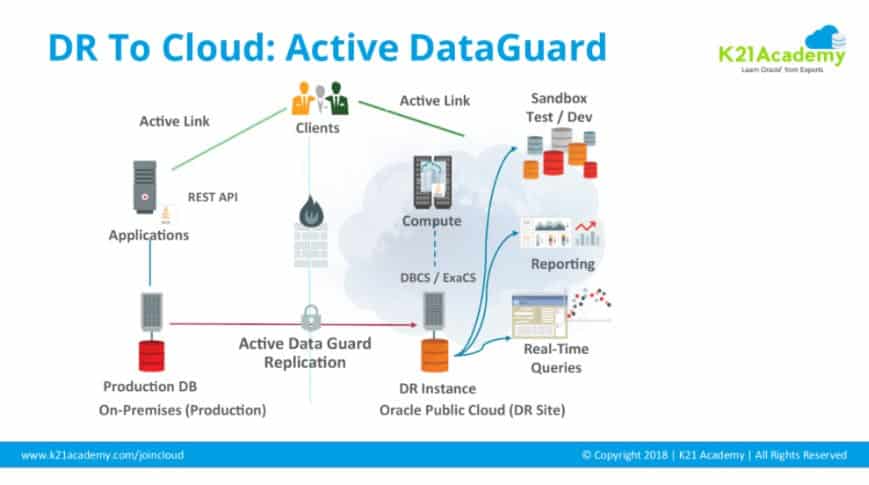
- Standby Database (DataGuard) is a process of setting up two databases which might be geographically distant where one database acts as Primary (open in Read/Write and serving clients) while another as Standby (accepting changes from primary and possibly applying them to stay in sync).
The Primary Database sends a Redo Logs to Standby, that is then applied to standby database (based on type Standby Database). In the Live 60 minutes show, I discussed three different types of Standby Database (Dataguard Configuration) i.e. Physical, Logical, Snapshot.
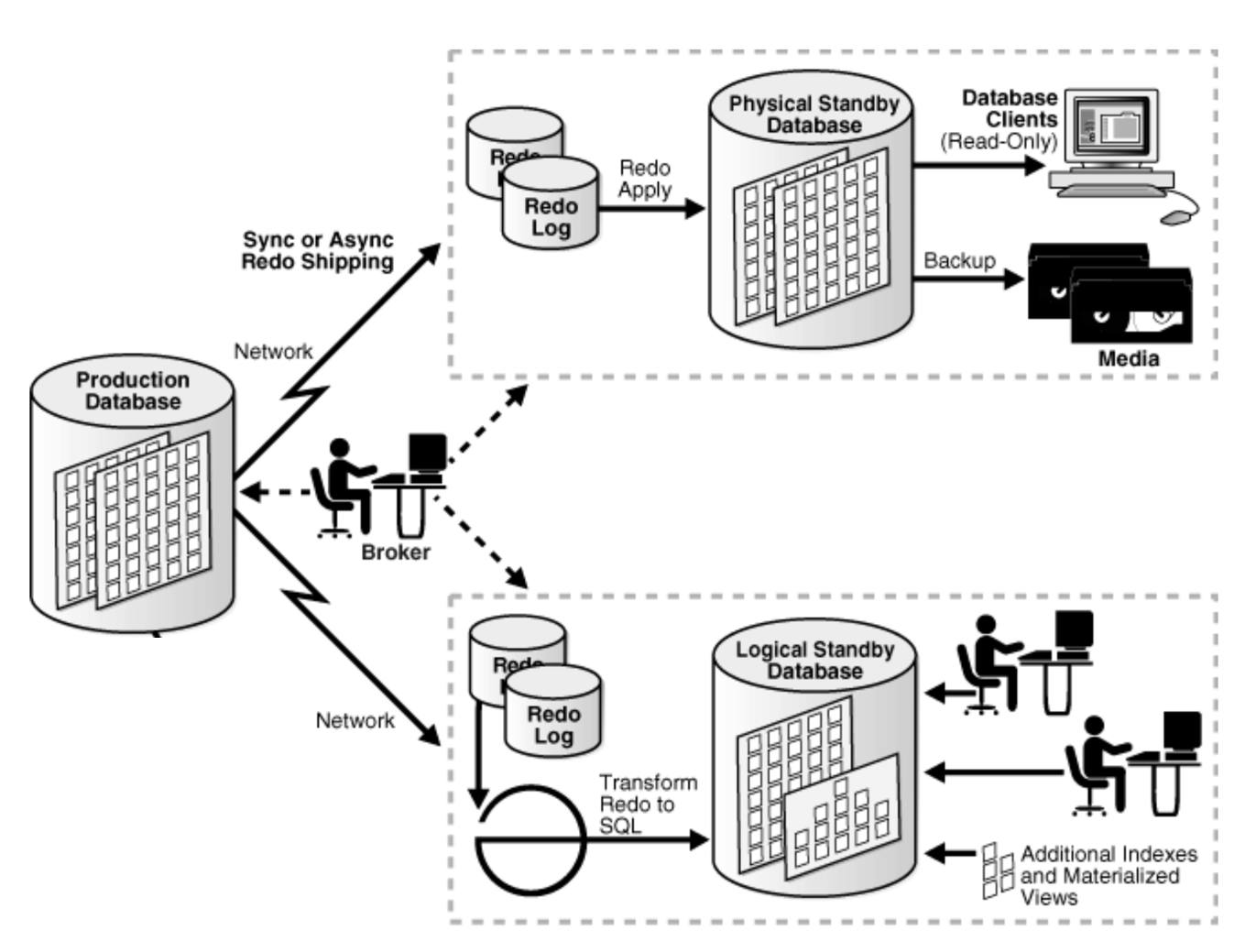

Note: Failover from Primary Database to Standby Database, can be Manual or Automatic (using Observer process in Fast Start Failover).
DataGuard Vs Active DataGuard
HA & DR in Cloud
(Note: Oracle RAC on Amazon AWS is not certified and should you learn Amazon AWS or Oracle Cloud, click here
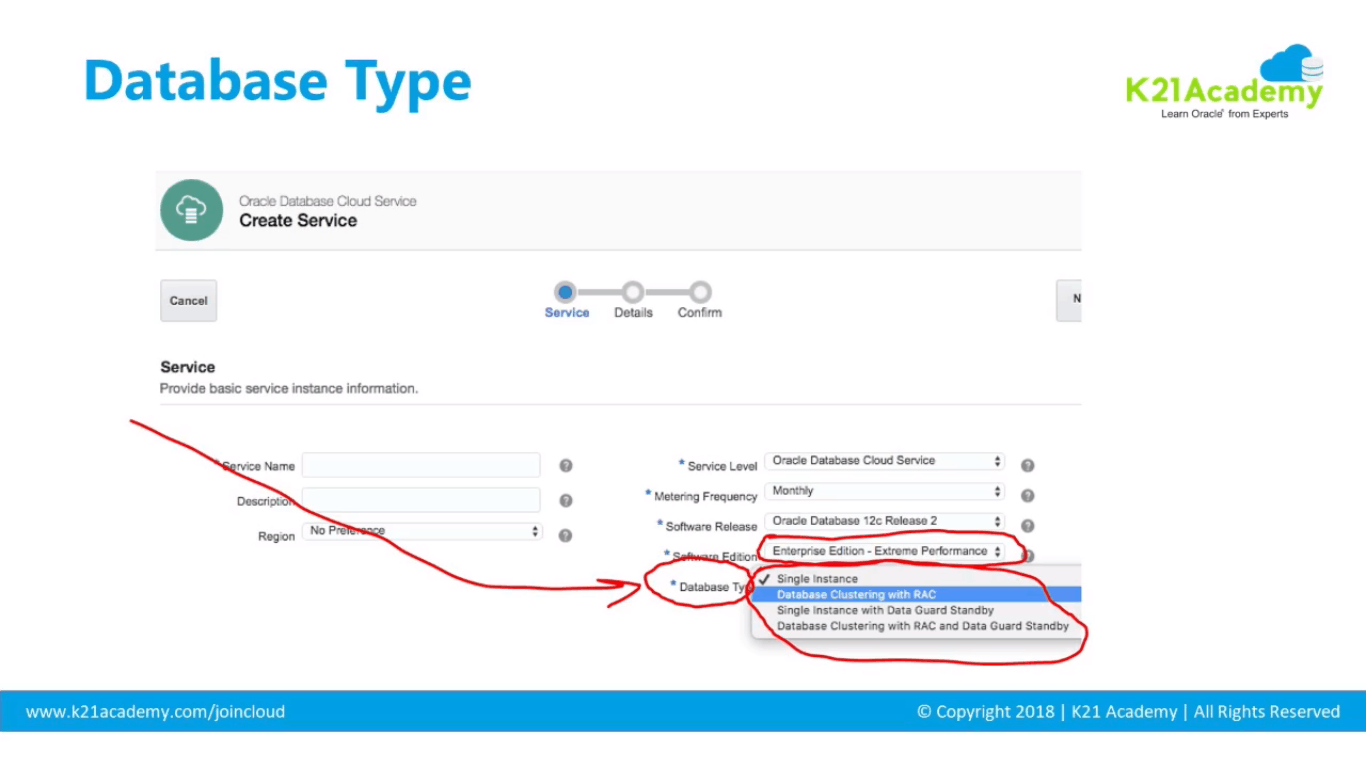
As shown above, depending on the software edition you select, you get the Database Type.
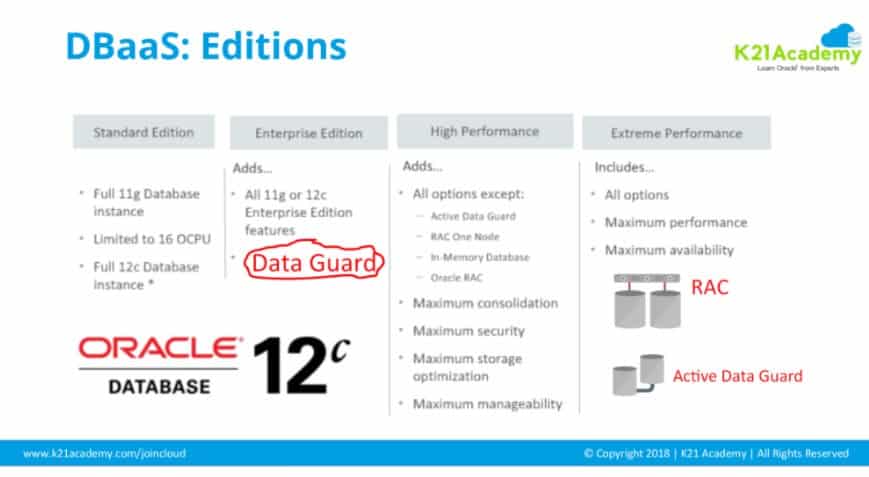
- For Dataguard select EP, HP or EP
- For Active DataGuard or RAC on Cloud select EP (Extreme Performance)
Related/Further Readings
If you are just a beginner to Oracle cloud, then check our below posts to start your journey:
- Oracle EBS (R12) on Cloud: Architects Perspective: What and Why?
- [Video] Oracle EBS (R12) On Cloud Deployment Architecture
- Cloud Service Models (SaaS | PaaS | IaaS )
- Amazon AWS or Oracle Cloud (Confused ?): Right Choice for DBA’s
- To check tasks performed by Apps DBAs in Cloud here
- Role of Oracle Apps DBA in Cloud
- EBS on Cloud Advanced Training
- Oracle EBS(R12) on Cloud for Apps DBAs & Architects Training: Step By Step Activity Guides/Hands-On Lab Exercise
Next Task For You
Join our FREE Masterclass on Build, manage & Migrate EBS R12 to Cloud For Beginners. Click on the image below to register for FREE


![Microsoft Agentic AI Business Solutions Architect [AB-100] | K21 Academy](https://test.k21academy.com/wp-content/uploads/2025/11/Microsoft-Agentic-AI-Business-Solutions-Architect-AB-100-Exam-Overview1.png)



