
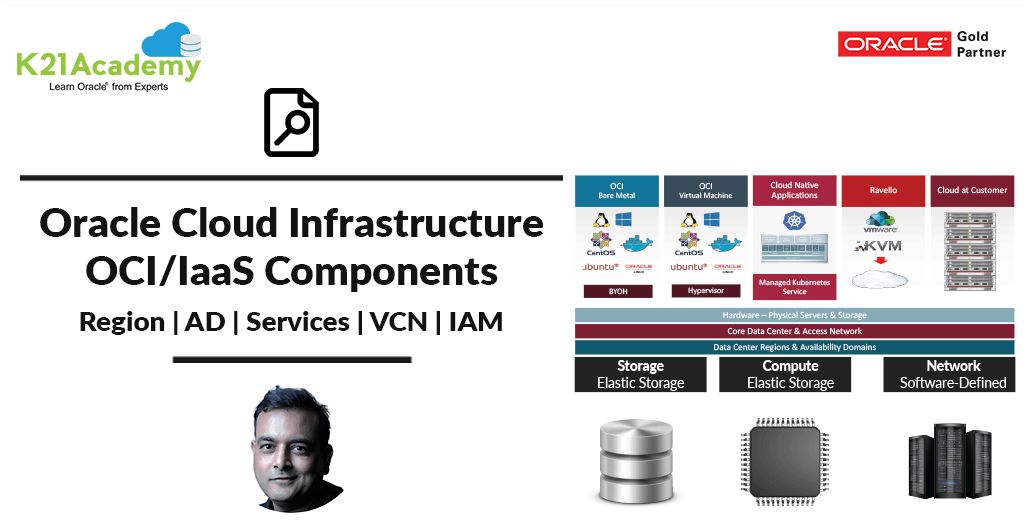





This post covers Oracle Cloud Infrastructure (OCI) building blocks like Region, Availability Domain (AD), Fault Domain (FD) Tenancy, Compartment, Compute, Virtual Cloud Network (VCN), Identity & Access Management (IAM), and Storage (Block, Object, Shared, Archive)
Note: OCI is part of the IaaS Service model (to know more about the service model please check our previous blog on Cloud Service Model), where OCI also provide Bare Metal Cloud Service (BMCS).
Another offering in IaaS from Oracle is OCI-Classic (or OCI-C) and to find the difference between two and when to use what, check my previous post on OCI vs OCI-C here
If you are just starting out in Cloud then I highly recommend you to go through these first
- Cloud Service Models (SaaS, PaaS, IaaS)
- 12 Point Checklist for DBA for Beginner to Expert Cloud DBA (Facebook Live)
- If you are confused to pick Amazon AWS or Oracle Cloud then check this
- To check tasks performed by Apps DBAs in Cloud here
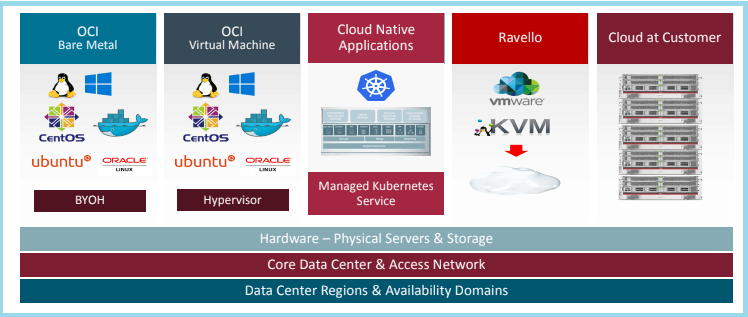
OCI Offering
- OCI has an Exadata Cloud at Customer, Bare Metal offering or Virtual Machine, you can also bring your own hypervisor (BYOH) for Bare Metal
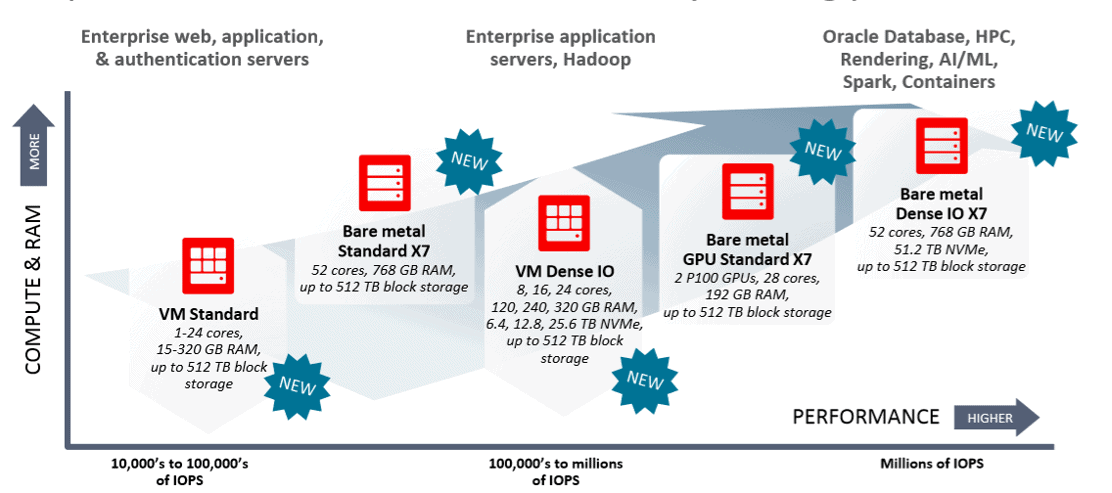
- OCI Compute comes in various shapes like Standard I/O, High I/O, Dense I/O, and GPU (for High-Performance HP & Machine Learning ML)
Region
OCI Servers & Data is hosted in a region where region is a localized geographic area. As of Dec 2022, there are 41 regions for OCI i.e. London, Sao Paulo, Frankfurt, Ashburn, Phoenix, Canada, Tokyo, Seoul, Mumbai, Dubai, Zurich, Sydney, Osaka, Melbourne, Jeddah, Amsterdam, Montreal, Hyderabad, Chuncheon, San Jose, Newport, Santiago, Vinhedo, Jerusalem, Marseille & Singapore, Paris, Marseille, Milan, Queretaro, Madrid, Stockholm, Abu Dhabi, Singapore, Toronto, Chicago.
- You can have OCI resources (Compute, Network, Storage) in multiple Regions
- When you create Tenancy (Account in Cloud) a Home Region is selected and later you can add more Regions
Availability Domain (AD)
Availability Domain (AD) is one or more data centers located within a region. A region is composed of three availability domains. Services/Resources are either Region-Specific (like VCN) or Availability Domain Specific (like Compute),
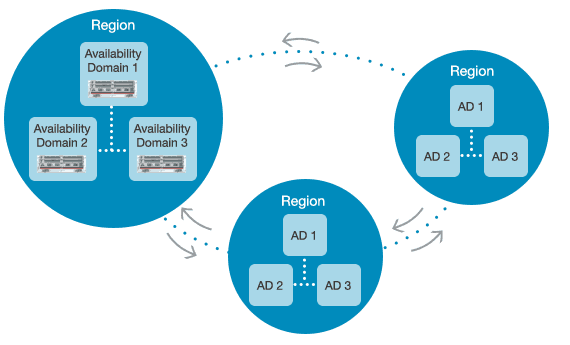
Note: AD provide DR capability for any Service
Fault Domain (FD)
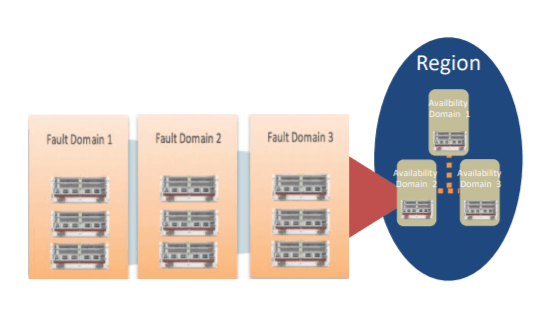
- A fault domain is a logical grouping of hardware and infrastructure within an Availability Domain, Provides a higher degree of protection from
unexpected hardware failures or computer hardware maintenance. - Each Availability Domain has 3 Fault Domains., You can optionally select an FD when creating an
instance. Otherwise, OCI will select an FD in that AD - Supported for BM/VM instances in all regions, OCI will place each instance of a RAC database in
a separate FD.
Tenancy
The tenancy is an Oracle Cloud Account given to you when you register for Oracle Public Cloud (OCI).
Compartment
The compartment is a logical container to organize OCI resources (like Compute, Storage, VCN, etc)
- You can restrict access to Cloud Users based on Compartment so create DEV Compartment and servers, network in Dev Compartment only.
- OCI resources cannot be created in more than one compartment; they are all created in and belong to a single compartment.
- There are compartments in every region and are global to the tenancy.
- After creation, the majority of resources can be moved between compartments, but at any given time, a resource is always in one compartment.
- Users, groups, and specific tag namespaces are examples of global resources that are not part of any compartment.
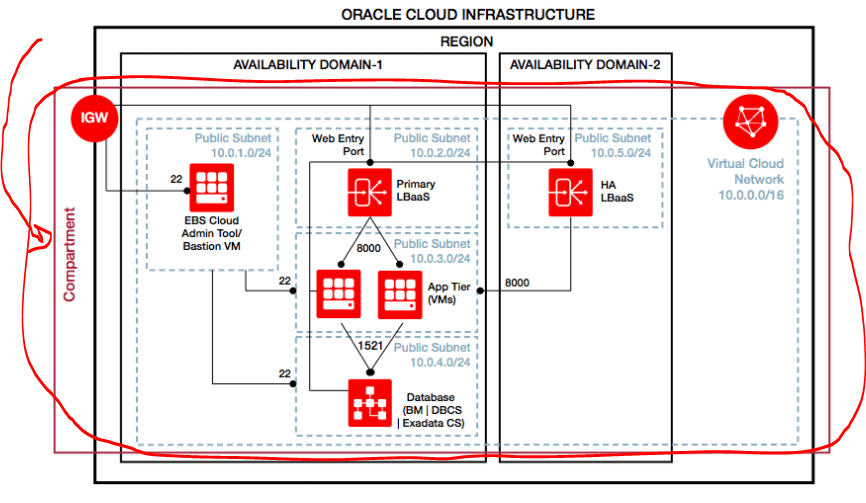
- In the below diagram, there is one compartment, in 1 Region (note: as of Mar18, there are 4 Regions), 2 Availability Domains, 1 VCN, 5 Subnets, 3 Computes for EBS, 1 Database Cloud Service, 2 Load Balancer as a Service (LBaaS) and 1 Internet Gateway (IGW)
- When a Tenancy is created a ROOT Compartment is created in Home Region (Check Tenancy, Region & Home Region above)
- You can create additional Compartments, assign resources in Compartment and apply Access Policies (part of IAM Service below) to the compartment to restrict who can do what on Resources in these compartments
- Compartments are global in scope meaning they can span across Regions
Instance | Compute (CPU & Memory)
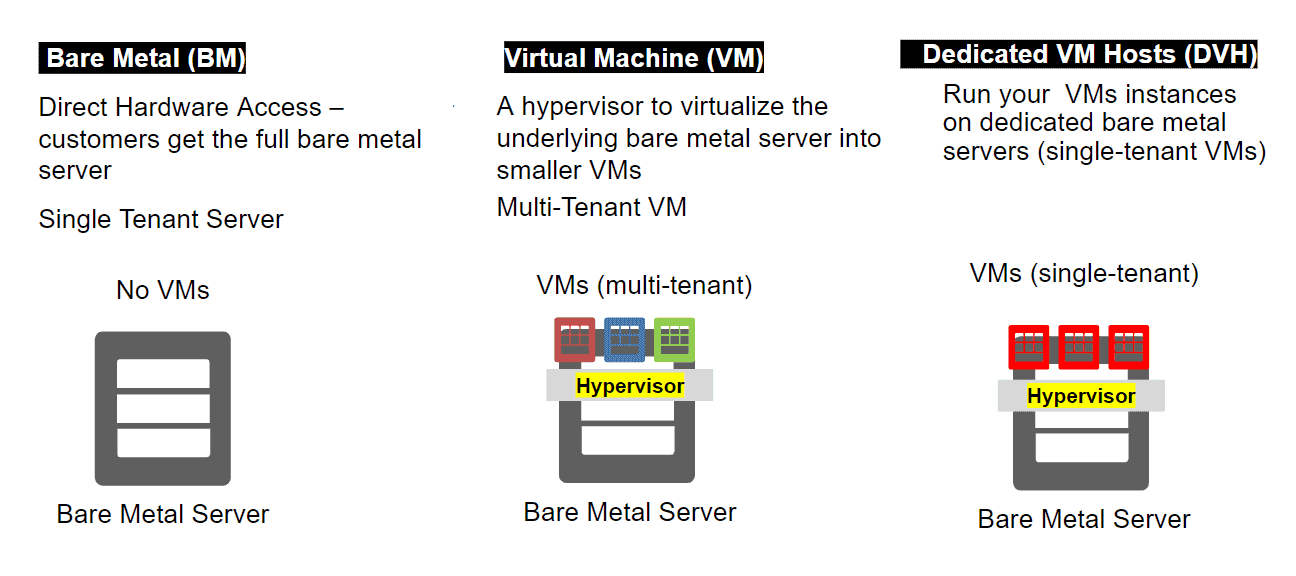
An instance or Compute Instance in OCI can be Bare Metal (You can a Server with no Virtualization and you can bring your own Hypervisor or use as Bare Metal) or Virtual Machine (KVM based hypervisor running on Bare Metal)
OCI compute comes in various shapes like Standard I/O, Dense I/O, Optimized Shapes and for Extreme Performance
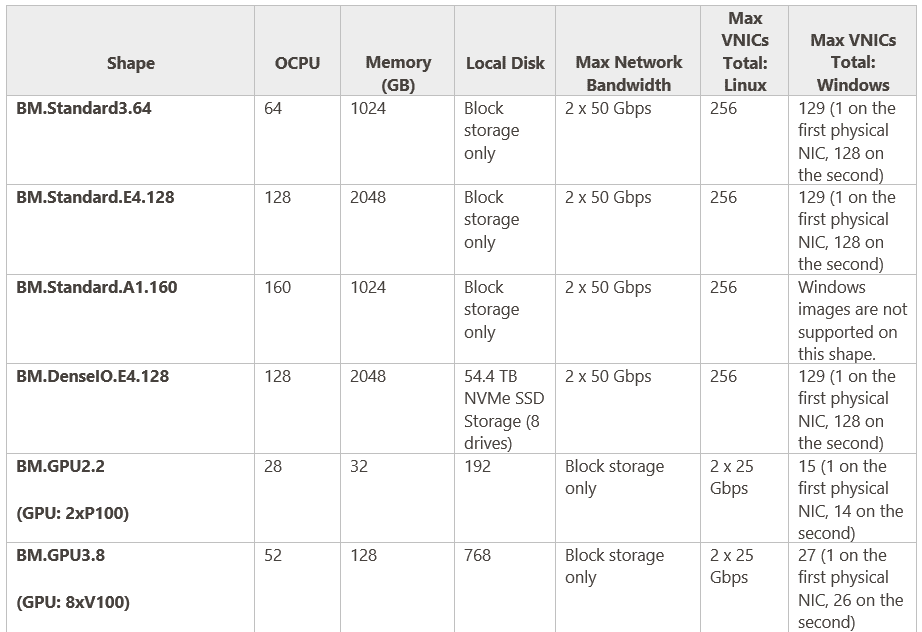
Available Shapes BM (Bare Metal)
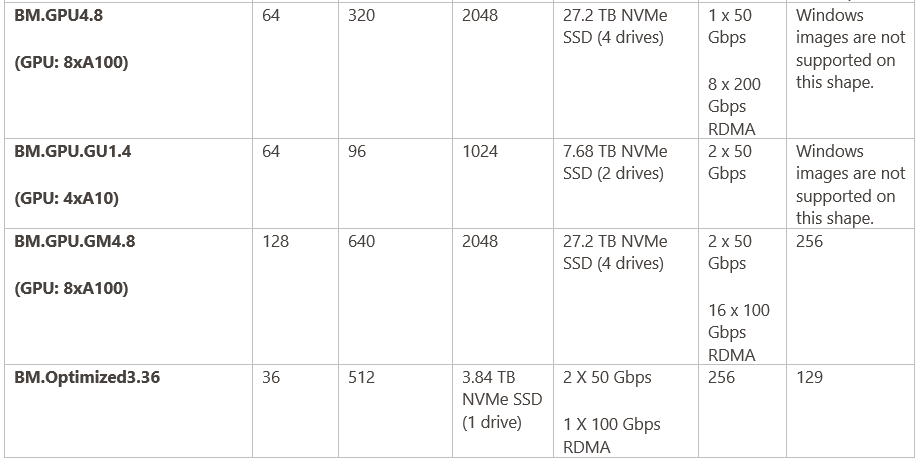
Available Shapes VM (Virtual Machine)
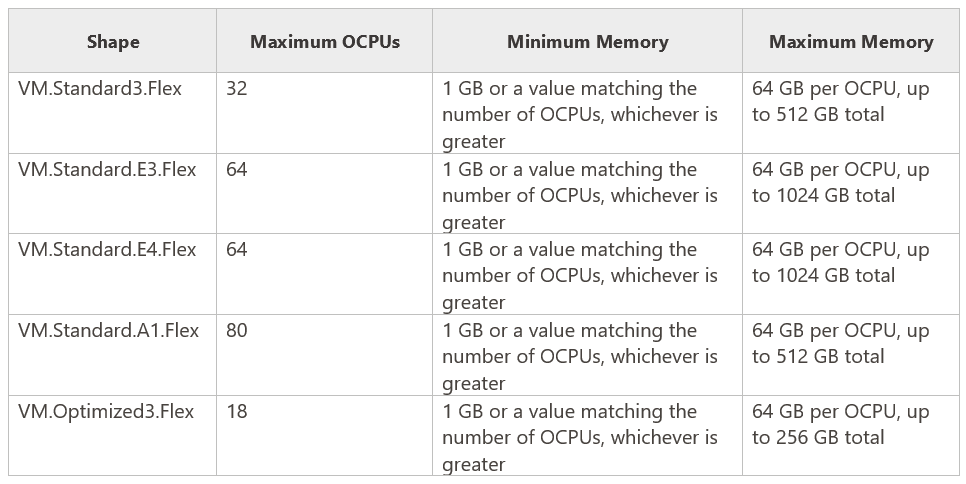
To know more about Compute check our post on Oracle Cloud Infrastructure (OCI Compute CPU & Memory
Virtual Cloud Network (VCN)
A Virtual Cloud Network (VCN) is a virtual version of a traditional network including subnets, route tables, and gateways.
- A cloud network resides within a single Region but can cross multiple Availability Domains (AD).
- There can be multiple VCN’s within Region or in different Regions.
- You can connect one VCN with another VCN (in the same or different Region) using VCN Peering
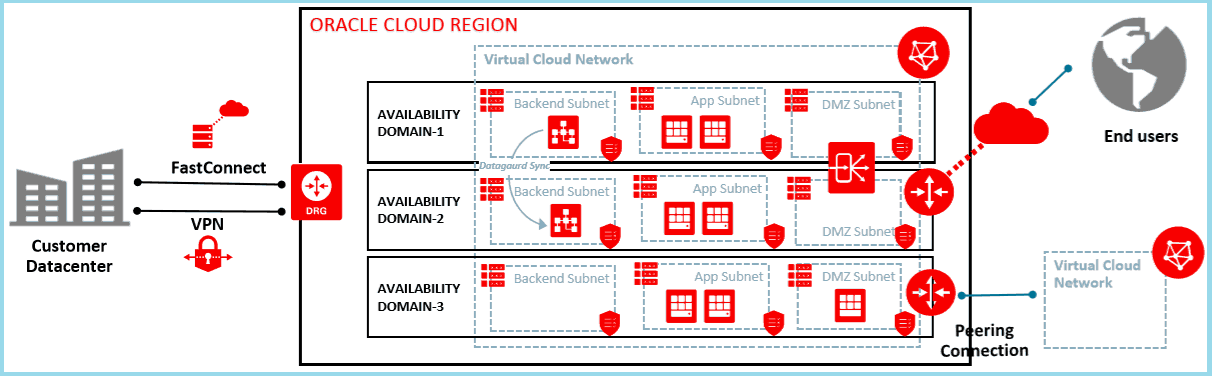
To know more about VCN and its component (Click Here)
IAM Service
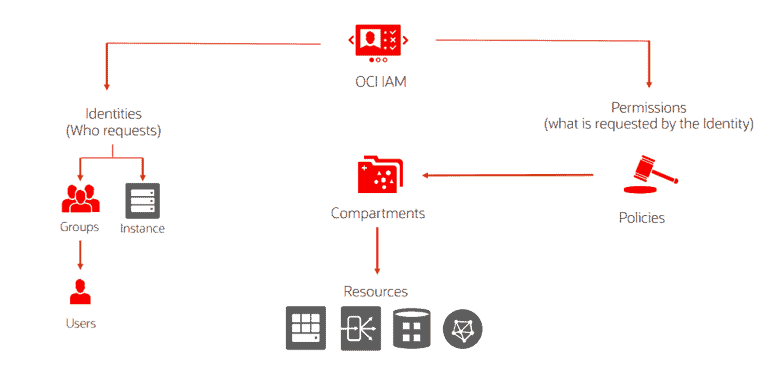
Identity & Access Management (IAM) service lets you control who has access to what cloud resource using Groups/ Users/ Access Policy (More on IAM on its own dedicated post)
- A Resource is a Cloud represents a Service you can create like Compute Instance, VNC, Compartment, Storage etc
- A user in IAM Service represents Cloud User that can log in to Cloud and manages Cloud Resources
- A group is a collection of Users and is used in Policy to control who can do want on a Resource
- A Policy is a set of rules that control who can do what on a Cloud Resource
- IAM like Tenancy is Globally Scoped so spans across Regions and applicable to entire Account
- You can integrate IAM for OCI with Identity Cloud Service (IDCS) or Microsoft Active Directory Federation (ADFS)
Note: More on IDCS please check here.
Storage Services
On Cloud, you need storage to store Data Persistently. Oracle Cloud Infrastructure (OCI) has Storage Services that offers few storage options.
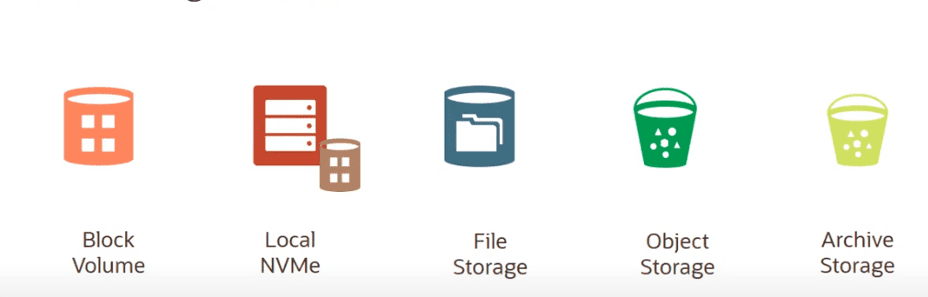
- Block Volumes: Block storage operates at the raw storage device level and manages data as a set of numbered, fixed-size blocks using protocols such as iSCSI. Block Volumes are Scoped to Availability Domain (AD).
- Object Storage Service: Object storage is independent of a server and ideal storage platform to store very large amounts of unstructured data. Object Storage is scoped to a Region in OCI.
- Archive Storage: The Archive Storage service is perfect for storing data that has long retention periods but is rarely accessed. For storing cold data, archive storage is more affordable than object storage.
- File Storage Service: FSS is a managed file storage service that can be accessed concurrently by thousands of compute instances using the NFSv3 protocol and file system interface.
- Local NVMe: Provides SSDs storage available for Instance while running that delivers fast random I/O and high IOPS.
To know more about various storage options in OCI check our post on Oracle Cloud Infrastructure (OCI) | Storage Object, Block | File Storage, Data Transfer Service|
Now it’s your turn to post your doubts in the comment section and let us know where you are facing challenges in Oracle Cloud Infrastructure
This post is from our Course “[1Z0-1072] Oracle Cloud Infrastructure Architect Associate” with 1 Year On-Job Support and 1-year Unlimited FREE Retakes (If you need to know more about this program then reach out to our team at contact@k21academy.com )
Begin Your Cloud Journey
Begin your journey towards becoming an Oracle Cloud Expert and earn a lot more in 2024 by joining our FREE CLASS. You will also know more about the Roles and Responsibilities, Job opportunities for OCI Architects, Admins in the market, and what to study Including Hands-On labs you must perform to get the Higher Paying jobs.
Click on the below image to Register for Our FREE Class on MASTERING ORACLE CLOUD FOR DBAs, APPs DBAs, ARCHITECTS & SYS ADMINS


![Microsoft Agentic AI Business Solutions Architect [AB-100] | K21 Academy](https://test.k21academy.com/wp-content/uploads/2025/11/Microsoft-Agentic-AI-Business-Solutions-Architect-AB-100-Exam-Overview1.png)



