



This blog post covers Hands-On Labs that you must perform in order to learn Oracle Cloud Infrastructure (OCI) & clear the Oracle Cloud Infrastructure (OCI) Architect Professional (1Z0 997) Certification.
This post helps you with your self-paced learning as well as for your team learning. There are 31 Hands-On Labs in this course.
- WAF Concepts & Use Cases
- Instance Principals & Dynamic Groups
- How to enable MFA(Multi-Factor Authentication)
- Federating OCI with Oracle Identity Cloud service (IDCS)
- Configuring OCI in CASB
- KMS in OCI
- Enable and Manage Data Safe
- Moving Resources & Compartments in OCI
- VCN Peering(Local & Remote)
- Configure Virtual Firewall in OCI
- SSL Handling by OCI LB
- DNS Zone Management
- Creating Health Checks
- Edge Services in OCI
- Transit Routing in OCI
- Zero Downtime Migration
- Move to Autonomous Database(ADB)
- Database CLI
- Install & Configure Storage Gateway in OCI
- Creating an Oracle Support Service Request
- Checking Limits, Quotas, & Usage in OCI
- Container Engine for Kubernetes
- Events and Functions in OCI
- Enabling Data Guard on VMDB System
- Data Guard Creation, Switch Over, Failover, Reinstate
- OCI Cost Analysis, Budgets, & Usage Reports
- Instance Configurations & Pools
- Autoscaling Configurations
- Instance Console Connection
- Create Custom Images
- Integrating Microsoft Azure Express Route and OCI FastConnect
Here’s the quick sneak-peak of how to start learning Oracle Cloud Infrastructure (OCI) & to clear OCI [1Z0 997] by doing Hands-on.
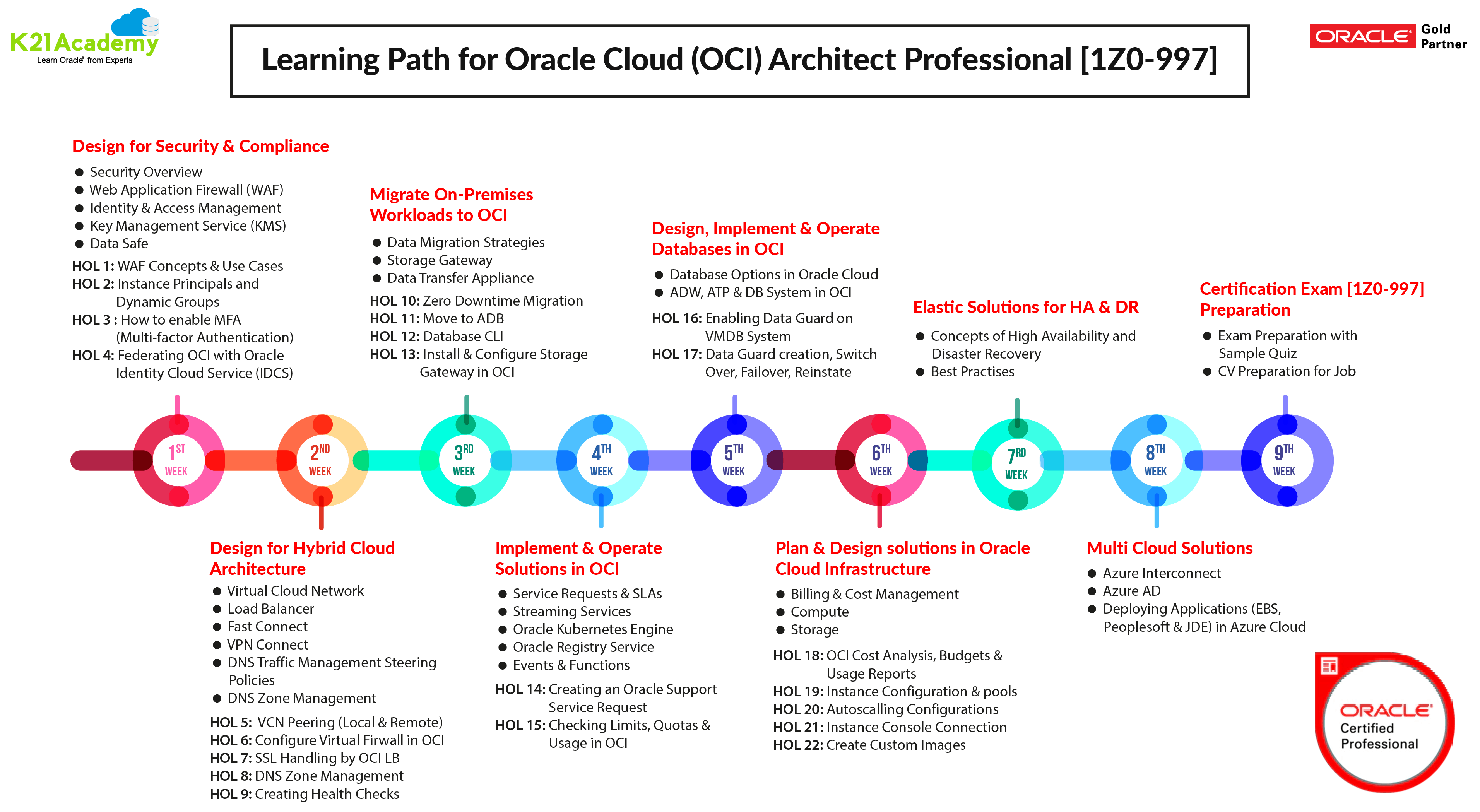 To know in more detail about the Oracle Cloud Infrastructure (OCI) Architect Professional (1Z0 997) Certification click here.
Module 1: Design for Security and Compliance:
1) Web Application Firewall(WAF) Concepts and Use Cases
- Web Application Firewall (WAF) refers to a device, server-side plugin, or filter that applies a set of rules to HTTP/S traffic
- By intercepting HTTP/S traffic and passing them through a set of filters and rules, WAF is able to uncover and protect against attack streams hitting a web application.
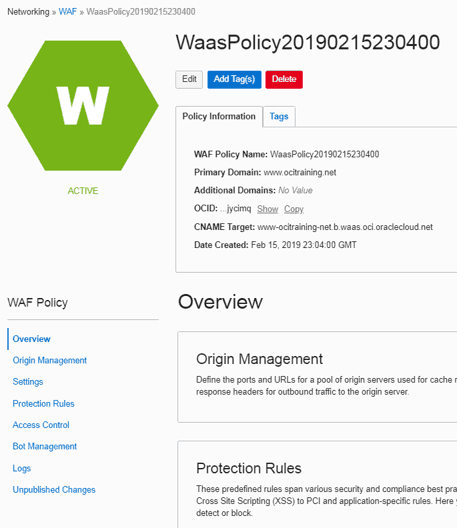
To know more about WAF in OCI Click here
2) Instance Principals and Dynamic Groups
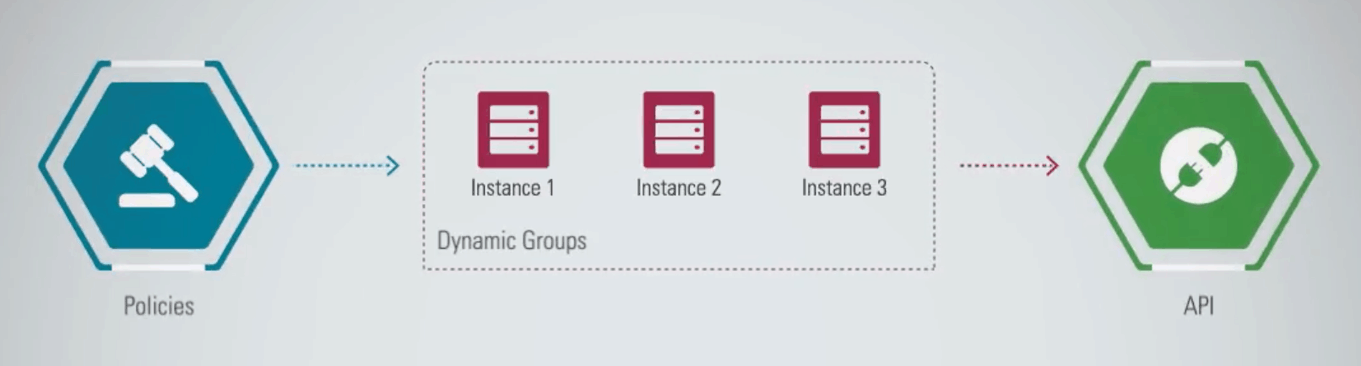
- Instance Principals lets instances (and applications) to make API calls against other OCI services removing the need to configure user credentials or a configuration file.
- Dynamic groups allow you to group Oracle Cloud Infrastructure compute instances as “principal” actors (similar to user groups).
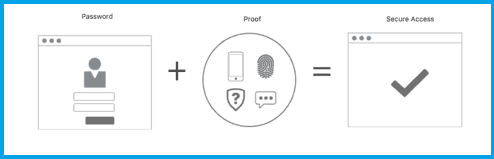
3) How to enable MFA (Multi-factor Authentication)
- Multi-factor authentication (MFA) is a method of authentication that requires the use of more than one factor to verify a user’s identity.
- Examples of authentication factors are a password (something you know) and a device (something you have).
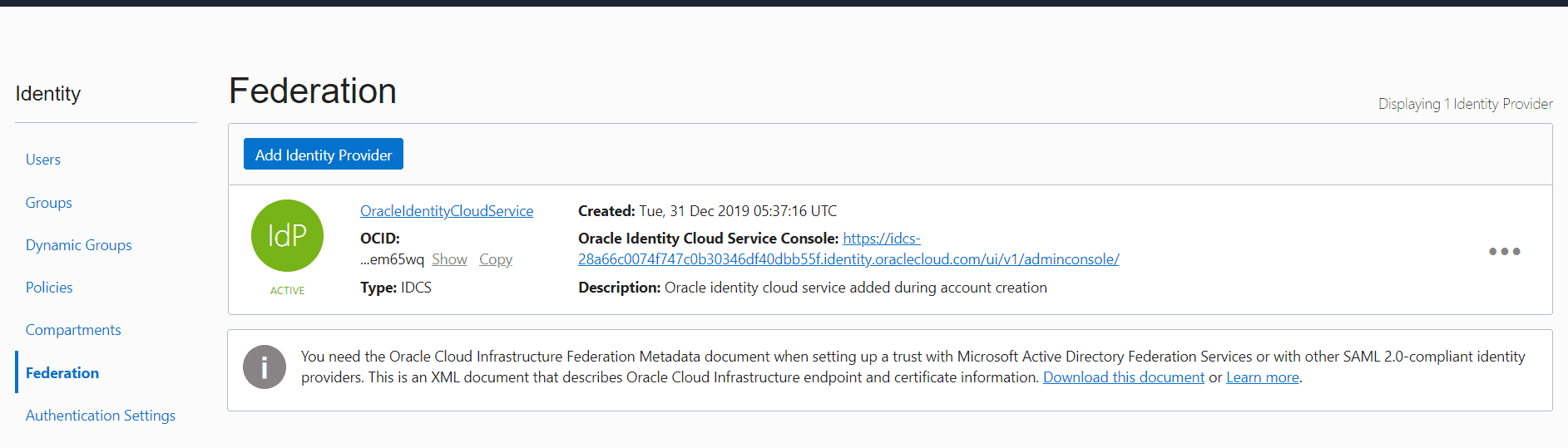
4) Federating OCI with Oracle Identity Cloud Service (IDCS)
Oracle Identity Cloud Service is the identity provider for multiple Oracle services. Federating Oracle Cloud Infrastructure with Oracle Identity Cloud Service allows you to have a seamless connection between services, without having to create a separate username and password for each one.
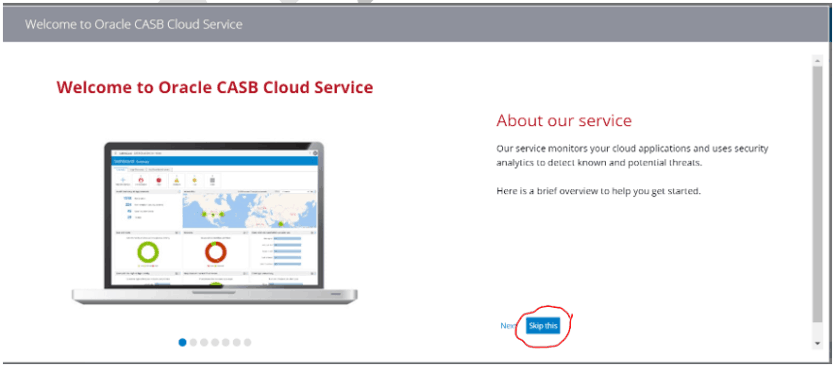
5) Configuring OCI in CASB
CASBs are software that helps enterprises enforce security, compliance, and governance policies for their usage of applications in the Cloud.
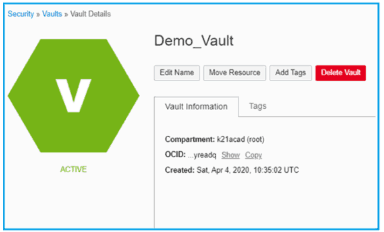
6) KMS in OCI
To keep data secure in OCI storage services oracle has introduced a Service Key Management Service in OCI that encrypts the data stored in storage services.
A New Feature has been introduced by Oracle, Secret Management in OCI that enables users to store confidential data like passwords, API tokens, etc.
To know more about KMS in OCI Click here
7) Enable and Manage Data Safe
It is a way to protect sensitive and regulated data in Oracle databases.
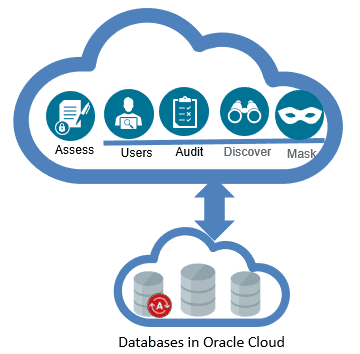
To know more about Data safe in OCI click here.
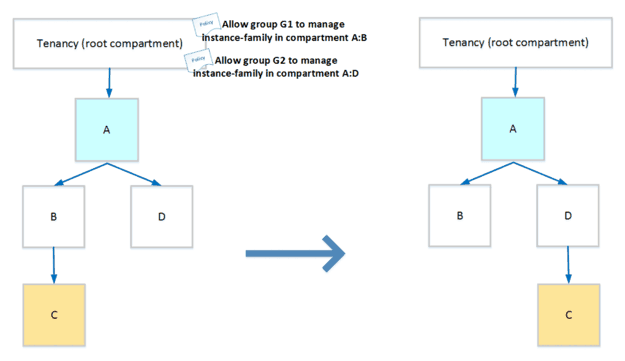
8) Moving Resources & Compartments in OCI
In this, we cover how we can move various resources and compartments in OCI and what will be the change in the Policy implications while doing the same.
Module 2: Design For Hybrid Cloud Architecture:
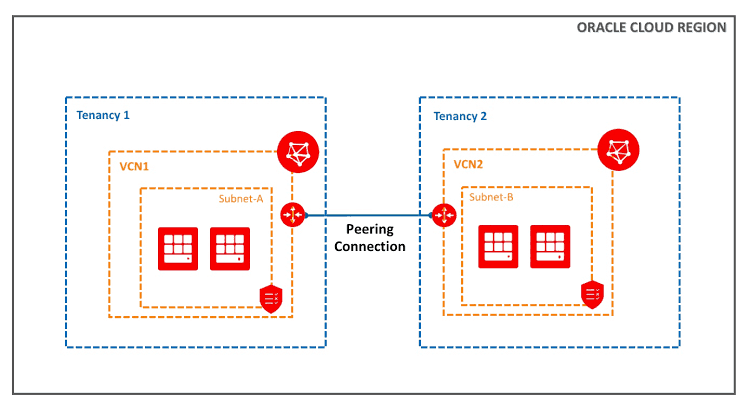
1) VCN Peering (Local & Remote)
- Enables connectivity between the resources in different VCNs
- Does not require public IPs or NAT to enable connectivity
- Traffic never leaves the Oracle Network
- Over other options such as connecting over the internet, VCN Peering offers
- Faster connectivity
- Higher security
- Two types of VCN peering (Local & Remote)
2) Configure Virtual Firewall In OCI
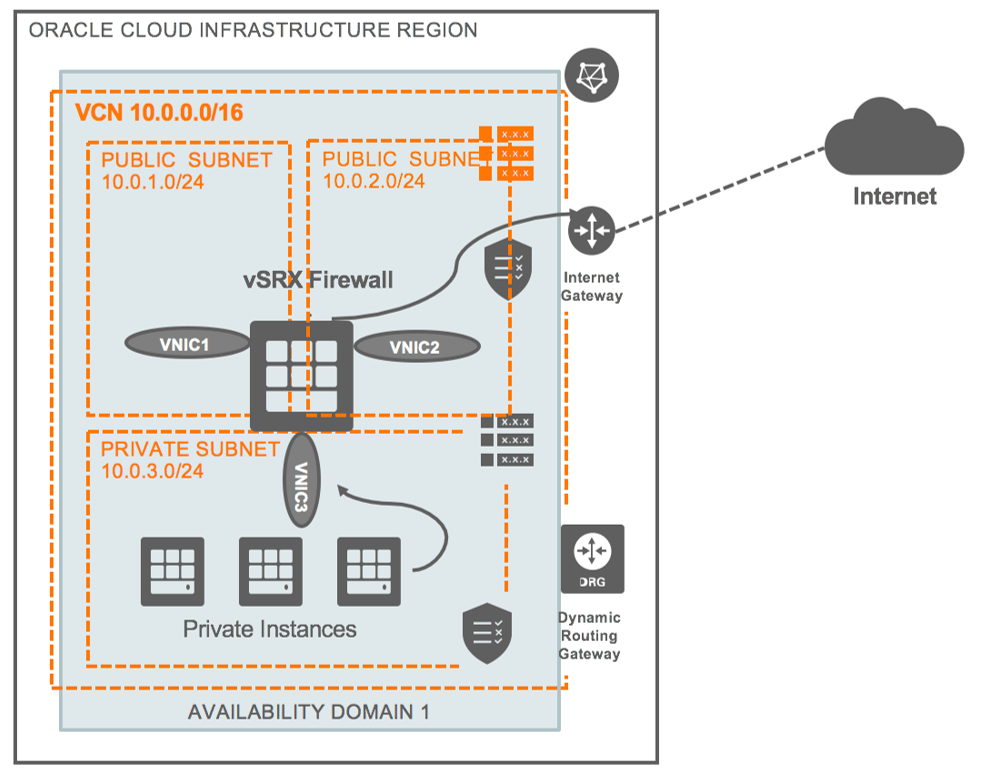
- Although Oracle Cloud Infrastructure includes firewall capabilities, some customers prefer to run their own custom firewalls.
- The benefits of configuring a virtual firewall in OCI are antivirus, web filtering, and antispam.
- This Hands-On Guide covers the process of configuring the different virtual firewalls in OCI.
3) SSL Handling by OCI Load Balancer(LB)
- SSL (Secure Sockets Layer) is an industry-standard protocol for securing network connections. SSL provides authentication, encryption, and data integrity using public key infrastructure (PKI).
- To use SSL with your load balancer, you must add one or more certificate bundles to your system.
- SSL Termination – SSL is terminated at LB. LB can accept encrypted traffic from a client; no encryption of traffic between LB and backend servers
- SSL Tunneling – SSL implemented between LB and backend servers
- End to end SSL – LB can accept SSL encrypted traffic from clients and encrypts traffic to the backend servers
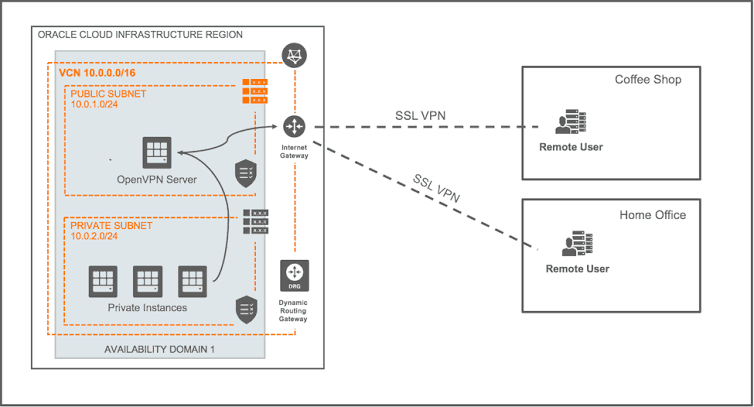
To know more about Load Balancer (LB) Click here
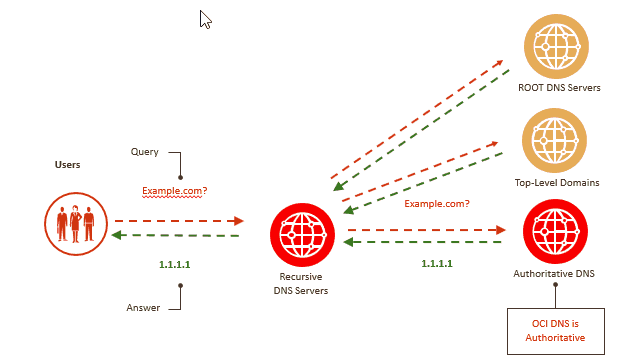
4) DNS Zone Management
- Highly scalable, global anycast Domain Name System (DNS) network that assures high site availability and low latency.
- Offers a complete set of functions for zone management:
- Create and manage zones and records
- Import/upload zone files
- Filter and sort views of zones and records
- Secondary DNS support
- APIs and SDKs
5) Creating Health Checks
- The Oracle Cloud Infrastructure Health Checks service provides users with high-frequency external monitoring to determine the availability and performance of any publicly facing service, including hosted websites, API endpoints, or externally facing load balancers.
- Health Checks Service Components
- Monitors: Monitors allow you to continuously monitor the health of public-facing endpoints.
- On-demand probes: It allows you to execute a one-time probe to assess the health of a public-facing endpoint.
- Vantage points: These are geographic locations from which monitors and probes can be executed to your specified target.
- Protocols: The Health Checks service allows you to configure both HTTP and ping type monitors. Each type has respective protocols.
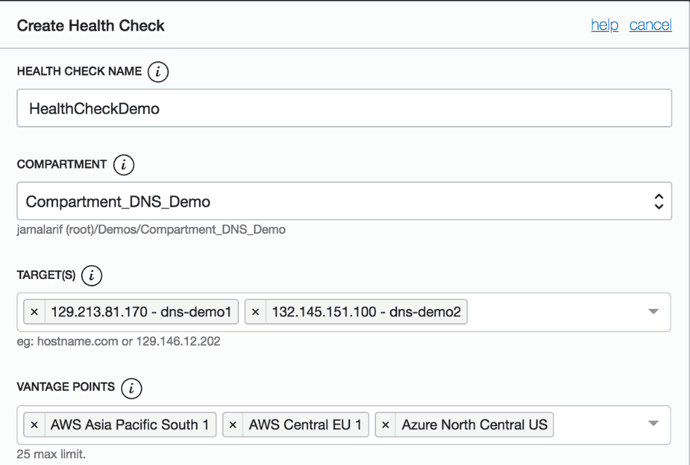
To know more about Health Checks in OCI Click here
6) Edge Services in OCI
OCI DNS has advanced traffic management capabilities to steer DNS traffic across multiple public OCI instances and other private and 3rd party assets/endpoints. Traffic management supports comprehensive policies to provide intelligent responses to ensure high performance, scalability, and availability.
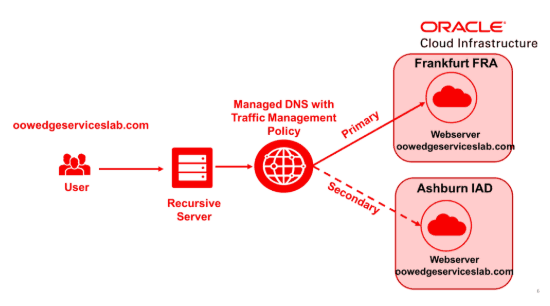
To know more about traffic management in OCI Click here
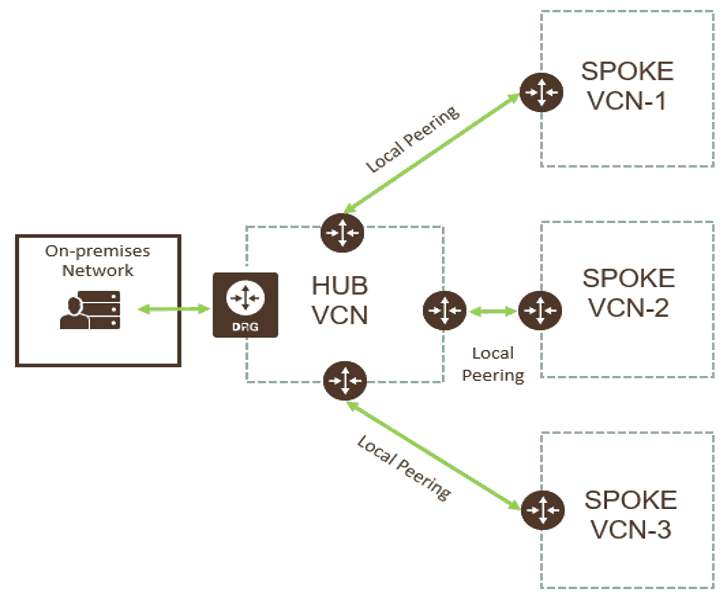
7) Transit Routing in OCI
It is a process of accessing multiple VCNs using (Hub & Spoke method). Transit routing refers to a network setup in which your on-premises network uses a connected virtual cloud network (VCN) to reach Oracle resources or services beyond that VCN.
To know more about Transit Routing in OCI Click here
Module 3: Migrate On-Premises Workloads To OCI:
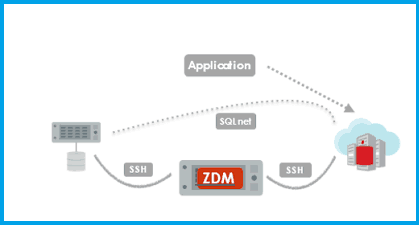
1) Zero Downtime Migration
- Zero Downtime Migration (ZDM) is a software solution that allows you to directly and seamlessly migrate your On-Premises Oracle Databases to the Oracle Cloud whether in OCI or ExaCS.
- It ensures that there is minimal to no production database impact during the migration.
To know more about Zero Downtime Migration click here
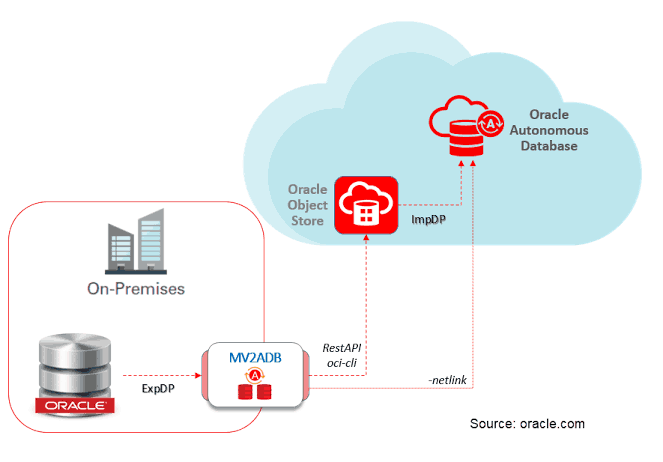
2) Move to Autonomous Database(ADB)
- Deliver automated patching, upgrades, and tuning—including performing all routine database maintenance tasks while the system is running—without human intervention.
- The autonomous database cloud is self-driving, self-securing, and self-repairing.
- Autonomous Database is fully elastic means at any time, you may scale, increase or decrease either the OCPUs or the storage capacity.
3) Database CLI
- The database CLI (dbcli) is a command-line interface available on bare metal and virtual machine DB systems.
- After you connect to the DB system, you can use the database CLI to perform tasks such as creating Oracle database homes and databases.

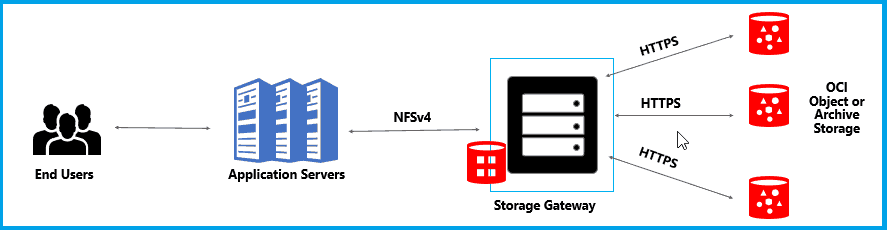
4) Install & Configure Storage Gateway In OCI
- Storage Gateway is a cloud storage gateway that lets you connect your on-premises applications with Oracle Cloud Infrastructure.
- Applications can interact with Oracle Cloud Infrastructure Object storage through standard NFSv4 protocols.
- This Hands-On Guide covers steps to install and configure storage gateway in OCI
Module 4: Implement And Operate Solutions In OCI:
1) Creating An Oracle Support Service Request
Some of the tasks you might typically perform yourself in an on-premise data center must be performed by Oracle Support. For example, you must file a Service Request (SR) so Oracle Support can perform the following actions for you:
- Set up a secure VPN connection from your data center to the Model 300 service.
- Set up NAT routing for public IP addresses.
- Recover or reinstall instances.
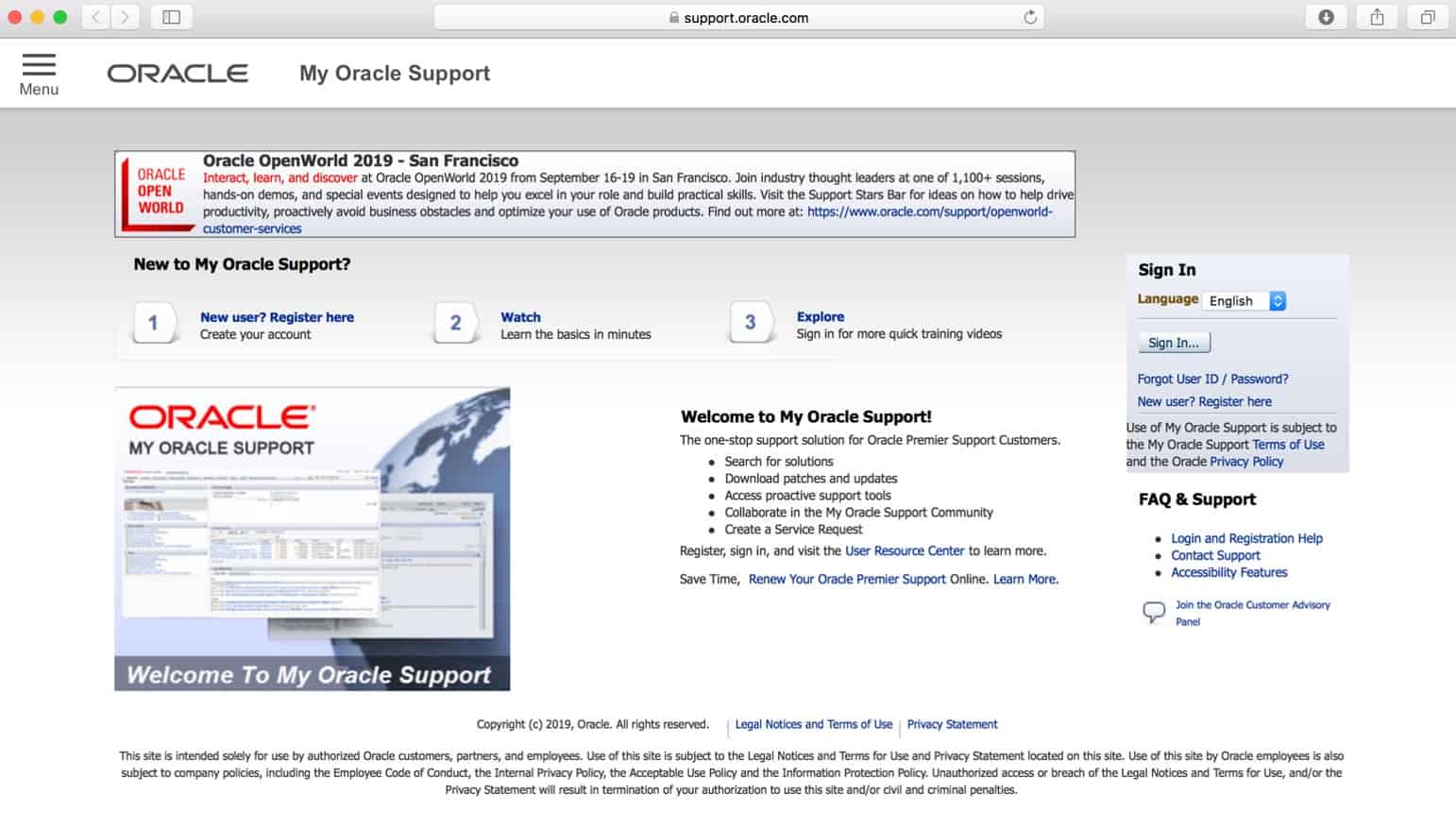
Note: Click here to get this step by step activity guide absolutely FREE.
2) Checking Limits, Quotas, And Usage In OCI
- Service Limit is the quota or allowance set on a resource. For example, your tenancy is allowed a maximum number of compute instances per availability domain.
- A Usage Report is a comma-separated value (CSV) file that can be used to get a detailed breakdown of resources in Oracle Cloud Infrastructure for audit or invoice reconciliation.
- Compartment Quotas are similar to service limits; the biggest difference is that service limits are set by Oracle, and compartment quotas are set by administrators
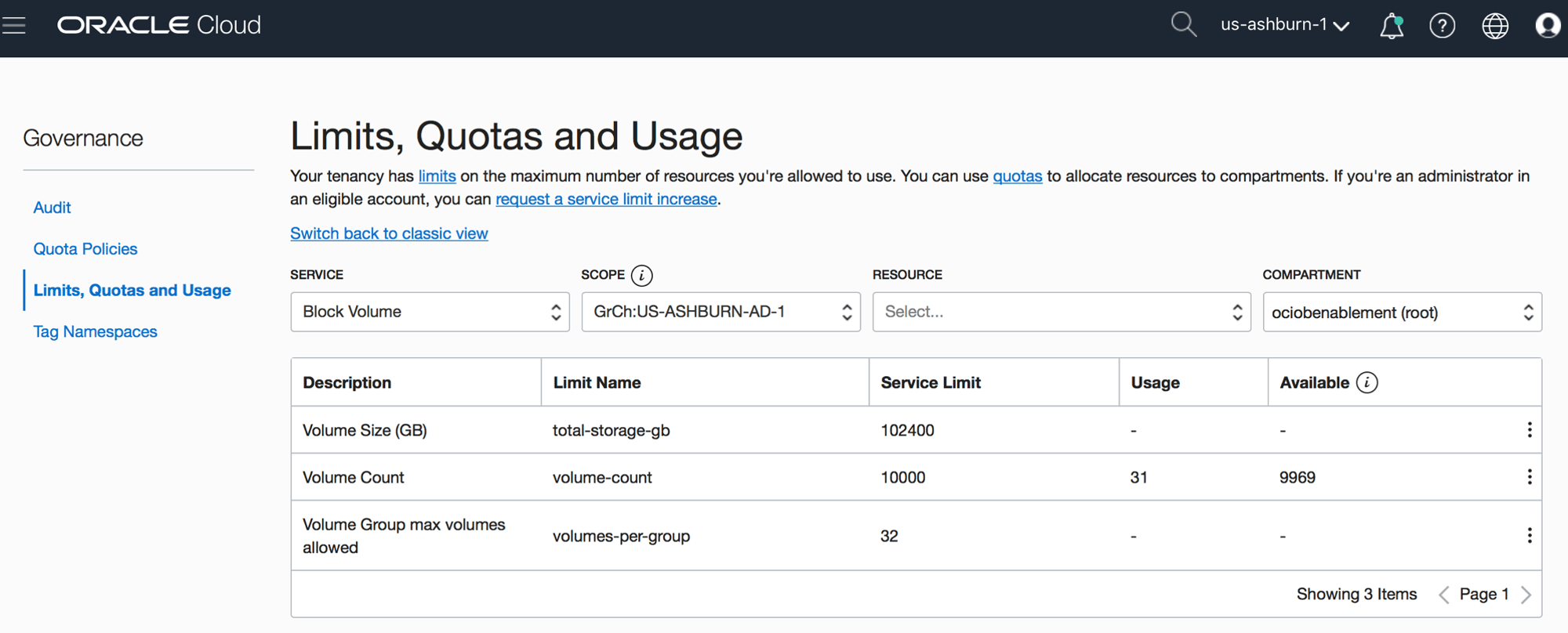
Click to know more about Service Limits, Usage Report.
3) Container Engine For Kubernetes
Oracle Cloud Infrastructure Container Engine for Kubernetes is a fully-managed, scalable, and highly available service that you can use to deploy your containerized applications to the cloud.
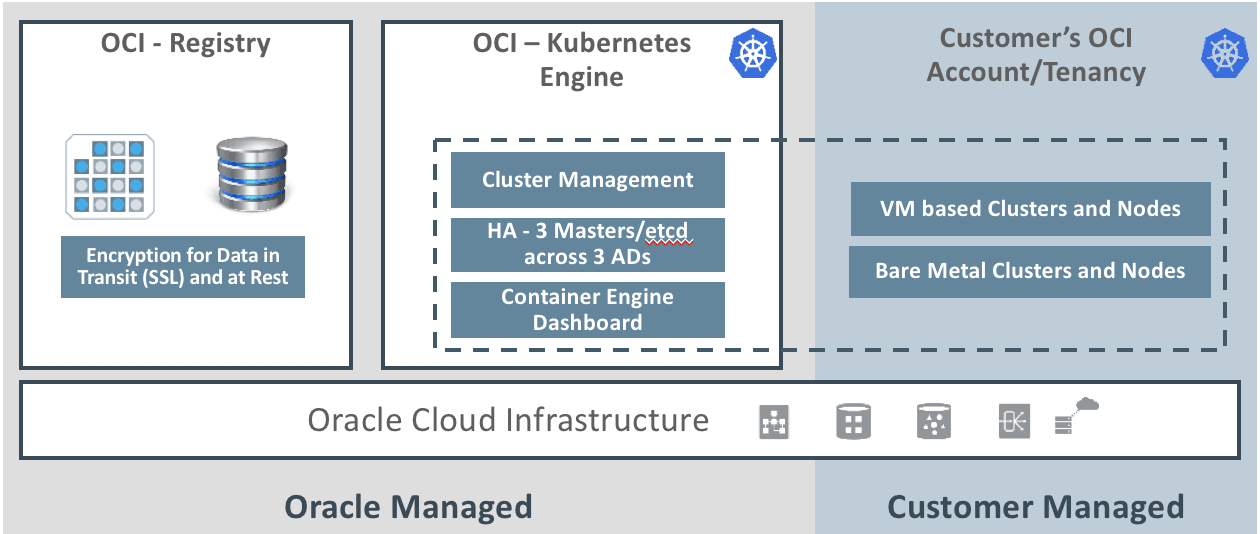
To know more about Container Engine for Kubernetes click here.
4) Events and Functions in OCI
Oracle has introduced Functions and Events in OCI to track the change in the state of our OCI services and to take immediate action for the same.
- Functions in oracle are used to perform multiple and sequential actions at a particular moment.
- Event triggers a message that specifies a change in the resources and decides immediately what action needs to be taken
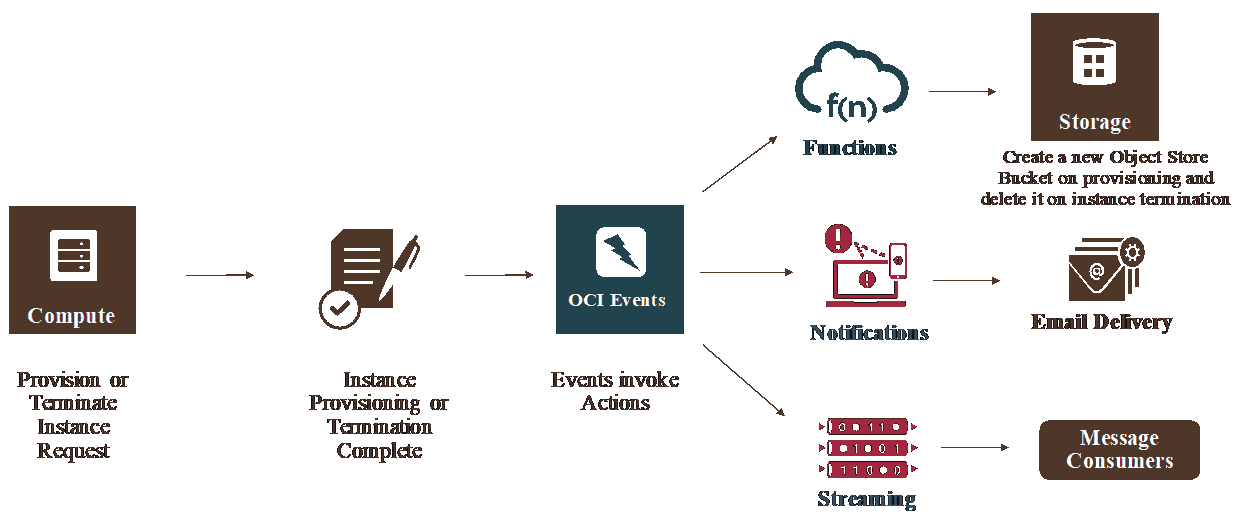
To know more about Data transfer Services in OCI Click here
Module 5: Design, Implement, And Operate Databases In OCI:
1) Enabling Data Guard On VMDB System
Data Guard and Active Data Guard provide disaster recovery (DR) for databases with recovery time objectives (RTO) that cannot be met by restoring from backup.
This Hands-On guide includes the steps to enable Data guard on a VMDB system.
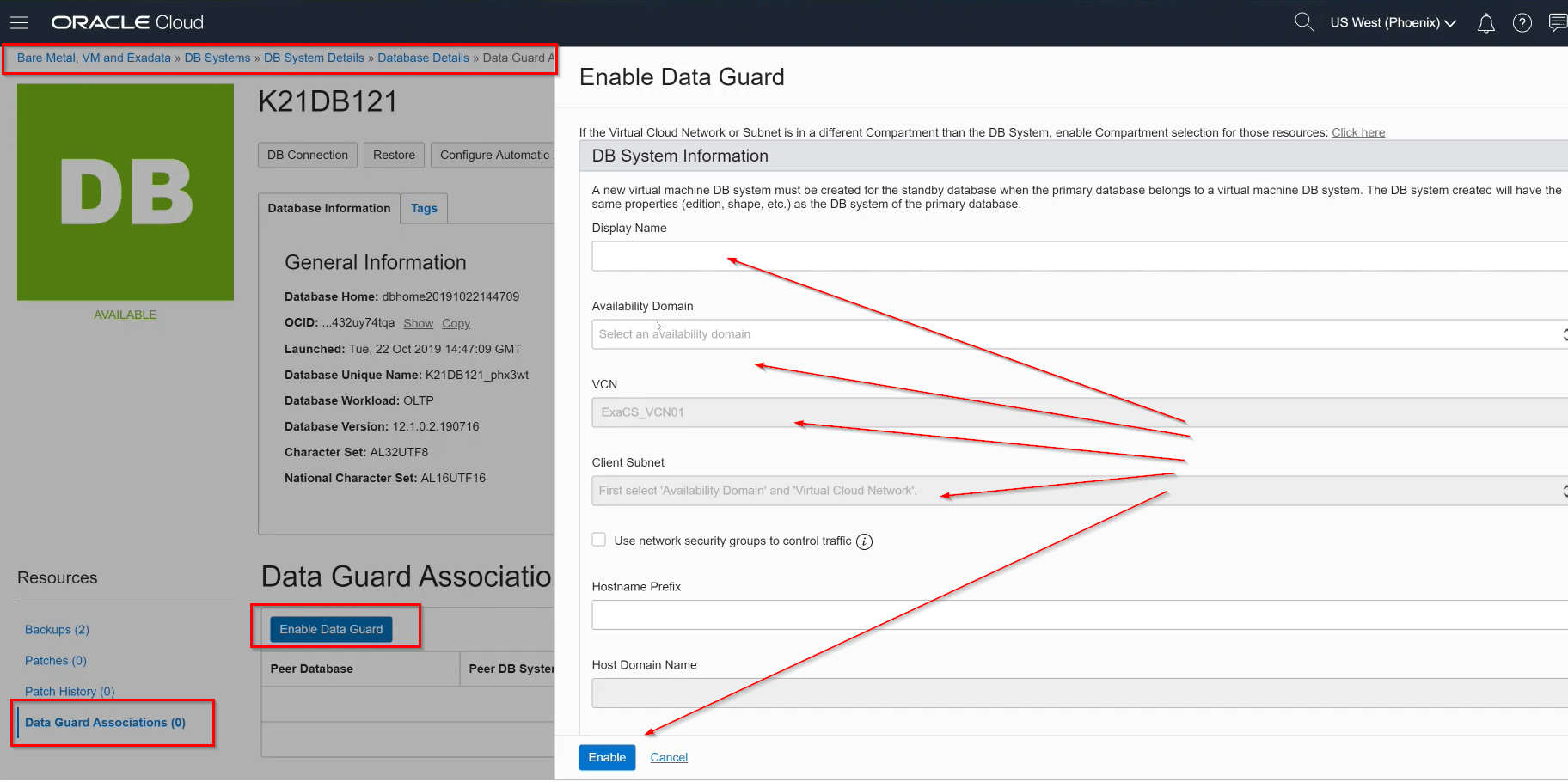
To know more about Data Guard in OCI Click here
2) Data Guard Creation, Switch Over, Failover, Reinstate
- Data Guard creation: It consists of the steps to create data guard for VM/BM
- Switch Over:
- A switchover reverses the primary and standby database roles.
- Each database continues to participate in the Data Guard Association in its new role.
- A switchover ensures no data loss.
- Failover:
- A failover transitions the standby database into the primary role after the existing primary database fails or becomes unreachable.
- A failover might result in some data loss.
- Reinstate:
- You can use the reinstate command to return a failed database into service after correcting the cause of failure.

Module 6: Plan And Design Solutions In Oracle Cloud Infrastructure:
1) OCI Cost Analysis, Budgets & Usage Reports
Billing and Cost Management is the service that you use to pay your Oracle services bill, monitor your usage, and budget your costs.
Note: All Billing and cost-related options are available under ‘Account Management’.
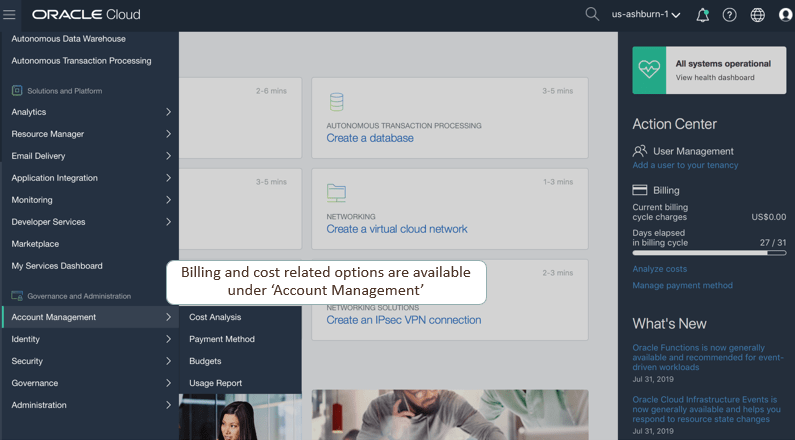
- OCI Cost analysis Visualization tools help to understand spending patterns at a glance.
- OCI Budgets can be used to set soft limits on your Oracle Cloud Infrastructure spending. You can set alerts on your budget to let you know when we might exceed our budget.
- OCI Usage Reports is a breakdown of the consumptions of your Oracle Cloud Infrastructure resources such as the Compute, Networking, Storage, etc.
2) Instance Configuration & Pools
- Instance Configuration assists you to save the configuration (such as Network Configuration, OS, VM Shapes, Attached Block Volume) of your compute instance which is already running.
- Instance Pools assists you to create single or multiple Compute instances (Machines) in one go of the same configuration using Instance Configuration.
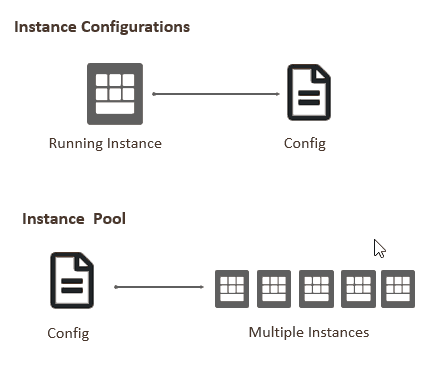
To know more about Instance Configuration & pools Click here
3) Autoscaling Configurations
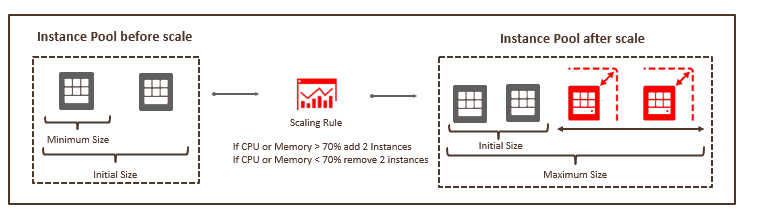
Autoscaling enables you to automatically adjust the number of Compute instances in an instance pool based on performance metrics such as CPU or Memory utilization.
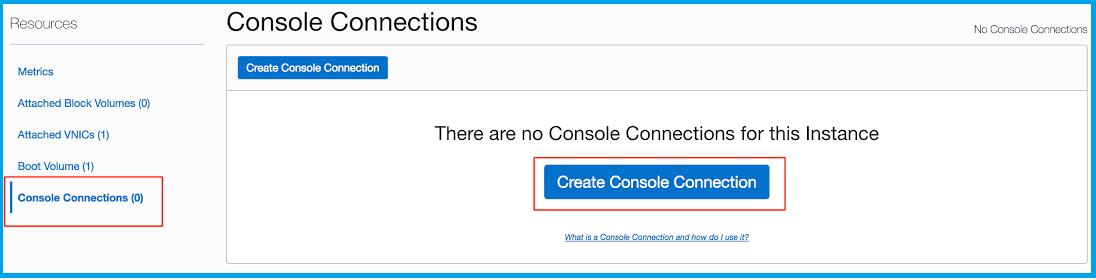
4) Instance Console Connection
Instance Console Connection provides console connections that enable you to remotely troubleshoot malfunctioning instances, such as:
- An imported or customized image that does not complete a successful boot.
- A previously working instance that stops responding.
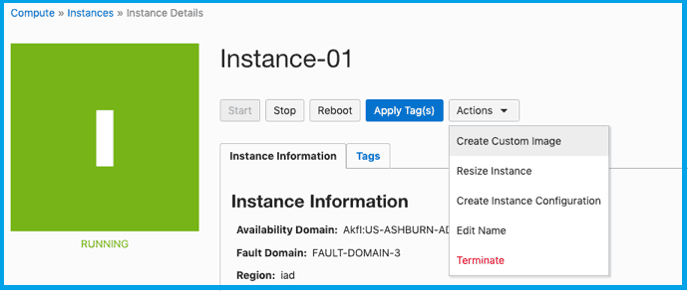
5) Create Custom Images
- Create a custom image of an instance’s boot disk and use it to launch other instances
- Instances you launch from your custom image include customizations, configuration, and software installed when you created the image
Module 8: Multi-Cloud Solutions
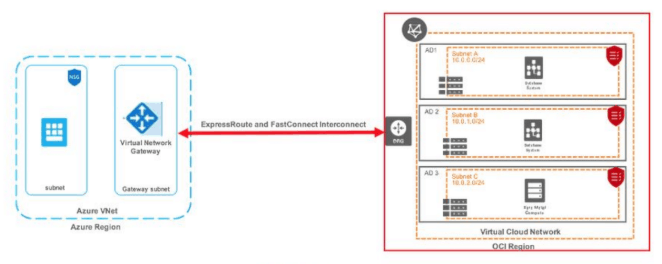
1) Integrating Microsoft Azure Express Route and OCI FastConnect
A cloud interoperability partnership between Microsoft and Oracle has recently been announced. This interconnect will allow customers to run their workloads across the two environments, seamlessly connecting Azure services like Analytics and AI to Oracle Autonomous Database services.
Registration
Register for the exam at Oracle’s official website i.e. Oracle Cloud Infrastructure Architect Professional Exam.
Related/References:
- Oracle Cloud Infrastructure 2019 Architect Professional | 1Z0-997
- Oracle Cloud Infrastructure Architect Certification 1Z0-1072
- WAF in OCI
- SSL on Load Balancer
- KMS in OCI
Next Task For You
Click on the below image to Register for the FREE Masterclass on [1Z0-997] OCI ARCHITECT PROFESSIONAL NOW!


![Microsoft Agentic AI Business Solutions Architect [AB-100] | K21 Academy](https://test.k21academy.com/wp-content/uploads/2025/11/Microsoft-Agentic-AI-Business-Solutions-Architect-AB-100-Exam-Overview1.png)


