






This post covers Apps Tier or middle tier cloning issue ‘ERROR: Script timed out’ in Oracle E-Business Suite R12 and how to troubleshoot it with complete solution.
But before that let’s first understand what is cloning and high level steps of Cloning in EBS R12
Cloning is the process of creating a copy of an existing Oracle E-Business Suite system using Rapid Clone. For more details about cloning check here
High Level Steps of Cloning in EBS (R12)
The cloning process consists of the following three phases, each of which is made up of several logical sections and their steps.
1. Prepare the Source System for database tier and application tier
1.1 Database Tier
a) Log on to the Source System as the oracle user.
b) Source the Database tier environment file.
c) Execute the following commands:
cd <RDBMS ORACLE_HOME>/appsutil/scripts/<CONTEXT_NAME>
perl adpreclone.pl dbTier
1.2 Application Tier
a) Log on to the primary node of the Source System as the applmgr user.
b) Source the environment file of the Run Edition File system.
Note: You can use the following command to confirm that the environment variable FILE_EDITION points to the Run Edition File System:
echo $FILE_EDITION
It should return the value:
run
c) Execute the following commands:
cd <INST_TOP>/admin/scripts
perl adpreclone.pl appsTier
2. Copy both database tier and application tier nodes from the Source System to Target System
2.1 Database Tier
a) Create Target Directory structure like “/u01/oracle/PRD122” from root user and then change ownership to target DB user, in our case its oracle:dba
mkdir –p /u01/oracle/PRD122
chown –R oracle:dba /u01
b) Copy DB Tier files from source to target (from root user)
cd /u01/oracle/PRD122
cp –RH data /u01/oracle/PRD122
cp –RH 12.1.0 /u01/oracle/PRD122
c) Change ownership of data and 12.1.0 to target DB User. In our case its oracle:dba
cd /u01/oracle/PRD122
chown –R oracle:dba data
chown –R oracle:dba 12.1.0
2.2 Application Tier
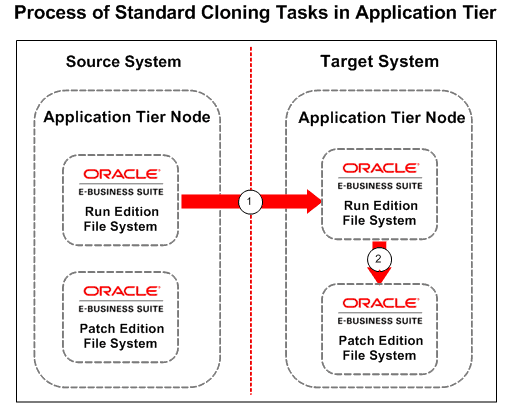
a) Copy Run and Patch Edition File System and Apps Tier files from source to target like $APPL_TOP, $COMMON_TOP, 10.1.2 ORACLE_HOME (from root user)
cd /u01/oracle/PRD122
cp -RH fs1 /u01/oracle/PRD122/fs1
cp -RH fs2 /u01/oracle/PRD122/fs2
b) Change permission of fs1 to applmgr:dba on target (/u01/oracle/PRD122).
cd /u01/oracle/PRD122
chown -R applmgr:dba fs1
chown -R applmgr:dba fs2
3. Configure the Target System for both database tier and application tier
3.1 Database Tier
a) Log on to the Target System as the oracle user and enter the following commands:
cd <RDBMS ORACLE_HOME>/appsutil/clone/bin
perl adcfgclone.pl dbTier
The log file is created in <RDBMS_ORACLE_HOME>/appsutil/log/<CONTEXT_NAME> directory.
3.2 Application Tier
a) Log on to the Run Edition File System in the Target System as the applmgr user and enter the following commands:
cd <COMMON_TOP>/clone/bin
perl adcfgclone.pl appsTier dualfs
Note: Different logs are created for Run Edition and Patch Edition Cloning. The log files are created in the following directories in the Run Edition File System:
<INST_TOP>/admin/log/clone/run
<INST_TOP>/admin/log/clone/patch
Below diagram explain the flow of Cloning in Application Tier of Oracle E-Business Suite R12
 Issue:
Trainee was hitting issue while Configuring the Target System on application tier as
cd <COMMON_TOP>/clone/bin
perl adcfgclone.pl appsTier dualfs
Error in logs: $INST_TOP/apps/$CONTEXT_NAME/admin/log/StageAppsTier_MMDDHHMM.log
Note: Kindly refer this post to know more about log file location in R12.2 Oracle Apps R12.2 Log Files Location every Apps DBA must know
START: Creating new WLS domain.
Running /u01/oracle/PRD122/fs2/FMW_Home/oracle_common/bin/pasteConfig.sh -javaHome /u01/oracle/PRD122/fs2/EBSapps/comn/util/jdk64 -al /u01/oracle/PRD122/fs2/EBSapps/comn/clone/FMW/WLS/EBSdomain.jar -tdl /u01/oracle/PRD122/fs2/FMW_Home/user_projects/domains/EBS_domain_PRD122 -tmw /u01/oracle/PRD122/fs2/FMW_Home -mpl /u01/oracle/PRD122/fs2/EBSapps/comn/clone/FMW/WLS/plan/moveplan.xml -ldl /u01/oracle/PRD122/fs2/inst/apps/PRD122_erpprd122/admin/log/clone/run/wlsT2PApply -silent true -debug true -domainAdminPassword /u01/oracle/PRD122/fs2/EBSapps/comn/clone/FMW/tempinfo.txt
Script Executed in 7200014 milliseconds, returning status -1
ERROR: Script timed out.
Solution:
Timeout Error Encountered for pasteBinary.sh While Running “adop phase=fs_clone” (Doc ID 1599424.1)
Though it is fs_clone, the workaround is good for the current issue as well.
Related/Further Readings
- Recommended Browsers for Oracle E-Business Suite Release 12 [Doc ID 389422.1]
- Oracle E-Business Suite Release 12.2 Information Center (Doc ID 1581299.1)
- Oracle E-Business Suite Release 12.2.9 Readme (Doc ID 2495027.1)
- Oracle E-Business Suite 12.2.9 Now Available
- [Troubleshooting] Forms Issue: FRM-92050 failed to connect to server:forms/servlet
- Oracle E-Business Suite (EBS) 12.2.9 Now Available & Its Upgrade Steps
- Steps to download Oracle E-Business Suite R12 Software
- Oracle AppsDBA (R12.2) Training: Step by Step Activity Guides/Hands-On Lab Exercise
- Oracle AppsDBA (R12.2): Install | Patch | Clone | Maintain
Next Task For You
We cover Oracle E-Business R12.2 Architecture & concepts in our Oracle Apps DBA For Beginners Training along with the Installation, Patching, Cloning, and Troubleshooting and also, Database upgrade to 19c and much more including the hands-on labs you must perform to upgrade your skills and get a good job with a high package.
Begin your journey towards becoming an Apps DBA by joining our FREE Masterclass on How To Learn Oracle Apps DBA (R12) & It’s New Features.


![Microsoft Agentic AI Business Solutions Architect [AB-100] | K21 Academy](https://test.k21academy.com/wp-content/uploads/2025/11/Microsoft-Agentic-AI-Business-Solutions-Architect-AB-100-Exam-Overview1.png)



