
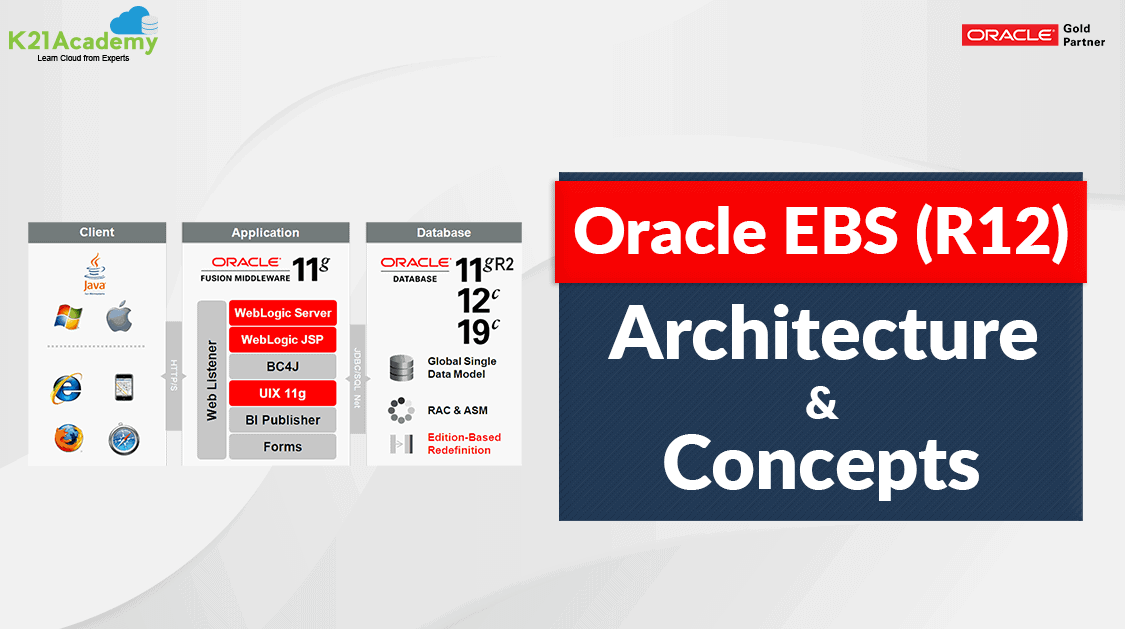



Oracle AppsDBA is in great demand and with that any beginner who is looking forward to starting their career in the Oracle EBS, the EBS Architecture will be the first thing they should look upon.
This blog is the first part of the series “Oracle Apps DBA (R12.2)”
Check this FREE video from Oracle ACE, Author and Oracle Apps Expert Atul Kumar below
In this video, I will cover the high-level 3 tier Architecture of Oracle E-Business Suite R12.2 for Apps DBA.
Oracle EBS R12.2 Overview
The Oracle E-Business Suite Architecture is a framework for multi-tiered, distributed computing that supports Oracle E-Business Suite products. In this model, various servers or services are distributed among three levels, or tiers.
Oracle E-Business Suite (EBS) aka Apps or Applications is an integrated business application consisting of:
- Enterprise Resource Planning (ERP)
- Human Resource Management System (HRMS)
- Customer Relationship Management (CRM)
- Supply Chain Management (SCM)
- Financial Management
- Advanced Procurement
- Service Management
- Project Portfolio Management
Check out: What all operating system are supported by the Oracle E-Business Suite (EBS) R12.2.
Roles & Responsibilities of an Apps DBA
An Appsdba is one who manages Oracle EBS day to day tasks for an organization such as:
- Installation/Configuration of EBS
- Patching of EBS to any new revised version.
- Cloning of the existing System.
- Startup/Shutdown of Services
- Managing (Technology Stack & Concurrent Manager)
- Troubleshooting
- Registering Custom Application & Schema
- Password Management
- Managing Concurrent Requests
- Sysadmin Role*
Also Check : Oracle Apps DBA ( R12.2 ) Installation Guide
Being an Oracle AppsDBA, the first thing you should know is the EBS R12.2 architecture and its concepts.
Architecture of EBS R12
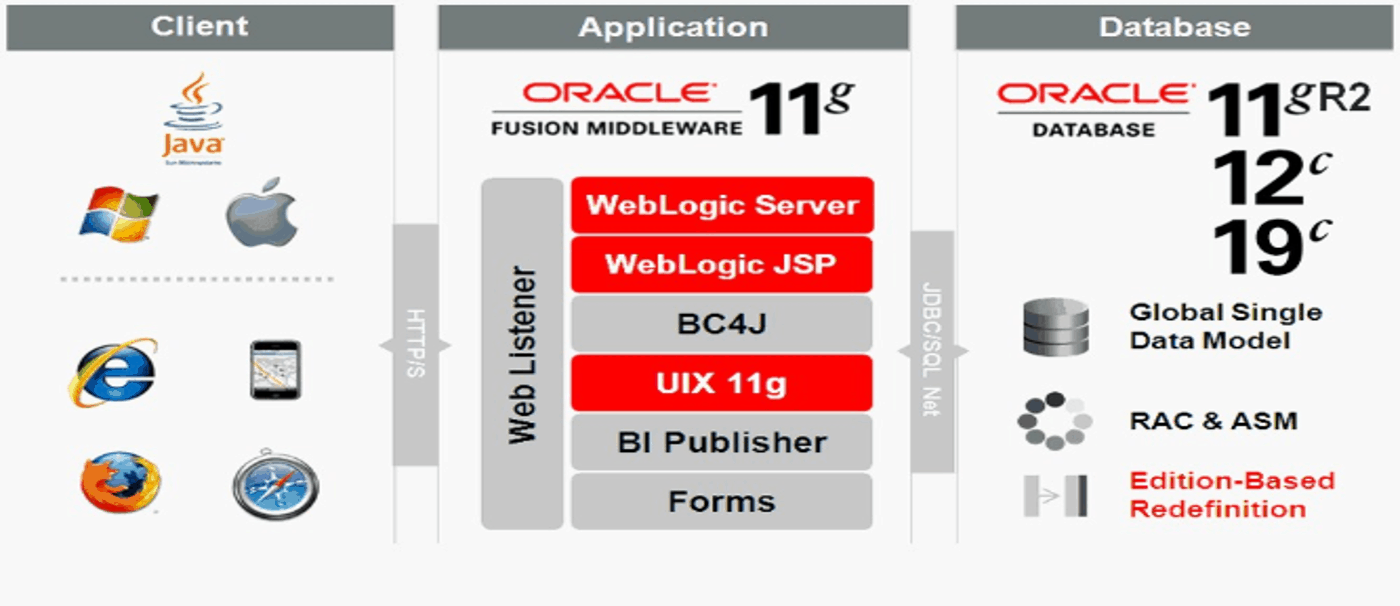
It is a 3 Tier Architecture,
- Client Tier
- Application Tier
- Database Tier
In which the Client tier is where users are. The application tier is Where our business logic sits through which Database Tier is accessed.
Also Check: Our blog post on EBS R12 Installation. Click here
1. Client Tier: aka Desktop Tier, where end-users access Oracle E-Business Suite.
- Web Browser
- Tablet
2. Application Tier: aka Middle Tier as it sits between Client and Database Tier. The client will be accessing the data in Database Tier via Application Tier. This tier runs on top of Oracle Fusion Middleware and runs the following services
- Web Services
- Forms Services
- Java Application Services
- Concurrent Processing Server
3. Database Tier: On this tier, Oracle Database resides and data for E-Business Suite is stored.
- Single Node
- RAC & ASM
- EBR
Also check: Steps to download EBS R12 software from Edelivery Oracle site
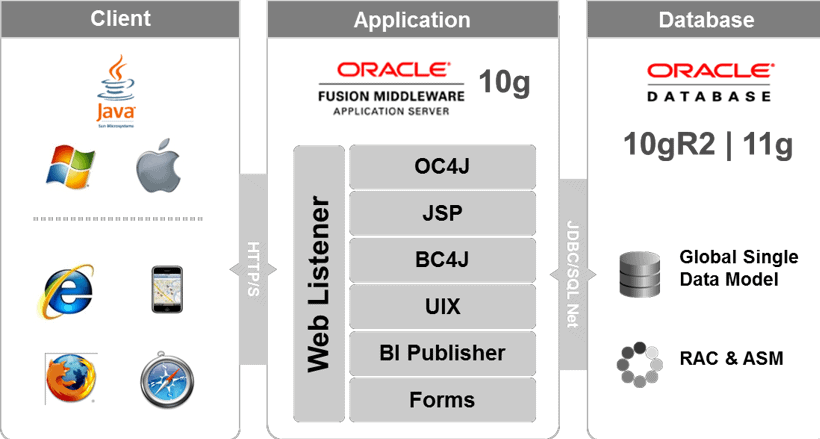
New Changes in EBS R12.2 from Previous Release 11i
In the EBS R12.2 Architecture below changes were seen:
- Database versions now used is 11g,12c, and 19c wheres in 11i it was 10.2 and 11g
- Edition based Redefinition is used in EBS R12.2 which enables you to upgrade an application’s database objects while the application is in use, thus minimizing or eliminating downtime.
- The FMW version used in EBS R12.2 is 11g whereas in 11g it was 10g.
- The OC4J and JSP in 11g are replaced by Weblogic Server & Weblogic JSP in 12 release.
This was a high-level overview of EBS R12.2 Architecture, this is covered in our AppsDBA Training (Register for Free MasterClass on Oracle AppsDBA)
Related/Further Readings
- Recommended Browsers for Oracle E-Business Suite Release 12 [Doc ID 389422.1]
- Oracle E-Business Suite Release 12.2 Information Center (Doc ID 1581299.1)
- Oracle E-Business Suite Release 12.2.9 Readme (Doc ID 2495027.1)
- Oracle E-Business Suite 12.2.9 Now Available
- [Troubleshooting] Forms Issue: FRM-92050 failed to connect to server:forms/servlet
- Oracle E-Business Suite (EBS) 12.2.9 Now Available & Its Upgrade Steps
- Oracle AppsDBA (R12.2) Training: Step by Step Activity Guides/Hands-On Lab Exercise
- Oracle AppsDBA (R12.2): Install | Patch | Clone | Maintain
Next Task For You
We cover Oracle E-Business R12.2 Architecture & concepts in our Oracle Apps DBA For Beginners Training along with the Installation, Patching, Cloning, and Troubleshooting and also, Database upgrade to 19c and much more including the hands-on labs you must perform to upgrade your skills and get a good job with a high package.
Begin your journey towards becoming an Apps DBA by joining our FREE Masterclass on How To Learn Oracle Apps DBA (R12) & It’s New Features.


![Microsoft Agentic AI Business Solutions Architect [AB-100] | K21 Academy](https://test.k21academy.com/wp-content/uploads/2025/11/Microsoft-Agentic-AI-Business-Solutions-Architect-AB-100-Exam-Overview1.png)


