



Did any of the below questions strike your mind when you saw this blog or are you looking for the answers to the below questions?
- What is cloning?
- Why cloning is required in Oracle EBS R12.2?
- What are things we should remember while cloning?
Then you have landed at the right place!
If you are new to Oracle AppsDBA or already working as Apps DBA but on version 11i or R12.1 then we recommend you to first go through the below videos on EBS R12.2 from Oracle ACE, Author, and Oracle Apps Expert Atul Kumar.
- Oracle EBS (R12.2) Architecture for AppsDBAs
- [Video] Oracle E-Business Suite R12.2 Installation
- [Video] File System in Oracle E-Business Suite R12.2
- [Video] Oracle EBS R12.2 Services: Start/Stop
- [Video] Online Patching (ADOP) In Oracle EBS R12.2
In this post, we are going to cover,
- Overview of Cloning
- 10 key points of Oracle EBS R12.2 Cloning
- Frequently Asked Questions
- Conclusion
So, let’s start with,
Overview of Cloning
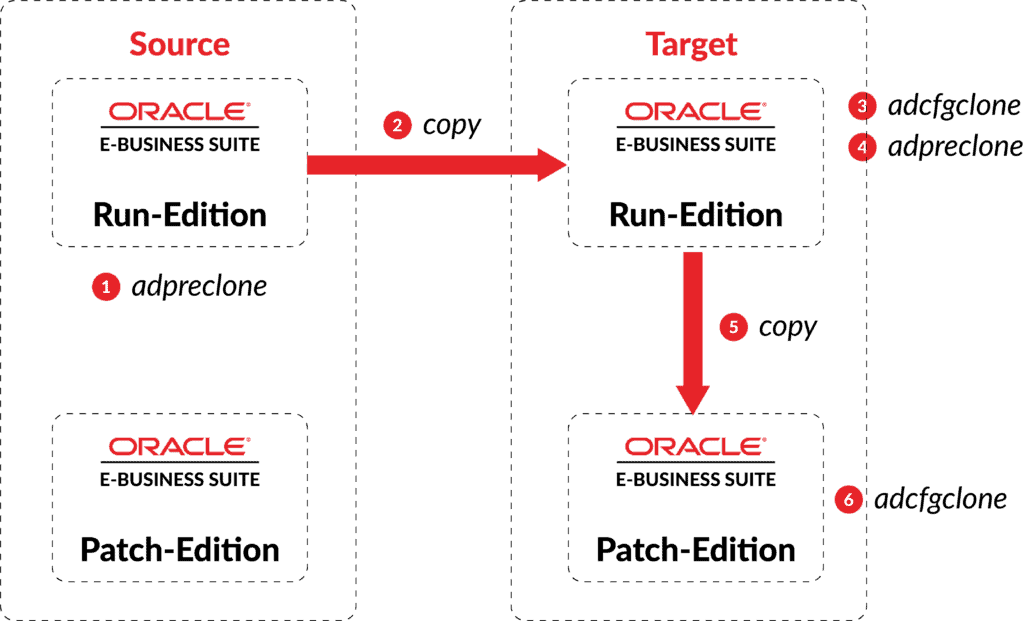
Cloning is the process of creating a copy of an existing Oracle E-Business Suite system and it is one of the most common tasks that AppsDBAs do. The system to be cloned is referred to as the source system, and the newly created system is referred to as the target system.
Cloning has various uses, such as:
- Creating a copy of a production system for patch testing
- Creating a staging area to reduce the downtime required for patching
- Refreshing a test system from a production system
- Moving an existing system to a different machine or platform
Check Out: What is Concurrent Manager in Oracle Apps R12.
Let’s look at the 10 points we must remember while cloning,
10 Key Points of Oracle EBS R12.2 Cloning
1. An Oracle E-Business Suite system can only be cloned to the same or a higher, major release of a platform (operating system).
For example, you can clone a system running on Oracle Solaris 10 to run on Oracle Solaris 11, but it is not supported to clone a system running on Solaris 11 to run on Solaris 10.
2. In AD-TXK Delta 7, Oracle recommends you clone the Application tier run and patch file systems in a single operation, using the ‘dualfs’ option. Separate cloning of the run and patch file systems will be deprecated in the future
3. Cloning can be done to Same or Higher release of Platform (You can’t clone from Linux to Solaris or Windows)
4. Standard cloning is different from file system cloning. Standard cloning is creating a copy of an Oracle E-Business Suite system using Rapid Clone (for example, cloning a complete Oracle E-Business Suite system to create a test copy from your production environment). In contrast, file system cloning is copying the run file system to the patch file system in online patching, and can only be undertaken with the adop phase=fs_clone command.
5. When cloning, ensure that you specify the actual locations for the directories involved so that AD utilities can properly identify the directories afterward. Do not use symbolic links to specify directory locations.
6. Before cloning a system with Rapid Clone, be sure to allow any active online patching cycles to run all the way through the final (cleanup) phase. In case patches are applied in hotpatch or downtime mode, then you must run cleanup phase of adop.
7. Then run fs_clone to synchronize with the other file system, to avoid the need for synchronization to be performed in the next patching cycle.
8. A global (central) inventory is generally recommended for all Oracle E-Business Suite Release 12.2 application tier nodes and database tier nodes.
However, starting AD/TXK.Delta.7, support for using an ‘EBS Installation Central Inventory’ has also been introduced for Application tier. This inventory will be specific to an E-Business Suite instance and will be identified by ‘<s_base>/oraInventory/oraInst.loc’.
9. If your system has separate installation user accounts for the database and the applications, both users must be in the same install group (inst_group) in oraInst.loc, which will need to contain a line such as inst_group=oracle.
10. In Release 12.2, you can set the base directory to any desired location. However, the subdirectory structure cannot be changed because of dependencies on both the WLS domain and the dual file system required for online patching. Also, the base directory must be the same across all nodes in multi-node configurations.
Read More: About ADOP (Online Patching).
Ready to check your understandings of cloning? Please go through the below FAQs,
FAQs
Q1. What is cloning in Oracle Apps DBA?
Ans. For those who are new to Cloning, it is the process of creating a copy of an existing Oracle E-Business Suite system. Cloning is one of the most common tasks that AppsDBAs do.
Q2. What does Adpreclone PL do?
Ans. The adpreclone.pl script prepares the source system to be cloned by collecting information about the database, and creating generic templates from existing files that contain source-specific hard-coded values.
Q3. How do we run Adcfgclone PL on Apps tier?
Ans. cd $COMMON_TOP/clone/bin perl adcfgclone.pl appsTier
Q4. How do we run Adcfgclone PL on DB tier?
Ans. cd $ORACLE_HOME/appsutil/clone/bin Perl adcfgclone.pl dbTier
Conclusion
We have covered the overview of cloning with its uses and 10 must remember points while cloning in Oracle EBS R12.2 with frequently asked questions.
So, that’s all about cloning in Oracle EBS R12.2. To know more about cloning, have a look at the below doc ids.
Related/Further Readings
- Cloning Oracle E-Business Suite Release 12.2 with Rapid Clone (Doc ID 1383621.1)
- Cloning Oracle E-Business Suite Release 12.2 (AD-TXK Delta 6 or Lower Code level) with Rapid Clone (Doc ID 2047809.1)
- Cloning Oracle E-Business Suite Release 12.2 Environments integrated with Oracle Access Manager 11gR2 (11.1.2) (Doc ID 1614793.1)
- Cloning an Oracle E-Business Suite System
- Oracle EBS (R12): Database Cloning from RMAN backup
Next Task For You
We cover Oracle E-Business R12.2 Architecture & concepts in our Oracle Apps DBA For Beginners Training along with the Installation, Patching, Cloning, and Troubleshooting and also, Database upgrade to 19c and much more including the hands-on labs you must perform to upgrade your skills and get a good job with a high package.
Begin your journey towards becoming an Apps DBA by joining our FREE Masterclass on How To Learn Oracle Apps DBA (R12) & It’s New Features.


![Microsoft Agentic AI Business Solutions Architect [AB-100] | K21 Academy](https://test.k21academy.com/wp-content/uploads/2025/11/Microsoft-Agentic-AI-Business-Solutions-Architect-AB-100-Exam-Overview1.png)


