
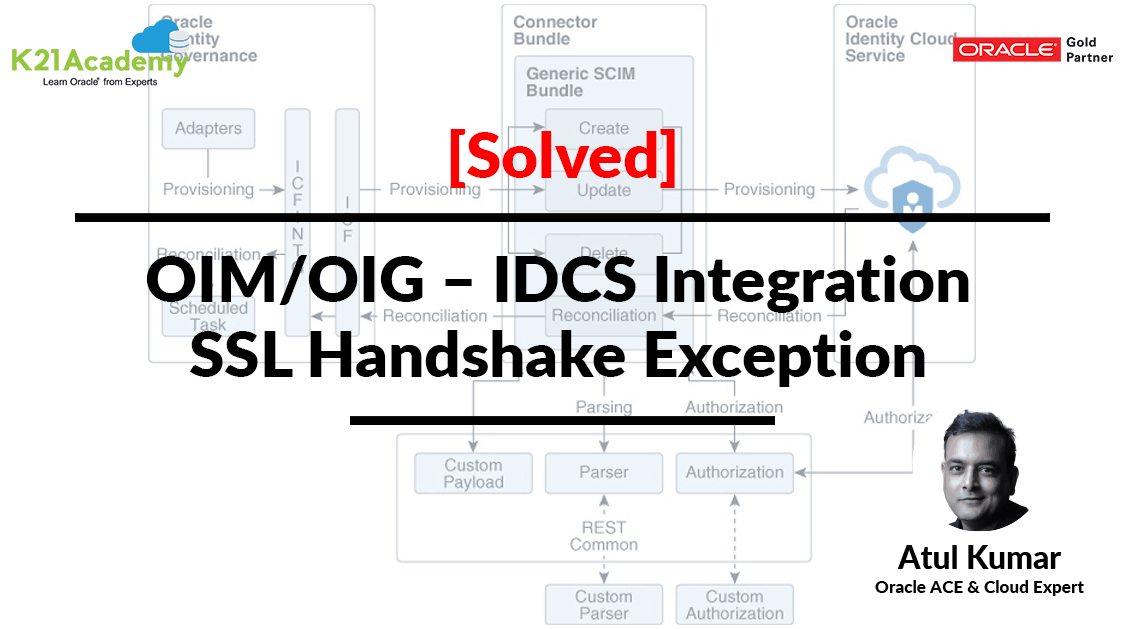



This Post Covers javax.net.ssl.SSLHandshakeException PKIX path building failed error while running schedule job IDCS Group Lookup Reconciliation as a part of Oracle Identity Manager (OIM)/Oracle Identity Governance (OIG), Integration with Oracle Identity Cloud Service (IDCS).
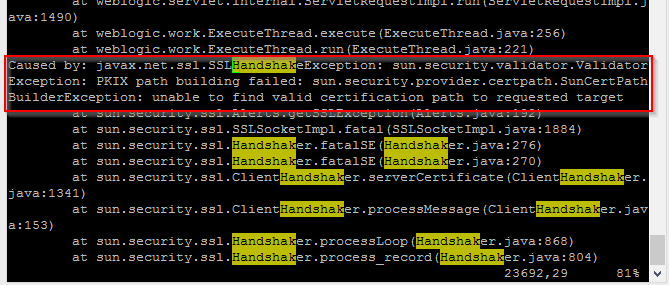
Error: javax.net.ssl.SSLHandshakeException: sun.security.validator.ValidatorException: PKIX path building failed: sun.security.provider.certpath.SunCertPathBuilderException: unable to find valid certification path to requested target.
If you are new to Secure Socket Layer (SSL), then I would suggest you check our previous post where we have covered in detail.
- SSL in WebLogic (CA, KeyStore, Identity & Trust Store): Things you must know – Part I Click Here
- SSL in WebLogic Server – Part II : Create KeyStore, generate CSR, Import CERT and configure KeyStore with WebLogic Click Here
If you want to know more about Oracle Identity Cloud Service (IDCS) check our previous post where we have covered in detail about Oracle Identity Cloud Serve ice (IDCS) Overview & Concepts
Issue:
Oracle Identity Manager (OIM) was integrated with Identity Cloud Service (IDCS) using the OIM IDCS connector.
While Running schedule job IDCS Group Lookup Reconciliation fails with javax.net.ssl.SSLHandshakeException: PKIX path building failed error:
Log Filename = $DOMAIN_HOME/servers/oim_server1/logs/oim_server1-diagnostic.log.
————————————————–
Caused by: javax.net.ssl.SSLHandshakeException: sun.security.validator.ValidatorException: PKIX path building failed: sun.security.provider.certpath.SunCertPathBuilderException: unable to find valid certification path to requested target
at sun.security.ssl.Alerts.getSSLException(Alerts.java:192)
at sun.security.ssl.SSLSocketImpl.fatal(SSLSocketImpl.java:1884)
at sun.security.ssl.Handshaker.fatalSE(Handshaker.java:276)
at sun.security.ssl.Handshaker.fatalSE(Handshaker.java:270)
at sun.security.ssl.ClientHandshaker.serverCertificate(ClientHandshaker.java:1341)
at sun.security.ssl.ClientHandshaker.processMessage(ClientHandshaker.java:153)
at sun.security.ssl.Handshaker.processLoop(Handshaker.java:868)
at sun.security.ssl.Handshaker.process_record(Handshaker.java:804)
at sun.security.ssl.SSLSocketImpl.readRecord(SSLSocketImpl.java:1016)
at sun.security.ssl.SSLSocketImpl.performInitialHandshake(SSLSocketImpl.java:1312)
at sun.security.ssl.SSLSocketImpl.startHandshake(SSLSocketImpl.java:1339)
at org.apache.http.conn.ssl.SSLConnectionSocketFactory.createLayeredSocket(SSLConnectionSocketFactory.java:290)
at org.apache.http.conn.ssl.SSLConnectionSocketFactory.connectSocket(SSLConnectionSocketFactory.java:259)
at org.apache.http.impl.conn.HttpClientConnectionOperator.connect(HttpClientConnectionOperator.java:125)
at org.apache.http.impl.conn.PoolingHttpClientConnectionManager.connect(PoolingHttpClientConnectionManager.java:319)
at org.apache.http.impl.execchain.MainClientExec.establishRoute(MainClientExec.java:363)
at org.apache.http.impl.execchain.MainClientExec.execute(MainClientExec.java:219)
at org.apache.http.impl.execchain.ProtocolExec.execute(ProtocolExec.java:195)
at org.apache.http.impl.execchain.RetryExec.execute(RetryExec.java:86)
at org.apache.http.impl.execchain.RedirectExec.execute(RedirectExec.java:108)at sun.security.validator.PKIXValidator.doBuild(PKIXValidator.java:385)
at sun.security.validator.PKIXValidator.engineValidate(PKIXValidator.java:230)
at sun.security.validator.Validator.validate(Validator.java:260)
at sun.security.ssl.X509TrustManagerImpl.validate(X509TrustManagerImpl.java:326)
at sun.security.ssl.X509TrustManagerImpl.checkTrusted(X509TrustManagerImpl.java:231)
at sun.security.ssl.X509TrustManagerImpl.checkServerTrusted(X509TrustManagerImpl.java:126)
at sun.security.ssl.ClientHandshaker.serverCertificate(ClientHandshaker.java:1323)
… 155 more
Root Cause:
The OIM/OIG and Oracle Identity Cloud Service (IDCS) integration is performed only using an encrypted protocol (HTTPS). This type of communication requires that the Oracle Identity Cloud Service certificate is available in the OIM server trust store.
Whenever OIM Server attempts to connect to Oracle Identity Cloud Service (Target system), it will only be able to connect to IDCS if it can trust it. The way trust is handled in the OIM Server is when you have Imported IDCS SSL Certificate in OIM and OIM JDK TrustStore Respectively.
OIM JDK TrustStore location: $JAVA_HOME/lib/security/cacerts
OIM Server TrustStore Location: $WL_HOME/server/lib/DemoTrust.jks
This contains a list of all known Certificate Authority (CA) certificates, and OIM Server will only trust certificates that are signed by one of those CAs or public certificates that exist within that keystore.
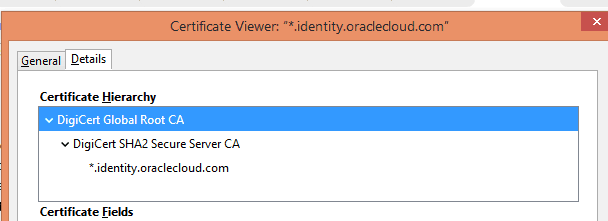
These certificates combined are referred to as the certificate chain, and, as they are all within the OIM Server Truststore (DemoTrust.jks) and OIM JDK Truststore (cacerts) OIM Server will trust any certificates signed by them (in this case, *.identoty.oraclecloud.com).
This problem is therefore caused by a certificate that is self-signed (a CA did not sign it) or a certificate chain that does not exist within the OIM Server TrustStore. OIM Server did not trust the certificate and fails to connect to the Oracle Identity Cloud Service (IDCS).
Troubleshooting:
You export the Oracle Identity Cloud Service HTTPS public certificate and import the same into the OIM trust store and make sure Enable SSL as “True” in IDCS IT Resource Parameter.
HighLevel Steps to export HTTP public certificate & Import them into OIM TrustStore:
- Export the HTTPS public certificate (IDCS Public certificate)
- Then, Check where to import OIM Trust Store
- After checking location, Import IDCS Public Certificate into OIM Trust Store
- Enable SSL as “True” in IDCS IT Resource Parameter
- Testing
1. How to Export the IDCS HTTPS public certificate:
In this section, you have to access the IDCS Service Console URL and export the HTTPs Public certificates.
- Access the Oracle Identity Cloud Service UI in Firefox Browser
- In the address bar, click the lock icon, click Connection>, and then click More Information.
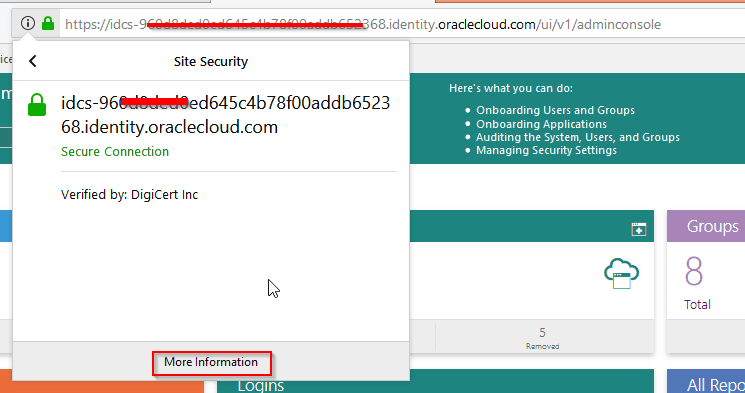
- Click View Certificate.
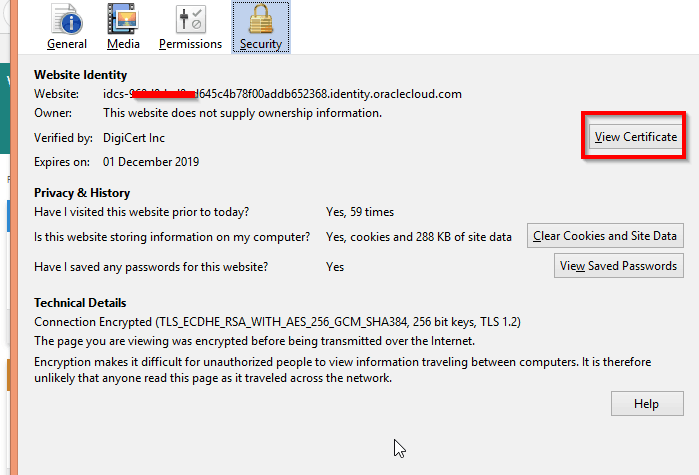
- Click Details and then click Export

- Select X.509 Certificate (PEM) as type and save the certificate file. Default name of this certificate is -identityoraclecloudcom , change it with idcs.cer
- Transfer that certificate in the OIM Server under /tmp
- Next, you need to import the IDCS certificates into the OIM trust store.
2. How to check Identity and Trust Keystore location into OIM
- Login to WebLogic console http://<hostname>:7001/console and Go to -> Servers->OIM Managed Server (oim_server1)
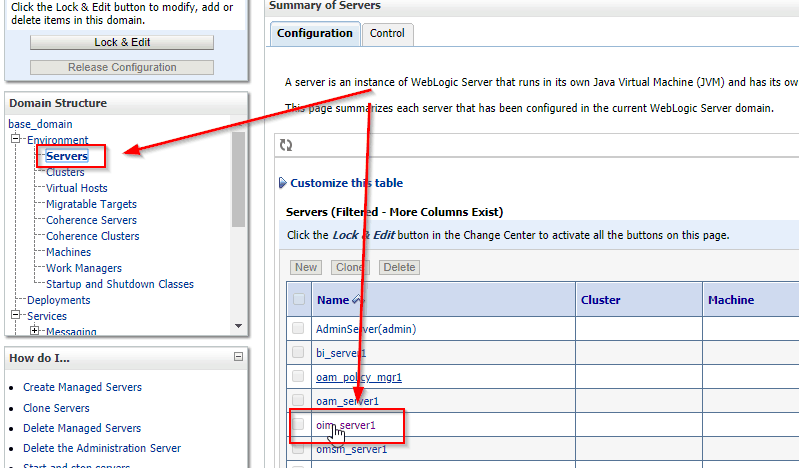
- Click on Configuration->keystores (This page let you view and define Identity & Trust keystore configurations)

3. How to import the IDCS HTTPS public certificate into the OIM trust store:
After exporting the IDCS HTTPs Public Certificates, you have to import them into the OIM Server and OIM JDK trust store.
- Launch the OIM server terminal and enter the following command to import the certificate into the OIM JDK trust store. (use root user else you will hit error permission denied at the end )
keytool -import -keystore $JAVA_HOME/jre/lib/security/cacerts -file /tmp/idcs.cer -storepass changeit -alias idcs
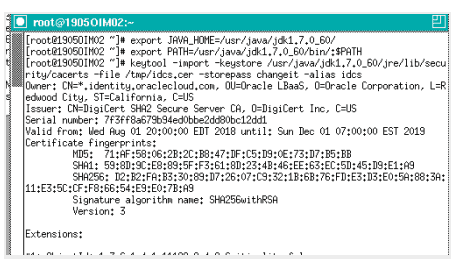
Click yes The keytool utility should display the message Certificate was added to keystore.
- Now, import the certificate into the OIM Server trust store:
keytool -import -keystore $WL_HOME/server/lib/DemoTrust.jks -file /tmp/idcs.cer -storepass DemoTrustKeyStorePassPhrase -alias idcs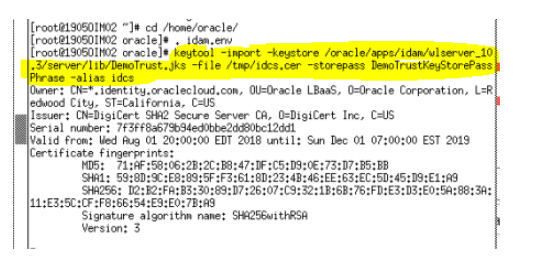
- When prompted, enter yes.
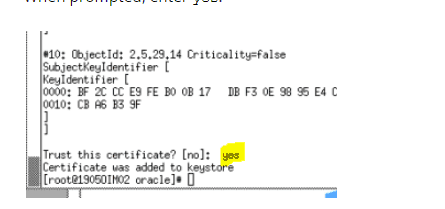
The keytool utility should display the message Certificate was added to keystore.
4. How to Enable SSL as “True” in IDCS IT Resource Parameter
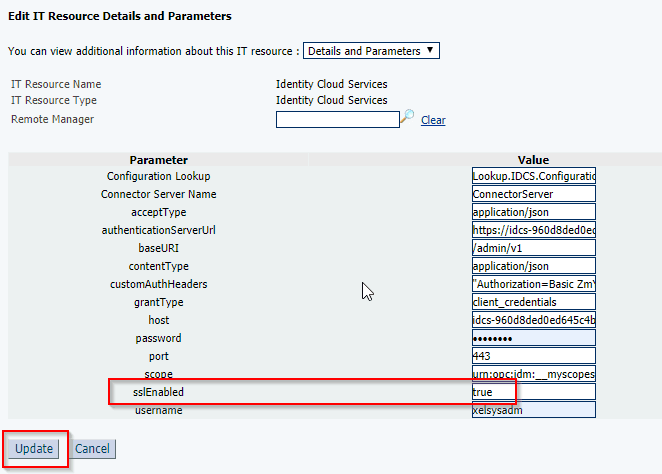
IDCS always expects SSL communication, so sslEnabled must be set on “true” in the IDCS IT Resource.
- login to Identity System Administration Console http://<hostname>:14000/syadmin and Go to IT Resource -> Edit -> IDCS IT resource
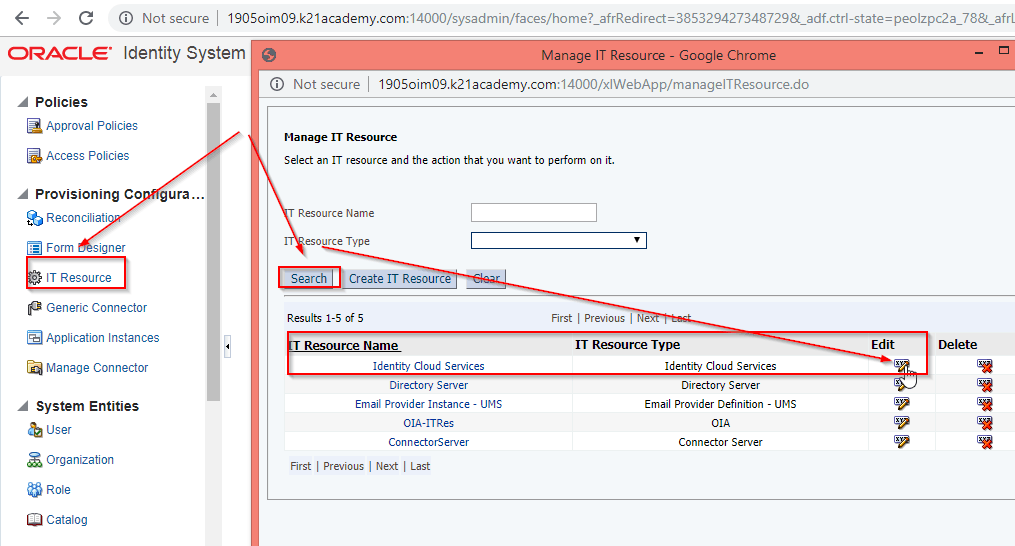
- Edit IT Resource Details and Parameters and add sslEnables as “True“
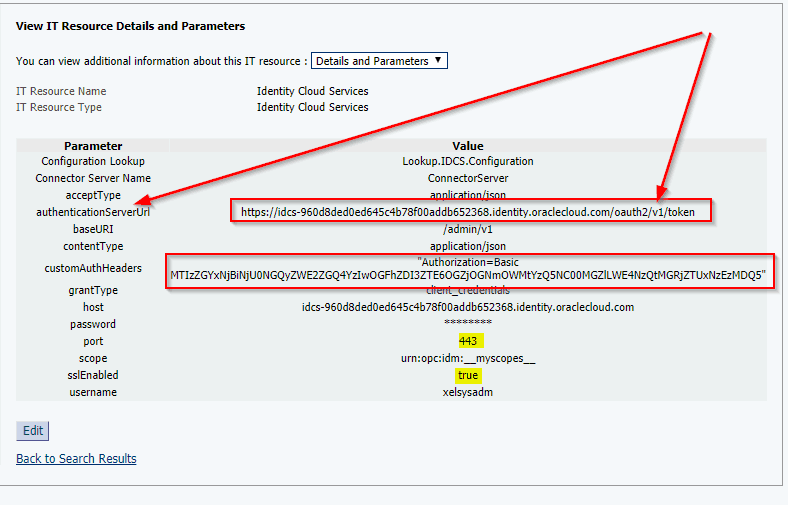
- View IT Resource Details and Parameters and Confirm details
Testing:
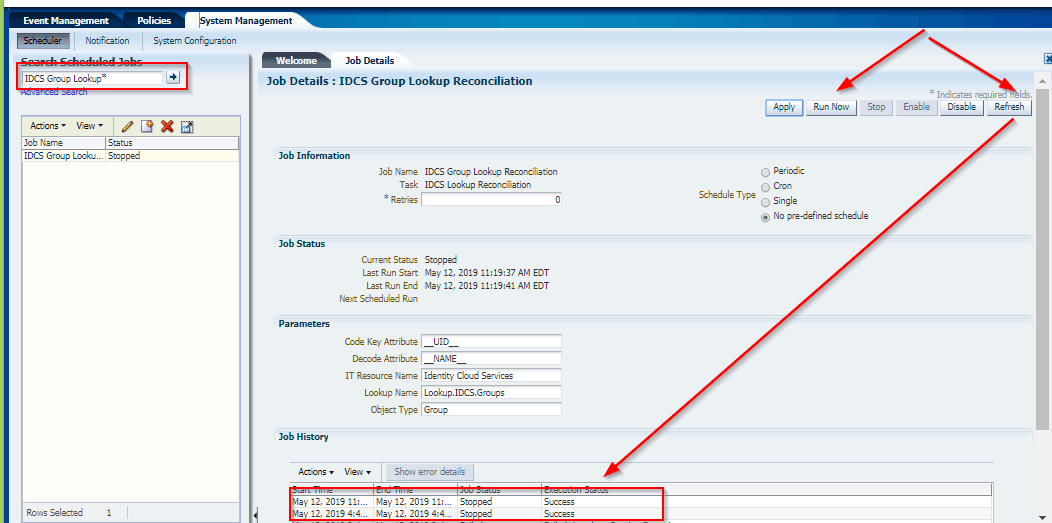
We could successfully run the Scheduled jobs in OIM/OIG.
This post is from our Oracle Identity Cloud Service (IDCS) training in which we have covered everything one should know about Oracle Identity Cloud Service like Architecture, Users & Groups Application, Branding, Auditing & Reports, Rest APIs, Adaptive security and much more.
Related Posts
- Cloud Security With Oracle Identity Cloud Service (IDCS) Click here
- Oracle Identity Cloud Service (IDCS): Step By Step Lab Activity Guide for Beginners Click here
- Oracle Identity Cloud Service (IDCS) Overview & Concepts Click here
- Cloud Security Using Identity Cloud Service Click here
- Oracle Identity Cloud Service: Configuring Multi-Factor Authentication (MFA) Click here
- High-level Steps to Protecting an On-premises Application with IDCS by Using WebGate Click Here
- OIM/OIG – IDCS Connector Integration : [Troubleshooting] InvalidCredentialException: HTTP 401 Error : User not authorized to execute service Click here
References
- Oracle Identity Cloud Service: Integrating with Oracle Identity Manager (OIM)
- SSL in WebLogic (CA, KeyStore, Identity & Trust Store): Things you must know – Part I Click Here
- SSL in WebLogic Server – Part II: Create KeyStore, generate CSR, Import CERT and configure KeyStore with WebLogic Click Here
Next Task for You
Download our FREE Guide i.e., 7 Docs Must Read to Become Expert in Cloud Security With Oracle Identity Cloud Service (IDCS).
Click on the image below to Download the Guide:


![Microsoft Agentic AI Business Solutions Architect [AB-100] | K21 Academy](https://test.k21academy.com/wp-content/uploads/2025/11/Microsoft-Agentic-AI-Business-Solutions-Architect-AB-100-Exam-Overview1.png)


