



Most of the Oracle Cloud Infrastructure (OCI) resources are assigned with a unique ID called Oracle Cloud Identifier (OCID). This is used to uniquely identify each resource in a tenancy.
Uses Of OCID
- To perform services through OCI CLI and Terraform.
- To raise Service requests (SR).
- To analyze which resource is having a bug while performing troubleshooting.
OCID Uses Below Syntax:
ocid1.<RESOURCE TYPE>.<REALM>.[REGION][.FUTURE USE].<UNIQUE ID>
(1) ocid1: The numerical value indicates the version of OCID.
(2) Resource Type: Type of resource (eg: instance, volume, VCN, subnet, etc).
(3) Realm: A realm is a set of regions that share Resources. There are 3 types of realms.
- oc1 – Commercial realm
- oc2 – Government Cloud realm
- oc3 – Federal Government Cloud realm
(4) Region: The region in which resource is (eg: phx, eu-frankfurt-1, etc).
(5) Future Use: Reserved for future use.
(6) Unique ID: Unique portion of the ID. (format differ depending on the type of service and resource).
Example:
Tenancy OCID: ocid1.tenancy.oc1..aaaaaaaazaizaakcbfd33qif7atm2a5vwppteukesf6dtyxpxgm66kvx3fmq
Check out: List of Free Oracle Cloud Certification
How To Get OCID From Console
You can find OCID of any resource in Oracle Cloud Infrastructure (OCI) by going to that resource and checking the resource information.
1) OCID Of A Compartment In OCI
Register & Log in to the Oracle Cloud account, cloud.oracle.com
Note: First, you should have an Account at Oracle Cloud and if you don’t have one, then you can register FREE using our step-by-step video & guide that I covered in episode 30. You can get it by visiting k21academy.com/30.
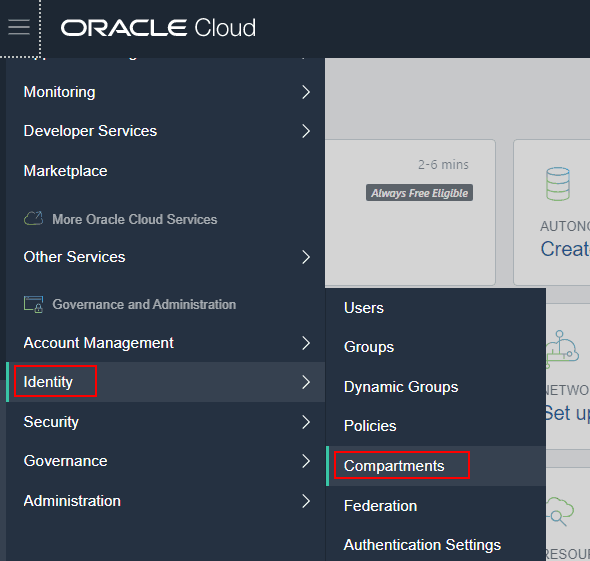
(1) Navigate to identity under Governance & Administration and select Compartment
(2) In Compartment information we will get OCID
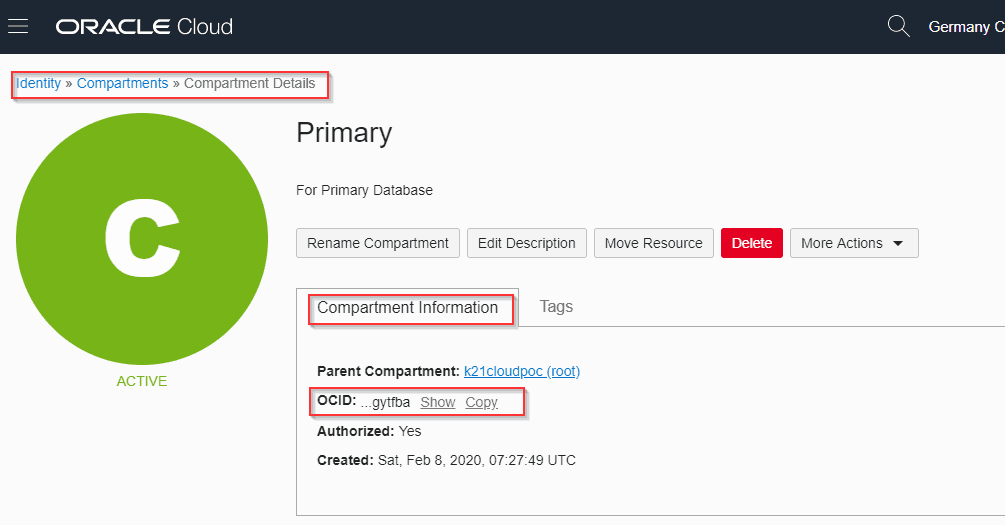
Note: When we delete a compartment and restore afterward the OCID of the compartment remains the same, only the name of the compartment changes. That means Oracle is providing the same compartment again rather than creating a new one.
To know more about Restoring Compartments in OCI click here https://k21academy.com/oci53
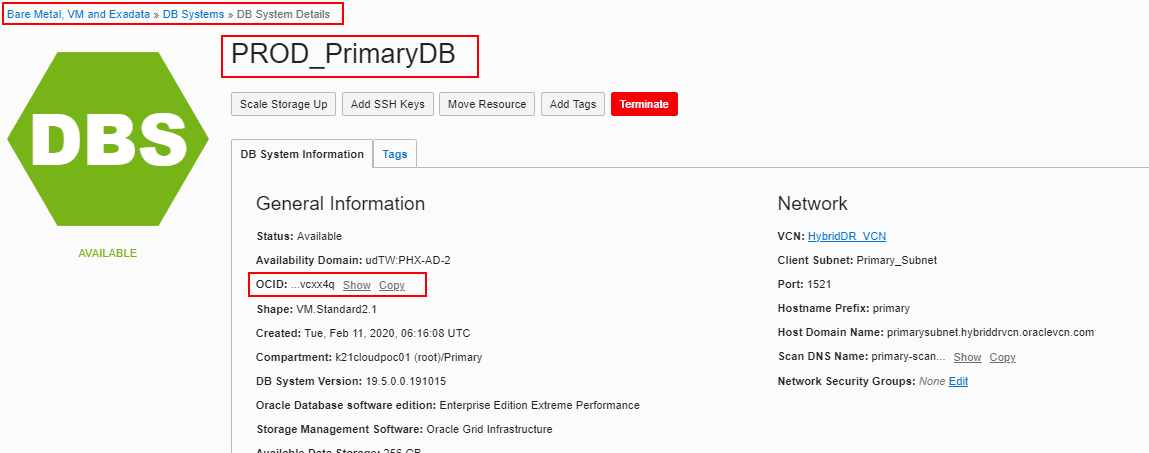
2) OCID Of A DB System In OCI
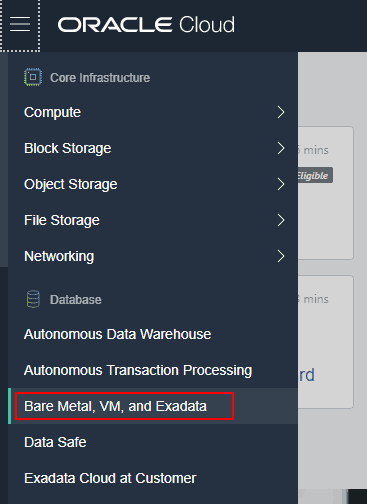
(1) Go to the Navigation menu and click on Bare Metal, VM & Exadata under Databases.
(2) Select the compartment and DB System.
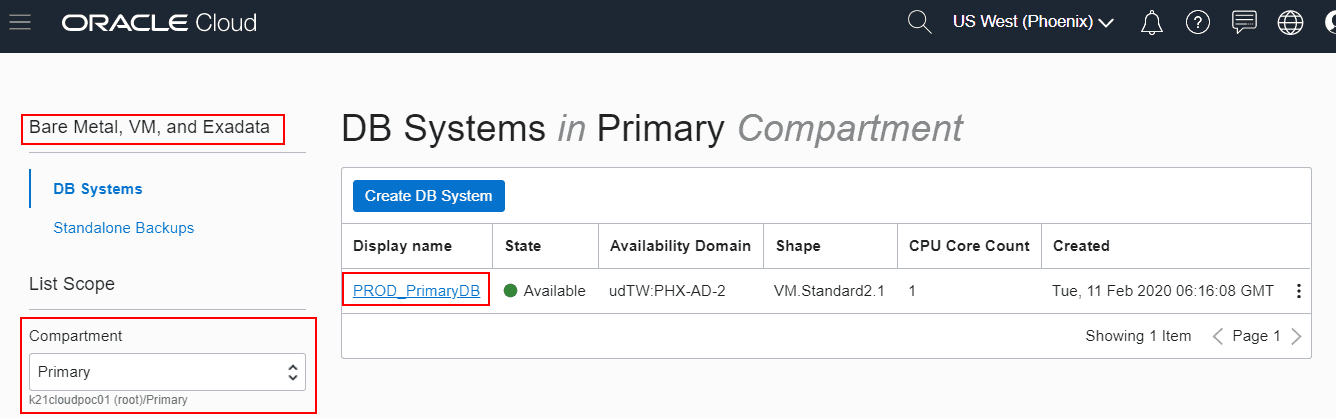
(3) You will find the OCID in DB System information
Note: You need to provide a unique name to each IAM services (users, groups, dynamic groups, federations, and policies) but for other services like (compartments, Instances), the name can be the same within a tenancy so to uniquely identify these resources OCID is used.
To know more about IAM services in OCI click here
Conclusion
It is necessary to uniquely identify each resource in an Oracle Cloud Infrastructure. In order to do so, a unique ID is provided to each resource in the infrastructure. In this blog post, I have covered the Overview of OCID, OCID Syntax and explained where to find OCID of each resource. I hope it will help you understand the concept of OCID in OCI.
Related/Further Readings
Begin Your Cloud Journey
Begin your journey towards becoming an Oracle Cloud Expert and earn a lot more in 2024 by joining our FREE CLASS. You will also know more about the Roles and Responsibilities, Job opportunities for OCI Architects, Admins in the market, and what to study Including Hands-On labs you must perform to get the Higher Paying jobs.
Click on the below image to Register for Our FREE Class on MASTERING ORACLE CLOUD FOR DBAs, APPs DBAs, ARCHITECTS & SYS ADMINS


![Microsoft Agentic AI Business Solutions Architect [AB-100] | K21 Academy](https://test.k21academy.com/wp-content/uploads/2025/11/Microsoft-Agentic-AI-Business-Solutions-Architect-AB-100-Exam-Overview1.png)


