





Policies play a vital role while giving access to users other than the Admin and what kind of access the user has got, all these comes under Policies.
In this post we will cover,
OCI Polices
OCI Policies are sets of rules defined using the Oracle Cloud Infrastructure Policy Language (OCPL). These rules govern who can access specific resources within OCI and the actions they can perform on those resources. A Policy is a document that specifies who can access which Oracle Cloud Infrastructure resources that your company has, and how. A policy simply allows a group to work in certain ways with specific types of resources in a particular compartment.
If you’re not familiar with users, groups, or compartments, check our post, Here
To govern the control of your resources, your Cloud account will have at least one policy. Each policy consists of one or more policy statements that follow this basic syntax:
Allow group <group_name> to <verb><resource-type> in compartment <compartment_name>
Check Out: Our blog post on Data Transfer Service OCI. Click here
Why We Use Policies?
In any Cloud Account, there are certain resources and the services that only the Admin has all the permissions and privileges to access. But as Cloud is a multi-tenant service, we can add users other than the Admin. As the access of the resource is to be defined for the new users, this will be done with the help of policies.
The policy statement will specify which user can access what resources in which compartment.
Key Components of OCI Policies:
- Statements: These are the fundamental elements of an OCI policy and consist of the following key parts:
- Principals: Users, groups, compartments, or other entities to which the policy applies.
- Resources: The cloud resources to which access is being controlled.
- Actions: The specific operations or actions that are allowed or denied on resources.
- Conditions: Optional clauses that further restrict when a policy is in effect.
- Policy Types:
- Identity and Access Management (IAM) Policies: Governs access to Oracle Cloud resources.
- Network Security Policies: Manages security rules for virtual cloud networks (VCNs) and related components.
- WAF (Web Application Firewall) Policies: Implements rules for the WAF service.
Scope Of Polices
You can define Policies at two levels, i.e at Compartment Level and at Tenancy Level
- Compartment Level: We assign Policies to Groups at Compartment Level as:
Allow group <Group> to manage all-resources in compartment <Compartment>
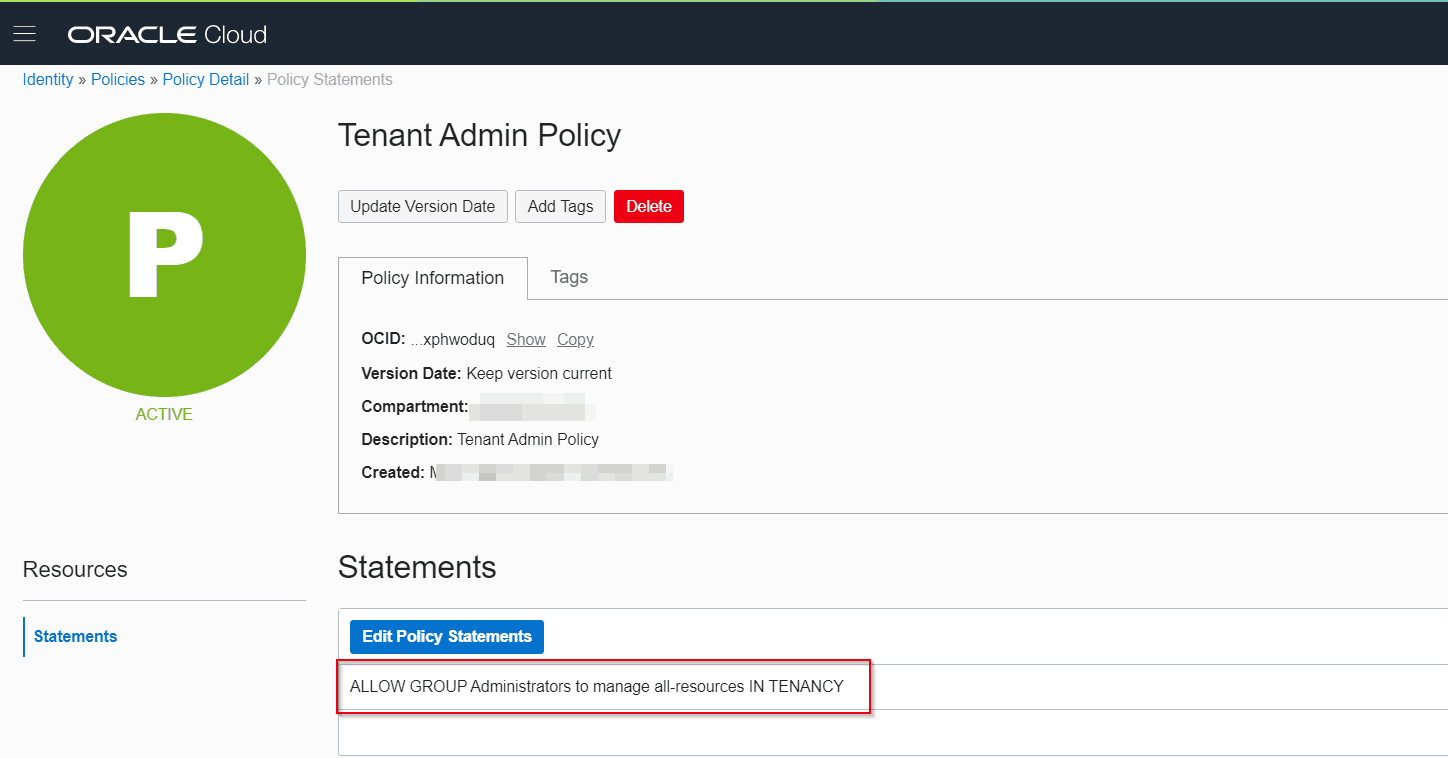
- Tenancy Level: We assign Policies to Groups at Tenancy Level, hence all the compartments in that tenancy and all the groups under these compartments will have access to all the resources defined in the policy.
Allow group <Group> to manage all-resources in tenancy
Also Read: Our previous blog post on OCI Compute. Click here
Steps To Define Policy
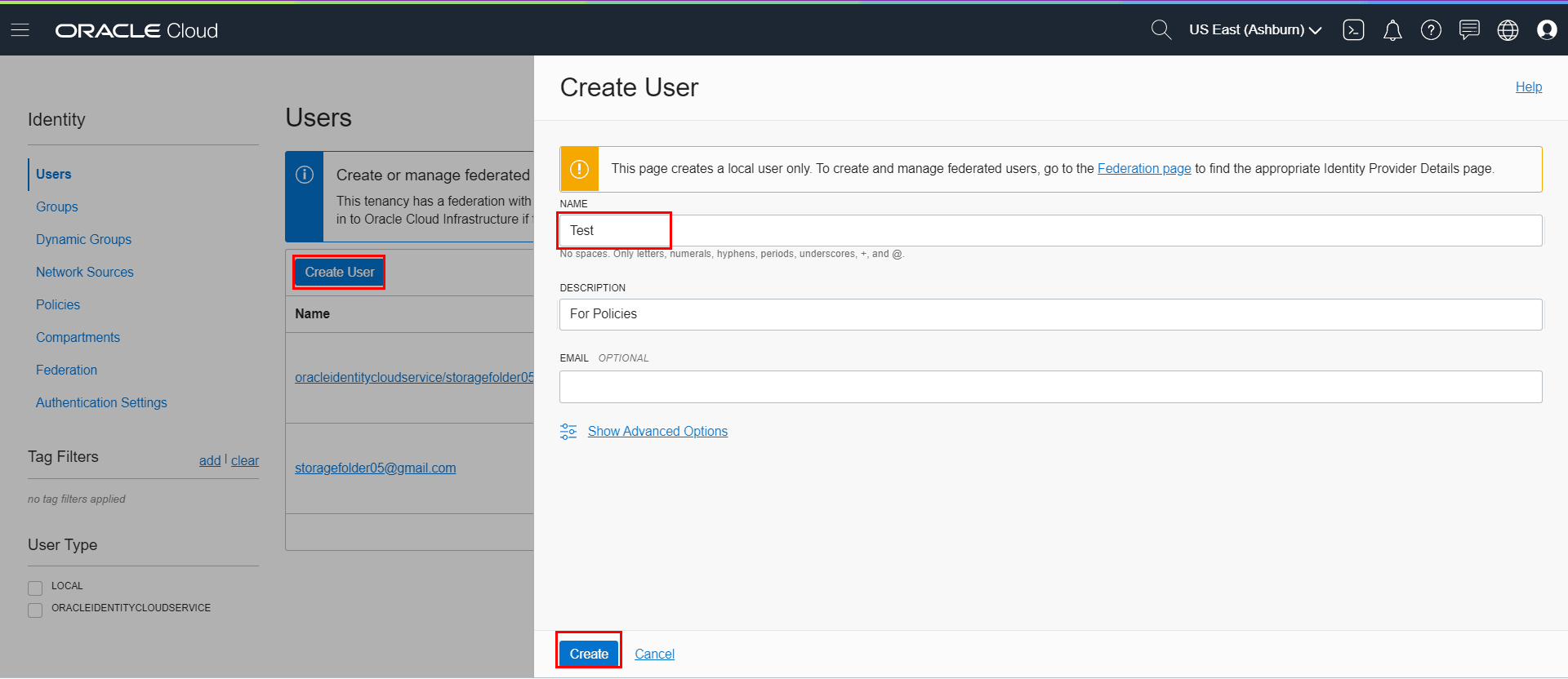
- Create a User in the Identity–>User–>CreateUser.
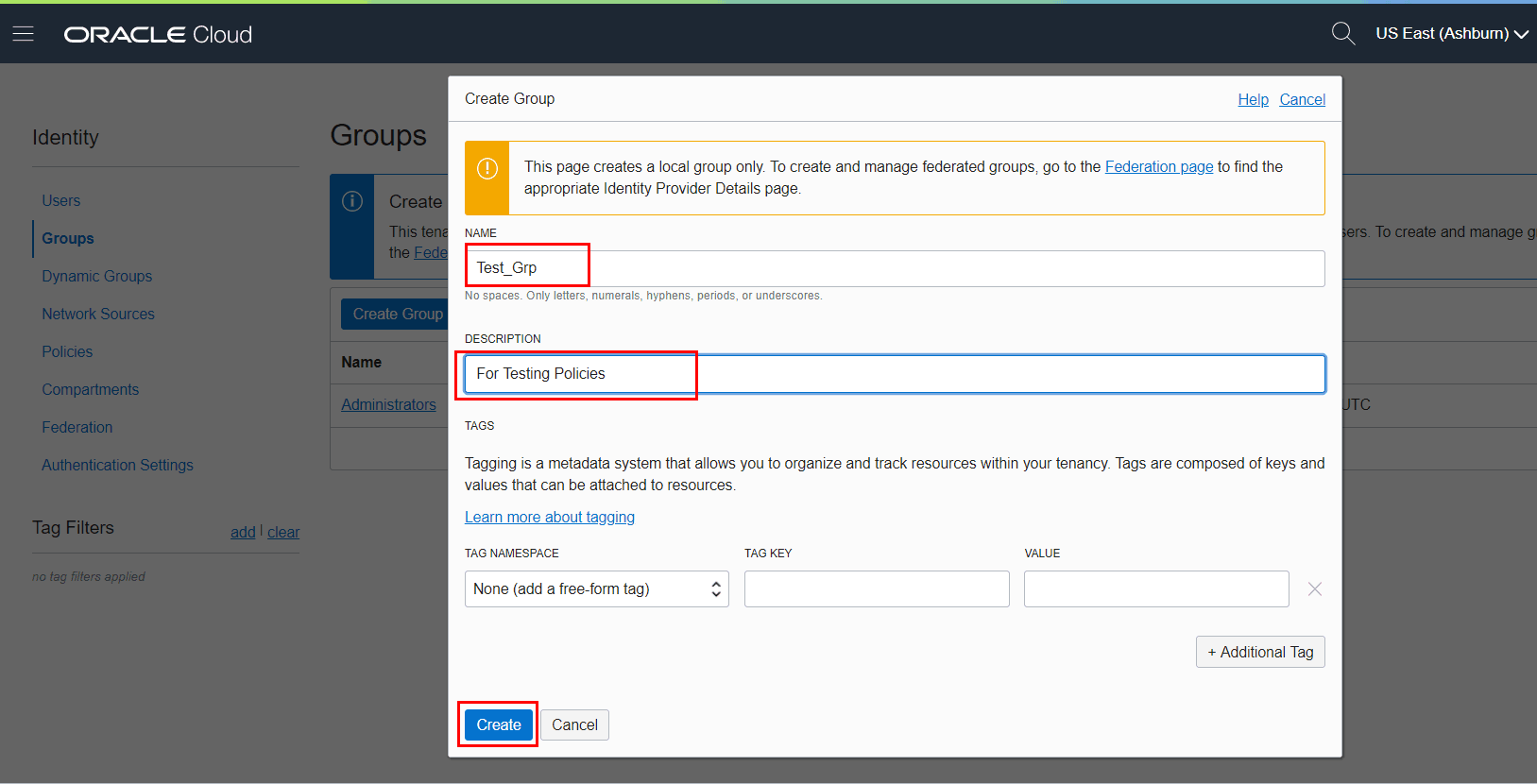
- Once the User is Created, Create one Group, under Identity–>Groups–>Create Groups.
- After that, add the created user to the Group, under Identity–>Groups–>GroupName–>Add User To Group
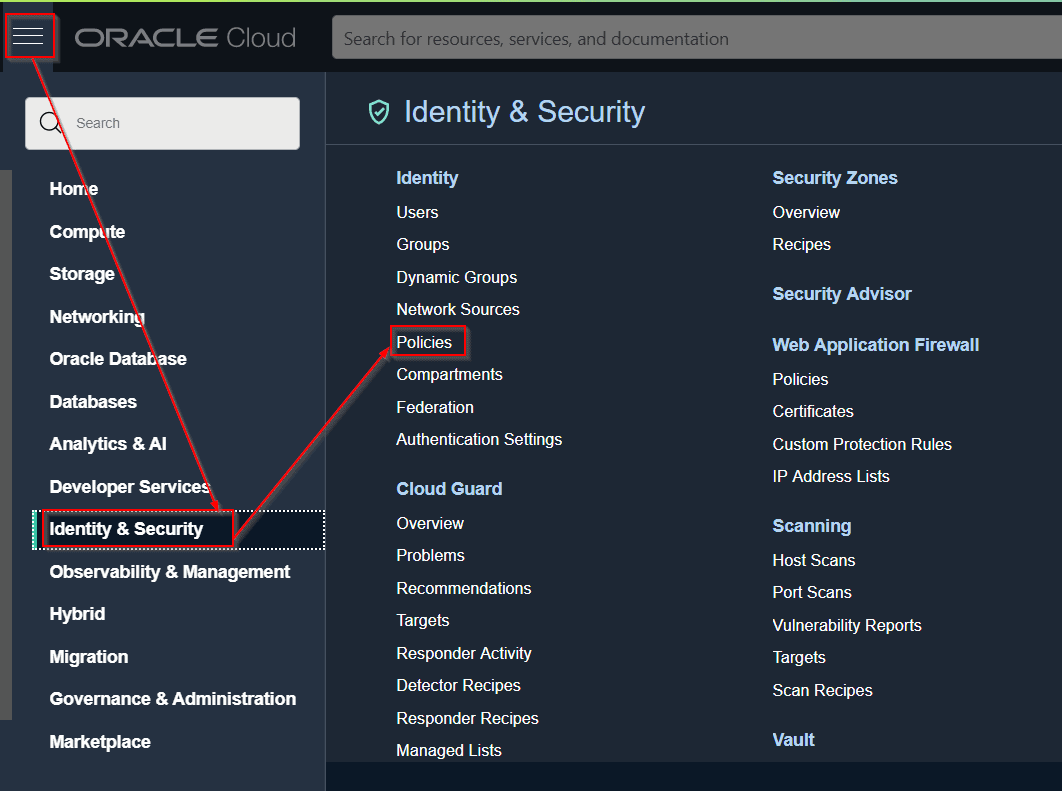
- Then, Go under Identity–>Policies–>Create–>Policy.( Define policy )
If you face any issue while creating the policy under the compartment, check our blog HERE
Check out: our blog on Oracle Security Zones
Steps to Create Policy
Step 1: We created a User under Identity–>User–>CreateUser–>Test.
Step 2: Create one Group, under Identity–>Groups–>Create Group–>Test_Grp.
Step 3: Add the created user to the Group, under Identity–>Groups–>GroupName–>Add User To Group
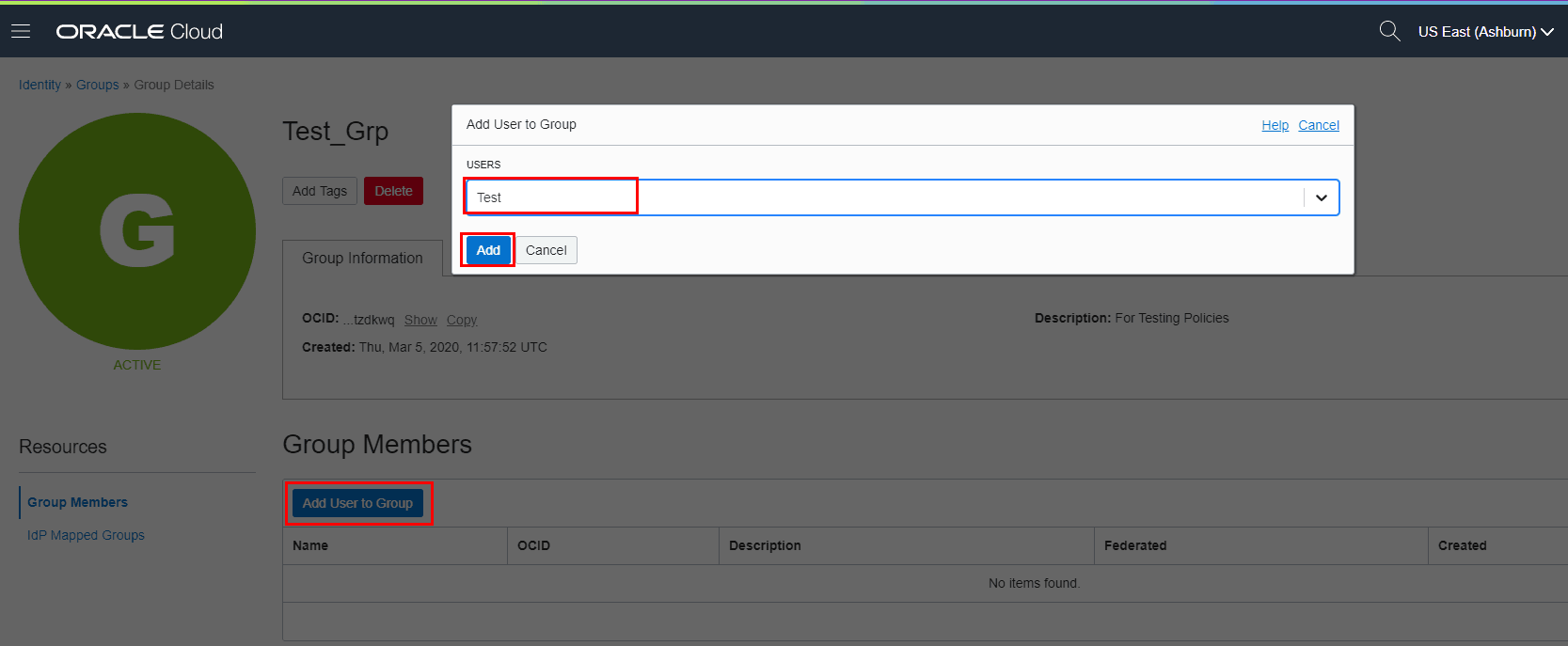
Step 4: Go under Identity–>Policies–>Create–>Policy
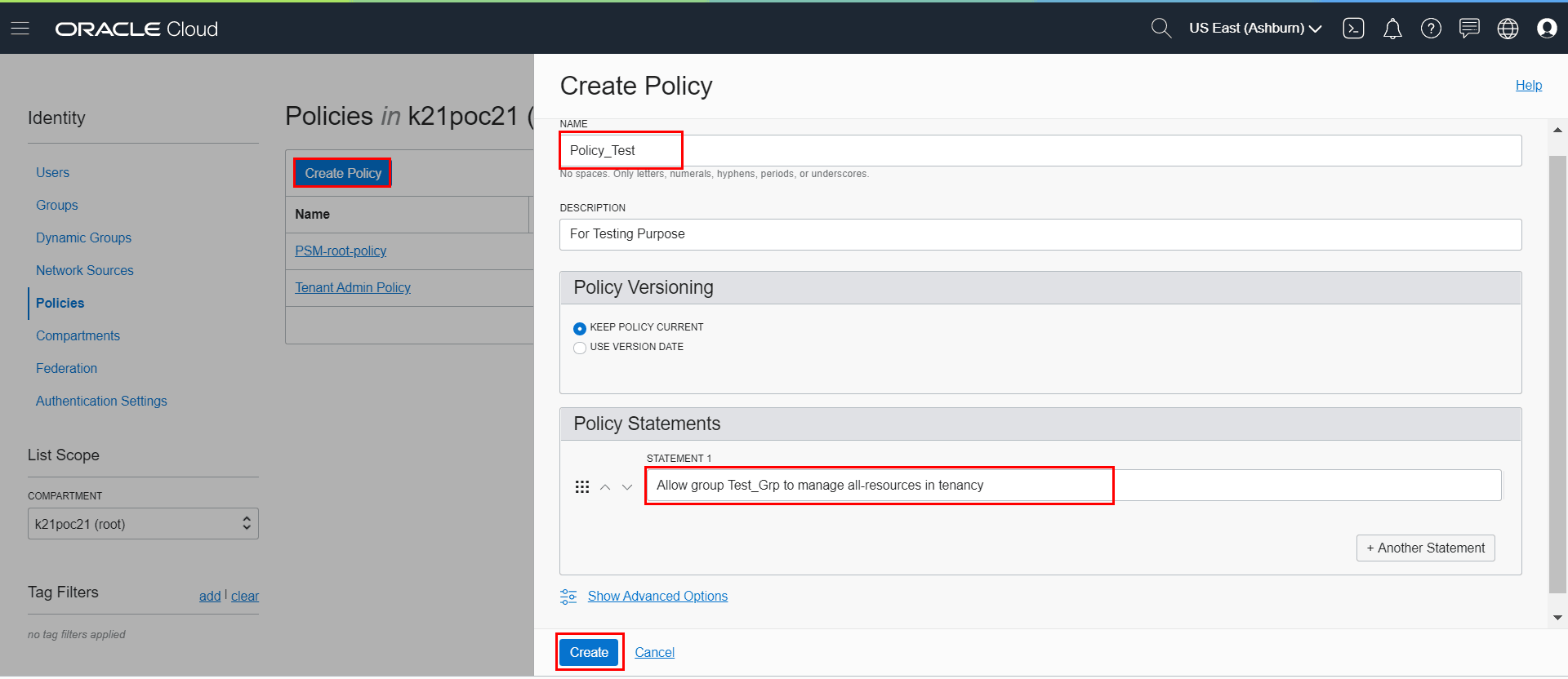
With this, we have successfully created a user, created a group, added the user to the group, defined a policy statement allowing access to the group.
Note: In this, we have given the policy statement at tenancy level with all the permissions and privileges, same as the admin, but for production env, it should not be implemented as no user other than the Admin should have all the permissions. (if-else required)
Conclusion
In Oracle Cloud Infrastructure, you can give access to the resources to users only when Users are added to a group and there is a policy defined for that specific group to access a particular resource.Oracle Cloud Infrastructure’s Policy feature serves as a robust framework, enabling precise access control and governance over resources within the cloud environment. Proficient understanding and adept implementation of OCI policies bolster security measures, ensure compliance, and facilitate efficient resource management.
Frequently Asked Questions
What are OCI Policies?
OCI Policies are sets of rules that control access to resources within Oracle Cloud Infrastructure (OCI).
How do OCI Policies work?
OCI Policies grant specific permissions to users/entities on defined resources, allowing or denying actions based on policy statements.
What's the principle of least privilege in OCI Policy creation?
The principle of least privilege advocates granting minimum required access to reduce security risks.
What types of policies can be created in OCI?
OCI supports various types of policies including: Identity and Access Management (IAM) Policies: Governs access to OCI resources. Network Security Policies: Manages security rules for virtual cloud networks (VCNs) and associated components. Web Application Firewall (WAF) Policies: Implements rules for the WAF service.
Can policies be assigned to specific resources or compartments in OCI?
Yes, policies in OCI can be attached to specific compartments or resources. This allows for the precise governance of access control, ensuring that policies apply only to the designated entities or resources.
What's the benefit of hierarchical structure in OCI Policies?
The hierarchical structure allows policies to inherit permissions, making access control management more scalable and efficient.
Related/Further Readings
- Oracle Cloud Infrastructure (OCI): Region, AD, Tenancy, Compartment, VCN, IAM, Storage Service
- Oracle Cloud Infrastructure (OCI): Unable To Create a Policy Under a Compartment
- [Q/A] 1Z0-932 Oracle Cloud Infrastructure Architect Certification Day 2: IAM (Compartments, Policies, Users, Groups)
- Getting Started with Policies
- Compartment & Policy In Oracle Cloud Infrastructure (OCI): Everything You Must Know
Begin Your Cloud Journey
Begin your journey towards becoming an Oracle Cloud Expert and earn a lot more in 2024 by joining our FREE CLASS. You will also know more about the Roles and Responsibilities, Job opportunities for OCI Architects, Admins in the market, and what to study Including Hands-On labs you must perform to get the Higher Paying jobs.
Click on the below image to Register for Our FREE Class on MASTERING ORACLE CLOUD FOR DBAs, APPs DBAs, ARCHITECTS & SYS ADMINS


![Microsoft Agentic AI Business Solutions Architect [AB-100] | K21 Academy](https://test.k21academy.com/wp-content/uploads/2025/11/Microsoft-Agentic-AI-Business-Solutions-Architect-AB-100-Exam-Overview1.png)



