




Oracle listens to its users and on huge demand, Oracle recently released Block Volume Sharing in reading/Write Mode. This will ease design and lower the storage cost too. Till now, Block Volume could only attach one compute instance at a time and for Storage sharing, we have File System Service.
This blog post discusses the new feature from Oracle that allows us to share Block Volume with Multiple Instances.
If you are new to Oracle Cloud, check our FREE Guide to Register for Oracle Cloud Trial Account.
Storage Options in Oracle Cloud
Oracle Cloud Infrastructure offers the below main storage services:
- Block Volume Service: Block storage operates at the raw storage device level and manages data as a set of numbered, fixed-size blocks using protocols such as iSCSI.
- Object Storage Service: Object storage is independent of a server and accessed over the Internet. Data is managed as objects using an API built on standard HTTP verbs. It is an ideal storage platform to store very large amounts of data.
- Local storage: Local NVMe-based SSD storage with very high IOPS and low latency available for the Storage Optimized Instance Type (e.g. BM.DenseIO2.52).
- File Storage Service (FSS): Fully managed file storage service. NFS3 along with Network Lock Manager (NLM). It starts from a few KBs to 8 Exabytes (EB) and Data & Metadata are encrypted at rest
To know more about the types of storage in Oracle, check our blog post: Oracle Cloud Infrastructure (OCI) | Storage Object, Block | File Storage, Data Transfer Service
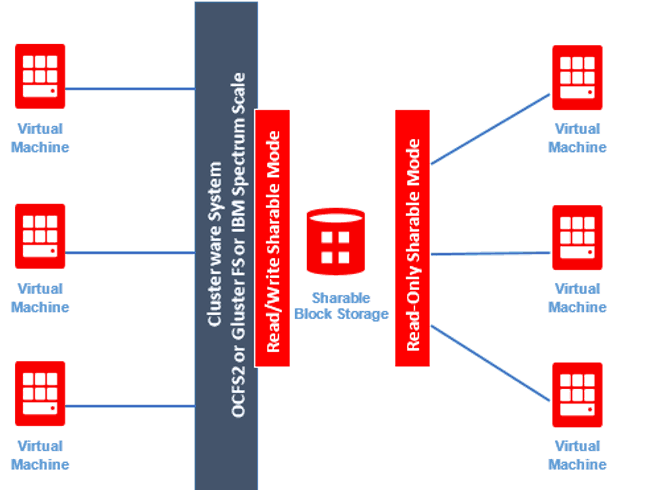
Points to be noted here:
- Available for DBCS since May 2017 and now it is available to the public.
- Default attachment from Compute is non-shareable and exclusive read/write.
- Two options introduced Read/Write Sharable and Read-only Sharable.
Sharable Block Volume
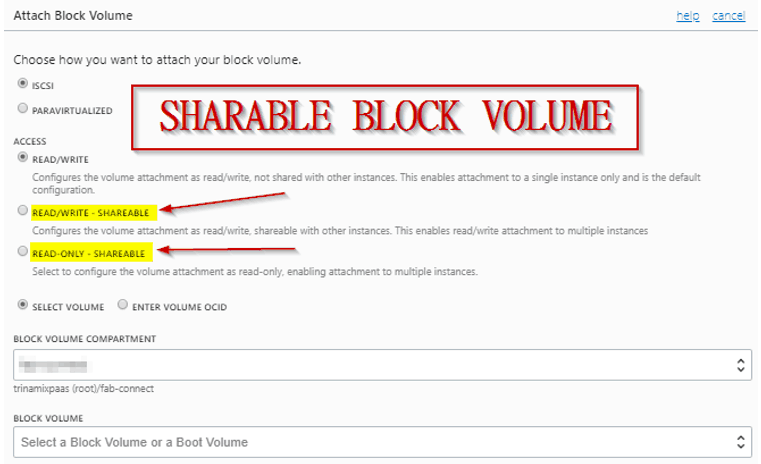
- Read-only attachment is available in sharable mode to multiple instances.
- No need for concurrency access control or cluster-ware solution for Read-only sharable Block Volume across multiple readers.
- Volume groups, Disk-to-Disk Clone, automated backups are available for Shared Block Volumes.
- Available in all regions via OCI Console, CLI, SDK, and Terraform.
- Other vendors provide only Read-only Block Volumes but have a limitation on Read-Write shareable attach.
Possible Use Cases
With the Shared Block Volume (Read-Write of Read-Only attach) can be useful in various deployments and designs. I’m listing a few of them:
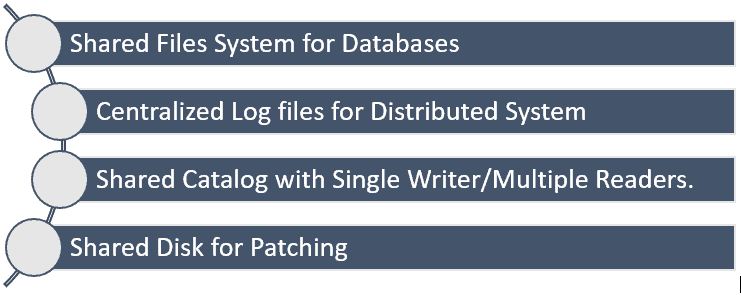
I hope you find this blog post useful in understanding the latest enhancement on block volume and its several use cases.
Related/Further Readings
- Oracle Cloud Infrastructure (OCI) | Storage Object, Block | File Storage, Data Transfer Service|
- Object Storage Service in Oracle Cloud Infrastructure (OCI)
- FREE Guide to Register for Oracle Cloud Trial Account
Begin Your Cloud Journey
Begin your journey towards becoming a Certified Oracle Cloud Infrastructure Architect and earning a lot more in 2022 by joining our FREE CLASS. You will also know more about the Roles and Responsibilities, Job opportunities for OCI Architects in the market, and what to study Including Hands-On labs you must perform to clear the Oracle Cloud Architect Associate Certification (OCI) certification exam by registering for our FREE Masterclass.
Click on the below image to Register Our FREE Class on Master Oracle Cloud (OCI) and Get a Higher Paying Job!

FREE Community
Click on the below image to join our FREE Telegram Group.


![Microsoft Agentic AI Business Solutions Architect [AB-100] | K21 Academy](https://test.k21academy.com/wp-content/uploads/2025/11/Microsoft-Agentic-AI-Business-Solutions-Architect-AB-100-Exam-Overview1.png)


