



This post is Part 4 from my FREE 5 Part Video Series On Networking in Oracle’s Gen 2 Cloud for beginners in which I have covered OCI Load Balancer (Public & Private) in Oracle Cloud Infrastructure & steps to create & test Public Load Balancer in OCI.
If you haven’t watched part 3 or completed task given in the third video, then I suggest you to first check the Part 3, where I have covered Oracle Cloud: Create VCN, Subnet, Firewall (Security List), IGW, DRG: Step By Step
Overview Of Load Balancer In Oracle Cloud (OCI)
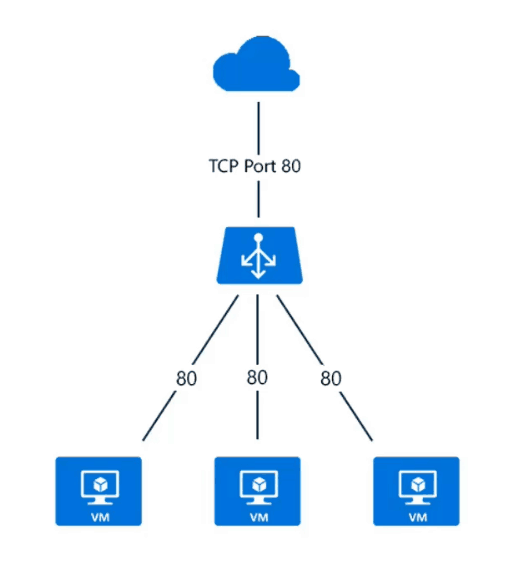
Load Balancer provides automated traffic distribution from one entry point to multiple servers in VCN or Load balancer automatically distributes traffic to list healthy backend servers based on
- Health Check Policy
- Load Balancing Policy
Where Health Check Policy is a test to confirm the availability of backend servers & A load balancing policy tells the load balancer how to distribute incoming traffic to the backend servers.
Check out: our blog on Oracle Security Zones in OCI
Type Of Load Balancer In Oracle Cloud (OCI)
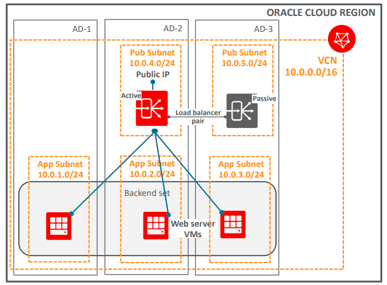
1)Public Load Balancer
- Traffic Originating from Public Internet
- Requires 2 subnets, each in a separate AD
- Subnet1 – Primary LB
- Subnet2 – Standby LB (in case of an outage at AD)
- Public IP attached to subnet1
- LB and IP switch to subnet2 in case of an outage
- Service treats the two LB subnets as equivalent and you cannot denote one as “primary“
- Public LB provides Redundant/Highly Available in a Region i.e. In two ADs
2)Private Load Balancer
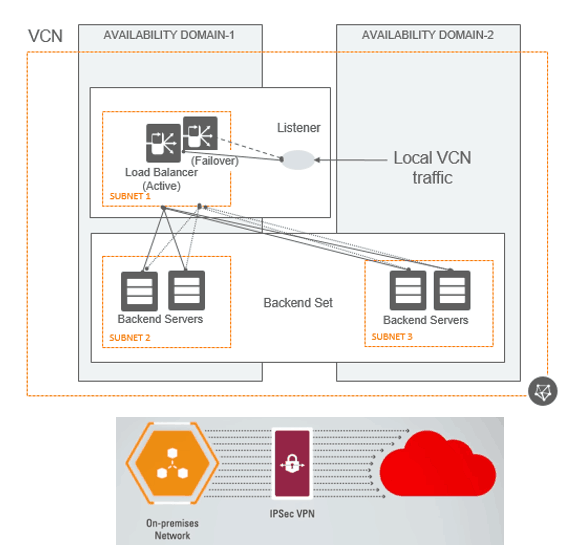
- Traffic Originating from with-in OCI or On-Premise connected using VPN or FastConnect
- The primary and standby load balancers each require a Private IP address from that subnet
- Private IP assigned as per Subnet to which AD belongs
- Private LB provides redundancy (Highly Available) within Availability Domain (AD)
- No HA in case of AD outage
A glance of Next Video!
In my next video, I’ll be covering ORACLE EBS (R12) High Availability & Disaster Recovery ON GEN 2 CLOUD (OCI), even if you are not an EBS Consultant, you can use this logic to deploy PeopleSoft, JD Edwards or any third party application in Oracle Cloud Infrastructure (Gen2 Cloud).
Quiz Time!!
Q)When deploying a highly available, Internet-facing, 2-tier web application on Oracle Cloud Infrastructure (OCI), which design option would you use?
- Deploy all web servers into one Availability Domain and behind a public load balancer, and deploy two single-node OCI database systems in the same Availability Domain with Data Guard enabled.
- Deploy all web servers into multiple Availability Domains and behind a public load balancer, and deploy two single-node OCI database systems across two Availability Domains with Data Guard enabled.
- Deploy all web servers into multiple Availability Domains and behind a private load balancer, and deploy two single-node OCI database systems across two Availability Domains with Data Guard enabled.
- Deploy all web servers into one Availability Domain, and deploy a single-node OCI database system into a different Availability Domain.
Leave your answer in the comment and I’ll be discussing the answer in the last video of FREE 5 Part Video Series On Networking in Oracle’s Gen 2 Cloud
Action Plan For You
- An assumption, you already have VCN, Subnets, Security List as covered in previous Video ( If not watch it at k21academy.com/1z093215 )
- Create two machines for Apps Tier Server assume running on port 8000, these will be created as backend or origin servers and will be added as part of backend set
- Create a Public Load Balancer
- Add backend Server to Backend Set
- Create HTTP Listener for Load Balancer
- Allow Load Balancer Listener Port via Security List for Internet
- Test Connection from the Internet
Do you want to take your career to the next level by becoming an Oracle Certified Cloud Architect even if you are a beginner?
Related/References
- [Q/A] Oracle Cloud Infrastructure Architect Training Day 2: IAM (Compartments, Policies, Users, Groups)
- Network Security Groups (NSGs) Vs. Security List (SL): When to use What?
- How To Increase Service Limit in Oracle Cloud (OCI)
- How To Create Always FREE Services in Oracle Cloud
- Oracle Cloud Infrastructure (OCI): Unable To Create a Policy Under a Compartment
- [Q/A] Oracle Cloud Infrastructure Architect Training Day 3: Networking (VCN, Subnets, Gateways, Route Tables, Security List)
Begin Your Cloud Journey
Begin your journey towards becoming an Oracle Cloud Expert and earn a lot more in 2024 by joining our FREE CLASS. You will also know more about the Roles and Responsibilities, Job opportunities for OCI Architects, Admins in the market, and what to study Including Hands-On labs you must perform to get the Higher Paying jobs.
Click on the below image to Register for Our FREE Class on MASTERING ORACLE CLOUD FOR DBAs, APPs DBAs, ARCHITECTS & SYS ADMINS


![Microsoft Agentic AI Business Solutions Architect [AB-100] | K21 Academy](https://test.k21academy.com/wp-content/uploads/2025/11/Microsoft-Agentic-AI-Business-Solutions-Architect-AB-100-Exam-Overview1.png)


