




This post covers how to get Compute Classic Services on your free Oracle Cloud Account. If you are new to the cloud, then I would suggest you check our previous blog on Cloud Service Model (SaaS, PaaS, IaaS)
Note: OCI (Compute )is part of the IaaS Service model (the other 2 Cloud Service models are SaaS & PaaS), where OCI is re-branding of Bare Metal Cloud Service (BMCS).
Another offering in IaaS from Oracle is OCI-Classic (or OCI-C) and to find the difference between two and when to use what, Check our previous post on OCI vs OCI-C here
Things Good To Know About Compute Classic
Compute Classic is an Infrastructure-as-a-Service (OCI-C) solution that provides on-demand, scalable compute resources—virtual machines with the required networking and storage resources—in the public cloud.
Compute Classic if of two types compute Classic & Dedicated Compute
- Dedicated Compute Classic: With this offering, you get a compute environment (called a site) that’s isolated at the hardware level. Your virtual machines (called instances) run on hardware that’s dedicated to you. You enjoy complete network isolation from other tenants. You can choose Oracle’s enterprise-grade x86 servers.
- Compute Classic: In this offering, which is priced lower than Dedicated Compute Classic, your instances run on hardware that’s shared with other tenants.
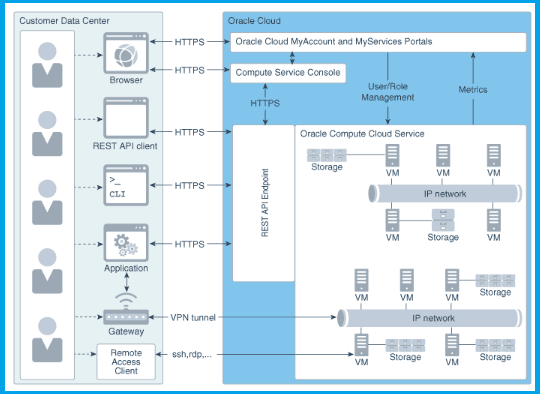
As of December 2018, Oracle has removed Compute Classic services from EMEA & North America Region, to know more which services in which region in Oracle Cloud Check Here
Note: While creating Oracle free cloud account as of Dec 2018 you can only select only one of two regions North America and EMEA, wherein you can later subscribe to other regions from the console
Steps to enable Compute Classic Services to your Oracle Cloud Account
1.Log into Oracle Cloud Account
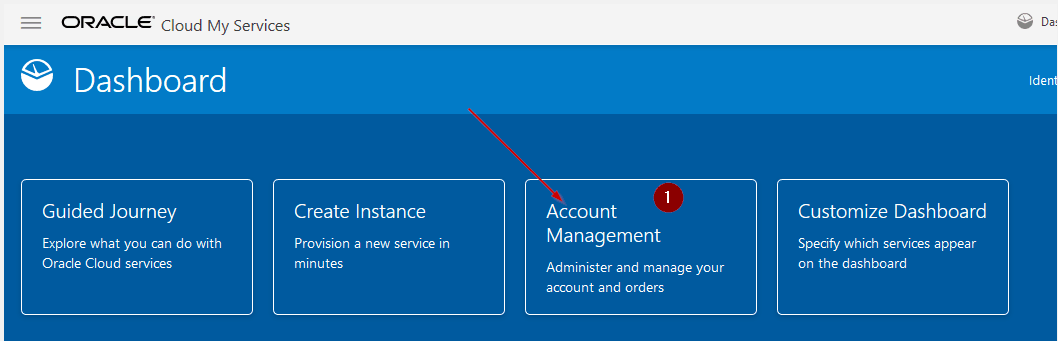
2. Click on Account Management
Check Out: Our blog post on EBS Cloud Manager OCI. Click here
3. Under Account Management Click on Hamburger Menu & Select Manage Data Region


Also Read: Our blog post on Oracle Database 18c. Click here
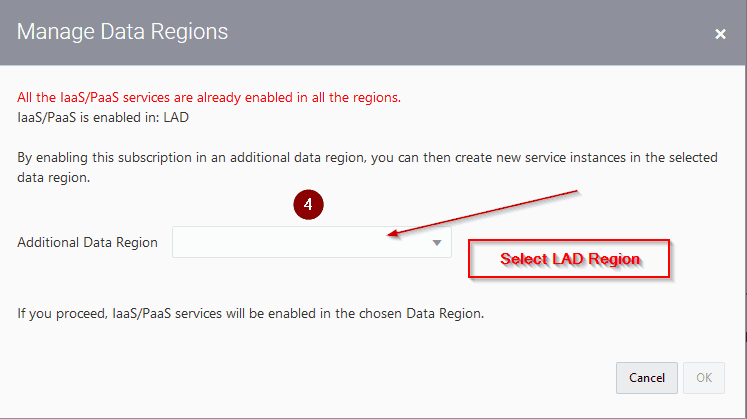
4. Under Manage Data Regions Choose London Region (LAD), the reason is that as of Dec 2018 all the classic services are available in London Region, to know more on what services available on what region check here
Wait for 45 mins to 1 Hour, you receive a mail from Oracle confirming that region has been subscribed and along with you all get a temporary password for that region, which you have to change
Check Out: Our blog post on EBS R12 Database Upgrade. Click here
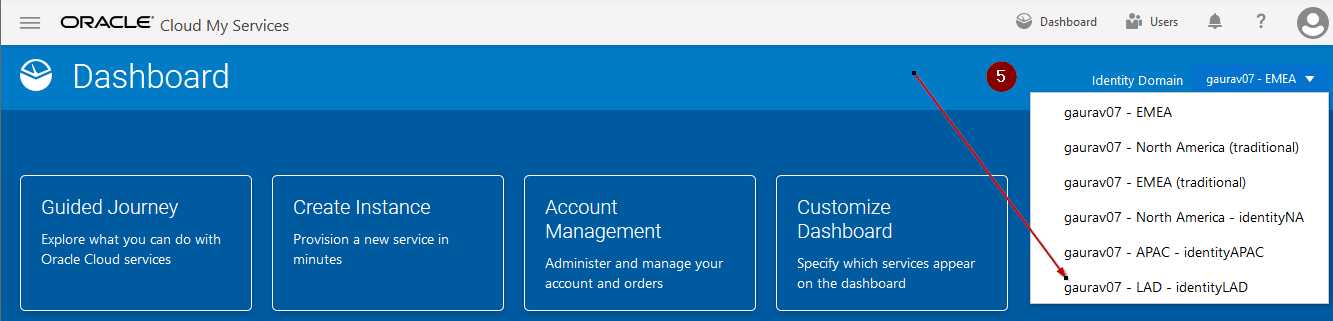
5. Login to the account and change region as below
Check Out: How to Migrate EBS to Oracle Cloud. Click here
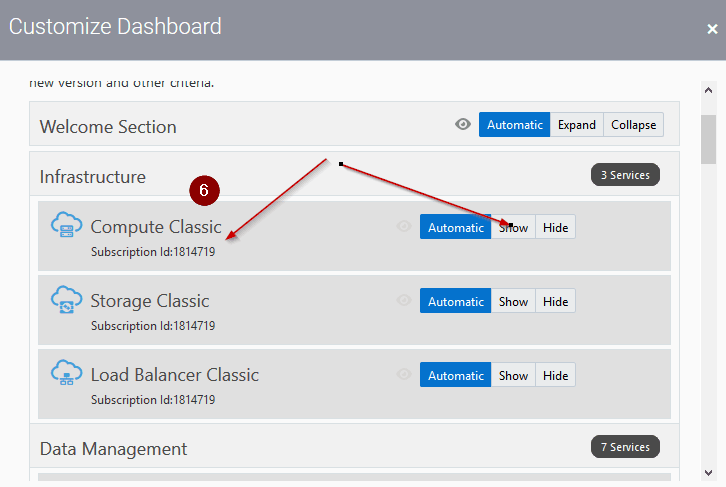
6. You should be able to see Compute Classic and you can start using Services.
Read More: About Oracle EBS R12 On Cloud. Click here
Note: This is one of the workarounds to get compute classic on free trial account, however in future you might not see classic services in all the region, as Oracle might remove it from all the regions.
This post is from our Course “Build, Manage & Migrate (Lift & Shift) EBS (R12) on Cloud Expert” where we are using compute classic to build & manage EBS on Cloud
Related/Further Readings
If you are just a beginner to Oracle cloud, then check our below posts to start your journey:
- Oracle EBS (R12) on Cloud: Architects Perspective: What and Why?
- [Video] Oracle EBS (R12) On Cloud Deployment Architecture
- Cloud Service Models (SaaS | PaaS | IaaS )
- Amazon AWS or Oracle Cloud (Confused ?): Right Choice for DBA’s
- Role of Oracle Apps DBA in Cloud
- EBS on Cloud Advanced Training
- Oracle EBS(R12) on Cloud for Apps DBAs & Architects Training: Step By Step Activity Guides/Hands-On Lab Exercise
Next Task For You
Join our FREE Masterclass on Build, manage & Migrate EBS R12 to Cloud For Beginners. Click on the image below to register for FREE


![Microsoft Agentic AI Business Solutions Architect [AB-100] | K21 Academy](https://test.k21academy.com/wp-content/uploads/2025/11/Microsoft-Agentic-AI-Business-Solutions-Architect-AB-100-Exam-Overview1.png)