



This post covers the steps to increase the Service limit in Oracle Cloud (OCI).
Initially, when you create a free trial account on Oracle Cloud, there is a limitation of resources (Compute, Database, Load Balancer, etc.) which means you cannot create resources beyond their limitation and you will get the “Service error: LimitExceeded” error after the service limit is reached.
In case you are using POC or a Cloud Account for learning, and don’t want to upgrade your trial account to a paid one to increase the service limit, there used to be an option in your console where you can ask Oracle to increase the service limit but now you can’t increase service limit in Trial account.
Note: We can no longer increase service limits on Oracle Cloud Trial accounts
If you haven’t yet registered for a FREE Oracle Trial account, Download our Step-By-Step Guide to create one.
How To Increase the Service limit?
A request to increase your service limits can be submitted within the Console. If a resource has to be created for which the limit has been met, a prompt will be shown to submit a limit increase request. Additionally, you can launch the request from the service limits page any time by clicking the link under the Help menu.
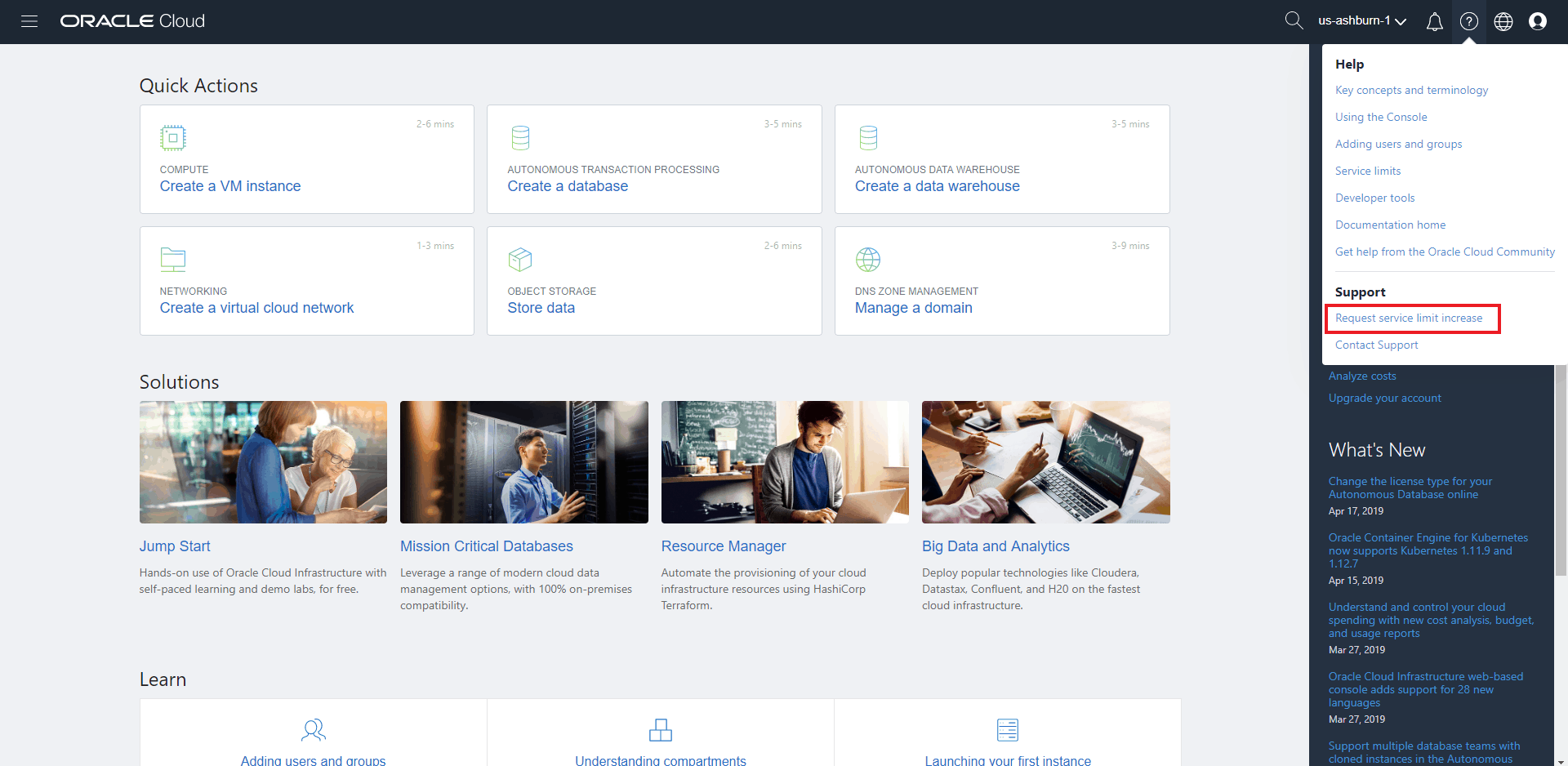
1. Click on the Help menu, under Support and click Request service limit increase.
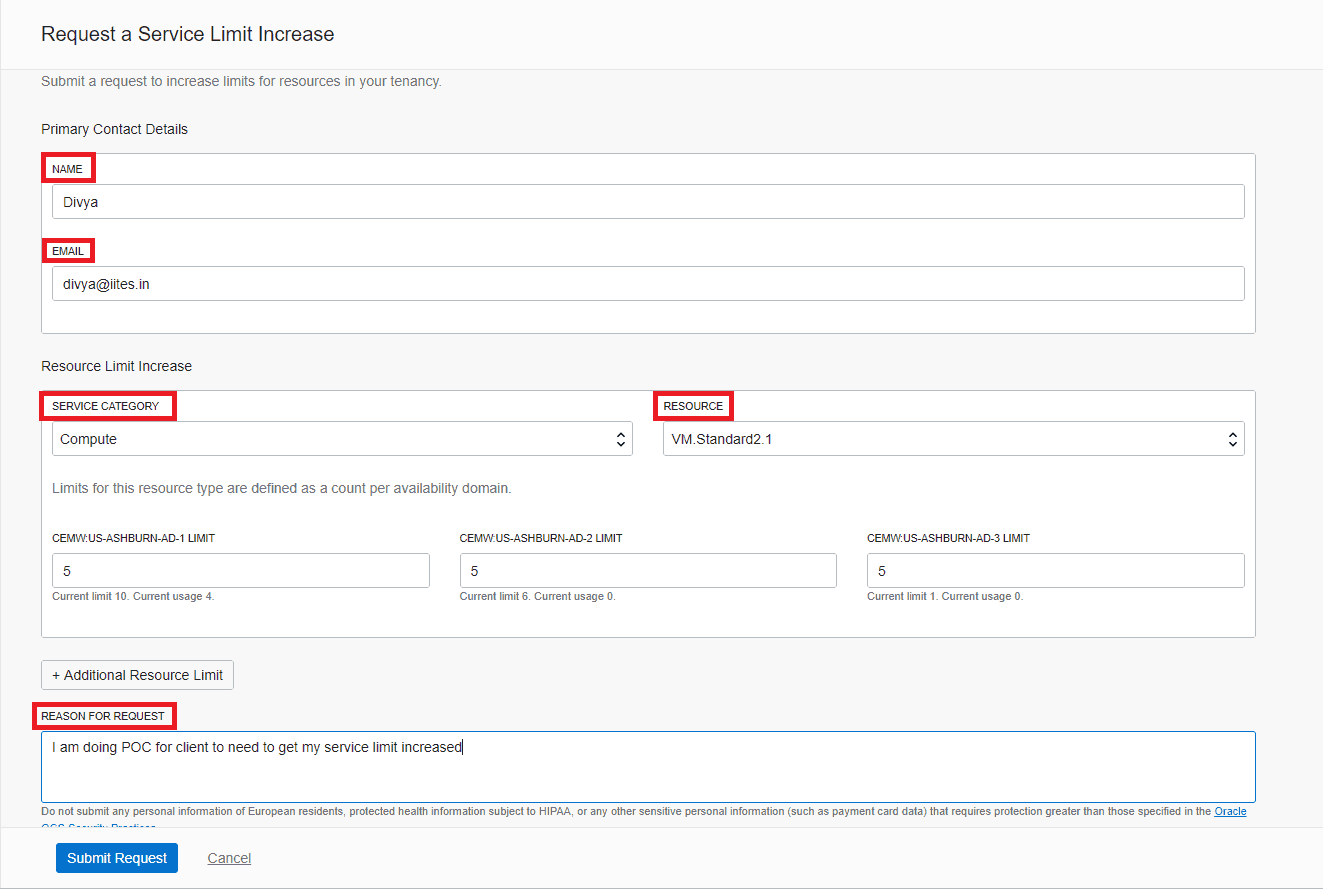
2.Enter the following details:
- In the Primary Contact details fields, enter your name and email address of the person making the request. A confirmation mail will be sent to the mentioned email address.
- In the Service Category field, select a suitable category for your request.
- In the Resource field, select an appropriate resource.
- Depending on the resource you select, additional fields might display more specific information.
- In the Reason for Request field, specify a reason for your request. In case the request is urgent or unusual, please provide the details here.
3. Click on Submit Request.
After you click on Submit Request, the request is reviewed. If your request is processed, a confirmation email is sent to the address provided in the primary contact details.
Stay tuned for my upcoming blog where I will discuss the topics related to Oracle Cloud. Feel free to comment if you have any doubts.
Related/References
- Download the Step-By-Step Activity Guide to Register for an Oracle Cloud Trial Account.
- Oracle Cloud Infrastructure (OCI) Architect Live Training.
- Oracle Cloud Infrastructure Architect Certification: Step-By-Step Activity Guides
- Service Limits in OCI
Begin Your Cloud Journey
Begin your journey towards becoming an Oracle Cloud Expert and earn a lot more in 2024 by joining our FREE CLASS. You will also know more about the Roles and Responsibilities, Job opportunities for OCI Architects, Admins in the market, and what to study Including Hands-On labs you must perform to get the Higher Paying jobs.
Click on the below image to Register for Our FREE Class on MASTERING ORACLE CLOUD FOR DBAs, APPs DBAs, ARCHITECTS & SYS ADMINS


![Microsoft Agentic AI Business Solutions Architect [AB-100] | K21 Academy](https://test.k21academy.com/wp-content/uploads/2025/11/Microsoft-Agentic-AI-Business-Solutions-Architect-AB-100-Exam-Overview1.png)


