





In the dynamic landscape of modern business, seamless integration between various applications has become paramount. Oracle Integration Cloud (OIC) stands as a robust solution, allowing organizations to weave a network of interconnected systems. However, ensuring the right individuals have appropriate access within the OIC instance is crucial for operational efficiency and data security.
In This blog we will cover
- Understanding OIC Instance Access
- Things Good to Know
- Steps involved in granting OIC instance access To a User
- Granting Instance Access and Role to User
- Best Practices for Access Management in OIC Integration 3
- Conclusion
- Frequently Asked Questions
Understanding OIC Instance Access
Oracle Integration Cloud provides a range of functionalities that cater to different aspects of integration, necessitating varied roles and access levels. Granting access to the OIC instance involves defining roles, permissions, and access controls to enable users to perform their designated tasks effectively.
Role-Based Access Control (RBAC)
RBAC forms the backbone of user access management within OIC Integration 3. This method involves mapping specific roles to different tasks or areas within the integration platform.
Things Good to Know
- Oracle recently made new features and capabilities available for the Oracle Cloud Infrastructure (OCI) Identity Domain service.
- As part of the upgraded service, Oracle migrated the features and functionality of the existing Oracle Identity Cloud Service (IDCS) into Identity Domain.
- Identity domains are similar to other OCI resources. As an administrator, you can create, move, tag, and delete an identity domain. OCI access policies can be written to allow users in a specific domain to access resources in other domains. You can also assign user accounts to predefined administrator roles to delegate administrative responsibilities within a domain.
- Previous it was IDCS and now it is changed to Identity Domain.
- Identity Domain is where we create users, groups, and apply roles for users.
Steps involved in granting OIC instance access To a User
Defining User Roles
Typical roles include Integration Developer, Integration Administrator, Security Officer, Support Engineer, and more. Each role carries distinct privileges and access rights aligned with the tasks they perform.
- Service Administrator: Super user who can manage and administer all features.
- Service Developer: A user with this role can develop the artifacts like Integration, Processes, etc.
- Service Monitor: A user with this role will be able to monitor the integrations, processes etc.
- Service Deployer: This role is not specific to the Integration feature.
- Service User: A user with this role can view staged and published artifacts.
- Service Invoker: A user assigned to this role can invoke integrations only.
- Service Viewer: A user assigned to this role can view the details of the integration only.
Assigning Permissions
Once roles are established, permissions need to be configured. Permissions outline what actions each role can perform within the OIC instance. For instance, an Integration Developer might have permission to create, modify, or delete integrations, while an Integration Administrator might oversee user management and system monitoring.
Role Assignment
Assign users to their respective roles based on their job functions. This step ensures that individuals have access aligned with their responsibilities, preventing unnecessary access to sensitive functionalities.
To Know more : Oracle Integration Roles
Granting Instance Access and Role to User
- Go to Domain and Create a User
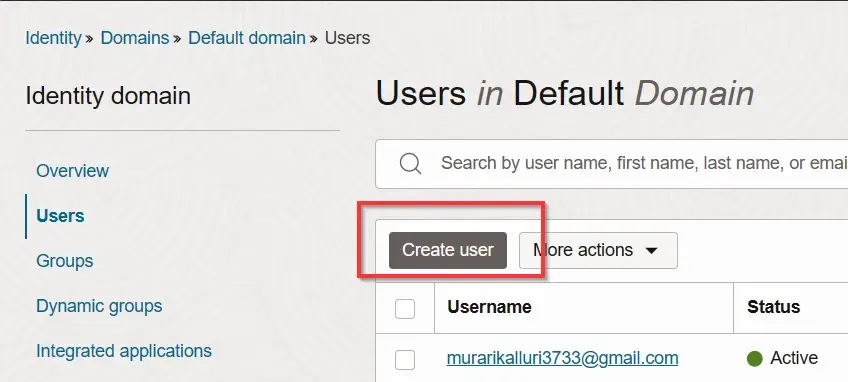
- Now enter first name, last name and also the email id and click on Next. The user will be created successfully.
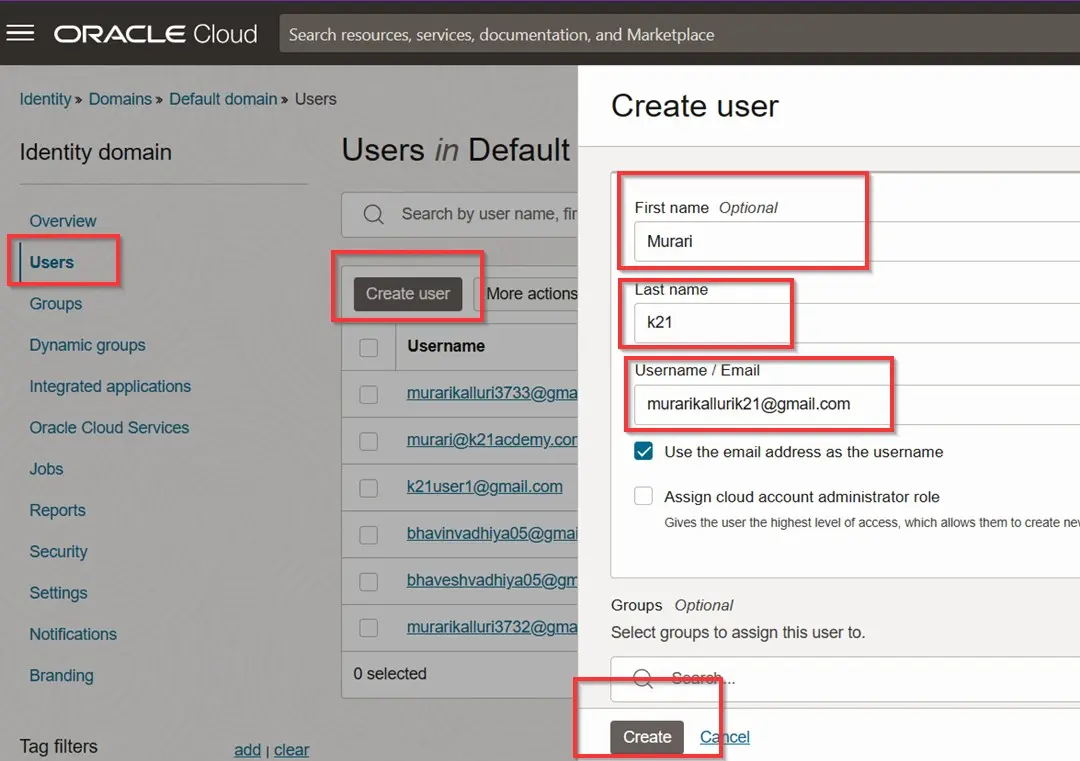
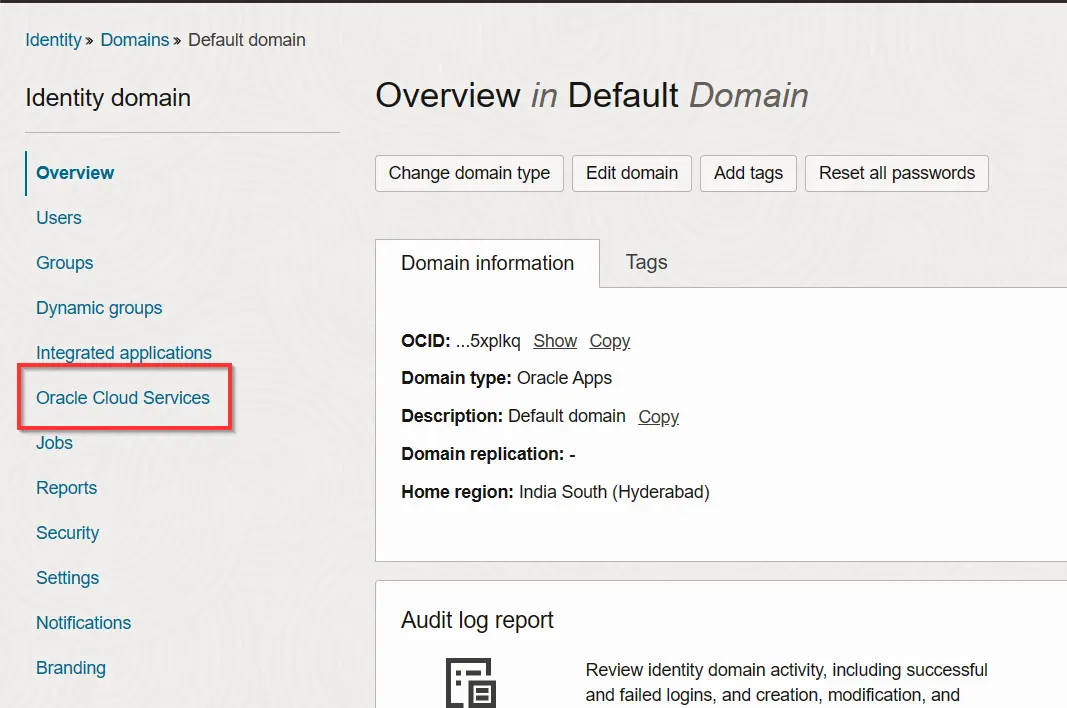
- Go to domain where you have created your user. And click on oracle cloud services.
- Search for the instance you have created and select and click on the instance.
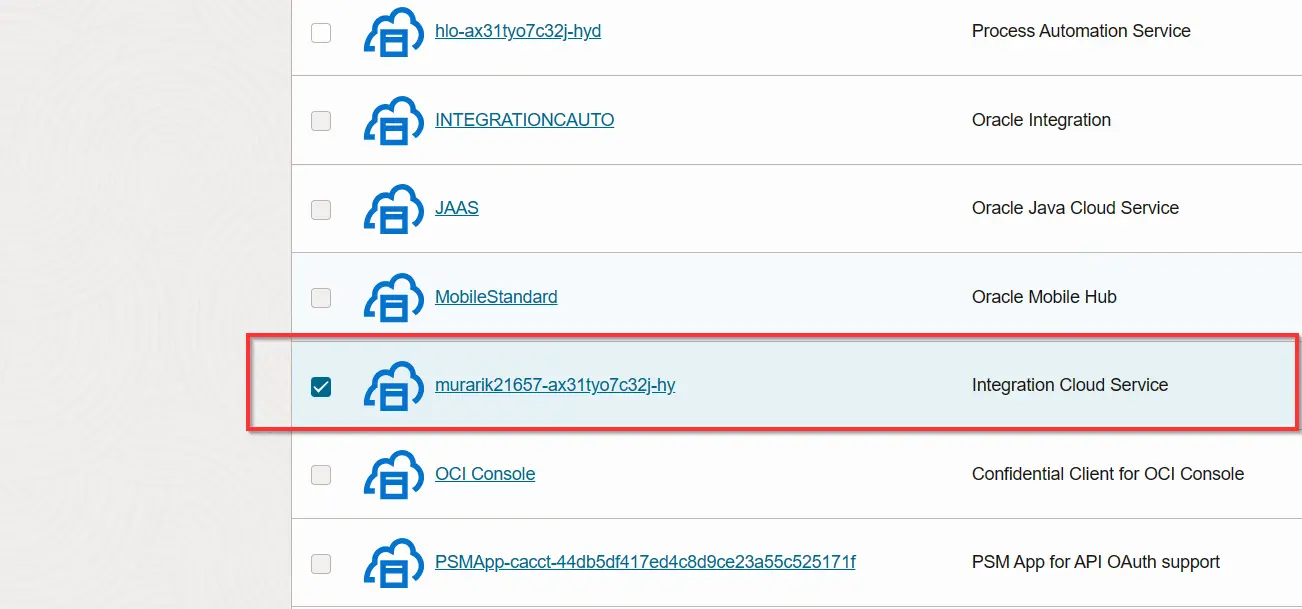
- Click on the instance you created and you will go to interface like in the below image.
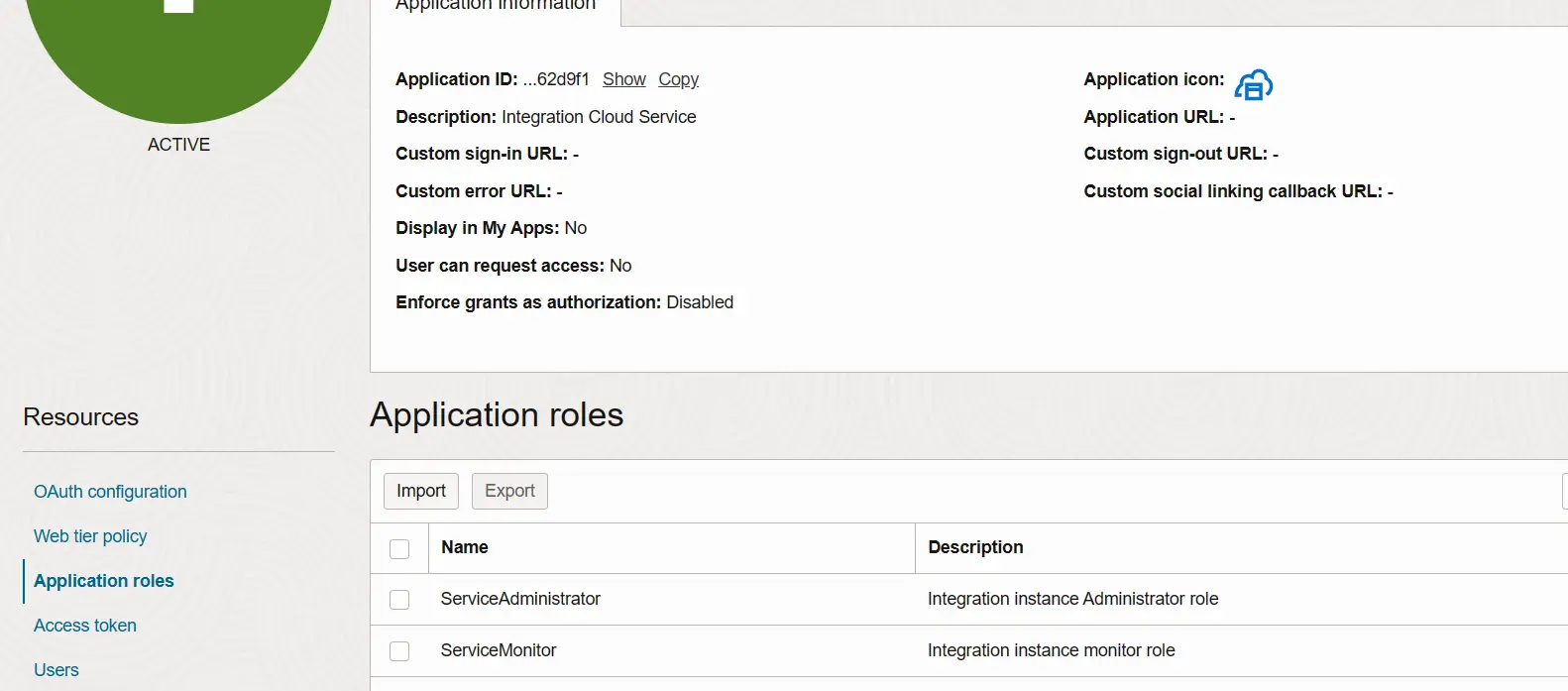
- Now we have to provide instance access to user whom we can to give access to our created instance.
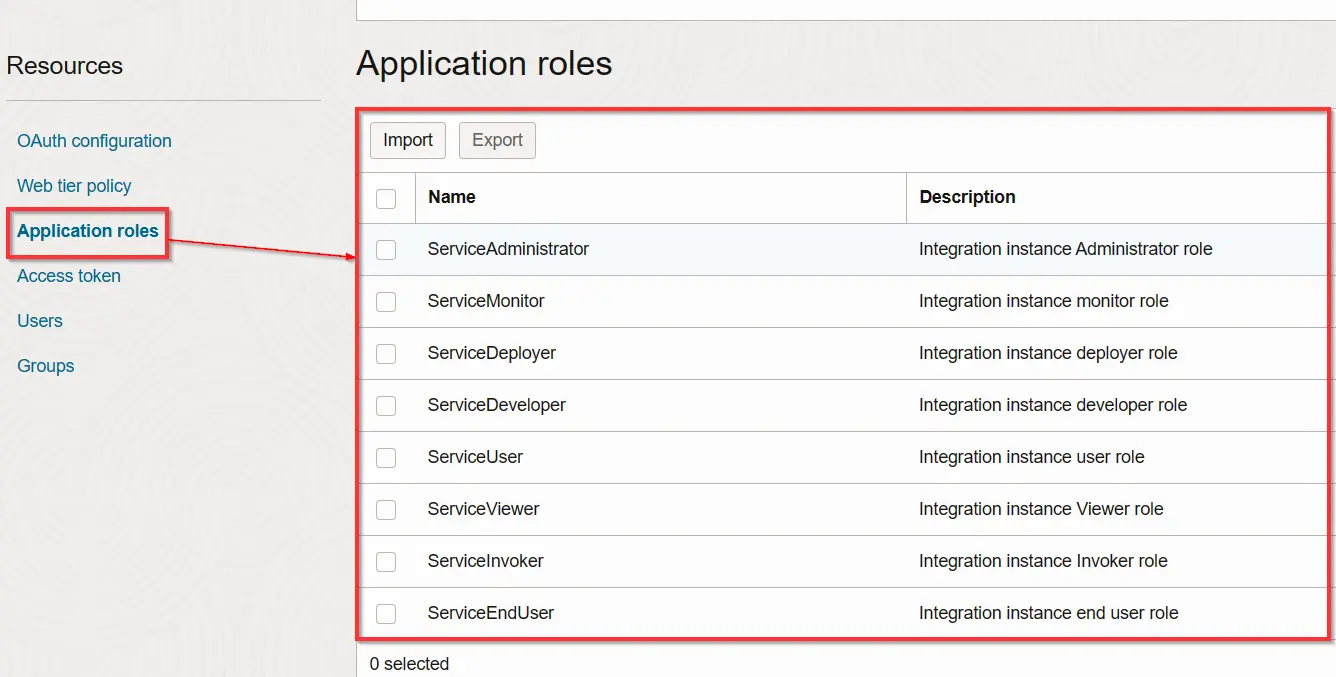
- Provide service Administrator role to the user so that he can access instance.
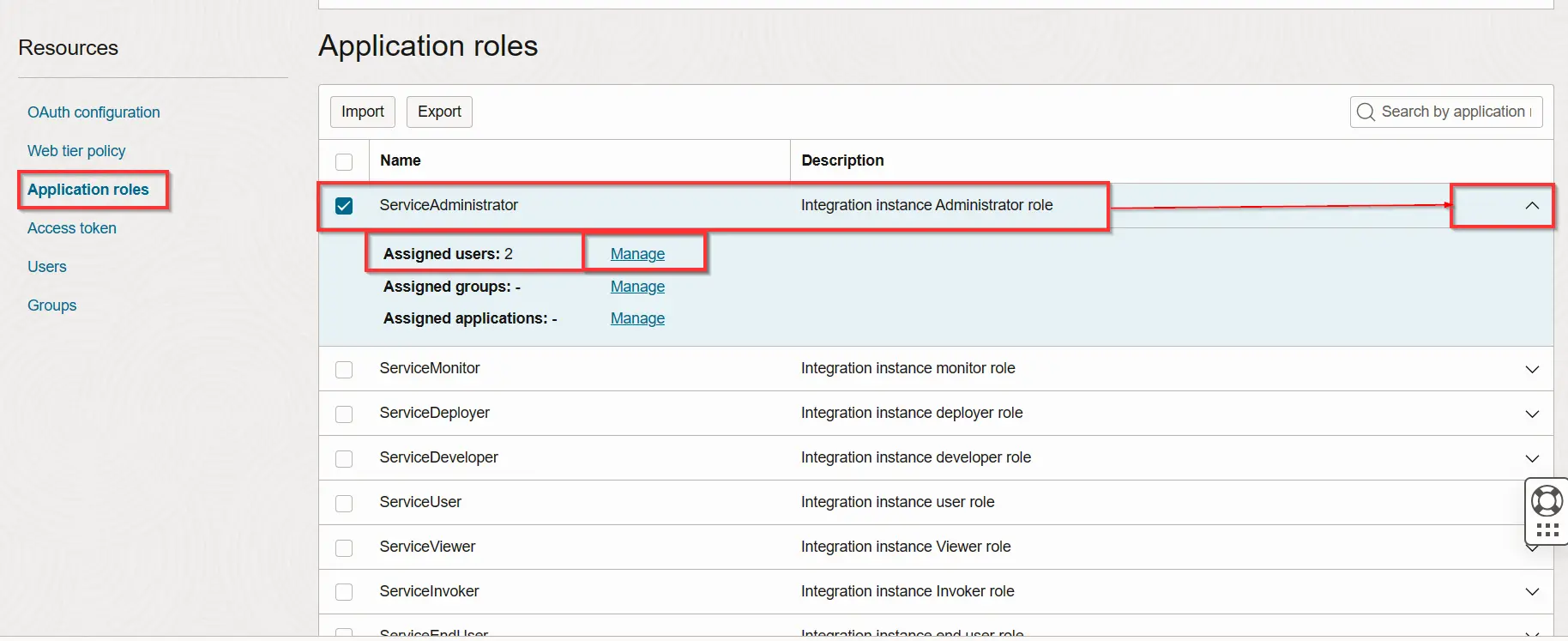
- Click on Service Administrator and click on the arrow right and it will display assigned user’s groups and applications.
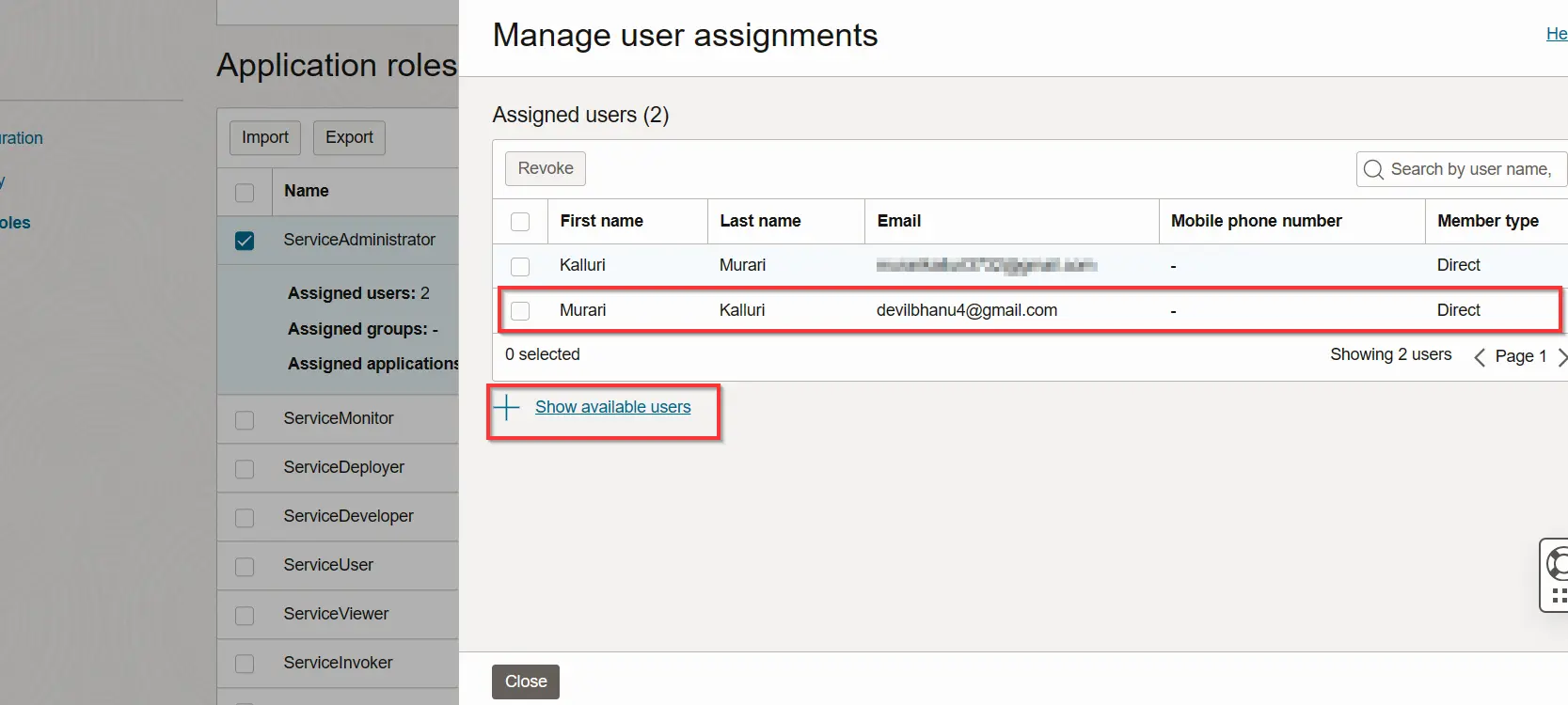
- A user panel will be displayed click on show available users so that you can all the created users and select the user to whom you want to assign the role and give access.
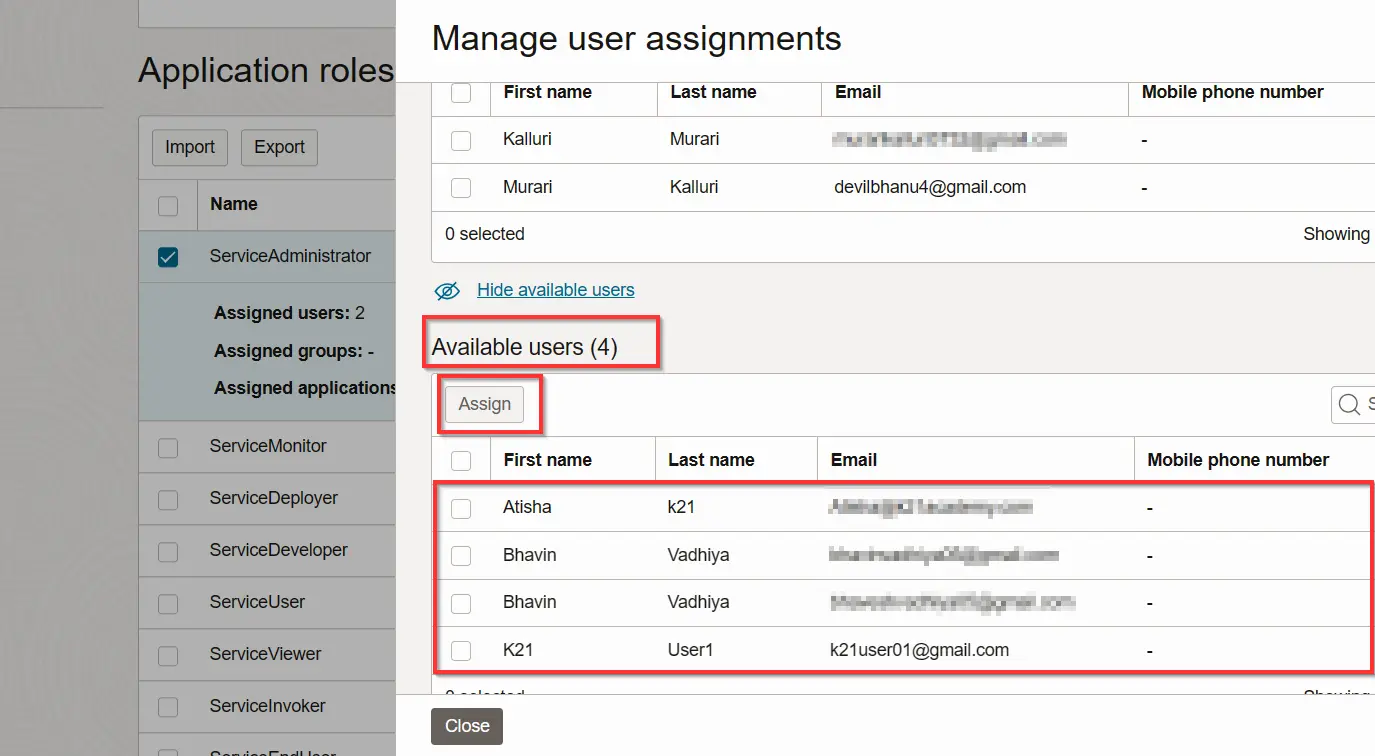
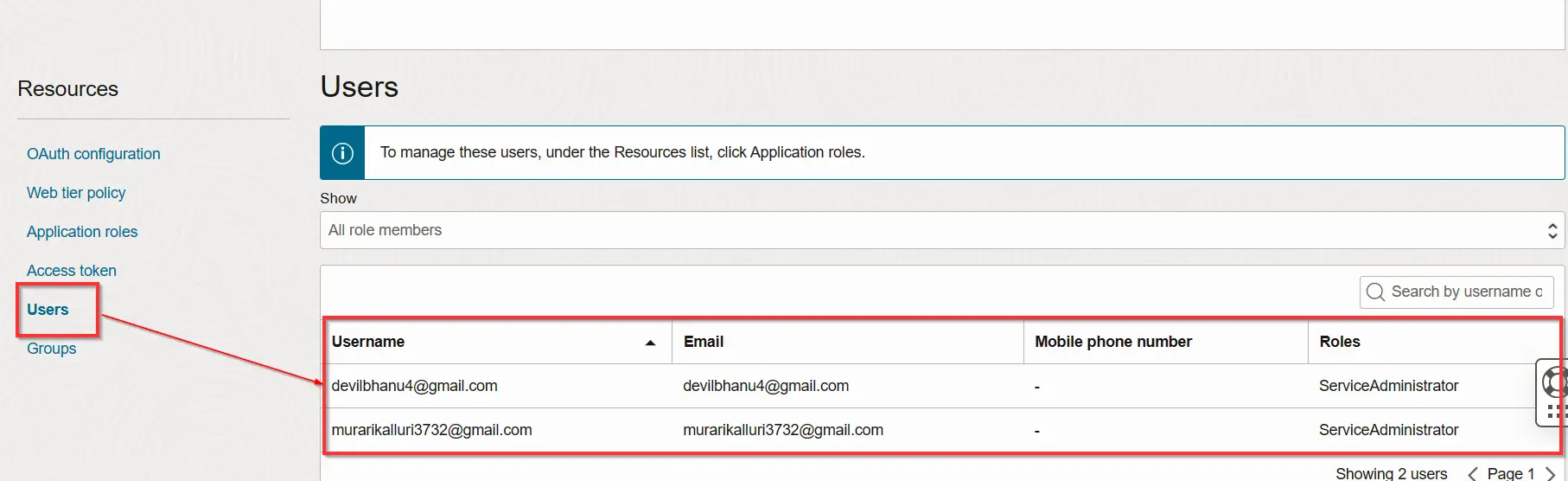
- We will see available users and we can select the user to whom we want assign and after selecting click on the assign and user will be will be assigned to the role.
Best Practices for Access Management in OIC Integration 3
- Least Privilege Principle: Granting users the minimum permissions required to perform their tasks. This mitigates the risk of unauthorized access or accidental misuse of privileges.
- Segregation of Duties: Avoid conflicts of interest or potential risks by ensuring that no single user possesses conflicting roles that could compromise security or compliance.
- Centralized Access Control: Implement a centralized access control mechanism to manage and monitor user access across the OIC instance. This centralized approach streamlines administration and enhances security oversight.
- Regular Audits and Monitoring: Conduct periodic audits to verify user access and monitor system logs for any anomalies or unauthorized activities.
Conclusion
Granting OIC instance access to users in Integration 3 involves a structured approach centered around role-based access control. By defining roles, assigning appropriate permissions, and regularly reviewing access, organizations can foster a secure and efficient environment for integrating their applications seamlessly. Effective access management not only ensures operational smoothness but also fortifies data integrity and confidentiality within the Oracle Integration Cloud ecosystem.
Frequently Asked Questions
What is the importance of granting access to an OIC instance?
Granting access to an OIC instance ensures that individuals within an organization have the necessary permissions to perform their designated tasks related to integration development, administration, monitoring, and security. Proper access management enhances operational efficiency and maintains data security within the integration platform.
How are user roles defined within OIC Integration 3?
Roles within OIC Integration 3 are defined based on the responsibilities and tasks of individuals using the platform. Typical roles include Integration Developer, Integration Administrator, Security Officer, Support Engineer, etc. Each role has distinct privileges and permissions aligned with their job functions.
Can access be customized for different users within an OIC instance?
Yes, access can be customized for different users based on their roles and responsibilities. Role-Based Access Control (RBAC) allows administrators to assign specific permissions to users or groups, ensuring that each user has access tailored to their tasks without unnecessary permissions.
What steps are involved in granting access to users in OIC Integration 3?
The process involves: Defining user roles based on job functions. Assigning permissions specifying what actions each role can perform. Assigning users to their respective roles. Regularly reviewing and updating roles and permissions as needed.
Can access permissions be changed or revoked?
Yes, access permissions can be modified or revoked by administrators. As job roles change or as part of security measures, permissions can be adjusted to align with the current responsibilities of users. Revoking access might be necessary when users change roles or leave the organization to prevent unauthorized access.
Related Links:
- To apply for 1z0-1042-23 Oracle cloud platform integration 2023 certified professional
- Step by Step guide to get a FREE Oracle Cloud account.
- Oracle Integration Cloud (OIC) For Beginners Overview
- Create Oracle Integration Cloud Instance: Step by Step
Next Task For You
Do you want to learn more about Oracle and confuse where to start or which certification is right for you? Then, click on the register now button below to register for a Free Masterclass on Oracle [1Z0-1042] Certified Cloud Integration Expert, which will help you better understand and choose the right path and clear the certification exam.

![Microsoft Agentic AI Business Solutions Architect [AB-100] | K21 Academy](https://test.k21academy.com/wp-content/uploads/2025/11/Microsoft-Agentic-AI-Business-Solutions-Architect-AB-100-Exam-Overview1.png)



