





This post covers Oracle Exadata Overview, Concepts, Architecture, including Migrating Database to the Engineered system (Exadata)
This post is for beginners as well as for experienced such as DBA’s who are just starting to learn Exadata and covers some of the very basic questions like What is Exadata, its Architecture, how to prepare the things before migrating database to the Engineered system (Exadata)
Note: You can also read our blog on Important feature of Exadata.
About Exadata
Exadata is a database appliance designed by Oracle that has the competency to provide support to a combination of database systems such as OLTP (On-line Transaction Processing) and OLAP (Online Analytical Processing), the transactional and analytical database systems respectively. Exadata offers its users an enhanced functionality relating to enterprise-class databases and their associated workloads.
Why Exadata?
The Oracle Exadata Database Machine is the World’s most secure database machine. It is engineered to be the top-performing and best available platform for running the Oracle Database. This simple and fast to implement machine protects and powers your most important database and is the perfect foundation for a consolidated database cloud
When To Use Exadata?
Oracle Exadata is best for customers who consider data warehousing and consolidation of the database. Enterprises targeting faster growth and striving to become more responsive to market fluctuations and client requirements must implement pioneering technologies like Oracle Exadata.
The Architecture Of Exadata Machine
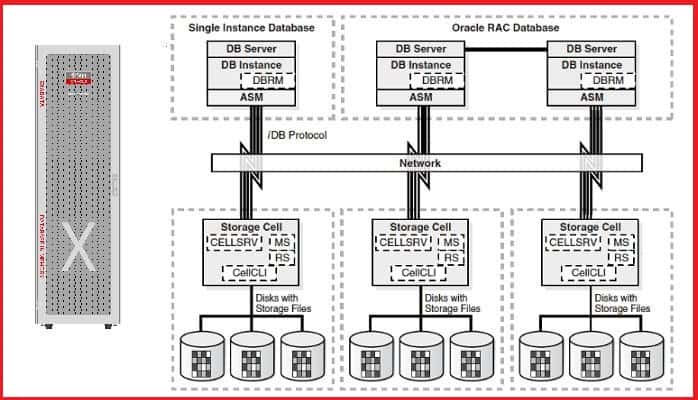
Component of Exadata Storage Server
It’s another storage device, which has CUP, Memory, Disks, network cards, an Operating System Oracle Linux and Most important past Exadata Storage Server Software. There are mainly three services which run on cell server for the processing which are:
CellSRV (Cell Service): This is the primary component of Exadata Cell which provides all Exadata Storage services. This process communicates with the Database server for providing database blocks
MS (Management Server): MS service provides an interface to DBA for communicating or Managing Cell Server. CellCLI is the Command Line tool that Exadata DBA used for performing Exadata Administration services.
RS (Restart Server): This service is to make sure the functioning of the Exadata Server. RS monitors CellSRV and MS for liveliness and restarts them whenever required.
Also read: Difference between Oracle Exadata and oracle database appliance.
Four Main Features of Exadata Storage Server
1.Smart Flash Cache Intelligent Caching: Storage servers usually have two kinds of storage Hard disk and Flash Cache. Flash Cache is a fast storage device used to keep most frequently accessed data for faster access, whenever there is a requirement of a block it is first looked into Flash Cache and if available returned to the server without going to Hard disk for reading the block. This is a common feature in Storage servers.
2.Hybrid Columnar Compression (HCC): Compression is used for reducing storage consumption for large databases. In this technique, a logical unit called the Compression unit is used to store Hybrid columnar Compressed Rows. At the time of data loading Column values are detached from rows, grouped and then compressed. After compression, this is fit into the compression unit
3.Smart Scan Processing: In the Exadata storage server has got the intelligence to filter data at the storage level, rather than transferring it to the database server.
Exadata Smart Scan works filtering for the following kind of queries:
- Predicate Filter: In a query with where clause only blocks with satisfying where clause condition will only go to the database server, not the entire table.
- Column Filtering: Suppose in a select query like “select name, age from employee” is execute on DB server by DBA, then only columns name and age data will send to Database Server not all columns of tables.
- Join Processing: All join processing are done at Storage level itself, so only filtered data is sent to the DB server.
4. I/O Resource Management: In a traditional Database environment, If you have more than one database running on a Shared storage server. Large queries from one database can use more resources and cause a performance issue for other databases. Another case a batch job has started in one DB by a DBA which case performance trouble into OLTP Database.
Managing Exadata Machine
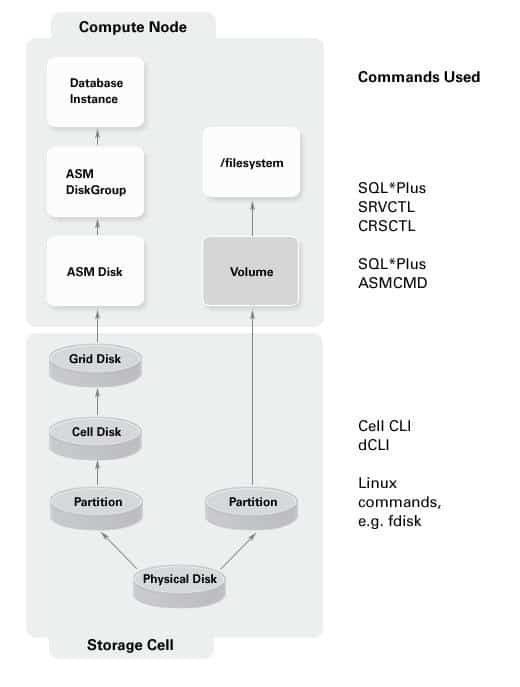
Some important utilities used in managing Exadata machine
CellCLI – Let’s move on to the next stack in the software: the Exadata Storage Server. To manage this, Oracle provides a command-line tool: CellCLI (Cell Command Line Interpreter). All the cell-related commands are entered through the CellCLI.
DCLI – The scope of the CellCLI command is the cell where it is run, not in other cells. Sometimes you may want to execute a command across multiple cells from one command prompt, e.g. shutting down multiple nodes. There is another command-line tool for that: DCLI.
SQL – Once the cell disks are made available to the database nodes, the rest of the work is similar to what happens in a typical Oracle RAC database, in the language you use every day: SQL. SQL*Plus is an interface many DBAs use. You can also use other interfaces such as Oracle SQL Developer. If you have Grid Control, there are lots of commands you don’t even need to remember; they will be GUI based.
ASMCMD – ASMCMD is the command-line interface for managing ASM resources like disk groups, backups, etc.
SRVCTL – SRVTCL is a command-line interface to manage Oracle Database 11.2 RAC Clusters. At the database level, most of the commands related to a cluster, e.g. starting/stopping cluster resources, checking for status, etc. can be done through this interface.
CRSCTL – CRSCTL is another tool to manage clusters. As of 11.2, the need to use this tool has dwindled to near zero. But there is at least one command in this category.
Migrating Database to Engineered systems like Exadata
Migration Preparation is Essential:
Prepare Source Database Prepare Exadata System:
Database upgrade to 11.2 ASM Configuration
Hardware upgrade Install latest versions
Drop unnecessary schema objects Review Exadata Critical Issues
Note: There are many ways to migrate to Exadata the “best” way depends on your Environment and goal.
References
For MOS 888828.1 (Exadata Database Machine and Exadata Storage Server Supported Versions), click here.
For MOS1270094.1 (Exadata Critical Issues), click here.
Related Post
- Important features of Exadata
- Oracle Exadata Cloud Service (ExaCS): Overview for Beginners
- Oracle Exadata Cloud Service(ExaCS) Architecture
- Exadata (ExaCs) DB System: Shared Database Homes
- Oracle Exadata Cloud Service(ExaCS) Storage Options
Join FREE Masterclass
In our DBA to Cloud DBA Training, we cover Exadata DB system, in which we cover how to administer Exadata system, How to patch Exadata system, How to backup & restore Exadata system, and how to migrate DB system, to know more about DBA to Cloud DBA Training by Registering for our FREE Masterclass.
Click the image below to Register Our FREE Masterclass!!

Join FREE Community [Oracle Cloud DBA]

![Microsoft Agentic AI Business Solutions Architect [AB-100] | K21 Academy](https://test.k21academy.com/wp-content/uploads/2025/11/Microsoft-Agentic-AI-Business-Solutions-Architect-AB-100-Exam-Overview1.png)



