





OCI is built on 5 pillars IAM, Networking, Compute, Storage, & OCI Database. In this post, we are going to cover the final pillar of OCI that is Database. It is the place in Oracle Cloud Infrastructure (OCI) to store, arrange, and manage data coming from various sources.
To know in detail about the remaining 4 pillars:
Oracle OCI Database
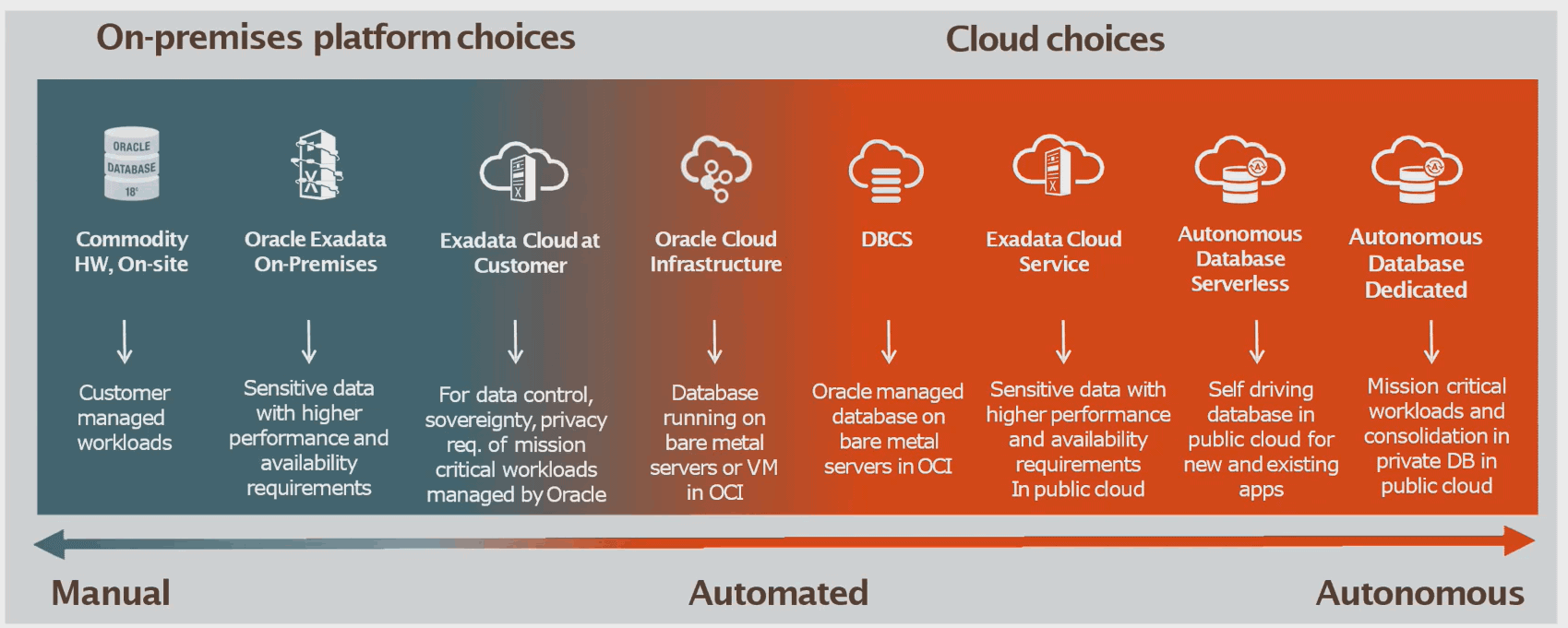
OCI provides two types of databases based on the involvement of the users in managing the databases.
1) Autonomous Database OCI (ADB):
There are two types of ADB, Autonomous Transaction Processing (ATP) and Autonomous Data Warehouse (ADW)
- To know more about Autonomous Databases click here
2) Co-Managed Databases: There are 3 types of co-managed Databases, VMDB, BMDB, and Exadata DB
- To know more about Co-managed databases in OCI click here
- Oracle Exadata Cloud Service (ExaCS): Overview for Beginners click here
- Oracle Cloud at Customers(C@C): Overview and Concept for Beginners click here
- Exadata Deployment Options: Cloud Service (ExaCS) vs Cloud at Customer (ExaCC) vs Exadata Machine click here
- To know about Exadata cloud service in detail click here
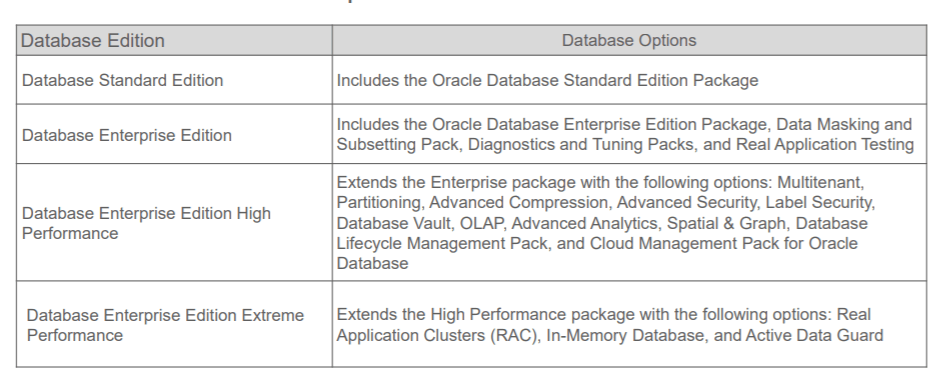
Database Editions
All 1- node RAC DB systems support the following Oracle Database editions:
- Standard Edition
- Enterprise Edition
- Enterprise Edition – High Performance
- Enterprise Edition – Extreme Performance (required for 2-node RAC DB systems)
To know more about Database Editions in detail, check here
Provisioning & Connecting
We can create a database in OCI using RestAPI, CLI, DBascli, & Console.
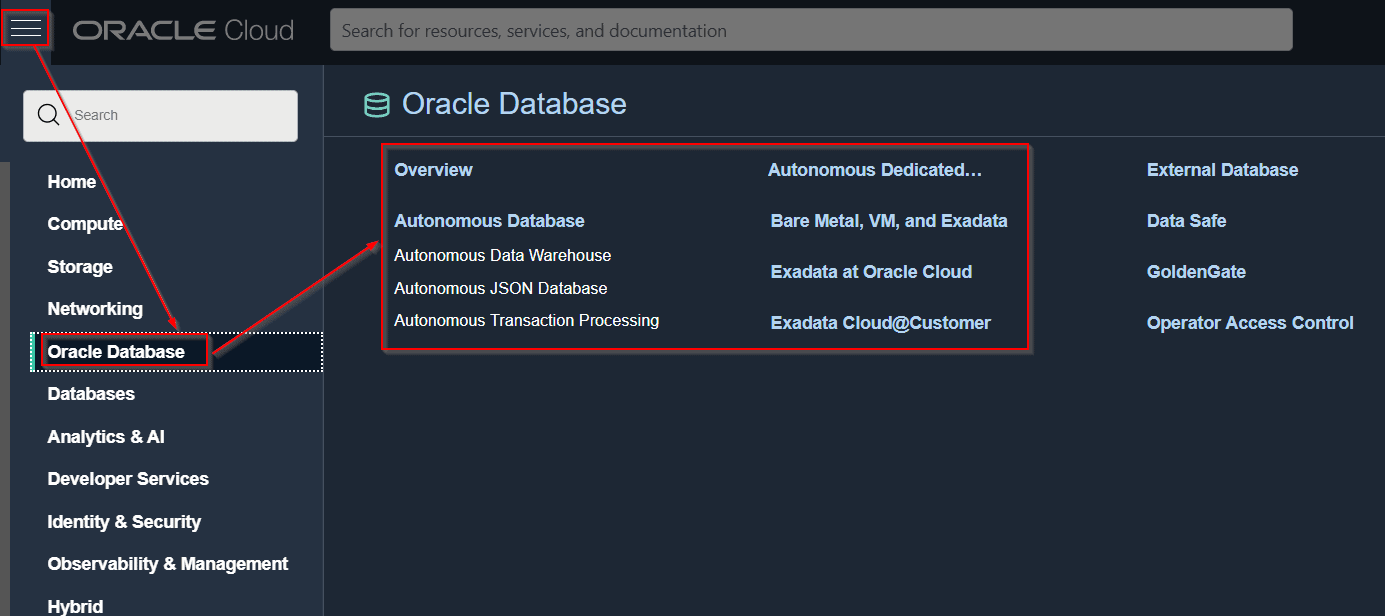 To know the steps to provision & connect to BM, VM & Exadata DB system click here
- [Video] Oracle Exadata Cloud Service (ExaCS) Networking click here
- To know the steps to provision an Autonomous DB system click here
- To know about the steps to connect to ADB created click here
If You haven’t registered for the free trial account yet, then you can register FREE using my step-by-step video & guide. Click here to download the guide
Administer Database On Cloud
Database on the Oracle cloud allows you to:
- Start/Stop Databases
- Scale Up CPU & Storage
- Cloning
- Managing Exadata DB System
To know more Administration of Database click here
Patching
Patching is done for fixing a bug and improving system performance.
The 4 things you should know about Patching.
- Database Patching
- Grid Infrastructure patching
- Cloud tooling patching
- Operating systems patches
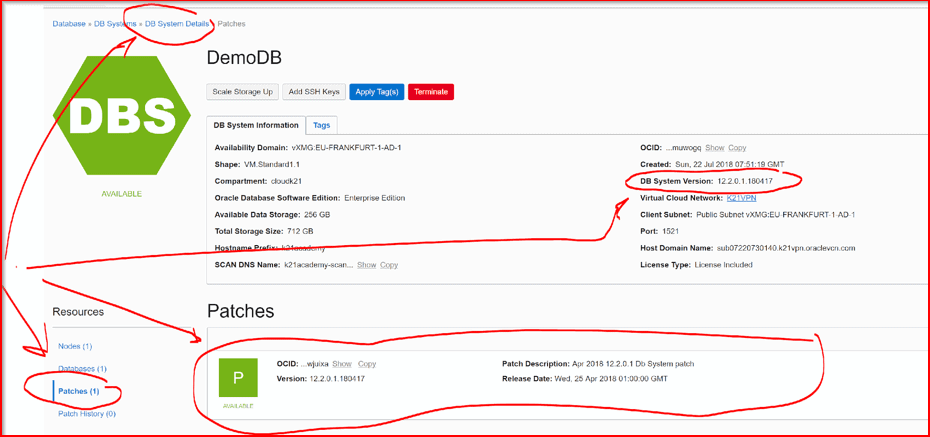
You have to apply patches to the User-Managed Databases i.e VM DB, BM DB, and Exadata Cloud Service.
Note: Patching in the Autonomous database is being taken care of by Oracle.
To know more about patching in databases Click here
Backup & Restore
There are two ways to take the backup of Databases. Backup is stored either in Object Storage or in Local NVMe Storage.
- Managed backup: Taken care by OCI
- Unmanaged backup: Backup is taken using RMAN, DBCLI, or backup_api
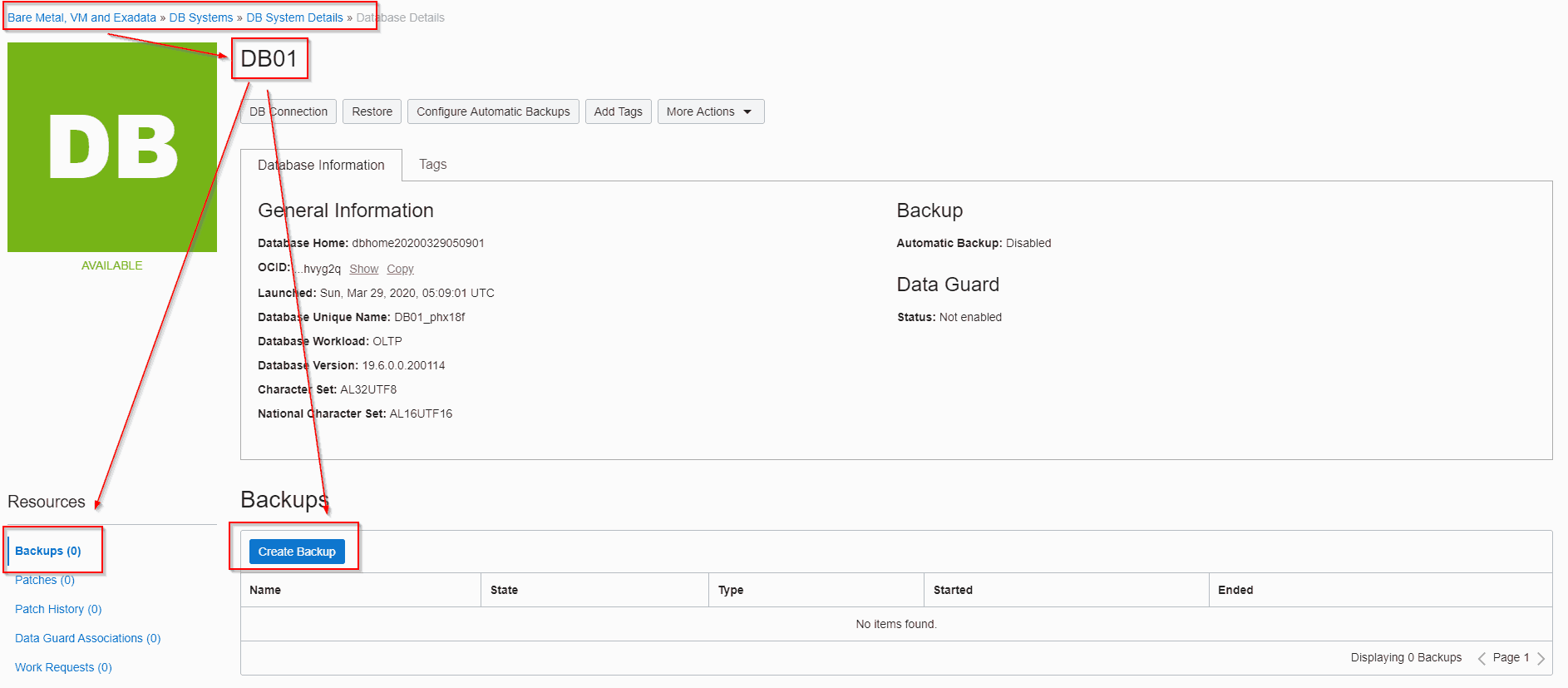
To know more about how to take Backup of the DB System Click here
Migration Of Databases
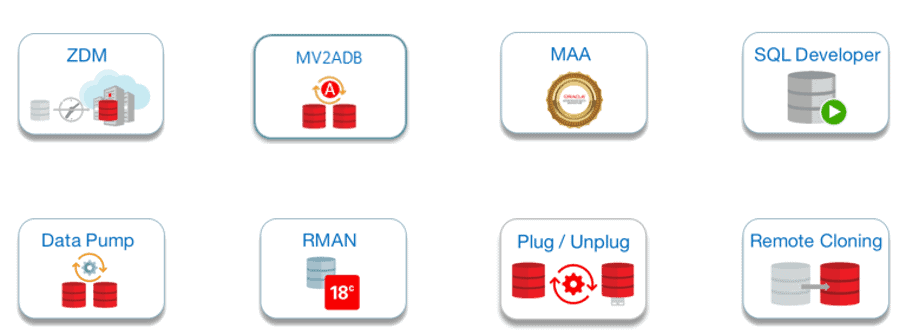
We can migrate our databases from on-premise to the cloud. Oracle provides a lot of migration options like ZDM( Zero Downtime), MV2ADB (move to ADB), SQL Developer, Data-Pump, RMAN, Plug-Unplug, etc.
- Oracle Database Migration To Cloud (Lift & Shift): Overview & Methodology Click here
- Zero Downtime Migration: Database To Oracle Cloud Using Hybrid Data Guard click here
- Data Loading in Autonomous Database [Migrate Database To Oracle Autonomous Database Cloud Options: Data Pump, SQL Loader, DBMS_CLOUD, GoldenGate] click here
- Zero Downtime Migration In OCI: Overview & Capability click here
- Zero Downtime Migration (ZDM) Database To Oracle Cloud In 8 Steps click here
High Availability (HA) & Disaster Recovery (DR)
Real Application Cluster (RAC) provides HA. In RAC databases multiple machines running database instances are deployed across FD & AD but all instances are connected to a single database.
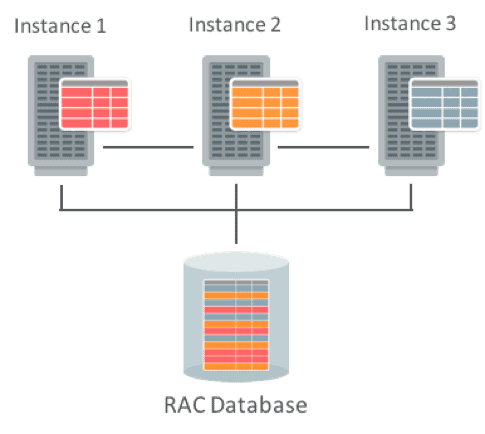
- What & How to Create RAC Database On Oracle Cloud (OCI) Click here
- [Video] Is RAC possible on Oracle Cloud? If Yes How Click here
Data Guard is used for Disaster recovery. Data Guard creates a secondary DB system in another datacenter so that in case of failover the secondary DB system becomes primary.
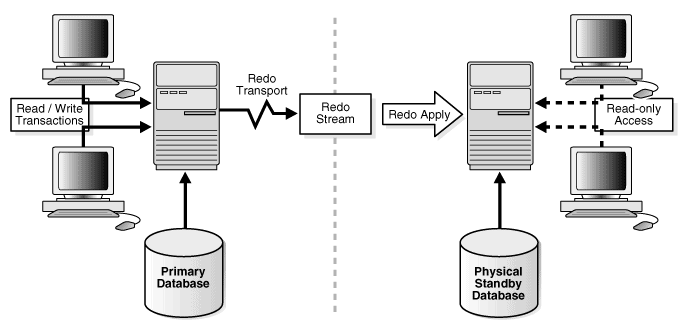
- To know in detail about HA & DR using RAC & Data Guard Click here
- Data Guard In Oracle Cloud Infrastructure (OCI): Overview & Concepts Click here
Oracle Cloud Database Certifications
FAQs
How does VMDB differ from BMDB?
VMDB (Virtual Machine Database) offers flexibility on virtual machines, while BMDB (Bare Metal Database) provides dedicated physical servers for maximum performance.
Can I bring my existing Oracle Database license to OCI?
Yes, OCI allows users to Bring Your Own License (BYOL), providing flexibility for those with existing Oracle Database licenses to deploy their databases in the cloud.
What security features are available in OCI Database services?
OCI ensures database security with features like encryption at rest and in transit, network security, access controls, and options for BYOL (Bring Your Own License) for added flexibility.
What is Exadata Cloud Service in OCI?
Exadata Cloud Service harnesses Oracle Exadata's power for high-performance database workloads, offering scalability and reliability in the cloud.
How does OCI facilitate database migration?
Oracle Cloud Infrastructure provides tools and services, including Database Migration Service, for seamless migration of on-premises Oracle Databases to the cloud, minimizing downtime.
Can I customize the configurations of VMDB instances in OCI?
Yes, VMDB (Virtual Machine Database) instances in OCI offer customizable configurations, allowing users to tailor the resources and settings based on their specific requirements.
How does OCI Database Migration Service simplify the migration process?
OCI Database Migration Service streamlines the migration of on-premises databases to OCI, automating tasks and minimizing downtime, ensuring a smooth transition to the cloud.
Related/Further Readings
- Right Choice for DBA? Amazon AWS | Microsoft AZURE | Oracle (Confused?)
- [Video] Roles & Responsibilities of Oracle Cloud DBA: Tasks
- Oracle Cloud for DBAs: 9 Things Every Beginner Should Know
- Oracle Cloud Infrastructure (OCI): Region, AD, Tenancy, Compartment, VCN, IAM, Storage Service
- OCI Regions | OCI Availability Domain | Oracle Cloud Region | OCI Realms
- Gateways In OCI
- Oracle Cloud Infrastructure 2022 Architect Associate Certification
- Oracle Cloud (OCI)
Begin Your Cloud Journey
Begin your journey towards becoming a Certified Oracle Cloud Infrastructure Architect and earning a lot more in 2024 by joining our FREE CLASS. You will also know more about the Roles and Responsibilities, Job opportunities for OCI Architects in the market, and what to study Including Hands-On labs you must perform to clear the Oracle Cloud Architect Associate Certification (OCI) certification exam by registering for our FREE Masterclass.
Click on the below image to Register Our FREE Class on Master Oracle Cloud (OCI) and Get a Higher Paying Job!


![Microsoft Agentic AI Business Solutions Architect [AB-100] | K21 Academy](https://test.k21academy.com/wp-content/uploads/2025/11/Microsoft-Agentic-AI-Business-Solutions-Architect-AB-100-Exam-Overview1.png)



