



Database Patching is done for fixing bugs and improving system performance. Patching co-managed (VMBD/BMDB/Exadata) databases are the responsibility of the user while applying patches to autonomous databases is done by the provider (Oracle).
Things You Must Know About Database Patching
There are 5 things we should know about patching
- Operating systems patches
- Database Patching
- Grid Infrastructure patching
- Cloud tooling patching
- Interim Patches
1) Operating System Patches: Oracle provides security patches for machines on the VMDB/BMDB system.
2) Database Patching: Patches are applied to databases in two ways. To the DB system in which the databases are present and to the databases directly.
3) Grid Infrastructure Patching: Grid Infrastructure is the infrastructure in which database components like OS and storage are present. We can apply patches to this infrastructure.
4) Cloud tooling patching: We can apply patches to cloud tools like (DBcli & DBaaSCLI) which we use to apply patches to databases.
5) Interim Patches: Interim patches are used to fix specific bugs for a particular customer. These patches require a particular base release or patchset to be installed before they can be applied. These patches are not versioned and are generally available in a future patchset as well as the next product release.
Read this post for an overview of Autonomous Database, Types of Autonomous database (Autonomous data warehouse & Autonomous Transaction Processing) and Autonomous offering as Serverless & Dedicated Infrastructure.
Important Points Regarding Database Patching
- We can apply patches using console or cli.
- Requires reboot and so need to plan for downtime.
- Implement High availability to minimize downtime.
- Backup the database before applying the patch.
- Patch the DB system node before and then the databases.
Read More: Oracle Enterprise Manager(OEM) 13c for beginners, what is OEM, high-level steps to deploy OEM on Oracle cloud infrastructure (OCI), OEM architecture components, OEM HA/DR overview.
Prerequisite To Apply Patches
- The DB system requires access to the Oracle Cloud Infrastructure Object Storage service, this is where the patches are stored.
- The /u01 directory on the database host file system has at least 15 GB of free space for the execution of patching processes.
- The Oracle Clusterware should be up and running on the DB system.
- All nodes of the DB system is up and running (RAC databases).
Note: This blog post covers the steps to apply a patch on VMDB/BMDB databases using the console and dbcli.
Steps To Apply Patch Using Console
1) Navigate to the DB system created using the console. Under resources click patches. Click on the three dots against the patch available.
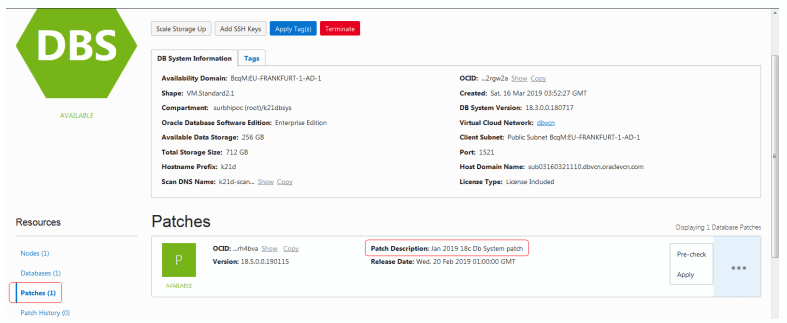
Now we can pre-check it and if the pre-check is done successfully then we can go ahead and apply the patch.
2) To apply a Database patch click on databases under resources in DB System details, and click databases and then under database resources click patches.
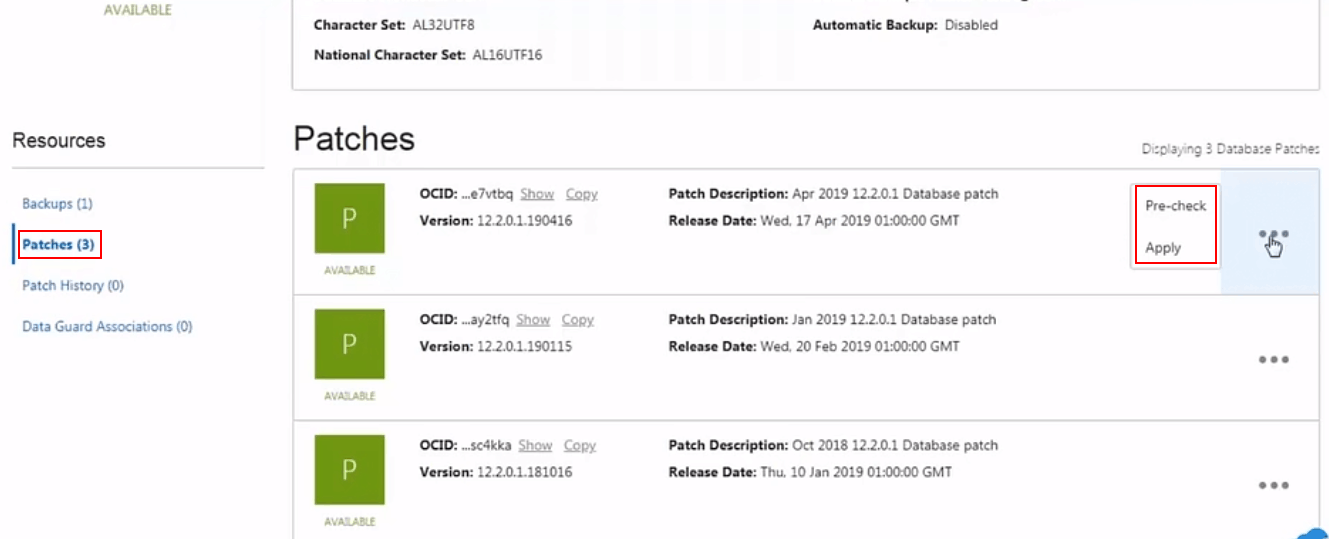
Steps To Apply Patch Using Command Line Interface
Patch using CLI is done in two ways:
- To apply a patch on User managed databases like (VMDB/BMDB) we use Dbcli.
- To apply a patch to an Exadata DB system we use DBaaSCLI
Note: You can use DBcli operation only as a root user.
Note: Before applying a patch to databases make sure you update the latest version of Cloud tool (Dbcli/ DBaaSCLI) you are using. You can do it by using below command
cliadm update-dbcli
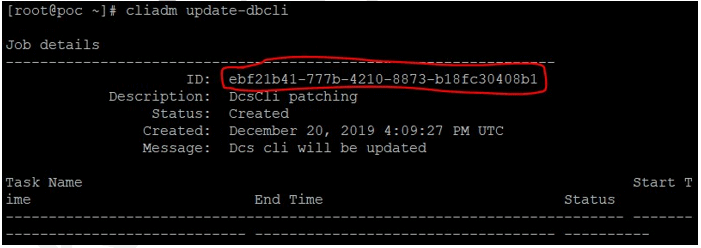
1) Display the installed patch versions by using the dbcli describe-component command.
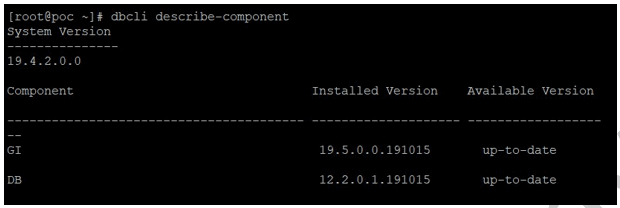
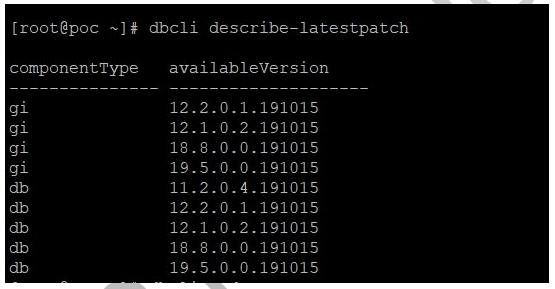
2) To display the latest patch available.
dbcli describe-latestpatch
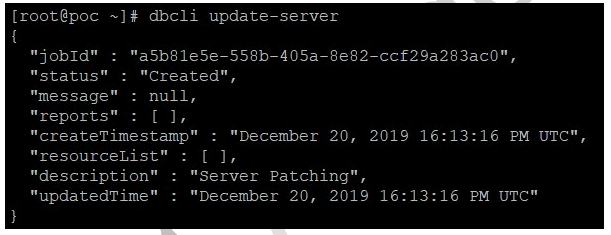
3) To patch server components:
dbcli update-server
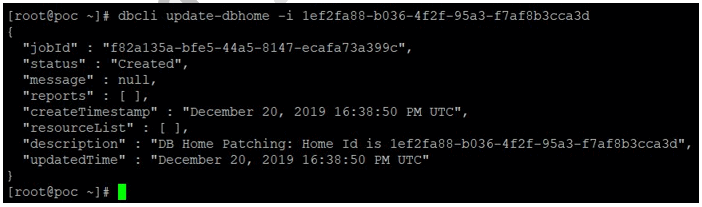
4) Update database home components by using:
dbcli list-dbhomes
dbcli update-dbhome -i <id>
5) Check the job output by using:
dbcli describe-job -i <job id>
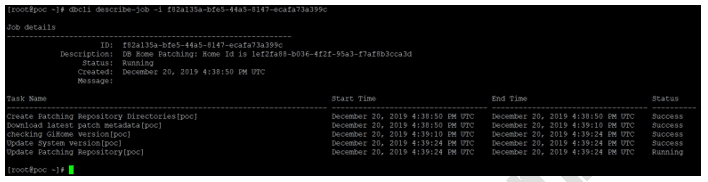
Note: We can also see patch history under the resources of DB System details.
Patching Exadata DB
There are two ways to patch an Exadata DB system.
- Using console
- Using DBaaSCLI (cloud tool)
1) Navigate to the Exadata DB system on the console, under resources you will find patches (same as that in VMDB/BMDB).
To know more about patching Exadata DB using console click here.
2) We can use DBaaSCLI tool to apply a patch on Exadata DB.
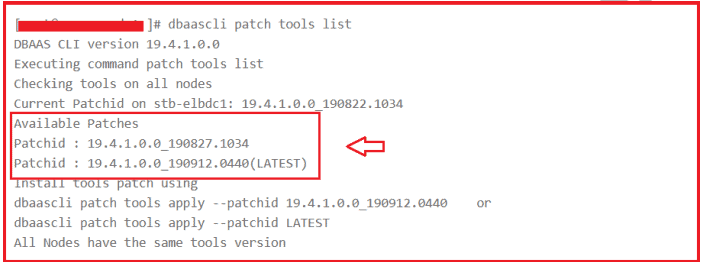
To know more about patching Exadata DB using DBaaSCLI tool click here.
Related/Further Readings
- [1Z0-931] Oracle Autonomous Database Cloud Certified Specialist Everything You Must Know About
- Difference between OCI vs OCI-C
- Oracle Cloud Database Options (VMDB, BMDB, ExaCS, ExaCS & Autonomous (ADW, ATP)
- Oracle Autonomous Database Overview: ADW, ATP, Serverless & Dedicated Infrastructure
- Create & Connect to Database on Oracle’s Gen2 Cloud (OCI)
- Connect to Autonomous database using SQL Developer Web
- NOSQL Cloud Database Service in Oracle Cloud
- MySQL Database as a Service in Oracle Cloud
- Introduction to Oracle Database 21c New Update Now Available On Oracle Cloud
Begin Your Cloud Journey
Begin your journey towards becoming an Oracle Cloud Expert and earn a lot more in 2024 by joining our FREE CLASS. You will also know more about the Roles and Responsibilities, Job opportunities for OCI Architects, Admins in the market, and what to study Including Hands-On labs you must perform to get the Higher Paying jobs.
Click on the below image to Register for Our FREE Class on MASTERING ORACLE CLOUD FOR DBAs, APPs DBAs, ARCHITECTS & SYS ADMINS


![Microsoft Agentic AI Business Solutions Architect [AB-100] | K21 Academy](https://test.k21academy.com/wp-content/uploads/2025/11/Microsoft-Agentic-AI-Business-Solutions-Architect-AB-100-Exam-Overview1.png)


