



This post covers the Overview of Data Guard (Standby Database) in Oracle Cloud Infrastructure (OCI).
- If you are new to Oracle Cloud Infrastructure(OCI) then check what is Region, AD, FD, Tenancy, Compartment, VCN, IAM, Storage Service, Click here
- If you are new to Database in Oracle Cloud (OCI), then check 9 things every beginner should know for Database on OCI Click here
Introduction To Data Guard
Oracle Data Guard enables & ensures high availability, data protection, and disaster recovery for your enterprise database.
Oracle Data Guard provides an extensive set of services that create, maintain, manage, and monitor one or more standby databases to enable production Oracle databases to survive disasters (such as natural calamities) and data corruption.
Active Data Guard vs Normal Data Guard
Oracle Data Guard maintains these standby databases as a cloned version of the production database and regularly applies changes from Primary Database to Standby Database. Then, If the production database becomes unavailable because of a planned or an unplanned outage, Oracle Data Guard can switch any standby database to the primary role, minimizing the downtime associated with the outage.
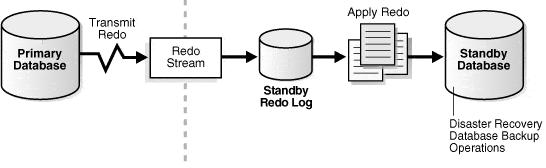
Image Source: Oracle
You Can Configure Two Types of Data Guard based on our requirement
1) Active Data Guard: Active Data Guard enables read-only access to a physical standby database for queries, sorting, reporting, Web-based access, and so on, while continuously applying changes received from the primary database.
Note: For Active Data Guard, when you create the database, you need to select the Extreme Performance
There are 4 different types of editions in Oracle Cloud, Enterprise Edition, Standard Edition, High-Performance & Extreme Performance.
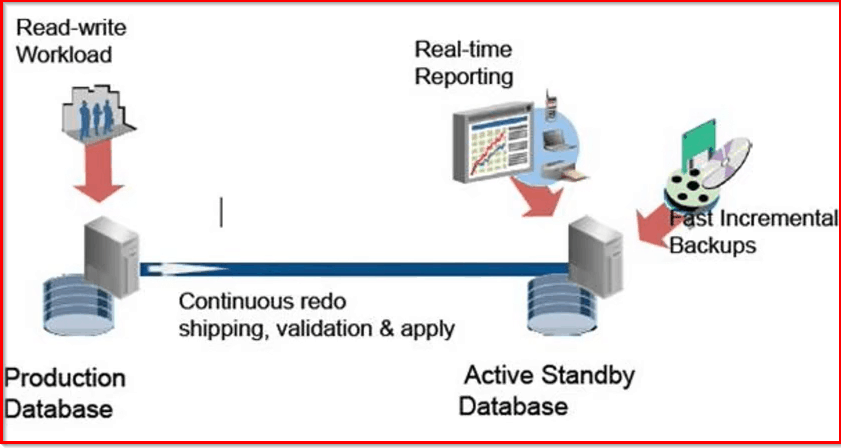
2) Normal Data Guard: Normal Data Guard enables you to switch to the Standby Database when your primary database is down due to some outage or natural calamities. In normal Data guard, you can still open the standby database in read-mode but changes not applied while in read-only mode.
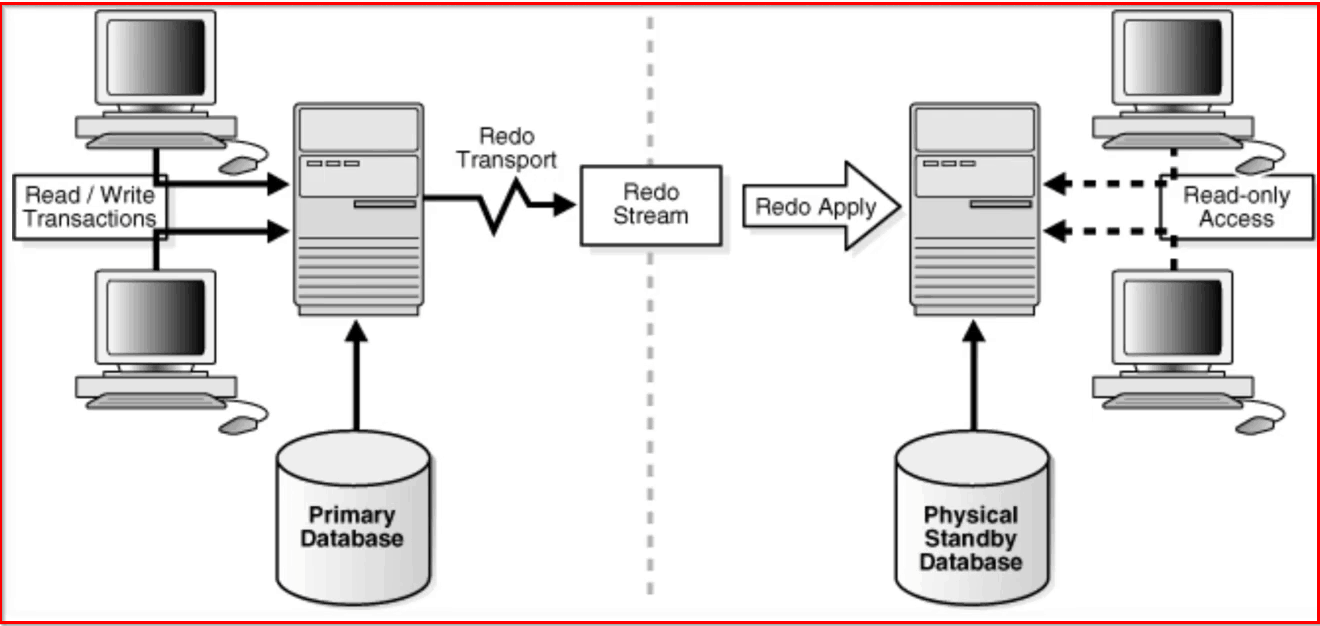
Types: Physical | Logical | Snapshot
- Physical: Redo logs are Shipped & Applied on Standby Database
- Logical: Mainly used for Rolling Upgrades & Redo logs are shipped & transformed to SQL & then they are applied.
- Snapshot: A snapshot Standby Database receives and archives, but does not apply redo logs data from a primary database.
For Standby Database, Recovery Type can be Manual or Automatic and Recovery Point can be Full Recovery or Point in Time.
Data Guard in Oracle Cloud: Key Points
1) There are 3 different types of Databases in Oracle Cloud & depending on the type of DB, you will use different tools to configure Data Guard
Database Can be deployed in 3 ways:
- Database on Compute: You follow the manual method of creating a Data Guard.
- User Managed Database: You will use Oracle OCI Cloud tooling (dbcli, dbaascli, OCI Console) to configure Data Guard
- Autonomous Database: Data Gaurd concept is Not applicable
2) Data Guard is currently available within Region.
3) To configure DG across the region or with On-premise or more than 1 standby, you will use manual method DGMGRL
4) By default, you will only get 1 Standby Database, so if you have the requirement of more than one then can configure using console / CLI
5) For ExadataCS, you need two Exadata DB Systems for Data Guard, one acting as Primary Database and another one as Standby Database.
6) For BM DB & ExaCS: DB system to be used as standby must be ready before DB association
7) If you have a VM DB, you can simply go to the Database system & configure a New Standby DB System by enabling the Data Guard.
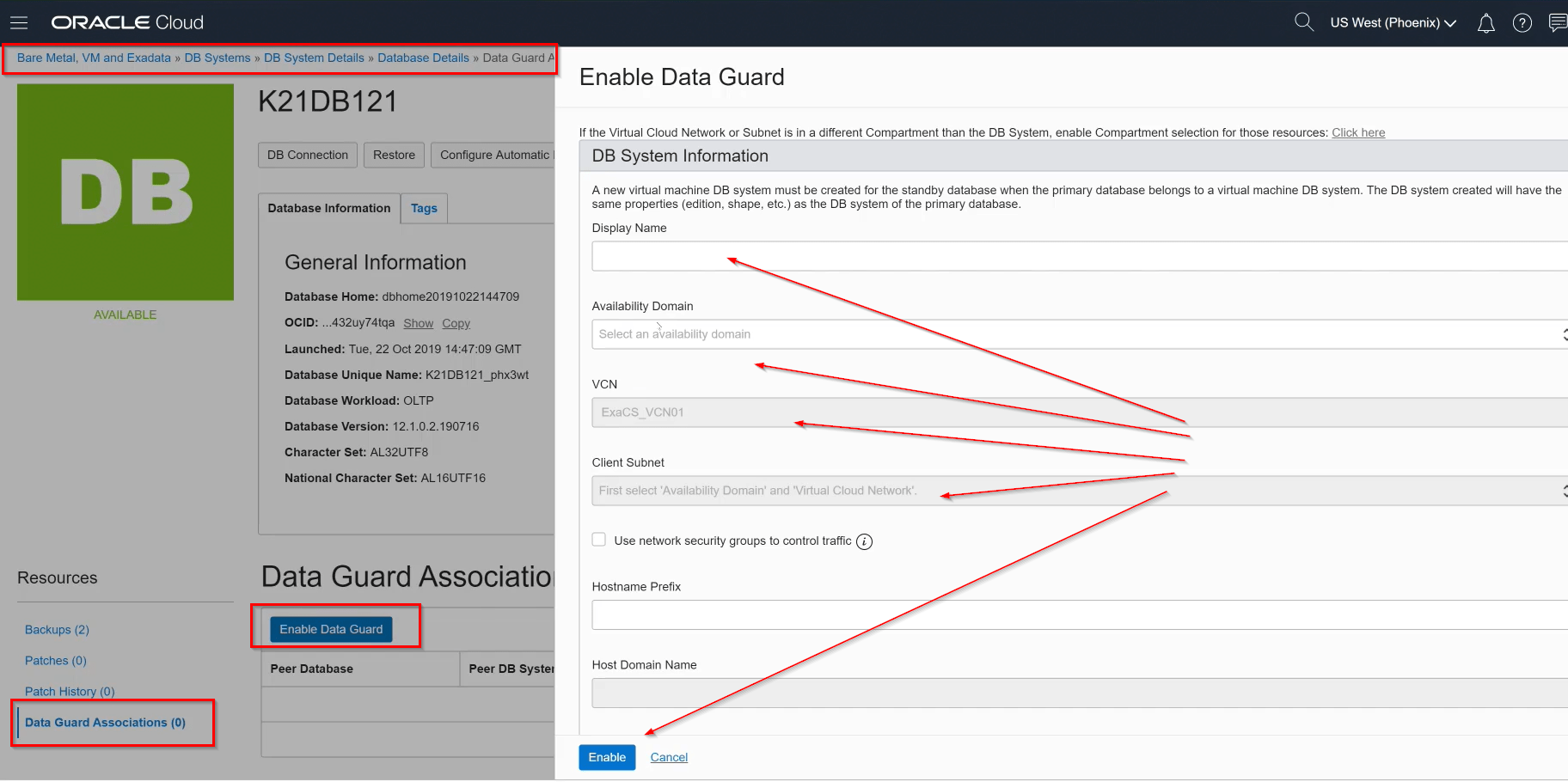
8) Both Primary & Standby DB systems must be in the same compartment, and they must be the same shape, to know more about Compartment click here
9) By Default Exadata comes with Extreme Performance, so you can configure Active Data Gaurd in this
Note: Oracle Active Data Guard provides read-only access to the physical standby database while it is synchronized with the primary database, enabling minimal latency between reporting and transactional data. Check more here
- If you are new to ExaCS then look at the Architecture here
10) For BM DB & ExaCS: DB system to be used as standby must be ready before DB association
11) Both DB must be in same VCN but can be in different Subnet & port 1521 should be open across subnet using Security List or NSG, To know more check here
12) It is recommended to have Standby DB on different AD from Primary DB. To know more about Region & Ad in OCI, click here
13) If you are working in Region which has one AD, then configure the Data Guard in different Fault Domain (FD).
Fast- Start Failover (FSFO)
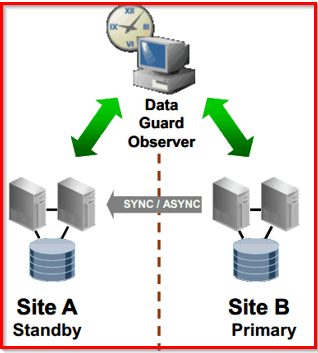
Fast-Start Failover is a feature that allows the Oracle Data Guard broker to failover a failed primary database automatically to a predetermined standby database. This feature increases the availability of the database by eliminating the need for DBA involvement as part of the failover process.
The best practice for high availability and durability is to run the primary, standby, and observer in separate availability domains.
Now it’s your turn to post your doubts in the comment section and let us know where you are facing challenges in Oracle Cloud Infrastructure
Related/Further Readings
- Using Data Guard in OCI VM/BM
- Using Data Guard in ExaCS
- Creating a Standby Database with Recovery Manager (Data Guard Concepts and Administration)
- Creating a Physical Standby Database (Data Guard Concepts and Administration)
Begin Your Cloud Journey
Begin your journey towards becoming an Oracle Cloud Expert and earn a lot more in 2024 by joining our FREE CLASS. You will also know more about the Roles and Responsibilities, Job opportunities for OCI Architects, Admins in the market, and what to study Including Hands-On labs you must perform to get the Higher Paying jobs.
Click on the below image to Register for Our FREE Class on MASTERING ORACLE CLOUD FOR DBAs, APPs DBAs, ARCHITECTS & SYS ADMINS


![Microsoft Agentic AI Business Solutions Architect [AB-100] | K21 Academy](https://test.k21academy.com/wp-content/uploads/2025/11/Microsoft-Agentic-AI-Business-Solutions-Architect-AB-100-Exam-Overview1.png)


