




Being a cloud architect, it is our responsibility to configure applications for Disaster Recovery & Business Continuity. We should know how to migrate our application or database easily from one region of Oracle Cloud Infrastructure to another. This can be easily achieved using the new feature of Oracle Cloud Infrastructure Block Volume which allows copying Block Volume backup Across Regions.
If you want to know more about the Regions in Oracle Cloud Infrastructure, please check our previous post on Oracle Cloud Infrastructure (OCI) (Region, AD, FD, Tenancy, Compartment, VCN, IAM, Storage Service)
To know more about Block Volume & various other storage options in Oracle Cloud Infrastructure, then check my previous post on Oracle Cloud Infrastructure (OCI) )Storage Object, Block | File Storage, Data Transfer Service
Copying Block Volume Across Region
Copying block volume across region feature enables you to move your backup of block volume from one region to another within your tenancy.
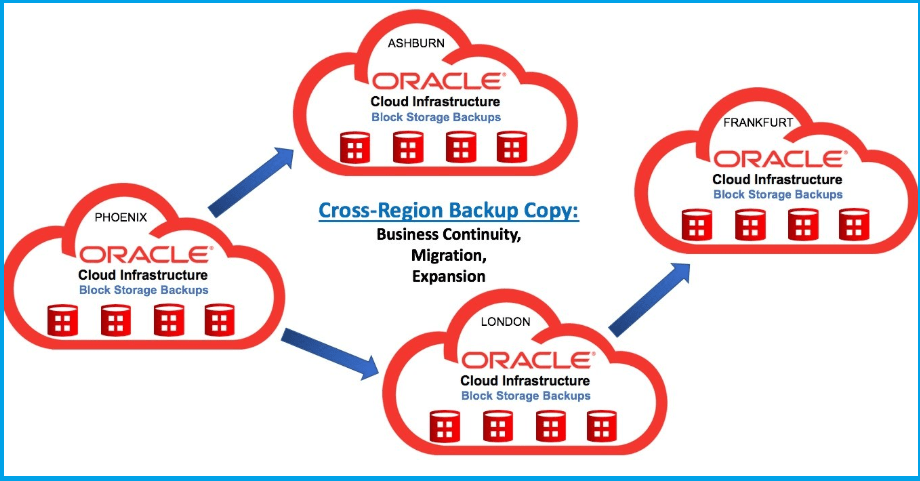
The feature is provided at zero additional costs to the Oracle Cloud Infrastructure customers. It is only available on the Oracle Cloud Infrastructure Console, API, CLI, SDK, and Terraform. If you aren’t aware, we manage Oracle Cloud Infrastructure resources such as compute, storage, databases, network, etc via OCI Console, Rest API, various SDK, or DevOps tool like Terraform.
Limitations
- So far, it is not possible to copy boot volume across regions. However, we can expect this feature in the future updates.
- This feature allows only one backup at a time.
Steps To Copy a Backup Across Regions:
1. Under the Block Storage section in OCI Console, go to block volume backups in the appropriate compartment.

2. Click on the hamburger menu (…) and select the backup you want to copy to another region using the Copy to Another Region option.

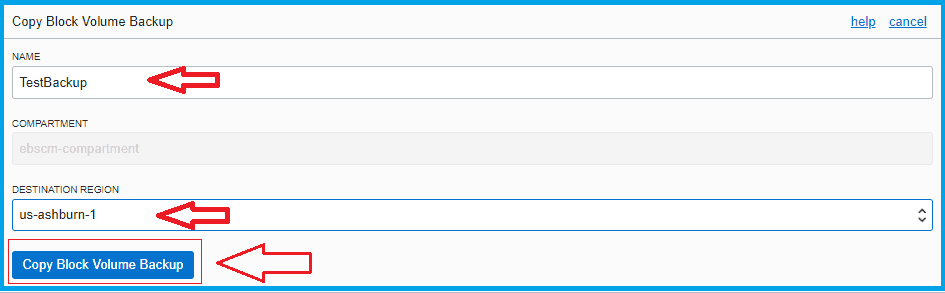
3. Specify the name and the target region for the backup, and click on the Copy Block Volume Backup.
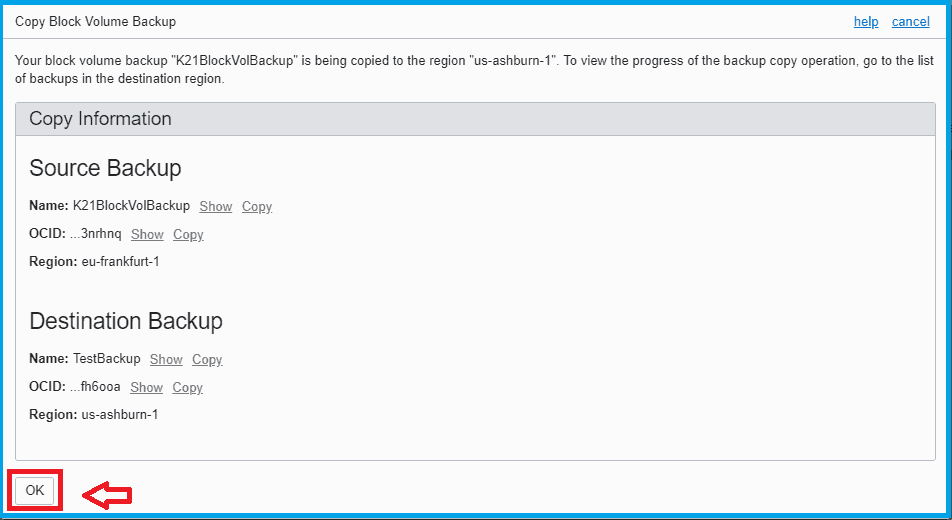
4. Click on “OK” to confirm the backup copy settings.
5. From the Console, go to the target region where you have copied the backup. Verify that the backup is available there.

Now, you can restore the required backup at the target destination by creating a new volume from the backup.
And that is how we can copy our block volume from one region to another region within the tenant.
Related/Further Readings
- Oracle Cloud Infrastructure (OCI) )Storage Object, Block | File Storage, Data Transfer Service
- Oracle Cloud Infrastructure: Steps to Resize a Volume [Block/Boot]
- Oracle Cloud Infrastructure (OCI) Architect Live Training
- Download the Step-By-Step Activity Guide to Register for an Oracle Cloud Trial Account.
Begin Your Cloud Journey
Begin your journey towards becoming an Oracle Cloud Expert and earn a lot more in 2024 by joining our FREE CLASS. You will also know more about the Roles and Responsibilities, Job opportunities for OCI Architects, Admins in the market, and what to study Including Hands-On labs you must perform to get the Higher Paying jobs.
Click on the below image to Register for Our FREE Class on MASTERING ORACLE CLOUD FOR DBAs, APPs DBAs, ARCHITECTS & SYS ADMINS


![Microsoft Agentic AI Business Solutions Architect [AB-100] | K21 Academy](https://test.k21academy.com/wp-content/uploads/2025/11/Microsoft-Agentic-AI-Business-Solutions-Architect-AB-100-Exam-Overview1.png)