




There are many automation tools to build and manage resources such as Compute, Networking, Database, Load Balancer, etc in Oracle Cloud Infrastructure (OCI) like APIs, SDKs, Command Line Interface(CLI), Terraform, Ansible.
In this post, I am going to cover:
- Overview of CLI
- Advantages of using CLI Over Cloud Console
- Steps to install OCI Command Line Interface (CLI)
- Basic Commands of CLI
Overview Of Command Line Interface (CLI)
- The OCI Command Line Interface (CLI) is a toolkit developed in Python.
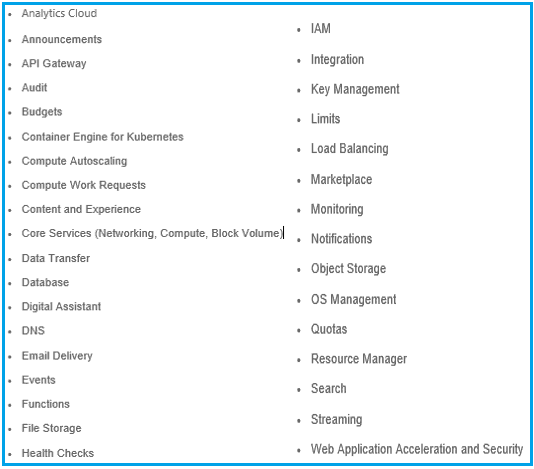
- You can work with most of the available services in Oracle Cloud Infrastructure (OCI) using the CLI tool.
- CLI works on the concept of request and response.
- The responses received are in JSON format.
Services That Can Be Performed By CLI In OCI:
Advantages Of Using CLI Over Cloud Console
- Functionality: It can be used to easily do the difficult task with Cloud Console.
- Speed: Console will be slower than CLI.
- Scripting & Automation: Create a script that contains a few lines of command and it will do the services in OCI and the script can be reused.
Steps to Install OCI Command Line Interface (CLI)
For MacOS, Linux, And Unix
- Open a terminal, run the following command.
bash -c “$(curl -L https://raw.githubusercontent.com/oracle/oci-cli/master/scripts/install/install.sh)

CLI requests are authenticated using API keys, so we need to generate a key pair.
Note: This is optional, as when you set up the CLI for OCI you will be asked to create a new key pair so you can create that time or else you can use the one which you create with below step
- Generate the private key:
mkdir ~/.oci
openssl genrsa -out ~/.oci/oci_api_key.pem 2048
- Generate the public key:
openssl rsa -pubout -in ~/.oci/oci_api_key.pem -out ~/.oci/oci_api_key_public.pem

- Copy the contents of the public key to the clipboard.
cat ~/.oci/oci_api_key_public.pem
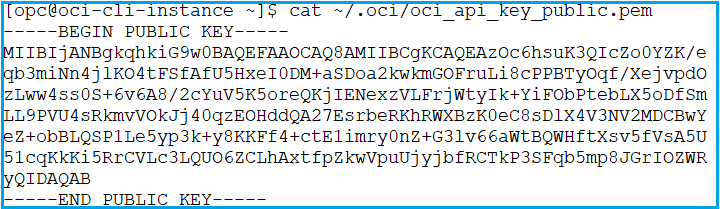
- Open the navigation menu. Under Administration, go to Identity and click Users.
- Select User (eg: K21AcademyUser).
- Go to API Keys under the Resources, and click Add Public Keys.
- Paste your complete Public Keys and Click ADD.
- Check your FingerPrint.
Setup OCI CLI
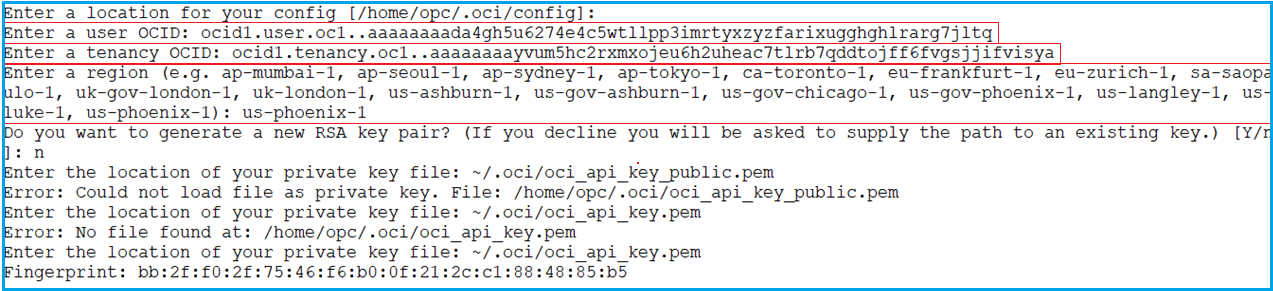
- To start the configuration process we need to run the command and follow the prompts:
$ oci setup config
- Three parameters will be required.
- Tenancy OCID: This can be found in the OCI console under Administration > Tenancy Details.
- User OCID: which can be found in the OCI console under Identity > Users > K21AcademyUser
- Region Name: us-phoenix-1
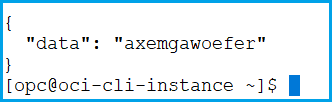
- Run Following Command to get object Storage Namespace to see if the CLI is correctly installed or not
oci os ns get
To know the process of installing Command Line Interface in Windows click here.
Some Basic CLI OCI Commands
- To list the compartments in your tenancy
oci iam compartment list -c <tenancy_id>
- Create a compartment
oci iam compartment create –name <compartment_name> -c <root_compartment_id> –description “<friendly_description>”
- Create the Virtual Cloud Network.
oci network vcn create –compartment-id <compartment_id> –display-name “<friendly_name>” –dns-label <dns_name> –cidr-block “<0.0.0.0/0>”
To know more about CLI commands in OCI click here.
Conclusion
It is not possible to giving access to Oracle console to everyone in a team due to some security and privacy issues. So to perform all the services of OCI without using Oracle console CLI interface is used. I have covered the steps to install the CLI interface on Linux, Unix, and MacOS and I hope it will help you understand the whole process. If you find it helpful then share it with your friends.
Related/Further Readings
- Command Line Interface (CLI) commands reference
- Documentation on API keys
- Core automation tools for OCI
Begin Your Cloud Journey
Begin your journey towards becoming an Oracle Cloud Expert and earn a lot more in 2024 by joining our FREE CLASS. You will also know more about the Roles and Responsibilities, Job opportunities for OCI Architects, Admins in the market, and what to study Including Hands-On labs you must perform to get the Higher Paying jobs.
Click on the below image to Register for Our FREE Class on MASTERING ORACLE CLOUD FOR DBAs, APPs DBAs, ARCHITECTS & SYS ADMINS


![Microsoft Agentic AI Business Solutions Architect [AB-100] | K21 Academy](https://test.k21academy.com/wp-content/uploads/2025/11/Microsoft-Agentic-AI-Business-Solutions-Architect-AB-100-Exam-Overview1.png)


