



Are you ever concerned that there is some unused storage or always running virtual machines that you’ve forgotten about? Do you ever think about cleaning up unutilized and waste resources from your tenancy? Cloud Advisor is the service you need, that provides easy-to-implement ways to help you reduce waste and save money in your cloud.
In this blog, I am going to cover Oracle Cloud Advisor and its related concepts. By the end of this blog, you will know how to avoid getting billed for the unused resources in your tenancy.
- Oracle Cloud Advisor
- Key Concepts
- Types of Recommendations
- Getting Started with Cloud Advisor in Console
Oracle Cloud Advisor
Cloud Advisor finds irregular activities in your tenancy and offers an action plan on how to resolve them. These recommendations use the in-built Cloud Guard to help you maximize cost savings and improve the security of your tenancy. Although not all recommendations are relevant for all customers, so you can dismiss or postpone recommendations that you don’t want to work on.
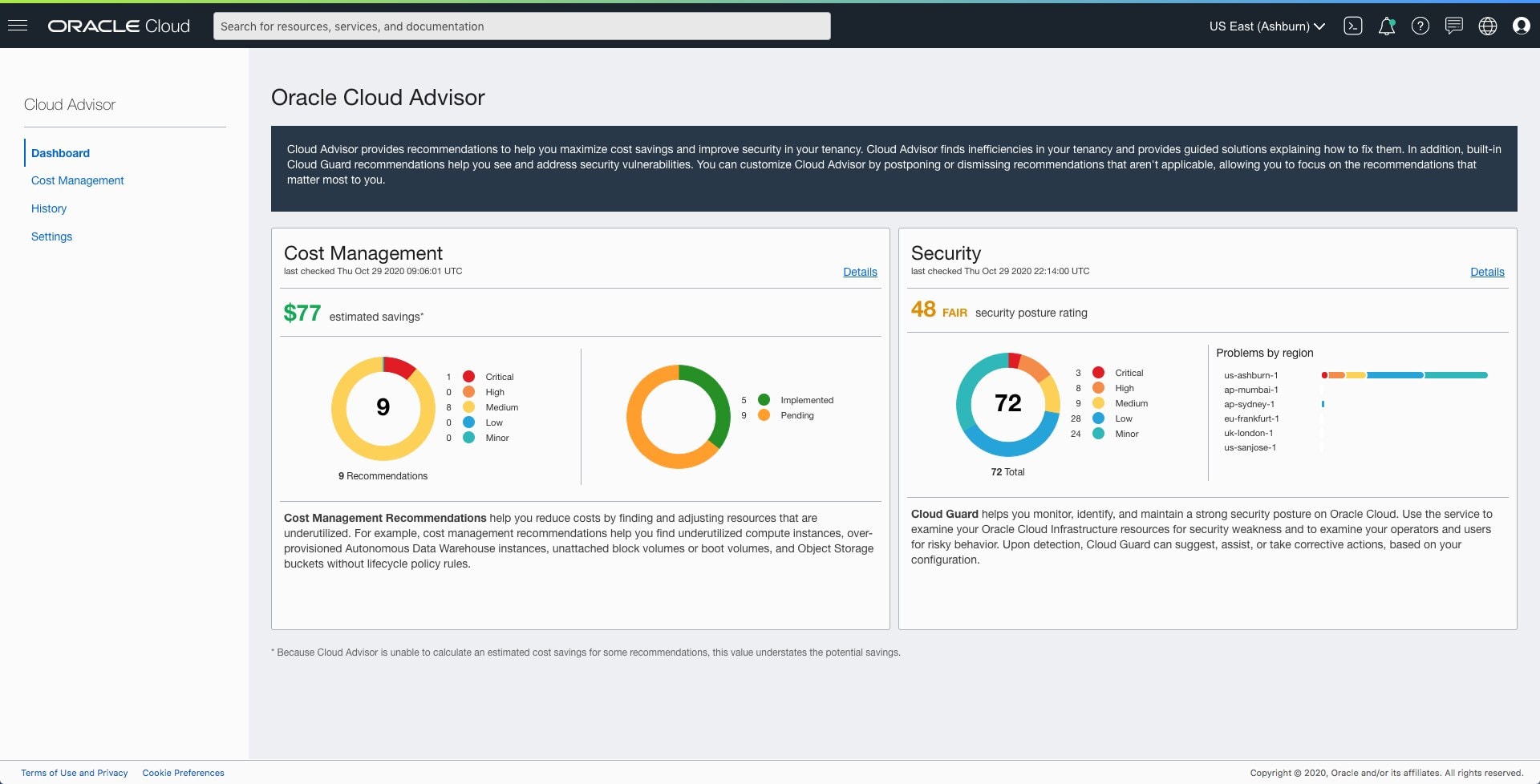
Cloud Advisor scans the tenancy once per day and identifies specific cost-saving recommendations. After seven days, Cloud Advisor collects enough data to provide recommended actions with associated cost savings estimates, wherever applicable. Once Cloud Advisor has enough data, a list of recommendations appears in the Recommendations dashboard. In the Recommendations dashboard, you can implement, postpone, or dismiss the recommendations. When a recommendation is implemented within Cloud Advisor, a work request is created for the same. When the work request completes, it appears in the History table with the new status.
Check Out: Our blog post on Private DNS.
Key Concepts
Following are the basic concepts that one should know:
1) Recommendation
Cloud Advisor scans your tenancy to find potential risks and irregular consumption and then uses this information to provide recommendations that suggest ways to reduce costs and increase efficiency.
2) Estimated cost savings
Cloud Advisor provides estimated cost savings, this value is a dollar amount estimating how much lower your costs could be if you implement the recommendation.
3) Status
Each recommendation has a status that reflects its current state.
- Pending: When Cloud Advisor identifies a recommendation but no user action has been taken
- Implemented: When Cloud Advisor has made the recommendation, and the suggested change has been made in the tenancy
- Postponed: A recommendation does not appear in your dashboard since you have postponed it until a future date that you choose.
- Dismissed: You have canceled a recommendation and it does not appear in your dashboard until you reactivate it.
- Reactivated: A recommendation can be reactivated or reinstated when it has been previously postponed or dismissed.
Check Out: Our previous blog post on OCI Network.
Types of Recommendations
Cloud Advisor helps with or provides the following recommendations:
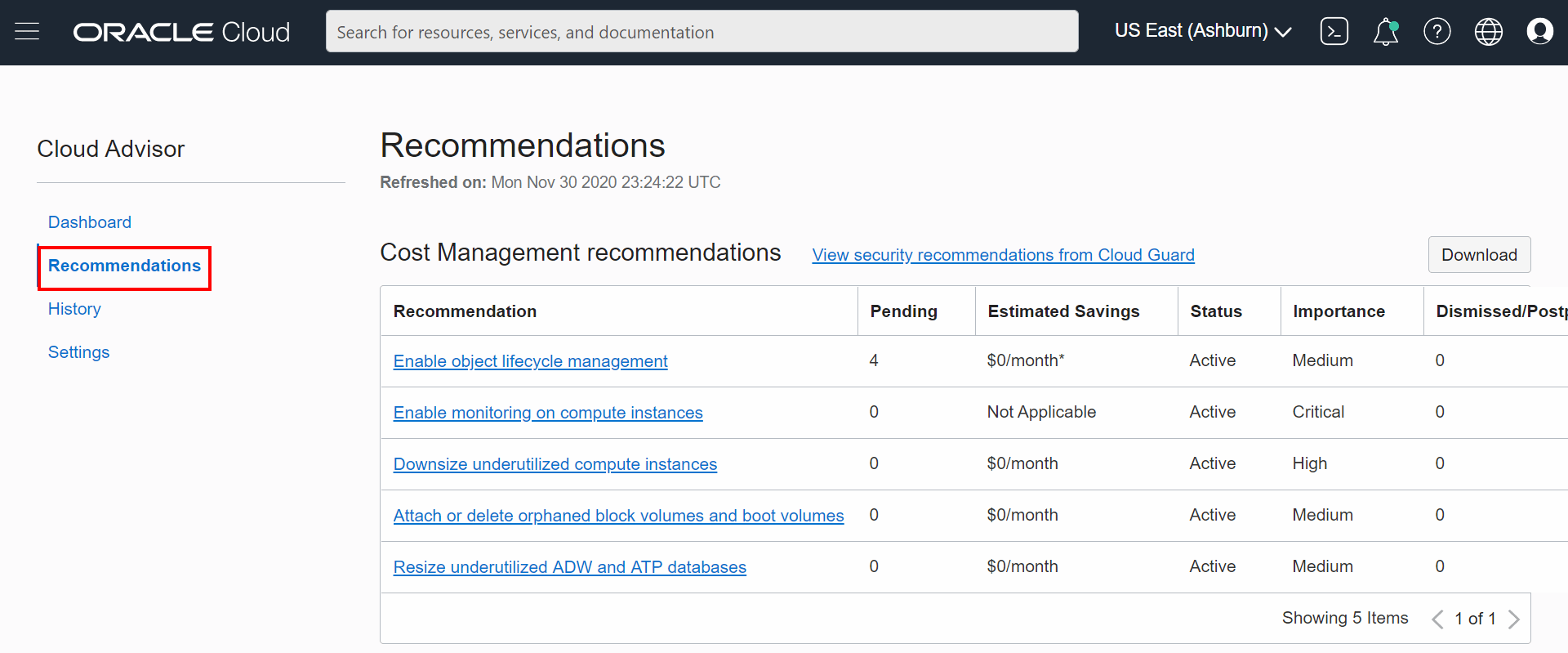
- Downsize underutilized compute instances: Find and remove underutilized compute instances to save money without degrading performance.
- Resize underutilized Autonomous Data Warehouse (ADW) and Autonomous Transaction Processing databases (ATP): Reduces the number of CPUs more than required to autonomous databases saving money.
- Attach or delete orphaned block volumes and boot volumes: Cloud Advisor finds block volumes and boot volumes that are not being used by any compute instance so that you can attach or delete them to reduce costs.
- Enable monitoring for compute instances: Monitoring compute instances allows Cloud Advisor to provide customized recommendations.
- Enable object lifecycle management: You can define lifecycle policy rules that automatically move Object Storage data to lower-cost tiers when possible. The data is still available, but your costs are lower.
Also Check: Our blog post on Oracle VPN Connect.
Getting Started With Cloud Advisor
First, you need to enable Cloud Advisor, if it is not enabled by default, then you need to enable Cloud Guard. You can view, implement, postpone, or dismiss recommendations using the Console.
Enable Cloud Advisor
1) Open the navigation menu. Under Governance and Administration, click Cloud Advisor.
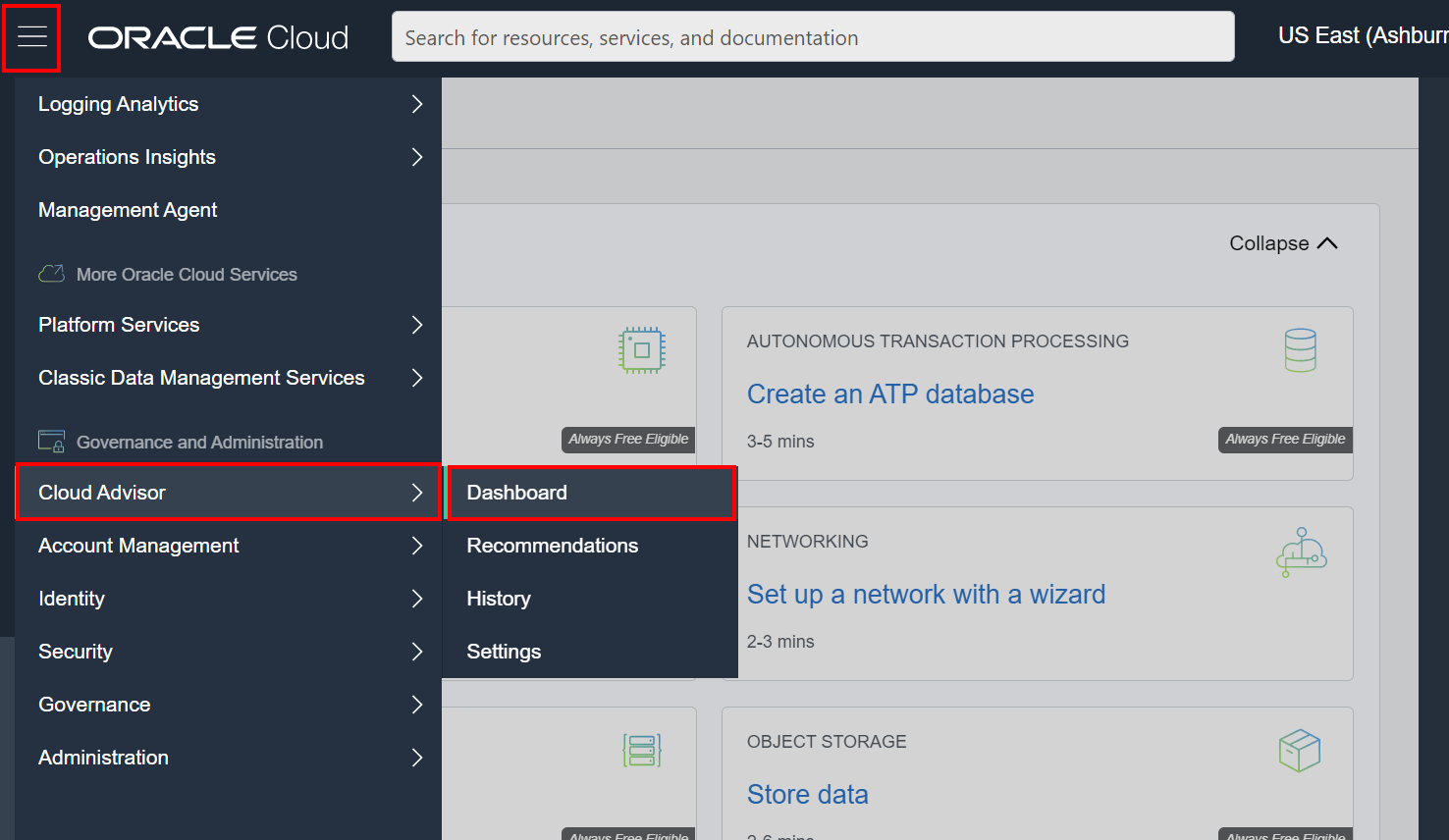
2) Cloud Guard integrates with Cloud Advisor to display security recommendations in the Cloud Advisor dashboard. Make sure the Cloud Guard is enabled.
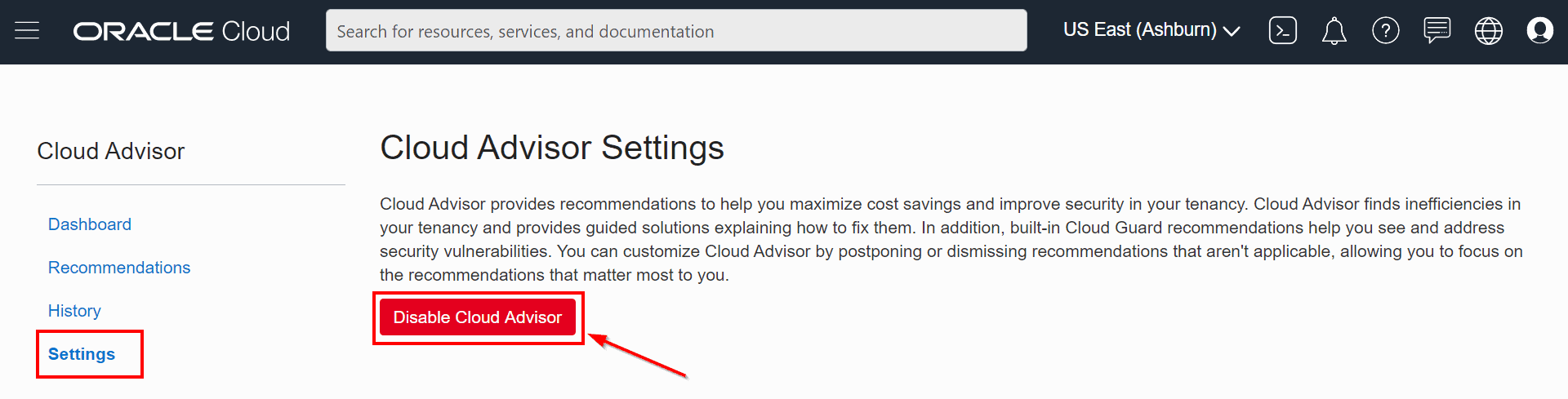
3) On the dashboard, click Settings. You can enable (or disable) Cloud Advisor from here.
If it is enabled, then you will see a screen like below.
Read More: About OCI IAM.
View Recommendations
4) On the Cloud Advisor dashboard, click Recommendations. Not all recommendations appearing in the dashboard are relevant, so you can dismiss or postpone recommendations that you don’t think are required.
Also Read: Our previous blog post on Network Load Balancer.
To Implement a Recommendation
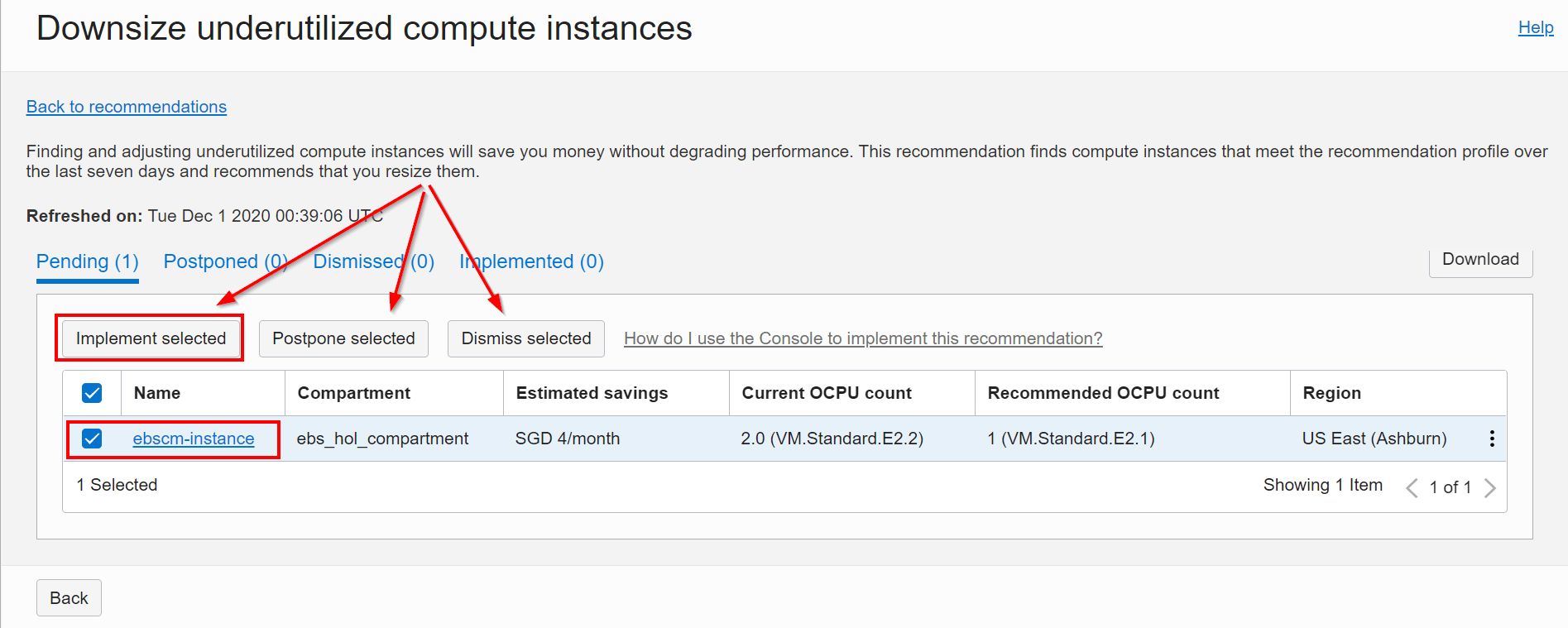
5) On the Recommendations dashboard, click a recommendation. The recommendation details panel opens and displays a list of resources this recommendation applies to. Select one or more resources, and then click Implement selected. Click Implement.
View History
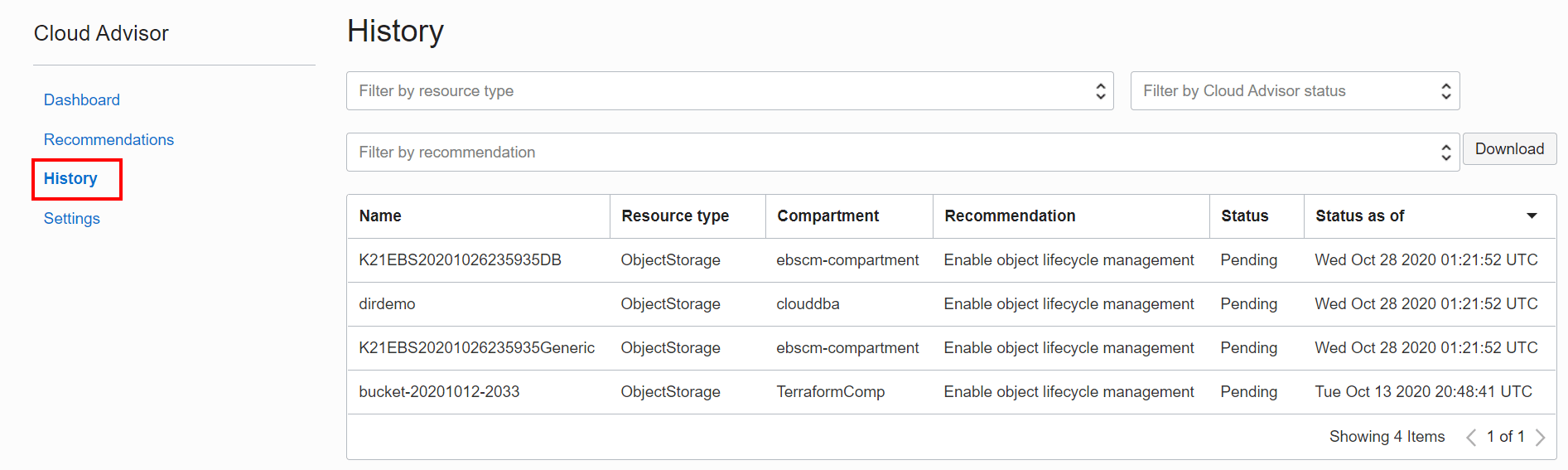
6) This history page tracks recommendation status changes. For example, it lists information about recommendations that have been implemented, postponed, and dismissed.
On the Cloud Advisor dashboard, click History. The Cloud Advisor History dashboard opens.
Conclusion
In this blog, I have discussed all the basic topics that you should know before you start working with Cloud Advisor. As the name suggests, cloud advisor only advises you or gives you recommendations while considering cost management and security in your tenancy, however, you can customize this as to whether you want to implement, postpone or dismiss a recommendation. So in the end, it is on you for making the best decision for your cloud resources.
Related/References
- 1Z0-1072-20 | Oracle Cloud Infrastructure 2020 Architect Associate
- Overview Of Policy & How It Work In Oracle Cloud (OCI)
- IAM In OCI – User, Groups, Compartment, Policy, Tags
- Security Zones in Oracle Cloud (OCI)
- Security In Oracle Cloud (OCI)
- Oracle Cloud (OCI) Top 15 New Releases That You Must Know
- Private DNS in Oracle Cloud (OCI) with Case Study
Begin Your Cloud Journey
Begin your journey towards becoming an Oracle Cloud Expert and earn a lot more in 2024 by joining our FREE CLASS. You will also know more about the Roles and Responsibilities, Job opportunities for OCI Architects, Admins in the market, and what to study Including Hands-On labs you must perform to get the Higher Paying jobs.
Click on the below image to Register for Our FREE Class on MASTERING ORACLE CLOUD FOR DBAs, APPs DBAs, ARCHITECTS & SYS ADMINS


![Microsoft Agentic AI Business Solutions Architect [AB-100] | K21 Academy](https://test.k21academy.com/wp-content/uploads/2025/11/Microsoft-Agentic-AI-Business-Solutions-Architect-AB-100-Exam-Overview1.png)


