




Automatic Workload Repository or AWR Oracle report collects, processes, and maintains performance statistics for problem detection and self-tuning purposes. This gathered data is stored both in memory and in the database and is displayed in both reports and views.
Over the years Oracle has provided performance gathering tools and reporting tools. Earlier UTLBSTAT/UTLESTAT scripts were used for monitoring performance. With the introduction of Oracle 8i we got Statspack functionality. Automatic Workload Repository (Oracle AWR) was introduced with Oracle 10g and is still being used in 18c.
(Note: If you are just starting out or new to DataBase Performance tuning then I would suggest you check our previous post on Introduction to Performance Tuning In Oracle Database)
The Automatic Workload Repository is a source for information and other Oracle features it Includes
- Wait for events to identify performance problems.
- Time model statistics.
- Active Session History (ASH).
- Statistics from the V$SYSSTAT and V$SESSTAT views.
- Object usage statistics.
- SQL statements that are resource-intensive.
- Automatic Database Diagnostic Monitor
- SQL Tuning Advisor
- Undo Advisor
- Segment Advisor
Snapshots
By default, the snapshot is generated once every 60 min and kept for 8 days
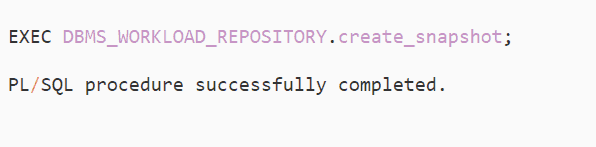
If you wish to generate awr snapshot manually, then it can be done by using the script below. This comes in handy when there is a requirement to generate an oracle awr report for a non-standard window that has a smaller interval.
So we will generate two snapshots at different intervals for 5 mins each. AWR can be generated using begin_snap_id and end_snap_id.
Generating a new snapshot
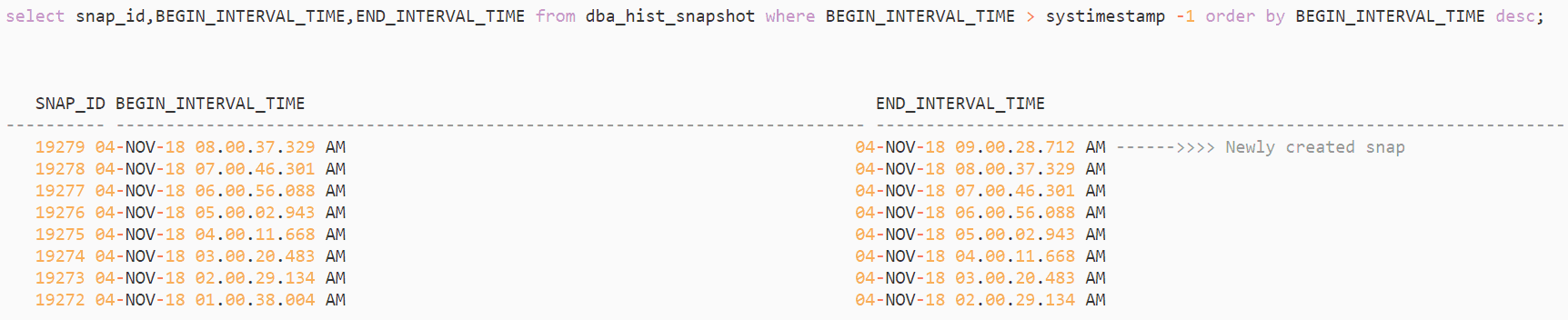
Checking the snapshots(whether new one is created or not)
Baselines
A baseline is a snapshots that represents a specific period of usage. Baselines can be used to compare current performance against periods in the past with similar work loads. You can create baseline to represent a particular period of batch processing
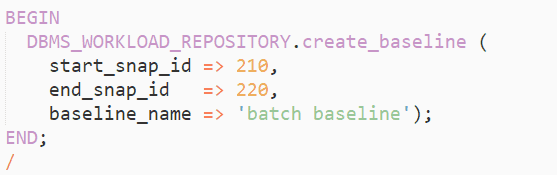
The pair of snapshots associated are retained until the baseline is explicitly deleted.

Reading Automatic Workload Repository Reports
The first thing you should do is run the ADDM report for a specific period of time. ADDM report provides an analysis of the parts of the system that are consuming the most time. It is often recommended to start with the ADDM report to narrow down your focus area.
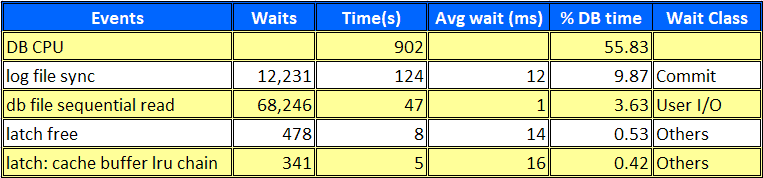
When you are looking at an Oracle AWR report, the top 5 events near the top should be the place where you begin. Looking at Timed Foreground Events indicates the bottlenecks for a particular period of time in the system.
Please stay tuned for our coming post on performance Tuning we will be covering how to do ASH analytics.
These are just a glimpse of some of the factor which needs to be taken care of while considering the performance of your database.
You will get to know all of this and deep-dive into each concept related to Performance Tuning once you will get enrolled in our Performance Tuning On-Premise & Cloud
Another question, which might come to your mind, What are all the things you will get when you enrolled!!
Now it’s your turn to post your doubts in the comment section and let us know where you are facing challenges in Performance Tuning
Frequently Asked Questions
Q1 – How do I get an AWR report?
Ans – The PL/SQL API provided in the DBMS workload repository package can be used to create the final AWR report. awr_report_text and awr_report_html are two procedures that generate AWR reports from awrrpt.sql. These procedures generate the AWR report in TEXT or HTML format for the specified snapshot range.
Q2 – Where is AWR report saved?
Ans – Use the command – $ORACLE_HOME/rdbms/admin/awr*.sql. Before you can use scripts like this, you must have a valid Diagnostic Pack licence.
Q3 – What is AWR and ADDM reports?
Ans – ADDM Reports – Automatic Database Diagnostic Monitor (ADDM) can analyze performance issues over time and make recommendations. A set of AWR snapshots is subjected to an ADDM analysis. The script addmrpt.sql is used to generate the ADDM report.
AWS Report – Oracle offers two scripts for creating workload repository reports (awrrpt.sql and awrrpti.sql). They are formatted similarly to statspack reports and provide the option of HTML or plain text. The two reports produce nearly identical results, but awrrpti.sql allows you to select a single instance.
1. @$ORACLE_HOME/rdbms/admin/awrrpt.sql
2. @$ORACLE_HOME/rdbms/admin/awrrpti.sql
Q4 – How do I create AWR report in PL SQL Developer?
Ans – The awrddrpt.sql SQL script generates an HTML or text report that compares the local database instance’s detailed performance attributes and configuration.
Related/Further Readings
- Overview of Automatic Database Diagnostic Monitor (ADDM)
- Introduction to Performance Tuning In Oracle Database
- Database Performance Tuning On-Premise & Cloud: Step by Step Hands-On Lab Exercise
- Database Performance Tuning: On-Premise & Cloud Training
- Performance Tuning Process
- [Video] Roles & Responsibilities of Oracle Cloud DBA: Tasks
- Oracle Database Administration DBA (12c) Training: Step by Step Activity Guides /Hands-On Lab Exercise
Next Task
Want to move ahead in your career and want to get a higher Earning Job?
Get 7+ Courses for DBAs & Apps DBA in a bundle program and learn from the Industry’s best Experts.


![Microsoft Agentic AI Business Solutions Architect [AB-100] | K21 Academy](https://test.k21academy.com/wp-content/uploads/2025/11/Microsoft-Agentic-AI-Business-Solutions-Architect-AB-100-Exam-Overview1.png)