





This post covers common questions related to Online Patching or ADOP one of the most common tasks that Oracle Apps DBA‘s (apart from Cloning & Troubleshooting).
If you are new to Oracle Apps DBA or already working as Apps DBA but on version 11i or R12.1 then suggest you first go through Oracle Apps DBA Architecture, Installation, Start/Stop, File System, in Oracle AppsDBA R 12.2 Training for AppsDBAs.
Overview of ADOP
ADOP stands for Application DBA Online Patching, introduced in EBS R12.2 to patch Oracle ADOP Applications while a system is available for users during Patching.
ADOP is the most important new feature introduced in Oracle EBS R12.2. It is the ability to patch a running system without having to take the system down for a significant period of time while the patches are applied.
ADOP uses dual file system (feature introduced in R12.2) to support online patching.
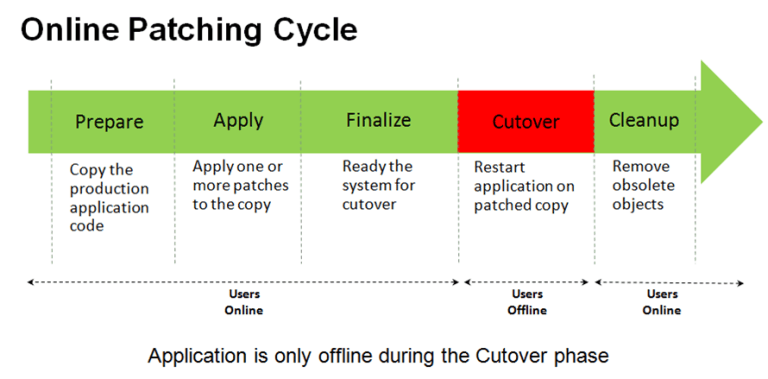
- adop phase=prepare -> copies the application code
- adop phase=apply -> apply patches to PATCH Environment
- adop phase=finalize -> makes ready the system for cutover
- adop phase=cutover -> bounce the system and does filesystem switchover. fs2 becomes RUN environment.
- adop phase=cleanup -> remove obsolete objects.
- adop phase=fs_clone -> synchronize filesystems
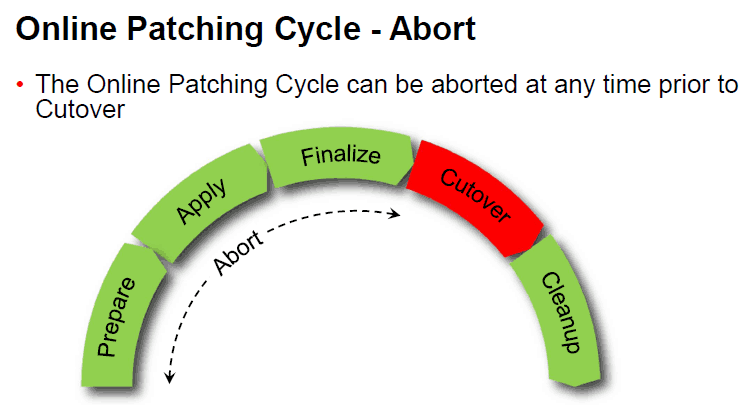
Note: that after cutover the command line environment should be re-loaded as the run edition file system has changed.
In a multi-node deployment, ADOP commands are only executed from the Primary Node. The primary ADOP session uses remote execution to automatically perform the required actions on any secondary node.
Also check: Steps to download EBS R12 software from Edelivery Oracle site
Questions on Online Patching
Below are the few questions raised by our trainees from our training Oracle Apps DBA (R 12.2)
Q1. Which Oracle E-Business Suite releases Online Patching feature is available?
Ans: Online patching is used with Oracle E-Business Suite 12.2 and higher.
Q2. What types of the patch are applied online?
Ans: All Oracle E-Business Suite Release 12.2 patches are applied online. This includes one-off patches, patch rollups, consolidated updates and security patches.
Q3. What is the Online ADOP Patching cycle?
Ans: The Online Patching ADOP cycle is a sequence of inter-related steps (ADOP phases) used to apply patches to an Oracle E-Business Suite system.
Q4. What tool is used to apply online patches?
Ans: The AD Online Patching (ADOP) command-line utility is used to manage the Online Patching cycle. ADOP invokes adpatch in the background only
Q5. Is there any downtime in Online Patching?
Ans: There is a short period of downtime when the application tier services are shut down and restarted. The database remains open all the time.
Q6. Can we still use adpatch in the Release 12.2 Online Patching environment?
Ans: No way. Only we can use adop utility in R12.2 onwards.
Q7. Can we upgrade to Release 12.2 with Online Patching?
Ans: We can’t. After you upgrade to Oracle E-Business Suite Release 12.2, you will enable to do Online Patching.
Q8. Should we enable Maintenance Mode before patching?
Ans: This is not available in Release 12.2.
Q9. Where are the log files stored for adop?
Ans: It is stored in the third filesystem which is non edition filesystem (fs_ne) :
s_ne_base/EBSapps/log/adop/<adop_session_id>/<phase>_<date>_<time>/<context_name>/log
Related/Further Readings
- Recommended Browsers for Oracle E-Business Suite Release 12 [Doc ID 389422.1]
- Oracle E-Business Suite Release 12.2 Information Center (Doc ID 1581299.1)
- Oracle E-Business Suite Release 12.2.9 Readme (Doc ID 2495027.1)
- Oracle E-Business Suite 12.2.9 Now Available
- [Troubleshooting] Forms Issue: FRM-92050 failed to connect to server: forms/servlet
- Oracle E-Business Suite (EBS) 12.2.9 Now Available & Its Upgrade Steps
- Oracle AppsDBA (R12.2) Training: Step by Step Activity Guides/Hands-On Lab Exercise
- Oracle AppsDBA (R12.2): Install | Patch | Clone | Maintain
Next Task For You
We cover Oracle E-Business R12.2 Architecture & concepts in our Oracle Apps DBA For Beginners Training along with the Installation, Patching, Cloning, and Troubleshooting and also, Database upgrade to 19c and much more including the hands-on labs you must perform to upgrade your skills and get a good job with a high package.
Begin your journey towards becoming an Apps DBA by joining our FREE Masterclass on How To Learn Oracle Apps DBA (R12) & It’s New Features.


![Microsoft Agentic AI Business Solutions Architect [AB-100] | K21 Academy](https://test.k21academy.com/wp-content/uploads/2025/11/Microsoft-Agentic-AI-Business-Solutions-Architect-AB-100-Exam-Overview1.png)



