





In the world of container orchestration, Kubernetes has emerged as a powerful platform for managing and deploying containerized applications at scale. One of the key components of Kubernetes is the ReplicaSet, which provides functionality for scaling and ensuring high availability of application pods.
In this Blog we will cover:
- What is ReplicaSet?
- Key features and functionality of ReplicaSet
- Creating a ReplicaSet in Kubernetes
- Scaling the ReplicaSet
- Conclusion
What is ReplicaSet?
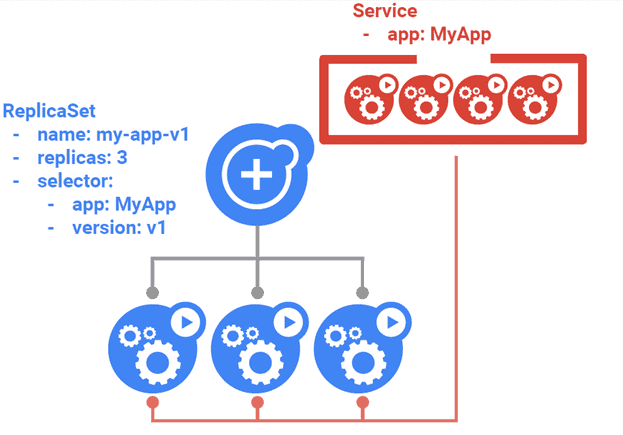
A ReplicaSet is a Kubernetes resource used to maintain a specified number of identical pod replicas within a cluster. It is responsible for monitoring the health of the modules it manages and ensuring that the required number of replicas are always running, thus providing self-healing capabilities. ReplicaSet automatically detect and recover from module failures by creating new replicas to replace the failed ones, ensuring that the desired state of the application is maintained. With their self-healing feature, ReplicaSet contribute to the overall resilience and high availability of applications in Kubernetes clusters.
Key features and functionality of ReplicaSet
- Specifying the desired number of replicas: ReplicaSet allows defining the desired number of replicas through its spec.replicas field in the manifest.
- Pod template: ReplicaSet uses a pod template to create and manage the replicated pods. The template includes specifications such as container image, resources, labels, and more.
- Pod labeling and selection: ReplicaSet uses labels to identify and select the pods it manages. Labels provide a way to organize and group pods based on specific characteristics.
Creating a ReplicaSet in Kubernetes
a) Pre-Requisites
- Kubernetes Cluster should be set up at least with one worker node
Note: Check out the Step-by-Step Kubernetes Cluster Creation Guide video blog to learn how to create a three-node Kubernetes Cluster.
b) Defining the ReplicaSet manifest file (YAML)
To create a ReplicaSet, you need to define its configuration in a manifest file using YAML syntax. The manifest file contains the specifications for the ReplicaSet, including the desired number of replicas and the pod template.
1. Create a YAML manifest file using vi editor.
$ vi demo-replicaset.yaml
apiVersion: apps/v1
kind: ReplicaSet
metadata:
  name: frontend
spec:
  replicas: 3
  selector:
    matchLabels:
      app: web-app
  template:
    metadata:
      labels:
        app: web-app
    spec:
      containers:
      - name: web
        image: nginx
Here we define a ReplicaSet named frontend with three replicas. The ReplicaSet uses a pod template with the app: web-app label, and the pod specification includes a container named web using the nginx image with specified resource limits and requests.
c) Creating and Checking the Status of a ReplicaSet
1. Use the kubectl apply command to create the ReplicaSet by applying the manifest:
kubectl apply -f demo-replicaset.yaml

2. Check the status of the ReplicaSet:
kubectl get rs frontend

3. Exploring the associated pods and their status
kubectl get pods --selector app=web-app

Scaling the ReplicaSet
a) Scaling up the number of replicas
To handle increased traffic or workloads, you can increase the number of replicas in a ReplicaSet. This allows you to spread the load between multiple instances of your application. To grow a ReplicaSet, do the following:
To scale up the number of replicas, use the kubectl scale command followed by the ReplicaSet’s name and the desired replica count:
kubectl scale replicaset frontend --replicas=5

This command scales the ReplicaSet named frontend to have five replicas. Kubernetes will create the additional replicas to match the desired state specified in the ReplicaSet manifest.
b) Scaling down the number of replicas
If you need to reduce the number of replicas, perhaps due to reduced demand or resource constraints, you can scale-down the ReplicaSet. To scale-down a ReplicaSet, do the following:
kubectl scale replicaset frontend --replicas=2

c) Verifying the changes in the ReplicaSet and pods
After scaling the ReplicaSet, you can verify the changes by examining its status and the associated pods:
1. Use the kubectl get replicaset command to view the updated replica count:
kubectl get rs frontend

This output shows that the ReplicaSet frontend along with the number of replicas currently running. It should reflect the desired replica count you scaled to.
2. To see the current status of the pods associated with the ReplicaSet, use the kubectl get pods command with the ReplicaSet’s label selector:
kubectl get pods --selector app=web-app

ReplicaSets play a crucial role in Kubernetes deployments by providing scalable and fault-tolerant application replicas. Understanding how ReplicaSets are utilized within the deployment workflow is essential for efficient application management and maintaining high availability. To explore this topic further, please read our blog post on Kubernetes Deployment.
Conclusion:
ReplicaSets are a fundamental building block in Kubernetes for achieving scalability and high availability. Understanding how to effectively use ReplicaSets will allow you to scale your applications based on demand, handle failures gracefully, and perform managed updates without sacrificing availability. By mastering ReplicaSets, you will be better equipped to deploy and manage your containerized applications in a dynamic and resilient manner within the Kubernetes ecosystem.
Frequently Asked Questions
What is a ReplicaSet in Kubernetes?
A ReplicaSet is a Kubernetes object that ensures a specific number of replicas (pods) are running at all times. It is used to maintain the desired state of a set of identical pods, typically as part of a deployment or workload management.
How does a ReplicaSet differ from a Deployment?
While both ReplicaSets and Deployments manage pod replicas, Deployments are a higher-level abstraction that provides additional features like declarative updates, rolling updates, and versioned releases. ReplicaSets are often used directly when fine-grained control over scaling and updates is required.
How do I create a ReplicaSet in Kubernetes?
You can create a ReplicaSet by defining its configuration in a YAML or JSON manifest file and using the kubectl apply command. The manifest should specify the desired number of replicas, the pod template, and other relevant metadata.
How does a ReplicaSet handle scaling and self-healing?
ReplicaSets continuously monitor the number of replicas/pods running and compare it with the desired replica count. If the actual count deviates from the desired count, the ReplicaSet automatically adjusts by creating or terminating pods to reconcile the state.
Can I update the configuration of a ReplicaSet?
Yes, you can update the configuration of a ReplicaSet. To do so, you need to modify the ReplicaSet's YAML or JSON manifest file and use the kubectl apply command with the updated file. The ReplicaSet will reconcile the changes by creating or terminating pods as necessary to reach the desired state.
How can I scale the number of replicas in a ReplicaSet?
You can scale the number of replicas in a ReplicaSet by updating the spec.replicas field in the ReplicaSet's YAML or JSON manifest file and using kubectl apply. Alternatively, you can use the kubectl scale command to adjust the replica count directly.
Related Post
- Kubernetes for Beginners
- Kubernetes Architecture | An Introduction to Kubernetes Components
- Install Docker on Windows, Ubuntu, and Mac: A Complete Step-by-Step Guide
- How To Setup A Three Node Kubernetes Cluster For CKA: Step By Step
- Visit our YouTube channel on “Docker & Kubernetes”
- Certified Kubernetes Administrator (CKA) Certification Exam: Everything You Must Know
- Certified Kubernetes Administrator (CKA) Certification: Step By Step Activity Guides/Hands-On Lab Exercise
Join FREE Masterclass of Kubernetes
Discover the Power of Kubernetes, Docker & DevOps – Join Our Free Masterclass. Unlock the secrets of Kubernetes, Docker, and DevOps in our exclusive, no-cost masterclass. Take the first step towards building highly sought-after skills and securing lucrative job opportunities. Click on the below image to Register Our FREE Masterclass Now!


![Microsoft Agentic AI Business Solutions Architect [AB-100] | K21 Academy](https://test.k21academy.com/wp-content/uploads/2025/11/Microsoft-Agentic-AI-Business-Solutions-Architect-AB-100-Exam-Overview1.png)



