





In the dynamic world of container orchestration, Kubernetes stands out as a powerful platform for managing containerized applications. One of the key features that contribute to the reliability and flexibility of Kubernetes is the concept of Init Containers. In this blog post, we’ll explore what Init Containers are, how they work, and why they are crucial in the Kubernetes ecosystem.
In this blog post, we will delve into the following subjects:
- What are Init Containers?
- Differences Between Init Containers and Regular Containers
- Understanding Init Containers
- Use Cases of Init Containers
- Best Practices
- Conclusion
What are Init Containers?
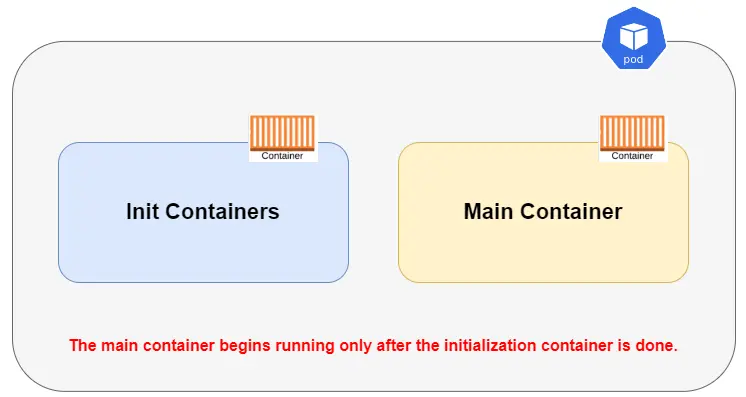
Init Containers are specialized containers in a Kubernetes Pod that are designed to run before the main application containers start. Their primary purpose is to perform setup tasks, such as initialization, configuration, or data preparation, before the main application containers are launched. Init Containers are executed sequentially, and each Init Container must complete successfully before the next one starts.
Note: Check out our guide to quickly create a three-node Kubernetes cluster.
Differences Between Init Containers and Regular Containers
Let’s discuss the key differences between init containers and regular containers in Kubernetes:
| Feature | Init Containers | Regular Containers |
|---|---|---|
| Purpose | Run setup tasks before main containers | Run the main application or service |
| Lifecycle | Run once and exit | Run continuously until the pod exits |
| Dependency Handling | Can specify dependencies on other init containers | Typically independent of other containers |
| Execution Order | Execute in a sequential order specified by the ‘initContainers’ field in the pod specification | Execute concurrently or sequentially as defined in the pod specification |
| Restart Policy | Does not support restarting | Supports restarting upon failure or manually |
| Resources | Limited resource options | Full range of resource options (CPU, memory, etc.) |
| Image Pull Policy | Always or IfNotPresent | Always, IfNotPresent, or Never |
| Termination Signal | SIGTERM (by default) | Configurable termination signal |
| Exit Status Handling | Ignored for pod readiness | Used for determining pod success/failure status |
| Example Use Cases | Database schema initialization, file downloading, configuration setup | Web servers, application processes, databases, etc. |
Note: Explore our beginner-friendly blog post about Kubernetes Pods.
Understanding Init Containers
In this example shows a basic setup with a Pod having one init container. The first container waits for the k21-service, and once it’s done, the Pod starts running the app container mentioned in its specifications.
1. Create a YAML Manifest file
$ vi init-container.yaml
2. Paste the following content into the init-container.yaml file.
apiVersion: v1
kind: Pod
metadata:
  name: k21-init-pod
  labels:
    k21: MyApp
spec:
  # Containers section defines the main application container
  containers:
  - name: main-app
    image: busybox:1.28
    # Command to run in the main container
    command: ['sh', '-c', 'echo The app is running! && sleep 3600']

  # InitContainers section defines the initialization container
  initContainers:
  - name: init-1
    image: busybox:1.28
    # Command to run in the init container, which waits for DNS resolution of "k21-service"
    command: ['sh', '-c', "until nslookup k21-service; do echo waiting for k21-service; sleep 2; done"]

3. Create the pod using the kubectl apply command and check the status of the pod.
$ kubectl apply -f init-container.yaml
$ kubectl get pods

4. The output indicates that the status is not running. Let’s check the logs of the pod.
$ kubectl logs k21-init-pod -c init-1

At this point, init container will be waiting to discover services named k21-service. Once we create that service, the init container succeeds, and the main application starts.
5. Create the service named k21-service and monitor the status of the pods.
$ kubectl expose pod k21-init-pod --type=ClusterIP --name=k21-service --port=80 --target-port=8080
$ kubectl get pods -w
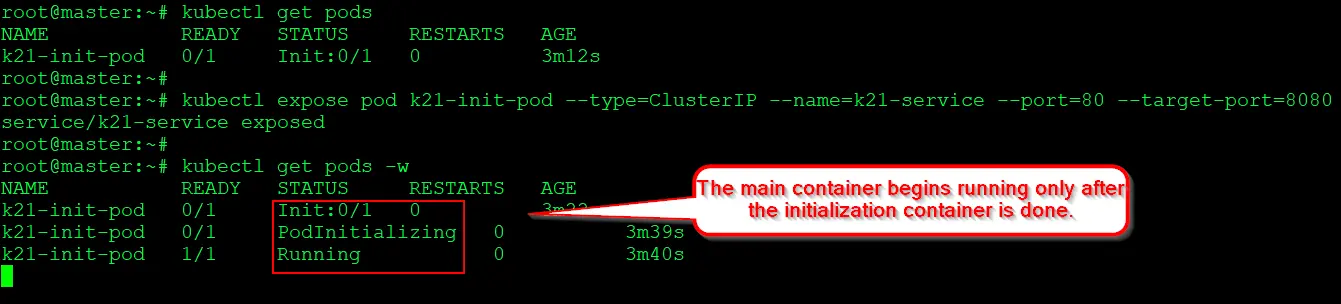
You’ll notice the init container finishing, and the k21-init-pod shifting to the Running state
Also Read: Our blog post on Multi Container Pods In Kubernetes
Use Cases of Init Containers
Init containers are a powerful feature in Kubernetes, offering flexibility in preparing the environment for the main application containers. Here are some common use cases:
- Preparing Configurations:
- Setting Up Config Files: Init container can create or update configuration files that the main app containers need.
- Database Migrations: They can run database updates or migrations before the app starts.
- Ensuring Service Availability:
- Checking Dependencies: Init container can wait until other services (like databases) are running and ready before starting the main app.
- Downloading Necessary Data: They can download files or data sets that the app needs.
- Managing Permissions and Security:
- Adjusting File Permissions: Init container can change file permissions so that the main app can access them correctly.
- Handling Secrets: They can safely fetch secrets or certificates needed by the app.
- Network Setup:
- Configuring Network Settings: Init container can set up network configurations required by the app.
- Preparing Infrastructure: They can set up cloud resources or other external infrastructure the app needs.
- Data Processing:
- Processing Data: Init container can format, filter, or preprocess data for the app.
- Compiling Assets: For web apps, they can prepare assets like minifying JavaScript or CSS.
Best Practices
- Simplicity and Efficiency: Keep init container small and focused on a single task.
- Error Handling: Implement robust error handling since the failure of an init container halts the pod startup.
- Security: Follow best practices for container security, such as using minimal base images.
Conclusion
Init containers in Kubernetes play a crucial role in preparing environments before the main application containers launch. They differ from regular containers in execution order, resource allocation, and lifecycle policies. This blog explored their use cases, such as configuration setup, dependency management, and permission adjustments. Understanding and utilizing init container effectively is key in Kubernetes management, offering flexibility and control in complex deployments. This blog aimed to equip readers with foundational knowledge and practical insights into leveraging init container for optimized Kubernetes environments.
Frequently Asked Questions
What is an init container in Kubernetes?
An init container is a specialized container that runs before the main application container in a pod. It is primarily used for setup and initialization tasks, ensuring that certain conditions are met before the main container starts.
Why use init containers?
Init containers are useful for performing tasks such as database schema setup, data preparation, or any other initialization steps required before the main application can start. They help ensure that the main container doesn't start until its dependencies are ready.
How is an init container different from a regular container?
Init container run to completion before the main container starts, while regular containers run concurrently. Init container are typically short-lived and handle initialization tasks, while main containers handle the core application logic.
What happens if an init container fails?
If an init container fails, the pod enters a failure state, and the init containers are re-executed before the main container starts. This process continues until all init containers succeed or until the pod reaches the maximum restart limit.
Can init container be updated or modified after pod creation?
No, once a pod is created, the set of init containers cannot be changed. If changes are needed, you must create a new pod with the updated init container configuration.
Related Posts
- Kubernetes for Beginners
- Install Docker on Windows, Ubuntu, and Mac: A Complete Step-by-Step Guide
- How To Setup A Multi-Node Kubernetes Cluster on SUSE Linux: Step By Step Guide
- Visit our YouTube channel on “Docker & Kubernetes”
- Certified Kubernetes Administrator (CKA) Certification Exam: Everything You Must Know
- Certified Kubernetes Administrator (CKA) Certification: Step By Step Activity Guides/Hands-On Lab Exercise
Next Task For You
Discover the Power of Kubernetes, Docker & DevOps – Join Our Free Masterclass. Unlock the secrets of Kubernetes, Docker, and DevOps in our exclusive, no-cost masterclass. Take the first step towards building highly sought-after skills and securing lucrative job opportunities. Click on the below image to Register Our FREE Masterclass Now!


![Microsoft Agentic AI Business Solutions Architect [AB-100] | K21 Academy](https://test.k21academy.com/wp-content/uploads/2025/11/Microsoft-Agentic-AI-Business-Solutions-Architect-AB-100-Exam-Overview1.png)



