In today’s world, automation taking place at a brisk pace across industries, especially in the tech space, domestic software firms, are set to slash headcounts by a massive 3 million by 2022! So, the need to up-skill is now or never. Kubernetes Certifications are what the IT professionals and recruiters are looking up. It is because of the value it holds.
Here are the topics covered and Q/A from the live training.
Kubernetes Certifications
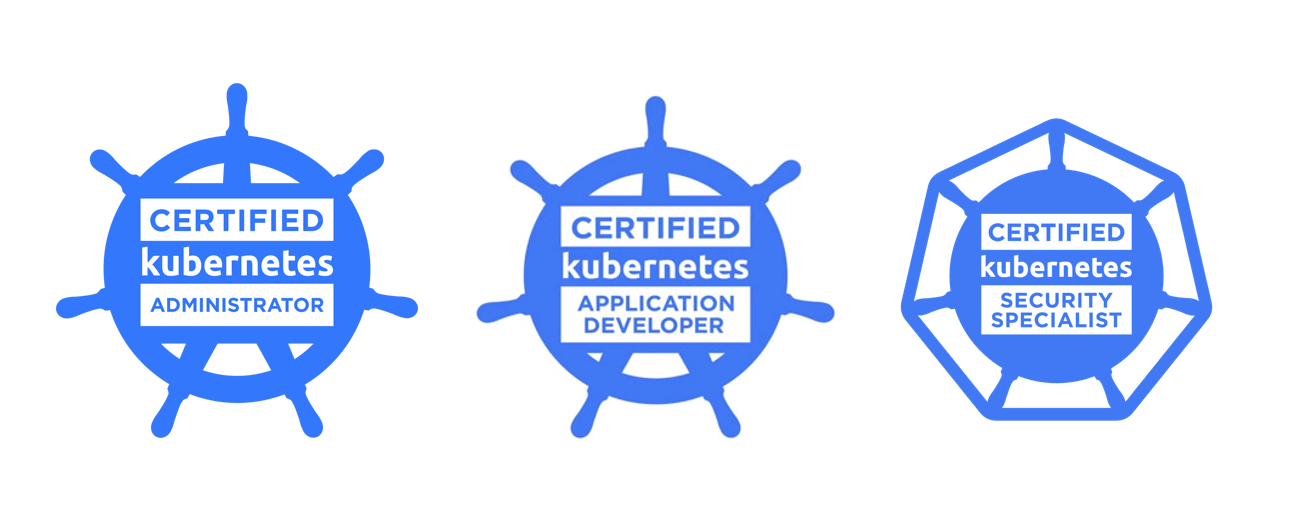
We started our session by discussing the different certifications in Kubernetes for different roles and [CKA] Certified Kubernetes Administrator is the most famous certificate in all of them.
[CKA] Certified Kubernetes Administrator: It assures that CKAs have the skills, knowledge, and competency to perform the responsibilities of Kubernetes administrators.
[CKAD] Certified Kubernetes Application Developer: It certifies that users can design, build, configure, and expose cloud-native applications for Kubernetes.
[CKS] Certified Kubernetes Security Specialist:It assurance that a CKS has the skills, knowledge, and competence on a broad range of best practices for securing container-based applications and Kubernetes platforms during build, deployment, and runtime.
After going through the different certifications in Kubernetes, we started to discuss Docker and Container. Docker is a containerization platform that is used to create a container. We can deploy our application into the Container through an image.
Q) Are Docker Engine and Hypervisor are used for the same purpose?
Ans: No, they are used for different purposes. A hypervisor is a kind of emulator, it is computer software, firmware or hardware that creates and runs virtual machines(VM). On the other hand, Docker Engine runs Inside virtual machines(VM).
To know the difference between VM and Container (Docker) Read our blog post
Introduction to Kubernetes
Kubernetes is an open-source container orchestration tool and it can be used to automate processes like deploying, managing, and scaling containerized applications. It was developed by Google and now it is managed by a cloud-native computing foundation.
With Kubernetes, the following are possible:
Orchestrate Containers
Improve your hardware utilization to maximize the resources required to operate your enterprise apps.
Control and automate the deployment and updating of applications.
To execute stateful apps, mount and add storage.
On-the-fly scaling of containerized apps and their resources
Declaratively manage services, which ensures that deployed applications are always functioning as intended.
Check and self-heal your apps using auto-placement, auto-restart, auto replication, and auto-scaling.
Ans: Kubernetes cluster consists of a set of the node that runs the containerized applications. A minimum cluster can contain a control plane and one or more nodes (virtual machines). The cluster is managed by the control plane.
Kubernetes Architecture
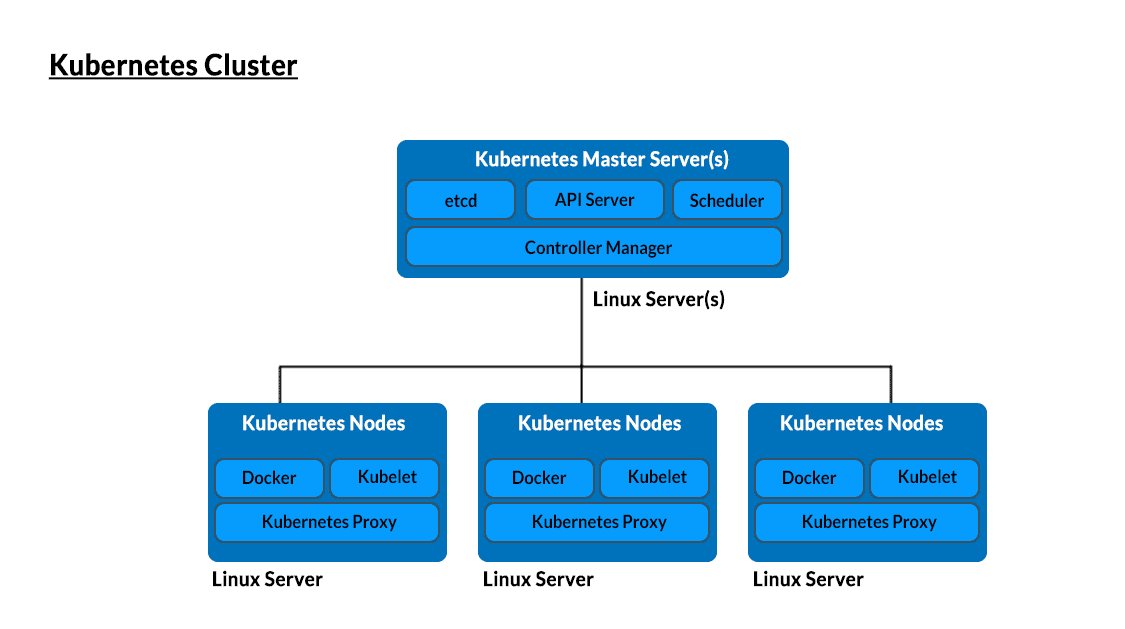
The master components are in charge of coordinating each cluster node, allocating work via pod scheduling, providing administrative interfaces to the cluster, and monitoring cluster-wide health and services.
The fundamental workhorse of Kubernetes clusters is the node or worker node. While the master components handle the majority of the structure and logic, the nodes are in charge of executing containers, providing health information back to the master servers, and controlling container access through network proxies.
Ans: A pod is the smallest deployable object in Kubernetes. It’s a process running inside your Kubernetes cluster. Containers are running inside the pod and a pod can have more than one running container inside it. In a single node, we may have multiple pods and pods can even share their resources.
Ans: A Master node is responsible for managing and controlling all the worker node inside a cluster. It has the following components.
Kube-APIServer – all the communication to the cluster is via the APIServer.
Kube-Controller – Manager-It takes care of the entire cluster by managing and controlling.
Etcd – It’s a database used to store cluster states.
Kube Scheduler – It is used to schedules activities to the worker nodes and allocates resources to nodes.
Kubernetes Cluster Creation
Kubernetes manages a highly available cluster of machines that are linked together to function as a single entity. Kubernetes abstractions enable you to deploy containerized apps to a cluster without attaching them to specific machines. To leverage this new deployment paradigm, programs must be packaged in a way that decouples them from particular hosts: they must be containerized.
Create your own Kubernetes Cluster by going through our step-by-step video blog.
Q) what initial namespaces does K8s start??
Ans:
Default – If an object has not been assigned with any namespace it will get assigned automatically with default.
kube-system – The namespace for objects created and managed by the Kubernetes.
kube-public – This namespace is created automatically and is readable by all users. This is useful for exposing any cluster information necessary to bootstrap components.
Q) What is the minimum requirement of VM to setups a Kubernetes cluster?
Ans:
3 Virtual machine
1 Master Node with 2 Cores CPU and 2GB RAM ( disable SELinux , disable swap and disable firewall)
2 Worker Node with 1 Cores CPU and 1GB RAM ( disable SELinux , disable swap and disable firewall)
Kubernetes Basic building blocks
Pods: Pods are the smallest, most basic deployable objects in Kubernetes. A Pod represents a single instance of a running process in your cluster. Pods contain one or more containers, such as Docker containers.
Deployment: A Kubernetes Deployment instructs Kubernetes on building or changing instances of the pods that comprise a containerized application. Deployments can expand the number of replica pods, enabling controlled distribution of new code, or roll back to an older deployment version if necessary.
ReplicaSet:A replica set ensures the guaranteed number of pods replicas are running at a time. A replica set is defined using fields with selectors it specifies how to identify pods it can acquire and the number of replicas indicating how many pods it should be maintaining and it also has a template.
Ans: A CNI(container network Interface) is used to connect containers to the outside network. The pod can communicate with the network using IP addresses in a Kubernetes cluster.
Kubernetes demo on deploying application
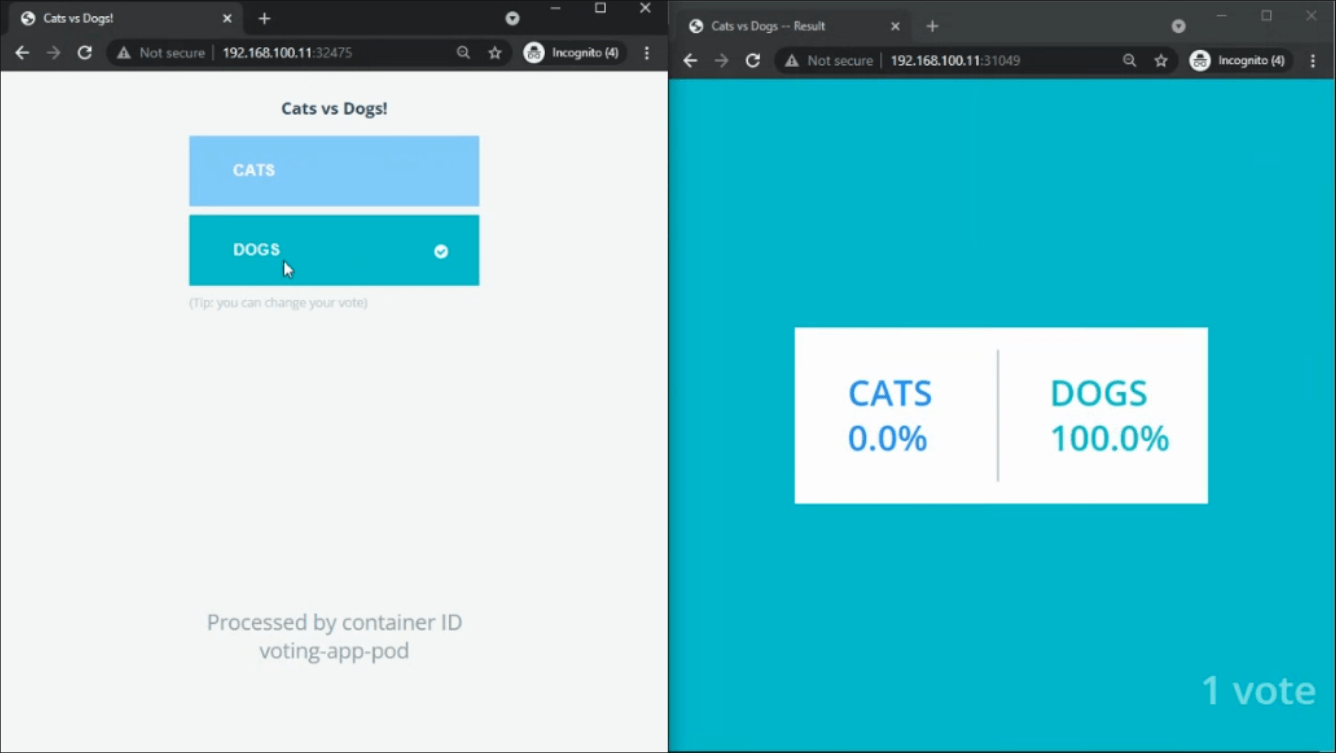
At last, we have Configured Kubernetes on virtual machines and deployed voting applications on the Kubernetes cluster.
Check out the various Kubernetes Certifications like CKA, CKAD, and CKS listed below.
Discover the Power of Kubernetes, Docker & DevOps – Join Our Free Masterclass. Unlock the secrets of Kubernetes, Docker, and DevOps in our exclusive, no-cost masterclass. Take the first step towards building highly sought-after skills and securing lucrative job opportunities. Click on the below image to Register Our FREE Masterclass Now!
I started my IT career in 2000 as an Oracle DBA/Apps DBA. The first few years were tough (<$100/month), with very little growth.
In 2004, I moved to the UK. After working really hard, I landed a job that paid me £2700 per month.
In February 2005, I saw a job that was £450 per day, which was nearly 4 times of my then salary.








![Microsoft Agentic AI Business Solutions Architect [AB-100] | K21 Academy](https://test.k21academy.com/wp-content/uploads/2025/11/Microsoft-Agentic-AI-Business-Solutions-Architect-AB-100-Exam-Overview1.png)


