





Kubernetes has revolutionized the way we deploy and manage applications in containerized environments. Apart from its powerful orchestration capabilities, Kubernetes offers specific resources for scheduling and executing batch jobs and recurring tasks. In this blog, we will delve into Kubernetes Jobs and CronJobs, two essential features that enable efficient task scheduling within Kubernetes clusters. We will explore their differences, use cases, and how they can be leveraged to automate various workloads effectively.
In this blog, we are going to cover what a job & cronjob are and how to create them.
We will be covering the following topics:
- What is Job in Kubernetes?
- Key Concepts in Kubernetes Jobs
- Use Cases for Kubernetes Jobs
- What are CronJobs in Kubernetes?
- Key Concepts in Kubernetes CronJobs
- Use Cases for Kubernetes CronJobs
- Kubernetes Jobs Vs CronJobs
- Create Kubernetes CronJobs
- Conclusion
What are Jobs in Kubernetes?
Kubernetes Jobs provide a way to run short-lived, parallel, or sequential batch tasks within the cluster. Jobs ensure that a specified number of pods successfully complete their tasks before considering the job as finished. They offer mechanisms for task parallelism, completion tracking, and automatic retries, making them ideal for executing one-time or on-demand tasks.
A Job produces one or more Pods and will attempt their execution until a certain number of them successfully terminate. The Job records the successful completion of pods as they finish. The job (ie, Job) is finished when a certain number of successful completions are met. When you delete a Job, it will clear out the Pods it produced. Suspending a Job will result in the deletion of all current Pods until the Job is restarted.
A simple example would be to build a single Job object in order to consistently execute one Pod through to completion. If the initial Pod fails or is removed, the Job object will start a new one (for example due to a node hardware failure or a node reboot).
You can also use a Job to run multiple Pods in parallel.
Key Concepts in Kubernetes Jobs
- Pod Template: Jobs use a pod template to create pods that perform the actual tasks.
- Completions: Specifies the desired number of successfully completed pods required for the job to be considered complete.
- Parallelism: Determines the maximum number of pods that can run concurrently to execute tasks.
- Restart policy: Specifies the behavior of pods when they fail or complete their tasks.
Use Cases for Kubernetes Jobs
The following are some use cases of k8s jobs:
- Running data processing or data analytics tasks in a distributed manner.
- Performing one-time or periodic backups and restores of data.
- Running batch jobs, such as image processing or report generation.
- Executing complex or resource-intensive tasks that require parallelism.
What are CronJobs in Kubernetes?
CronJobs in Kubernetes enable the scheduling and automation of recurring tasks based on a specified cron-like schedule. They provide a declarative way to define the schedule and parameters for executing tasks repeatedly. CronJobs are especially useful for automating periodic maintenance, data synchronization, or any task that needs to run at fixed intervals.
Key Concepts in Kubernetes CronJobs
- Schedule: Specifies the time and frequency at which the CronJob should execute.
- Job Template: Similar to Jobs, CronJobs use a pod template to define the tasks to be executed.
- Concurrency Policy: Determines how the CronJob handles overlapping schedules if a previous execution is still running.
- Starting Deadline Seconds: Specifies the maximum time a CronJob’s job should start running before it is considered missed or failed.
Use Cases for Kubernetes CronJobs
The following are some use cases of k8s Cronjobs:
- Scheduled backups or data synchronization between different systems.
- Regular system maintenance tasks like log rotation or database cleanup.
- Periodic data aggregation or reporting tasks.
- Automated scaling of resources based on time-specific requirements.
Kubernetes Jobs Vs CronJobs
| Feature | Kubernetes Jobs | Kubernetes CronJobs |
|---|---|---|
| Purpose | Run a task once or a set number of times. | Schedule tasks to run at specific times or intervals. |
| When It Runs | Runs immediately when created. | Runs based on a specified schedule (e.g., daily, weekly). |
| Use Case | One-time tasks like backups or batch processing. | Recurring tasks like periodic backups or reports. |
| How to Define | Use a Job resource in YAML. |
Use a CronJob resource in YAML. |
| Execution Control | Runs until it completes or fails. | Creates Jobs according to the schedule. |
| Scheduling | Not scheduled; starts right away. | Uses cron syntax to set the schedule (e.g., */5 * * * *). |
| Retries | Can retry failed tasks a set number of times. | Jobs it creates can retry failed tasks. |
| Concurrency | Runs a single instance or multiple in parallel. | Can control how many jobs run at the same time (Allow, Forbid, Replace). |
| Pausing | Cannot be paused once started. | Can be paused to stop creating new jobs temporarily. |
| Cleaning Up | Can delete pods automatically after they finish. | Can set limits on how many old jobs are kept. |
How to create Kubernetes CronJobs
CronJobs are useful for cluster jobs that must be completed on a regular basis. They are handy for conducting backups, sending emails, or scheduling particular activities for a specified time, such as when your cluster is expected to be idle.
Prerequisites
Make sure you have a K8s cluster deployed already.
Learn How To Setup A Three Node Kubernetes Cluster For CKA
Creating a cronjob to execute on a scheduled time
I) Write a manifest file for cronjob
$ cat << EOF > cron.yaml
apiVersion: batch/v1
kind: CronJob
metadata:
  name: hello
spec:
  schedule: "*/1 * * * *"
  jobTemplate:
    spec:
      template:
        spec:
          containers:
          - name: hw
            image: busybox
            args:
            - /bin/sh
            - -c
            - echo Hello World!
          restartPolicy: OnFailure
EOF
II) Create the cronjob using the yaml from previous step
$ kubectl create -f cron.yaml

Verifying and analyzing the created cronjob
I) View the status of the cronjob
$ kubectl get cronjobs

$ kubectl get jobs
$ kubectl get pods
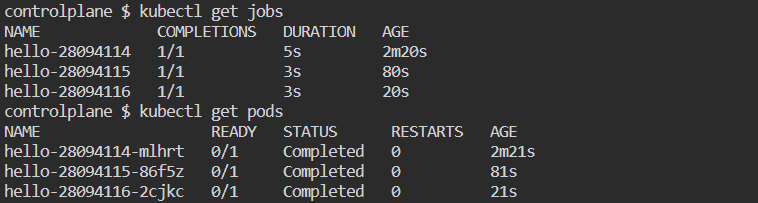
II) Wait for about a minute and you will notice that cronjob executes on the specified configured time and creates pod to execute the assigned job
$ kubectl get cronjobs

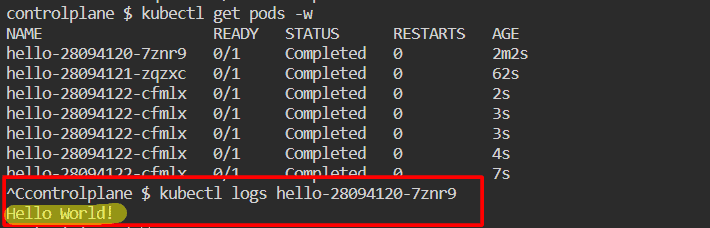
III) View the pods created by the job. Use the pod name to view its logs and verify that the jobs has run successfully
$ kubectl get pods -w
$ kubectl logs <pod_name>
Clean up the resources
$ kubectl delete -f cron.yaml

Conclusion
Kubernetes Jobs and CronJobs are powerful resources that enable efficient scheduling and automation of batch tasks and recurring jobs within Kubernetes clusters. Jobs provides a mechanism for running one-time or on-demand tasks, while CronJobs automate the execution of tasks at regular intervals. By utilizing these features effectively, organizations can automate various workloads
Frequently Asked Questions
What are Kubernetes Jobs?
Kubernetes Jobs are resources used to run short-lived, parallel, or sequential batch tasks within a Kubernetes cluster. They ensure a specified number of pods successfully complete their tasks before considering the job as finished. Jobs provide mechanisms for task parallelism, completion tracking, and automatic retries.
What is the difference between a Kubernetes Job and a Deployment?
Kubernetes Jobs are designed for running batch tasks that complete and then terminate, while Deployments are used for managing long-running, continuously available applications. Jobs ensure that a specified number of pods complete successfully, whereas Deployments maintain a desired number of replicas, continuously monitoring and managing their state.
What are Kubernetes CronJobs?
Kubernetes CronJobs enable the scheduling and automation of recurring tasks based on a specified cron-like schedule. They provide a declarative way to define the schedule and parameters for executing tasks repeatedly at fixed intervals.
How do Kubernetes CronJobs differ from Jobs?
While Jobs are designed for running one-time or on-demand tasks, CronJobs are used for executing tasks at regular intervals. CronJobs automate the execution of tasks based on a predefined schedule, allowing for periodic maintenance, data synchronization, or other recurring operations.
Related/References
- Visit our YouTube channel “K21Academy”
- Certified Kubernetes Administrator (CKA) Certification Exam
- (CKA) Certification: Step By Step Activity Guides/Hands-On Lab Exercise & Learning Path
- Certified Kubernetes Application Developer (CKAD) Certification Exam
- (CKAD) Certification: Step By Step Activity Guides/Hands-On Lab Exercise & Learning Path
- Create AKS Cluster: A Complete Step-by-Step Guide
- Container (Docker) vs Virtual Machines (VM): What Is The Difference?
- How To Setup A Three Node Kubernetes Cluster For CKA: Step By Step
Join FREE Masterclass of Kubernetes
Discover the Power of Kubernetes, Docker & DevOps – Join Our Free Masterclass. Unlock the secrets of Kubernetes, Docker, and DevOps in our exclusive, no-cost masterclass. Take the first step towards building highly sought-after skills and securing lucrative job opportunities. Click on the below image to Register Our FREE Masterclass Now!


![Microsoft Agentic AI Business Solutions Architect [AB-100] | K21 Academy](https://test.k21academy.com/wp-content/uploads/2025/11/Microsoft-Agentic-AI-Business-Solutions-Architect-AB-100-Exam-Overview1.png)



