





Containerization has revolutionized the way applications are deployed and managed. Kubernetes and Docker Compose are two popular tools in the container orchestration landscape, each offering unique features and capabilities. In this blog post, we will compare Kubernetes and Docker Compose (Kubernetes Vs Docker-compose), highlighting their differences, and use cases, and helping you choose the right tool for your containerized applications.
We will be discussing:
- What is Docker-compose?
- Common Use Cases for Docker Compose
- What is Kubernetes?
- Differences: Kubernetes Vs Docker-compose.
- Choosing the Right Tool
- Conclusion
What is Docker-compose?
Docker Compose, on the other hand, is a tool specifically designed for managing multi-container applications. It uses a declarative YAML file to define and configure the services, networks, and volumes required by the application. Docker Compose simplifies local development and testing by allowing you to define the entire application stack and its dependencies in a single file. It is primarily focused on single-host deployments and lacks the scalability and high availability features of Kubernetes.
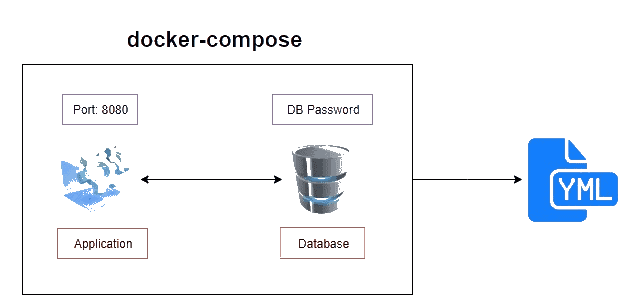
Compose configures the orchestration using the docker-compose.yml file. It specifies which images are required, which ports must be opened, whether or not they have access to the host filesystem, which commands must be executed upon startup, and other details. a docker-compose.yml file that, while still using Dockerfile, incorporates a database into the stack. This is how the docker-compose.yml file looks:
version: '3'
services:
  web:
    build: .
    ports:
     - "8080:80"
  db:
    image: mysql
    ports:
    - "3306:3306"
    environment:
    - MYSQL_ROOT_PASSWORD=password
    - MYSQL_USER=user
    - MYSQL_PASSWORD=password
    - MYSQL_DATABASE=demodb
You’ll write once and reuse the docker-compose.yml file. So, using docker-compose.yml, create a Dockerfile for a stack element and reuse it for multiple stacks. Docker-compose.yml files are used to define and run multi-container Docker applications, whereas Dockerfiles are simple text files containing the commands to assemble an image that will be used to deploy containers.
So the workflow is as follows:
- To build images, create Dockerfiles.
- Create complex stacks (consisting of individual containers) using the Dockerfile images defined in docker-compose.yml.
- Using the docker-compose command, deploy the entire stack.
Learn more about Docker-Compose
Common Use Cases for Docker Compose
Docker Compose is a popular tool for building a microservice infrastructure environment that connects various services across a network. Docker Compose is also commonly used in our test suites to create and destroy isolated testing environments. In addition, for scalability, we can look at Docker Swarm, a project created by Docker to work at the orchestration level, similar to Kubernetes.
Docker Swarm, on the other hand, has fewer features than Kubernetes.
What is Kubernetes?
Kubernetes is a powerful container orchestration platform that provides automated deployment, scaling, and management of containerized applications. It offers a highly scalable and fault-tolerant architecture, allowing you to run and manage containerized workloads across a cluster of nodes. Kubernetes provides features like service discovery, load balancing, auto-scaling, and rolling updates, making it suitable for complex and
Kubernetes’ architecture is simple: it consists of Master nodes and Worker nodes, with the Master communicating with the Worker via an API server. Multiple Master nodes may exist in order to provide High Availability, which is an important aspect of application deployment and a benefit of Kubernetes.
Template for Kubernetes
Kubernetes supports both declarative and imperative approaches, allowing us to use templates to create, update, delete, or scale Objects. Take this deployment template as an illustration:
apiVersion: apps/v1
kind: Deployment
metadata:
  name: nginx-deployment
  labels:
    app: nginx
spec:
  replicas: 3
  selector:
    matchLabels:
      app: nginx
  template:
    metadata:
      labels:
        app: nginx
    spec:
      containers:
      - name: nginx
        image: nginx:1.14.2
        ports:
        - containerPort: 80
Kubernetes vs Docker Compose
In simple words, both Kubernetes & Docker Compose are frameworks for container orchestration. Docker Compose deploys multi-container Docker apps to a single server, while Kubernetes is a production-grade container orchestrator that can run multiple container runtimes, including Docker’s, across multiple virtual or physical machines.
Kubernetes has been able to solve a number of significant issues with application administration, including:
- optimization of resources
- Container self-healing
- Downtimes during the redeployment of applications
- Auto-scaling
Finally, Kubernetes orchestrates the deployment of multiple isolated containers to a point where resources are always available with the potential for optimal distribution.
When it comes to development, however, Docker Compose can configure all of the application’s service dependencies in order to get started with, say, our automated tests. It is therefore a powerful tool for local development.
Key Differences:
- Scalability and Orchestration: Kubernetes excels in managing large-scale deployments across multiple nodes, offering features like auto-scaling, rolling updates, and high availability. It provides a robust orchestration layer that ensures optimal resource utilization and handles failures gracefully. Docker Compose, on the other hand, is limited to single-host deployments and lacks the advanced orchestration capabilities of Kubernetes.
- Multi-Node Clusters: Kubernetes supports the creation of multi-node clusters, allowing you to distribute your containerized workloads across multiple machines. It provides mechanisms for workload scheduling, load balancing, and fault tolerance. Docker Compose, on the other hand, is designed for single-host environments, making it suitable for local development and testing but less suitable for production deployments.
- Service Discovery and Load Balancing: Kubernetes offers built-in service discovery and load balancing mechanisms. It automatically assigns a unique DNS name to each service and distributes traffic across the available instances. Docker Compose relies on the Docker networking stack and does not provide native service discovery or load balancing features. However, you can integrate Docker Compose with external tools or add-ons to achieve similar functionality.
- Ecosystem and Community Support: Kubernetes has a vast ecosystem and a thriving community. It is supported by major cloud providers and has a rich set of add-ons, tools, and integrations available. Docker Compose, while widely used for local development, has a smaller ecosystem and is less mature in terms of production-grade deployment features.
Choosing the Right Tool
Kubernetes is the ideal choice when scalability, high availability, and production-grade deployments are required. It is well-suited for complex microservices architectures and large-scale applications. If you have multiple nodes, need auto-scaling, or require advanced features like service discovery and load balancing, Kubernetes is the preferred option.
Docker Compose, on the other hand, is well-suited for local development, testing, and small-scale deployments. It provides a simple and intuitive way to define and manage multi-container applications on a single host. If your application is relatively simple, doesn’t require advanced scaling or high availability, and you want a quick and easy setup, Docker Compose is a good choice.
Conclusion
Kubernetes and Docker Compose are powerful tools in the container orchestration landscape, each with its own strengths and use cases. Kubernetes excels in managing large-scale deployments and provides advanced features for scalability, high availability, and production-grade deployments. Docker Compose, on the other hand, simplifies local development and testing and is suitable for smaller deployments on a single host.
Consider your application’s requirements, scalability needs, and deployment complexity when choosing between Kubernetes and Docker Compose. Ultimately, the right choice depends on your specific use case and the level of orchestration and scalability your application demands.
To Download Kubernetes CKA Sample Exam Questions, Click here.
Frequently Asked Questions
What is the main difference between Kubernetes and Docker Compose?
The main difference lies in their scope and capabilities. Kubernetes is a robust container orchestration platform designed for managing large-scale deployments across multiple nodes. It provides advanced features like auto-scaling, high availability, and service discovery. Docker Compose, on the other hand, is a tool focused on defining and managing multi-container applications on a single host, primarily for local development and testing.
Can Kubernetes and Docker Compose be used together?
Yes, Kubernetes and Docker Compose can be used together in certain scenarios. Docker Compose can be used to define and test multi-container applications locally, and then the Compose file can be converted or translated into Kubernetes manifests for deployment on a Kubernetes cluster. However, it's important to note that the capabilities and features of Kubernetes may not be fully utilized in this setup.
Which tool is better for scalability and high availability?
Kubernetes is the preferred tool for scalability and high availability. It offers features like auto-scaling, load balancing, and fault tolerance, allowing applications to scale seamlessly and handle failures effectively across a cluster of nodes. Docker Compose, being focused on single-host deployments, lacks the advanced scalability and high availability features provided by Kubernetes.
Can Docker Compose provide service discovery and load balancing?
Docker Compose does not provide native service discovery and load balancing features. It relies on the Docker networking stack, which does not offer built-in mechanisms for service discovery or load balancing. However, external tools or add-ons can be used in combination with Docker Compose to achieve service discovery and load balancing functionality.
Is Docker Compose suitable for production deployments?
Docker Compose is primarily designed for local development and testing. While it can be used for small-scale production deployments, it lacks the advanced scalability, high availability, and orchestration capabilities required for large-scale production environments. Kubernetes is generally considered a more suitable choice for production-grade deployments.
Which tool is better suited for microservices architectures?
Kubernetes is generally considered better suited for microservices architectures due to its advanced features like service discovery, load balancing, scaling, and fault tolerance. It provides a robust and scalable platform for managing and orchestrating microservices-based applications. Docker Compose, while capable of managing multi-container applications, may not offer the same level of flexibility and scalability as Kubernetes for complex microservices architectures.
Related/References
- Visit our YouTube channel “K21Academy”
- Certified Kubernetes Administrator (CKA) Certification Exam
- (CKA) Certification: Step By Step Activity Guides/Hands-On Lab Exercise & Learning Path
- Certified Kubernetes Application Developer (CKAD) Certification Exam
- (CKAD) Certification: Step By Step Activity Guides/Hands-On Lab Exercise & Learning Path
- Create AKS Cluster: A Complete Step-by-Step Guide
- Container (Docker) vs Virtual Machines (VM): What Is The Difference?
- How To Setup A Three Node Kubernetes Cluster For CKA: Step By Step
Join FREE Masterclass
Discover the Power of Kubernetes, Docker & DevOps – Join Our Free Masterclass. Unlock the secrets of Kubernetes, Docker, and DevOps in our exclusive, no-cost masterclass. Take the first step towards building highly sought-after skills and securing lucrative job opportunities. Click on the below image to Register Our FREE Masterclass Now!


![Microsoft Agentic AI Business Solutions Architect [AB-100] | K21 Academy](https://test.k21academy.com/wp-content/uploads/2025/11/Microsoft-Agentic-AI-Business-Solutions-Architect-AB-100-Exam-Overview1.png)



