We are back again with some quick tips, including Q/A and blog posts on the topics covered in the Day 7 Live sessions, which will help you clear Kubernetes Certifications [CKA/D] and get a better-paid job in the field of Microservices, Containers, DevOps & Kubernetes.
In the previous week, i.e. onDay 6session, we covered Introduction to Volume and Persistent Storage with NFS (PV, PVC, Storage Class), Dynamic Volume.
This week of Day, we have covered the Kubernetes Security introduction & RBAC, Kube-Config, Admission Controller, Network Policies, and Security Context.
So, here are some of the Q/A’s asked from Day 7 Live session⏲
Kubernetes Security RBAC
Role-based access control (RBAC) is a method of regulating access to computer or network resources based on the roles of individual users within your organization. RBAC authorization uses the rbac.authorization.k8s.io API group to drive authorization decisions, allowing you to dynamically configure policies through the Kubernetes API.
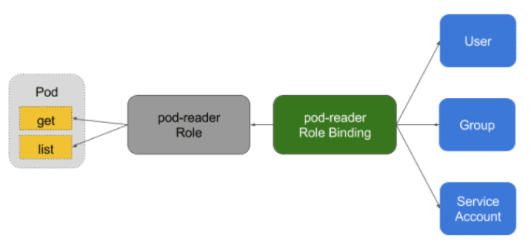
Q) What is Role binding in RBAC? Ans: Role Binding in Kubernetes Role-Based Access Control is used for granting permission to a Subject in a Kubernetes cluster. Subjects are nothing but a group of users, services, or teams making an attempt at Kubernetes API. It defines what operations a user, service, or group can perform.
Q) What is Role and Role Binding In RBAC? Ans:
The role is a set of rules that represent a set of purely additive permissions
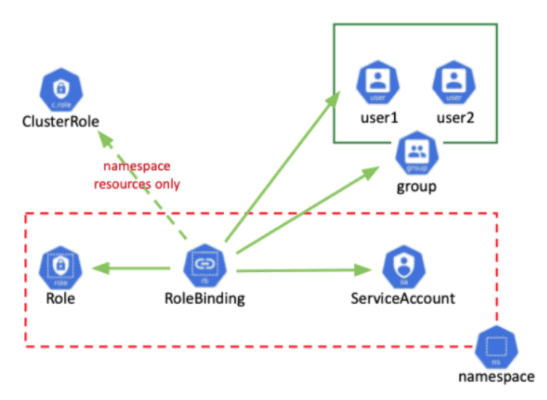
The role is used to grant access to resources within a single namespace
RoleBinding binds the permissions defined in a role to a user or set of users
Q) What is Cluster Role and Cluster Role Binding In RBAC? Ans: ClusterRole: A role that has a cluster-wide scope. ClusterRole can also be used to grant access to:
Define permissions on namespaced resources and be granted within an individual namespace(s)
Define permissions on namespaced resources and be granted across all namespaces
Define permissions on cluster-scoped resources
Cluster Role Binding in RBAC is used to grant permission to a subject on a cluster-level in all the namespaces. It will offer you permissions for cluster resources and it can even offer you permissions for resources within any namespace within a cluster.
A file that is used to configure access to clusters is called a kubeconfig file. This is a generic way of referring to configuration files. It does not mean that there is a file named kubeconfig. By default, kubectl looks for a file named config in the $HOME/.kube directory.
Q) How do Kube-Config works? Ans: Kubecofig enables clients like kubectl and many programming languages to securely access your Kubernetes Cluster. A kubeconfig file is a file used to configure access to Kubernetes when used in conjunction with the kubectl command-line tool (or other clients). The kubectl command-line tool uses kubeconfig files to find the information it needs to choose a cluster and communicate with the API server of a cluster.
Admission Controller
The admission handler is a piece of code that intercepts the request to the Kubernetes API server before the object is persisted, but after the request is authenticated and authorized. The driver consists of the following list, is compiled into a kubeapiserver binary file, and can only be configured by the cluster administrator.
Network Policies
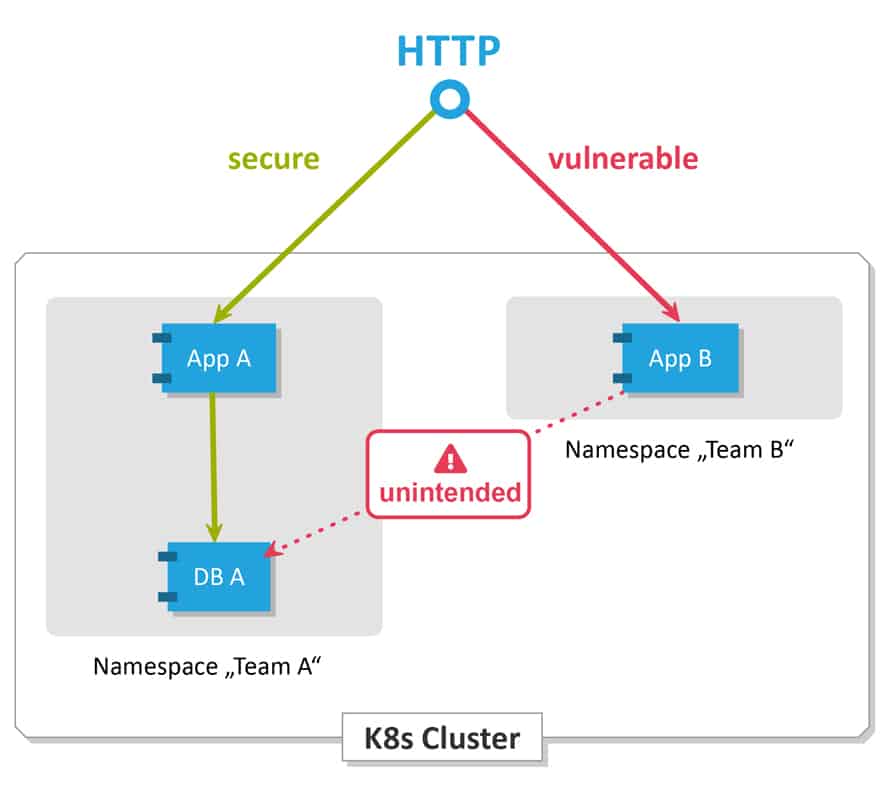
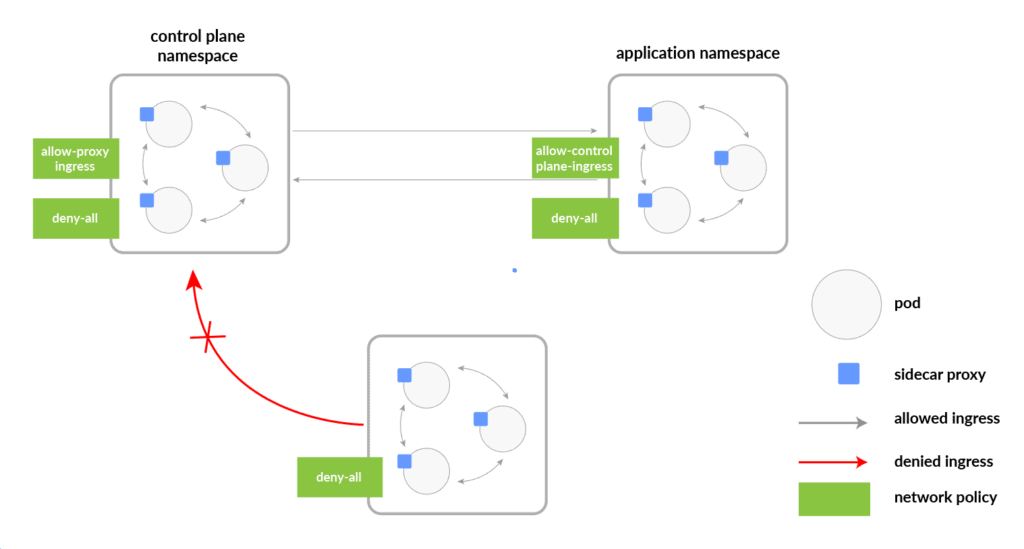
Network policies are Kubernetes resources that allow you to control the traffic between Pods and/or endpoints on the network. Most CNI plug-ins support network policy execution, but if they do not, the created network policy will be ignored.
The most popular CNI plugins with network policy support are:
Weave
Calico
Canal
Cilium
Q) What Are Kubernetes Network Policies? Ans: These are Kubernetes assets that control the traffic between pods. Kubernetes network policy lets developers secure access to and from their applications. This is how we can restrict a user for access.
Any request that is successfully authenticated (including an anonymous request) is then authorized. The default authorization mode is always allowed, which allows all requests. In Kubernetes, you must be authenticated (logged in) before your request can be authorized (granted permission to access).
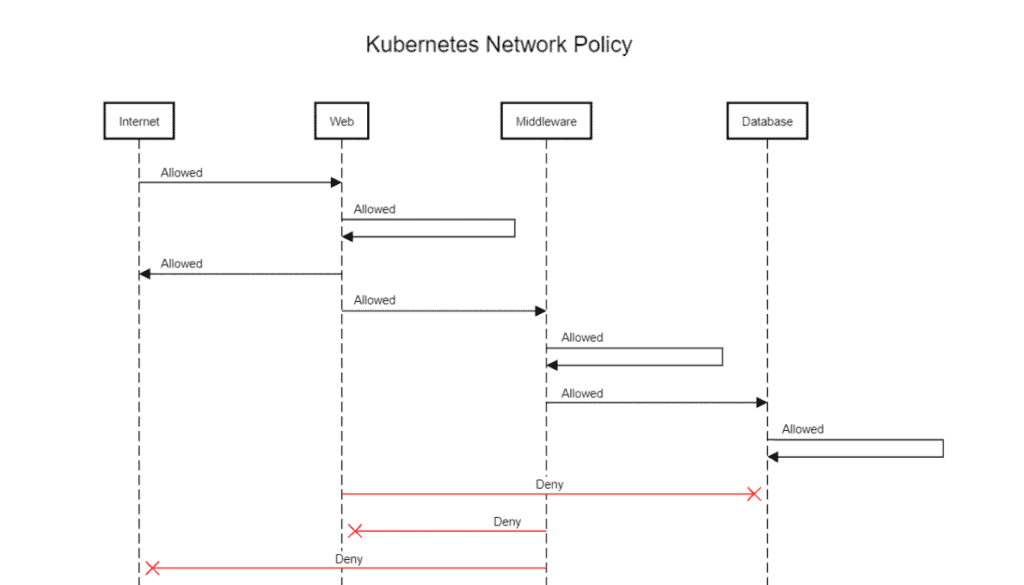
Q) How Does Network Policy Work? Ans: There are unlimited situations where you need to permit or deny traffic from specific or different sources. This is utilized in Kubernetes to indicate how gatherings of pods are permitted to speak with one another and with outside endpoints.
Rules:
Traffic is allowed unless there is a Kubernetes network policy selecting a pod.
Communication is denied if policies are selecting the pod but none of them have any rules allowing it.
Traffic is allowed if there is at least one policy that allows it.
Q) What is Network Policy In Pods? Ans: All Pods in Kubernetes communicate with each other which are present in the cluster. By default all Pods are non-isolated however Pods become isolated by having a Kubernetes Network Policy in Kubernetes. Once we have it in a namespace choosing a specific pod, that will restrict all the incoming and outing traffic of the pods.
Pod traffic is not restricted if If there are no network policies that exist.
Q) What is Network Policy Specification? Ans: PodSelector – Each of these includes a pod selector that selects the grouping of pods to which the policy applies. This selects particular Pods in the same namespace as the Kubernetes Network Policy which should be allowed as ingress sources or egress destinations.
Policy Types – indicates which sorts of arrangements are remembered for this approach, Ingress, or Egress.
Ingress – Each Network Policies may include a list of allowed ingress rules. This includes inbound traffic whitelist rules.
Egress – Each Network Policy may include a list of allowed egress rules. This includes outbound traffic whitelist rules.
Q) What are the Default Network Policies In Kubernetes Ans: At the point when no policy is defined, The default Kubernetes policy permits pods to get traffic from anyplace. Every Pod can communicate with one another freely.
Default permit all ingress traffic
Default deny all Egress traffic
Default deny all ingress traffic etc.
Q) What is an ingress network? Ans: Inbound traffic includes all data communications and network traffic, which originate from the external network and are destined for nodes on the host network. Inbound traffic can be any form of traffic originating from an external network and destined for the host network.
Q) What is Kubernetes egress? Ans: Inbound and Outbound From the perspective of a Kubernetes Pod, the input is the incoming connection to the Pod, and the output is the outgoing connection from the Pod. In the Kubernetes network policy, create inbound and outbound “permissions” rules (outbound, inbound, or both) independently.
Q) Why is network policy important? Ans: The Value of Cybersecurity Strategy Information is the most important product for many business organizations. They have sensitized company employees to security issues and helped the company demonstrate its commitment to protecting valuable data assets.
ConfigMaps in Kubernetes
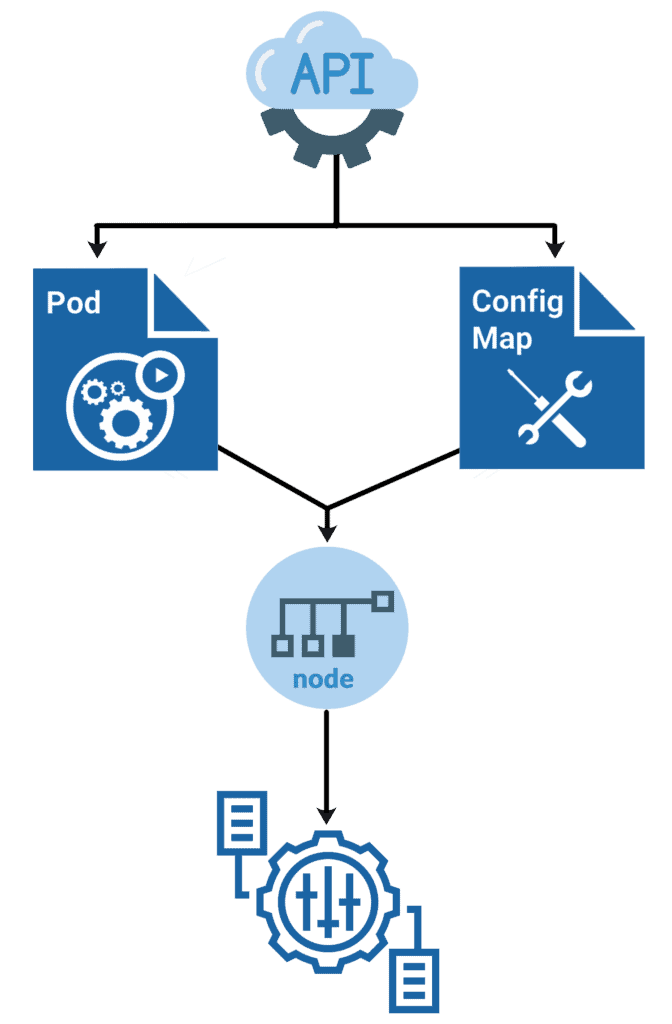
ConfigMap is a Kubernetes object that allows you to separate configuration data/files from image content to maintain the portability of containerized applications.
ConfigMaps links configuration files, command line parameters, environment variables, port numbers, and alternate configuration artifacts to your Pod container and system components at runtime.
ConfigMap can be used to store and share non-encrypted and non-sensitive configuration data. Like Secrets, you can generate configuration maps from files and YAML statements.
Security Context
The starting point for understanding how Pod security works in Kubernetes is the so-called “security context,” which refers to specific access and permission restrictions at the individual Pod level configured at runtime.
Q) What is the security context in Kubernetes and How does it work? Ans: A security context defines privilege and access control settings for a Pod or Container. Permission to access an object, like a file, is based on user ID (UID) and group ID (GID).
Q) Which level of security context works? Ans: It defines the operating system security settings. It defines privilege and access control settings for a Pod or Container. It is available on two levels; per pod and container. Some configurations are possible on both levels. Security settings for Pods are typically applied by using security contexts. Security Contexts allow for the definition of privilege and access controls on a per-Pod basis.
Quiz Time (Sample Exam Questions)!
With the CKA training program, we will cover 100+ sample exam questions to help you prepare for CKA certification. Check out the questions and see if you can solve this.
Ques) Which of the below are the most popular CNI plugins supported by network policy?
A. Weave
B. Calico
C. Cilium
D. All of the above
Comment down your answers.
The correct answer will reveal in next week’s blog.
Here is the answer to the question shared last week
Ques) What is a Kubernetes volume?
A. The software within an OS that controls capacity allocation for nodes
B. A directory for the data accessible to containers in a pod
C. Layering software that puts apps into compartments for easier deployment
D. Code that enables two software programs to communicate
Answer: B
Explanation: K8s Volume is a directory for the data accessible to containers in a pod.
Feedback
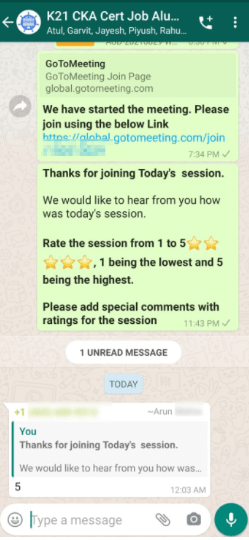
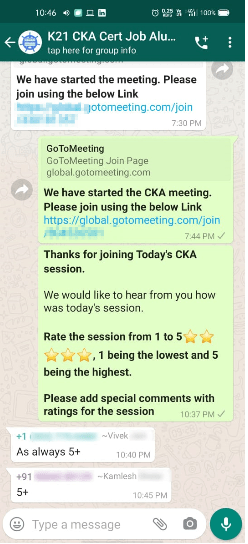
We always work on improving and being the best version of ourselves from the previous session hence constantly ask feedback from our attendees. Here’s the feedback that we received from our trainees who had attended the session…
Begin your journey towards becoming a Certified Kubernetes Administrator [CKA] from our Certified Kubernetes Administrator (CKA) training program. To know about the Roles and Responsibilities of a Kubernetes administrator, why learn Docker and Kubernetes, Job opportunities for Kubernetes administrator in the market, Hands-On labs you must perform to clear the Certified Kubernetes Administrator (CKA) Certification exam by registering for our FREE class.
I started my IT career in 2000 as an Oracle DBA/Apps DBA. The first few years were tough (<$100/month), with very little growth.
In 2004, I moved to the UK. After working really hard, I landed a job that paid me £2700 per month.
In February 2005, I saw a job that was £450 per day, which was nearly 4 times of my then salary.









![Microsoft Agentic AI Business Solutions Architect [AB-100] | K21 Academy](https://test.k21academy.com/wp-content/uploads/2025/11/Microsoft-Agentic-AI-Business-Solutions-Architect-AB-100-Exam-Overview1.png)


