





In this blog, We are going to cover the Certified Kubernetes Administrator(CKA) & Certified Kubernetes Application Developer Exam Questions and Answers. As Kubernetes has been one of the most demanding technology in the IT sector. Most learners are already preparing themselves in the field of Kubernetes, and for those, we are here to cover some cka exam questions & ckad exam questions.
Introduction to CKA & CKAD
Certified Kubernetes Administrator(CKA) certification is to provide assurance that Kubernetes Administrators have the skills, knowledge, to perform the responsibilities of Kubernetes administrators.
The Certified Kubernetes Application Developer(CKAD) certification is designed to guarantee that certification holders have the knowledge, skills, and capability to design, configure, and expose cloud-native applications for Kubernetes and also perform the responsibilities of Kubernetes application developers. Hence, it also assures that the Kubernetes Application Developer can use core primitives to build, monitor, and troubleshoot scalable applications in Kubernetes.
Kubernetes CKA Exam Questions and Answers
Q1) Create a new service account with the name pvviewer. Grant this Service account access to list all PersistentVolumes in the cluster by creating an appropriate cluster role called pvviewer-role and ClusterRoleBinding called pvviewer-role-binding.
Next, create a pod called pvviewer with the image: redis and serviceaccount: pvviewer in the default namespace.
Ans.
Create Service account
$ kubectl create serviceaccount pvviewer
Create cluster role
$ kubectl create clusterrole pvviewer-role --verb=list --resource=PersistentVolumes

Create cluster role binding
$ kubectl create clusterrolebinding pvviewer-role-binding --clusterrole=pvviewer-role --serviceaccount=default:pvviewer

Verify
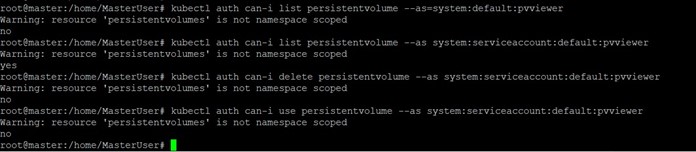
$ kubectl auth can-i list PersistentVolumes –as system:serviceaccount:default:pvviewer
Q2) Create a new deployment called nginx-deploy, with image nginx:1.16 and 1 replica. Record the version. Next upgrade the deployment to version 1.17 using rolling update. Make sure that the version upgrade is recorded in the resource annotation.
Ans.
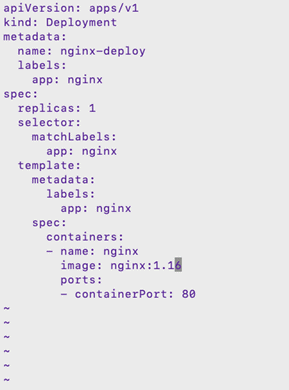
$ vim nginx-deployment.yaml
$ kubectl apply -f nginx-deployment.yaml --record
$ kubectl get deployment
$ kubectl rollout history deployment nginx-deploy

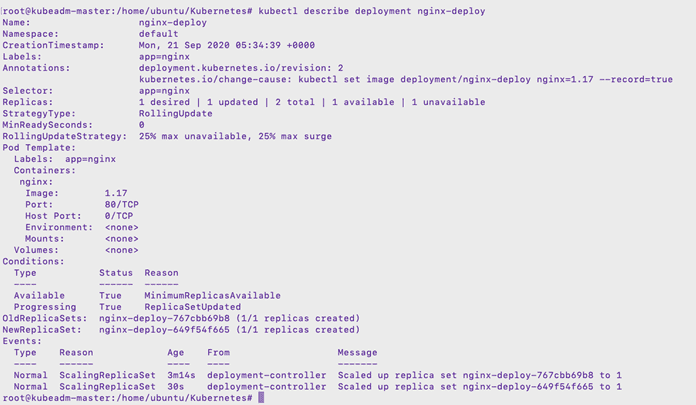
$ kubectl set image deployment/nginx-deploy nginx=1.17 --record
$ kubectl rollout history deployment nginx-deploy

$ kubectl describe deployment nginx-deploy
Q3) Create snapshot of the etcd running at https://127.0.0.1:2379. Save snapshot into /opt/etcd-snapshot.db.
Use these are certificate for snapshot
Ca certificate: /etc/kubernetes/pki/etcd/ca.crt
Client certicate: /etc/kubernetes/pki/etcd/server.crt
client key: /etc/kubernetes/pki/etcd/server.key
and then restore from the previous ETCD backup.
Ans:
$ ETCDCTL_API=3 etcdctl --endpoints=https://127.0.0.1:2379 --cert=/etc/kubernetes/pki/etcd/server.crt --cacert=/etc/kubernetes/pki/etcd/ca.crt --key=/etc/kubernetes/pki/etcd/server.key snapshot save /opt/etcd-snapshot.db
Verify//
Note: Do not perform this step in exam otherwise it may create an issue in the restoration process.
$ ETCDCTL_API=3 etcdctl --write-out=table snapshot status /opt/etcd-snapshot.db
Restore
No need to remember all the flags in the restore command:
You can do
$ ETCDCTL_API=3 etcdctl snapshot restore -h
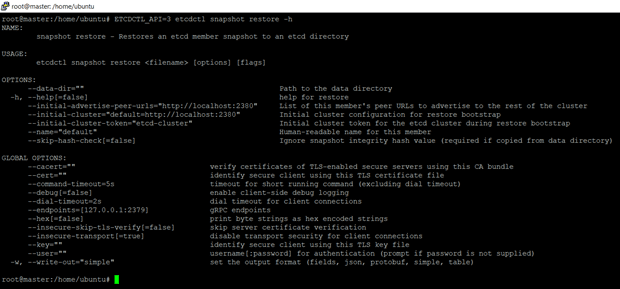
$ ETCDCTL_API=3 etcdctl snapshot restore /opt/etcd-snapshot.db --endpoints=https://127.0.0.1:2379 --cert=/etc/kubernetes/pki/etcd/server.crt --cacert=/etc/kubernetes/pki/etcd/ca.crt --key=/etc/kubernetes/pki/etcd/server.key --data-dir=/var/lib/etcd --initial-advertise-peer-urls=http://10.0.0.4:2380 --initial-cluster=<master-name>=http://10.0.0.4:2380" --initial-cluster-token="etcd-cluster" --name="<master-name>"
Q4) Create a Persistent Volume with the given specification.
Volume Name: pv-analytics, Storage: 100Mi, Access modes: ReadWriteMany, Host Path: /pv/data-analytics
Ans.
$ vim pv.yaml
apiVersion: v1
kind: PersistentVolume
metadata:
  name: pv-analytics
spec:
  capacity:
    storage: 100Mi
  accessModes:
    - ReadWriteMany
  hostPath:
    path:  /pv/data-analytics
$ kubectl create -f pv.yaml
$ kubectl get pv

Read More: K8s Persistent Storage
Q5) Taint the worker node to be Unschedulable. Once done, create a pod called dev-redis, image redis:alpine to ensure workloads are not scheduled to this worker node. Finally, create a new pod called prod-redis and image redis:alpine with toleration to be scheduled on node01.
key:env_type, value:production, operator: Equal and effect:NoSchedule
Ans.
$ kubectl get nodes
$ kubectl taint node node01 env_type=production:NoSchedule
$ kubectl describe nodes node01 | grep -i taint
$ kubectl run dev-redis --image=redis:alpine --dyn-run=client -o yaml > pod-redis.yaml
$ vi prod-redis.yaml
apiVersion: v1
kind: Pod
metadata:
  name: prod-redis
spec:
  containers:
  - name:  prod-redis
    image:  redis:alpine
  tolerations:
  - effect: Noschedule
    key: env_type
    operator: Equal
    value: prodcution
$ kubectl create -f prod-redis.yaml
Read More: Scheduling in K8s
Q6) Set the node named worker node as unavailable and reschedule all the pods running on it. (Drain node)
Ans.
$ Kubectl drain node <worker node> --ignore-daemonsets
Q7) Create a Pod called non-root-pod , image: redis:alpine
runAsUser: 1000
fsGroup: 2000
Ans.
$ vim non-root-pod.yaml
$ kubectl create -f non-root-pod.yaml
apiVersion: v1
kind: Pod
metadata:
  name:  non-root-pod
spec:
  securityContext:
    runAsUser:  1000
    fsGroup:  2000
  containers:
  -  name:  non-root-pod
Read More: K8s Pods For Beginners
Q8) Create a NetworkPolicy which denies all ingress traffic
Ans.
$ vim policy.yaml
apiVersion: networking.k8s.io/v1
kind: NetworkPolicy
metadata:
  name: default-deny
spec:
  podSelector: {}
  policyTypes:
  - Ingress
$ kubectl create -f policy.yaml
Read More: K8s Network Policy
Conclusion
Kubernetes is the leading technology, and companies always look for skilled employees. To help you crack the CKA exam and secure a job, we put some effort and listed some Sample Exam Questions.
Download Complete CKAD/CKA Questions Guide
To download the guide cka sample questions, click here.
Frequently Asked Questions
What are the CKA and CKAD certifications?
The CKA and CKAD certifications are designed to validate the skills of IT professionals in deploying, managing, and operating Kubernetes clusters (CKA) and designing, building, configuring, and exposing cloud-native applications for Kubernetes (CKAD).
Who should consider taking the CKA or CKAD exams?
The CKA is targeted towards Kubernetes administrators, cloud administrators, and other IT professionals responsible for the Kubernetes ecosystem. The CKAD is ideal for software developers who wish to demonstrate their expertise in building Kubernetes applications.
How can I register for the CKA or CKAD exams?
You can register for the exams through the Linux Foundation website or the Cloud Native Computing Foundation (CNCF), which administer the certifications.
What is the format of the CKA and CKAD exams?
Both CKA and CKAD exams are performance-based and require candidates to solve multiple tasks in a command-line environment. They are proctored online exams that you can take from anywhere.
Related/References
- Visit our YouTube channel “K21Academy”
- Certified Kubernetes Administrator (CKA) Certification Exam
- (CKA) Certification: Step By Step Activity Guides/Hands-On Lab Exercise & Learning Path
- Certified Kubernetes Application Developer (CKAD) Certification Exam
- (CKAD) Certification: Step By Step Activity Guides/Hands-On Lab Exercise & Learning Path
- Create AKS Cluster: A Complete Step-by-Step Guide
- Container (Docker) vs Virtual Machines (VM): What Is The Difference?
- How To Setup A Three Node K8s Cluster For CKA: Step By Step
Join FREE Masterclass
Discover the Power of Kubernetes, Docker & DevOps – Join Our Free Masterclass. Unlock the secrets of Kubernetes, Docker, and DevOps in our exclusive, no-cost masterclass. Take the first step towards building highly sought-after skills and securing lucrative job opportunities. Click on the below image to Register Our FREE Masterclass Now!


![Microsoft Agentic AI Business Solutions Architect [AB-100] | K21 Academy](https://test.k21academy.com/wp-content/uploads/2025/11/Microsoft-Agentic-AI-Business-Solutions-Architect-AB-100-Exam-Overview1.png)



