





Kubernetes is very popular in the world of containerization, and many IT professionals aim to get certified in it because it opens up many job opportunities. The Certified Kubernetes Administrator (CKA) certification is one of the top choices for those looking to prove their Kubernetes skills.
In this blog, I am going to cover:
- What is Certified Kubernetes Administrator (CKA) Certification?
- Why CKA (Certified Kubernetes Administrator) Certification?
- Certified Kubernetes Administrator Exam Details
- Understanding the Exam Structure
- Pre-requisites for CKA Exam
- Learning Path For Kubernetes Certification (CKA)
- Complete CKA Guide Hands-on Labs
- How to Register for CKA Certification Exam?
- The CKA Exam Checklist
- Tips for CKA Certification Exam
- CKA Certification Exam Day Tips
The following video covers everything you need to know about the CKA exam.
What is Certified Kubernetes Administrator (CKA) Certification? ^
The Certified Kubernetes Administrator (CKA) certification is designed to prove that you have the skills to manage Kubernetes clusters. It covers key tasks like installing and setting up a cluster, managing networking, storage, and security, and troubleshooting problems.
This certification is perfect for roles like DevOps Engineers, System Administrators, and Cloud Engineers who manage Kubernetes clusters and need to keep them running smoothly.
The exam is hands-on, so you’ll need to complete real-world tasks. The Cloud Native Computing Foundation (CNCF) maintains the certification, ensuring it stays up-to-date with industry standards.
If you are new to Kubernetes, we recommend reading our blog, Kubernetes for Beginners, which offers a detailed introduction to help you get started.
Why CKA (Certified Kubernetes Administrator) Certification? ^
- Prove Your Skills: The CKA certification shows that you have the necessary skills to manage Kubernetes effectively.
- For Key Roles: It’s ideal for professionals like DevOps Engineers and Cloud Engineers who need to work with Kubernetes every day.
- Hands-On Experience: The exam is practical, testing your ability to handle real tasks, which is crucial if you work with Kubernetes in production.
- Stay Current: Since CNCF maintains the certification, it reflects the latest best practices in the Kubernetes world.
- Boost Your Career: Achieving the CKA certification can enhance your job prospects in the cloud-native field, making you a more valuable candidate for employers.
Learn more about Kubernetes architecture by exploring our detailed diagram.
Certified Kubernetes Administrator Exam Details ^
The Certified Kubernetes Administrator(CKA) exam is structured as follows:
- Exam Type: Online, performance-based exam
- Duration: 2 hours
- Certification Validity: 2 years
- Exam Eligibility: 12 months to schedule after purchase
- Retake Policy: One free retake included
- Certification: PDF certificate and digital badge provided
- Software Version: Kubernetes v1.32
- Exam Simulator: Available for preparation
- Focus: Practical skills in real-world Kubernetes tasks
- Cost: $445 (may vary with discounts or promotions)
Understanding the Exam Structure ^
For the Certified Kubernetes Administrator (CKA) exam, the exam is similarly divided into domains, each representing a key area of Kubernetes administration. Here’s a breakdown of the five key domains for the CKA exam:
- Storage (10%)
- Troubleshooting (30%)
- Workloads & Scheduling (15%)
- Cluster Architecture, Installation and Configuration – 25%
- Services & Networking (20%)
1. Storage – 10%
- Overview: This domain focuses on managing storage in Kubernetes, emphasizing dynamic provisioning, persistent storage, and volume management.
- Key Tasks:
- Implement storage classes and dynamic volume provisioning.
- Configure volume types, access modes, and reclaim policies.
- Manage Persistent Volumes (PVs) and Persistent Volume Claims (PVCs).
2. Troubleshooting – 30%
- Overview: The largest and most critical domain, Troubleshooting, evaluates your ability to identify, diagnose, and resolve issues in Kubernetes clusters. It involves working with cluster components, networking, and services.
- Key Tasks:
- Troubleshoot clusters and nodes.
- Troubleshoot cluster components.
- Monitor cluster and application resource usage.
- Manage and evaluate container output streams.
- Troubleshoot services and networking.
3. Workloads and Scheduling – 15%
- Overview: This domain focuses on managing application deployments and workload scheduling, ensuring high availability, efficient scaling, and self-healing capabilities.
- Key Tasks:
- Understand application deployments and how to perform rolling updates and rollbacks.
- Use ConfigMaps and Secrets to configure applications.
- Configure workload autoscaling.
- Understand the primitives used to create robust, self-healing application deployments.
- Configure Pod admission and scheduling, including limits and node affinity.
4. Cluster Architecture, Installation, and Configuration – 25%
- Overview: This domain assesses your ability to set up, configure, and manage Kubernetes clusters, including their lifecycle management, high availability, and control plane configuration.
- Key Tasks:
- Manage Role-Based Access Control (RBAC).
- Prepare underlying infrastructure for installing a Kubernetes cluster.
- Create and manage Kubernetes clusters using
kubeadm. - Manage the lifecycle of Kubernetes clusters.
- Implement and configure a highly-available control plane.
- Use Helm and Kustomize to install cluster components.
- Understand extension interfaces (CNI, CSI, CRI, etc.).
- Understand Custom Resource Definitions (CRDs), and install and configure operators.
5. Services and Networking – 20%
- Overview: This domain evaluates your knowledge of Kubernetes networking, focusing on exposing applications, configuring services, and managing Ingress, Network Policies, and DNS.
- Key Tasks:
- Understand connectivity between Pods
- Define and enforce Network Policies
- Use ClusterIP, NodePort, LoadBalancer service types and endpoints
- Use the Gateway API to manage Ingress traffic
- Know how to use Ingress controllers and Ingress resources
- Understand and use CoreDNS
These five domains together cover the full scope of knowledge required for the CKA exam. Each domain has a specific weight toward the overall score, reflecting its importance in Kubernetes administration.
Pre-requisites for CKA Exam ^
While the CKA certification exam focuses on Kubernetes and doesn’t require any prior certifications, it’s helpful to have a basic understanding of Linux commands. Knowing how to use simple tools like the ‘vi editor’ can make navigating the exam tasks easier.
Learn with us: Explore our Kubernetes training to master Kubernetes from the basics.
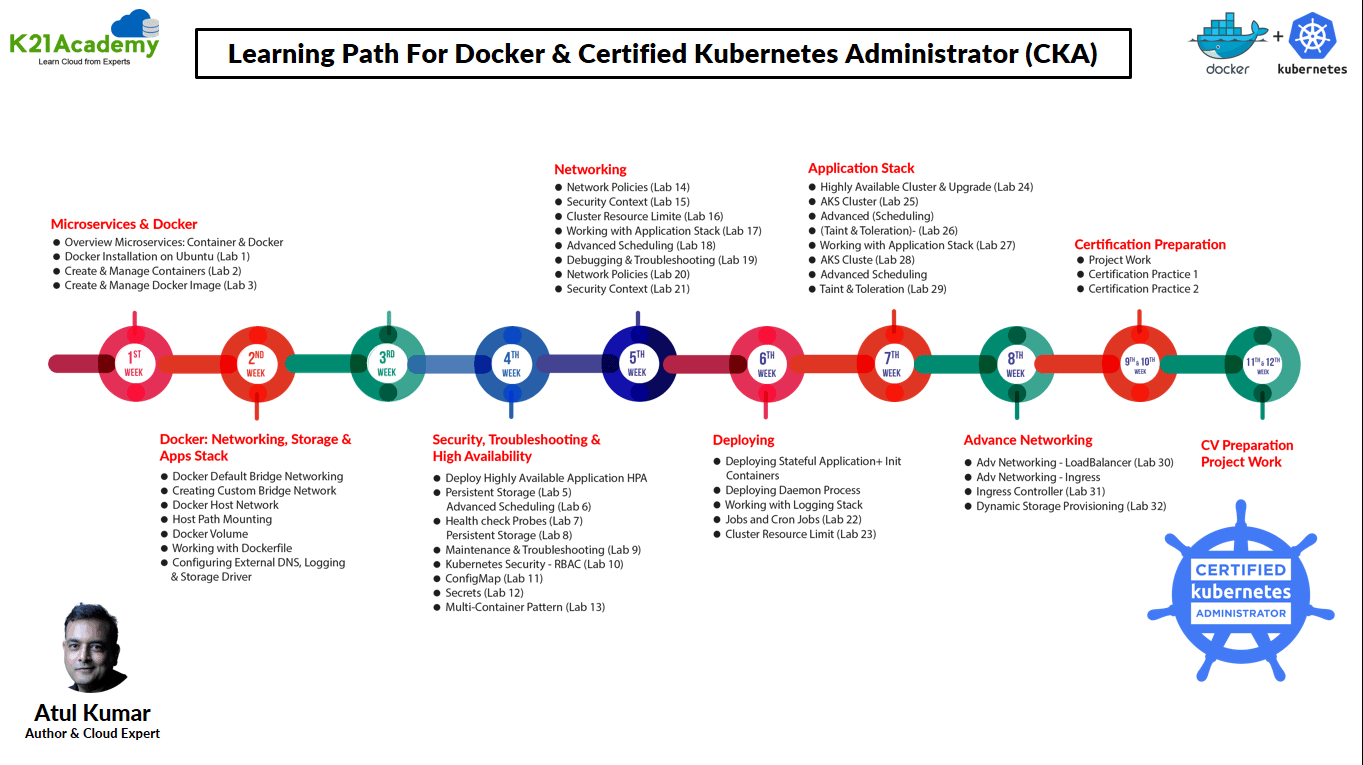
Learning Path For Kubernetes Certification (CKA) ^
Complete CKA Guide Hands-on Lab ^
These days, everyone wants to learn Kubernetes, and the best way to do so is through hands-on practice. DevOps engineers, in particular, aim to earn the Certified Kubernetes Administrator (CKA) badge and enhance their expertise in Kubernetes administration.
Here is a list of our activity guides:
- Register for Azure Free Trial Account
- VM Creation Walkthrough
- Docker Installation
- Working with Docker Containers
- Working with Docker Images
- Docker Host Networking
- Docker Custom Bridge Networking
- Working with Docker Volumes
- Implementing Docker Storage Bind Mount
- Configuring External DNS, Logging, and Storage Driver
- Working with Dockerfile
- Working with Application Stack
- Bootstrap Kubernetes Cluster Using Kubeadm
- Deploying High Availability Stateless Applications with Deployment & ReplicaSet
- Creating Pods with ClusterIP and NodePort Types of Service
- Upgrading and Rolling Back Applications with Deployment and ReplicaSet
- Automated Scaling of Applications with HPA and Metric Server
- Kubernetes Storage (Volume, PV, PVC, Storage Class)
- Advanced Scheduling with Node Affinity and Anti-affinity
- Advanced Scheduling with Pod Affinity and Anti-affinity
- Advanced Scheduling with Taint and Toleration
- Deploy and Update DaemonSet Controller
- Deploying and Managing a StatefulSet Resource
- Limiting Resources with Resource Quota
- Cluster Node Maintenance
- Troubleshooting Application and Control Plane Failures
- Security in Kubernetes: RBAC, Service Account, Security Context, ConfigMap
- Implementing Network Policies in Kubernetes Cluster
- Backup and Restore Etcd in Kubernetes
- Upgrading Kubernetes Cluster (Master & Worker Nodes)
- Deploy an End-to-End PHP Guestbook Application on Kubernetes
- Demonstrating Application and Cluster Logging & Monitoring
- Advanced Routing with Ingress Controller
- Dynamic Provisioning of Persistent Volumes
- Create and Configure Managed Kubernetes Cluster on Cloud
How to Register for CKA Certification Exam? ^
Registering for the CKA Certification exam is straightforward and costs $445 USD. This fee grants you eligibility to take the exam within 12 months from the date of registration. You also receive one free retake if you do not achieve a passing score, provided you have not been otherwise deemed ineligible for certification or a retake.

Note: To register for the CKA exam, click here
The CKA Exam Checklist^
The great thing about the CKA exam is that it is 100% hands-on. It’s an online, proctored exam where you’ll need to perform tasks using the command line. The Candidate Handbook is your go-to source for all the exam details, so make sure to read it thoroughly before your exam day.
Here’s a quick checklist of things to keep in mind before taking the exam:
- You need a steady internet connection.
- The exam environment is remote-proctored, meaning you will need a webcam and microphone so the proctor can monitor you throughout the exam.
- You must have a government-issued ID or a passport.
- The exam consists of around 17 questions that you can solve in any order.
- The duration of the exam is 2 hours.
- The pass mark is 66%.
- You need to use the Chrome browser.
- You have one free retake if you don’t pass on your first try.
Time Management is key. Make sure to pace yourself and avoid getting stuck on one question for too long.
Tips for CKA Certification Exam ^
There are some tricks for the help of the candidates which will help them to clear the certification but it entirely depends on you to make use of them, they are definitely not a compulsion. You should be confident enough about the kubectl command. Make sure you understand the components that make up the K8s cluster, how do they interact, and what each component is responsible for, in order to be able to fix the issues for the troubleshooting tasks. I am listing some of them below:
Tip #1: Create Aliases
kubectl is the most-used tool throughout the exam. It’s helpful to create aliases to use your time more efficiently and effectively.
Aliases for Common Commands:
  alias k="kubectl"
  alias kgd="k get deploy"
  alias kgp="k get pods"
  alias kgn="k get nodes"
  alias kgs="k get svc"
  alias kge="k get events --sort-by='.metadata.creationTimestamp' | tail -8"
Aliases for Describing Kubernetes Resources:
  alias kdp="kubectl describe pod"
  alias kdd="kubectl describe deployment"
  alias kds="kubectl describe service"
  alias kdn="kubectl describe node"
Exporting Variables:
export nks="-n kube-system"
Tip #2: Don’t get stuck with difficult questions
Make sure you answer the easy questions first, and if you are getting stuck with a difficult question please move on to the next one and utilize the time accordingly.
Tip #3: Reuse YAML’s
You will need to create pod and deployment resources again and again. Once yaml is generated for a pod or deployment, we can easily reuse the same yaml for different questions with small modifications.
Tip #4: Reach Documentation And Escape Memorizing
You will be allowed to refer to the Kubernetes documentation page during the exam. From the Kubernetes documentation search for “kubectl Cheat Sheet” & “Custom Column” respectively, then from the results click the first link.


Tip #5: Sort By
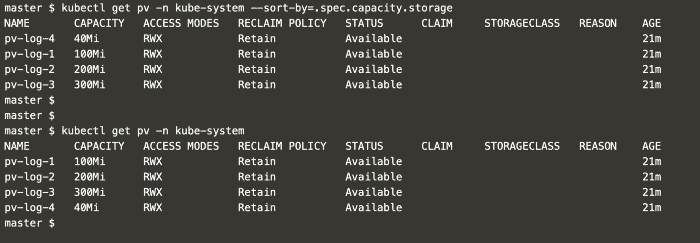
Sort by allows us to order the output based on a specific attribute. Let’s examine an example:
Here’s the command for both sorted and unsorted output:
  kubectl get pv -n kube-system — sort-by=.spec.capacity.storage
  kubectl get pv -n kube-system
Also Read Our blog post on helm Kubernetes. Click here
CKA Certification Exam Day Tips ^
Getting ready for the big day? Here are some key tips to keep in mind before the exam:
Before the exam begins, the proctor will ask you to clean your desk and show the entire room, including under the desk. Remove any electronics and make sure no one enters the room during the exam.
You’re allowed to open an extra tab in Google Chrome to access the kubernetes.io documentation. You can use the search box on this site, but you cannot use other search engines.
You can answer questions in any order. However, you’re not allowed to use pen and paper for notes. Instead, use the built-in notepad provided in the exam interface.
Make sure to use the restroom before the exam starts. During the 2-hour exam, you can take a break only if the proctor allows it, but remember, the timer will not stop.
You have two hours to complete the exam. If you find a question difficult, skip it and come back to it later to avoid wasting time.
Remember to stay calm throughout the exam. You’ve got this!
GOOD LUCK! We’re rooting for you!
Frequently Asked Questions ^
What is the CKA exam?
The Certified Kubernetes Administrator (CKA) exam is a certification program offered by the Cloud Native Computing Foundation (CNCF). It is designed to validate the skills and knowledge of professionals in administering Kubernetes clusters. The exam assesses candidates' ability to perform tasks related to cluster architecture, installation and configuration, networking, security, troubleshooting, and more.
What is the format of the CKA exam?
The CKA exam is a performance-based, hands-on exam conducted in a practical lab environment. It consists of a set of performance-based tasks that need to be completed within a given time frame (typically three hours). Candidates are expected to demonstrate their skills by executing commands and performing tasks on a live Kubernetes cluster.
How many questions are there in the CKA exam?
The CKA test is a problem-based exam in which you will answer problems via the command line or by authoring manifesto files. It is a two-hour exam with seventeen questions.
What is the passing score for the CKA exam?
The passing score for the CKA exam is set by the CNCF, and it may vary slightly from one exam session to another. Generally, candidates need to score around 74% or higher to pass the exam.
Are there any prerequisites for taking the CKA exam?
There are no specific prerequisites for taking the CKA exam. However, having hands-on experience with Kubernetes and a good understanding of its core concepts and components is highly recommended.
How long is the CKA certification valid?
The CKA certification is valid for three years. After that, you will need to recertify by passing the current version of the exam or an alternative recertification exam.
Related/References
- Subscribe to our YouTube channel on “Docker & Kubernetes”
- Docker & Certified Kubernetes Administrator (CKA) Training
- CKA/CKAD Exam Questions & Answers 2022
- Kubernetes Monitoring: Prometheus Kubernetes & Grafana Overview
- How To Setup A Three Node Kubernetes Cluster For CKA: Step By Step
Join FREE Masterclass of Kubernetes
Discover the Power of Kubernetes, Docker & DevOps – Join Our Free Masterclass. Unlock the secrets of Kubernetes, Docker, and DevOps in our exclusive, no-cost masterclass. Take the first step towards building highly sought-after skills and securing lucrative job opportunities. Click on the below image to Register Our FREE Masterclass Now!


![Microsoft Agentic AI Business Solutions Architect [AB-100] | K21 Academy](https://test.k21academy.com/wp-content/uploads/2025/11/Microsoft-Agentic-AI-Business-Solutions-Architect-AB-100-Exam-Overview1.png)



