
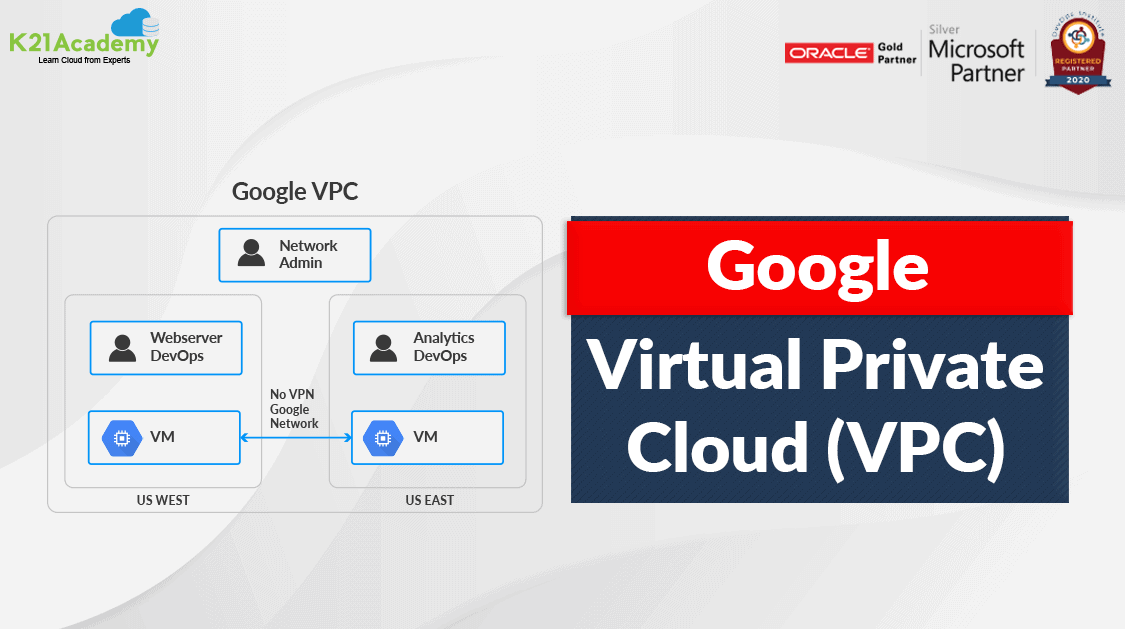



Google Cloud VPC or Virtual Private Cloud provides networking for your cloud-based resources and services that are global, scalable, and flexible. It facilitates networking functionality to Compute Engine VM instances, GKE clusters, and the App Engine flexible environment.
In this blog, we will take a quick look into :
- What is Virtual Private Cloud?
- Google Cloud VPC Overview
- VPC Components
- Networks & Subnets
- VPC Benefits
What Is Virtual Private Cloud (VPC)?
A virtual private cloud (VPC) is a secure, isolated private cloud hosted within a public cloud. Customers can run code, store data, host websites, etc which they could do in an ordinary private cloud, but the only difference is that that private cloud is hosted remotely by a public cloud provider. It combines the scalability and convenience of public cloud computing with the data isolation of private cloud computing.
A good analogy could be a hotel that has number of rooms and restaurants and a partiular room has been booked in that hotel. This booked room is like a virtual private cloud within the ‘hosted’ (public) hotel environment. The room can only be accessed by people who have made a reservation.
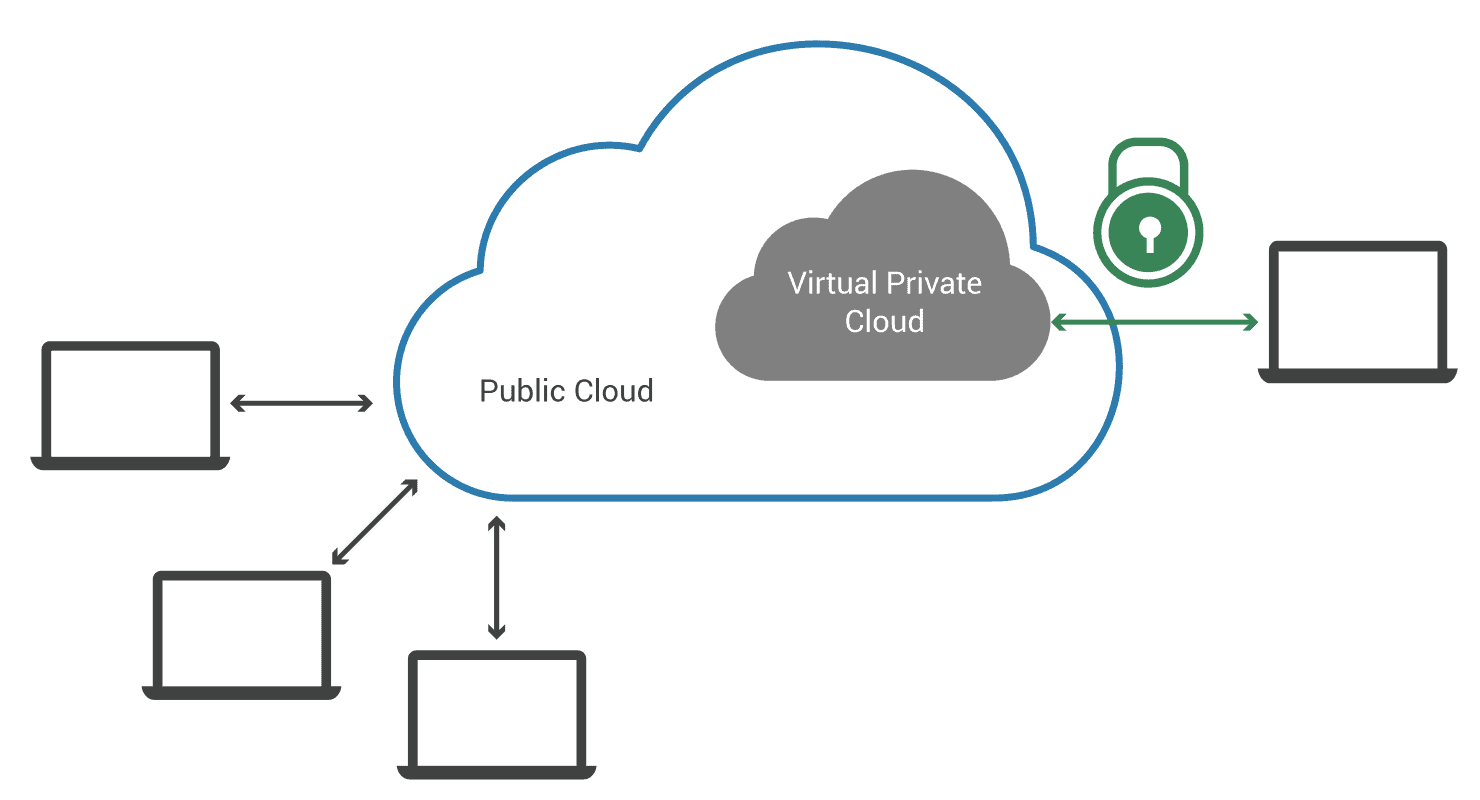
Overview: Google Cloud VPC
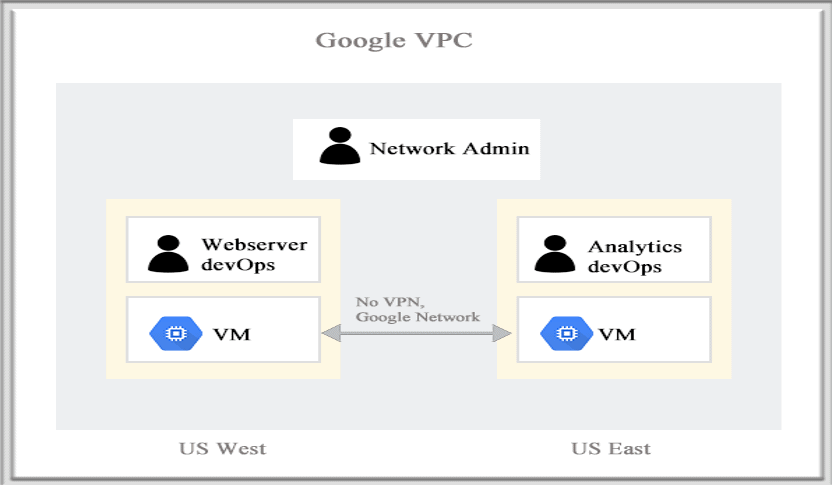
GCP VPC provides networking functionality to Compute Engine VM instances, Google Kubernetes Engine clusters, and App Engine flexible environment. It provides networking for customers’ cloud-based resources and services that are global, scalable, and flexible.
Read More: About Google Cloud IAM. Click here
VPC Components
These are the important components/features of GCP VPC. Let’s understand each of these in detail:
1.) VPC Networks
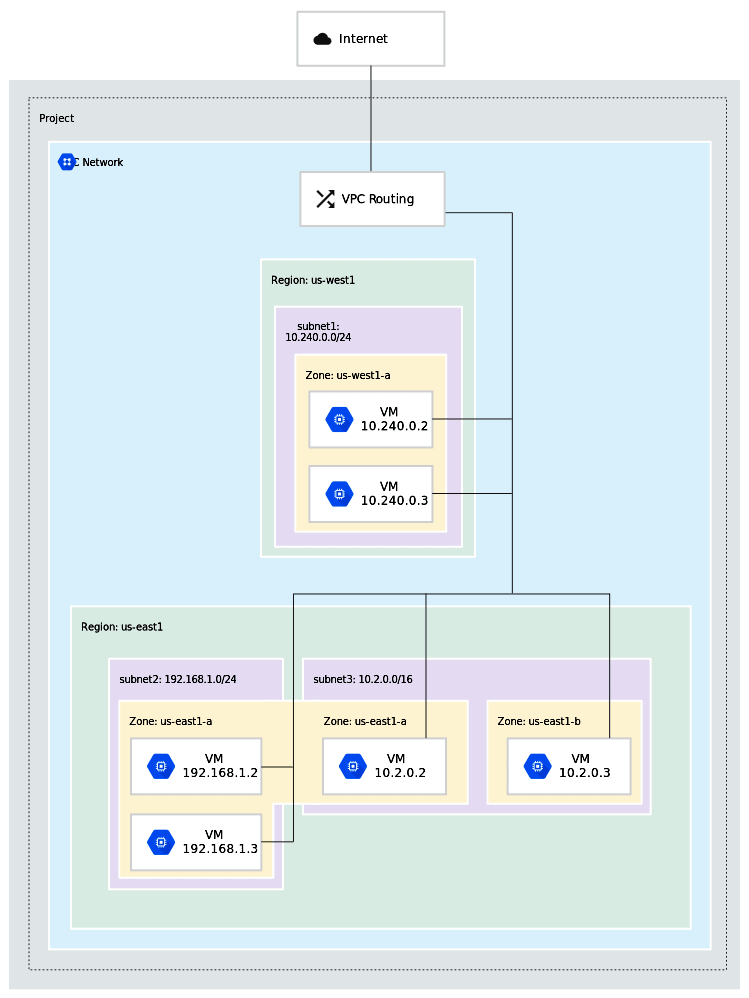
A Virtual Private Cloud (VPC) network is a virtual version of a physical network, implemented inside of Google’s production network, using Andromeda. VPC networks along with their associated routes and firewall rules, are global resources i.e., they are not associated with any distinct region or zone. A VPC network provides the following:
- Provides connectivity for your Compute Engine virtual machine (VM) instances, including Google Kubernetes Engine (GKE) clusters, App Engine flexible environment instances, and other Google Cloud products built on Compute Engine VMs.
- Offers native Internal TCP/UDP Load Balancing and proxy systems for Internal HTTP(S) Load Balancing.
- Connects to on-premises networks using Cloud VPN tunnels and Cloud Interconnect attachments.
- Distributes traffic from Google Cloud external load balancers to backends.
Note: Projects can contain multiple VPC networks. Unless an organizational policy is created by the user that prohibits it, new projects start with a default network (an auto mode VPC network) that has one subnetwork (subnet) in each region.
Source: Google
2.) Subnets
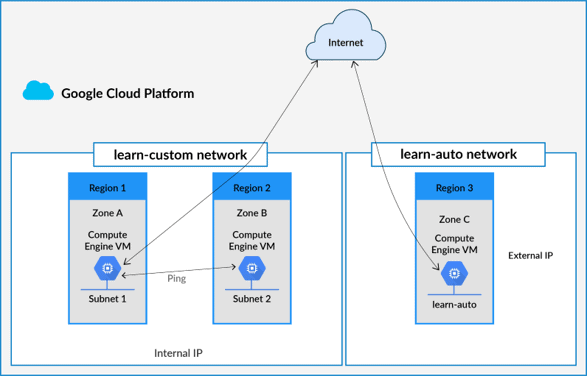
Each VPC network consists of one or more useful IP range partitions called subnets and each subnet is associated with a region. VPC networks do not have any IP address ranges associated with them, IP ranges are defined for the subnets. Subnets are regional resources. Each subnet defines a range of IP addresses.
Please Note: The terms subnet and subnetwork are synonymous. They are used interchangeably in the Google Cloud Console, gcloud commands, and API documentation. However, a subnet is not the same thing as a VPC network. They both represent different types of objects in Google Cloud.
When a subnet is created, its primary IP address range must be defined. Optionally secondary IP address ranges can also be added to a subnet, which is only used by alias IP ranges. Each primary or secondary IP range for subnets in the VPC network needs to be a unique valid CIDR block.
3.) IP Addresses
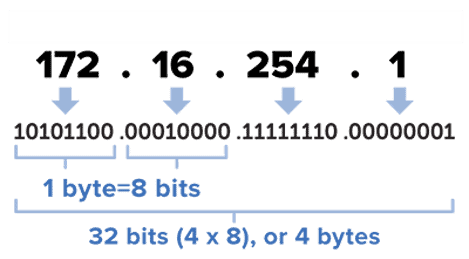
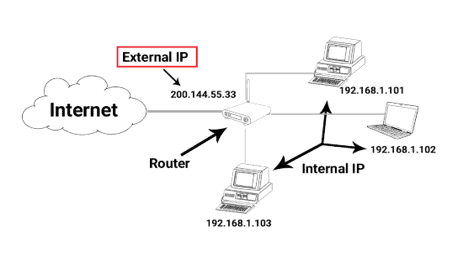
Resources such as VM instances and load balancers have IP addresses in Google Cloud which enables Google Cloud resources to communicate with other resources in Google Cloud, in on-premises networks, or on the public internet.
Google Cloud uses the following labels to describe different IP address types. For example, subnet IP address ranges must be internal IP addresses, which are addresses that are not publicly routed. An external IP address is a publicly routed IP address that can be assigned an external IP address to the network interface of a Google Cloud VM.
4.) Firewall Rules
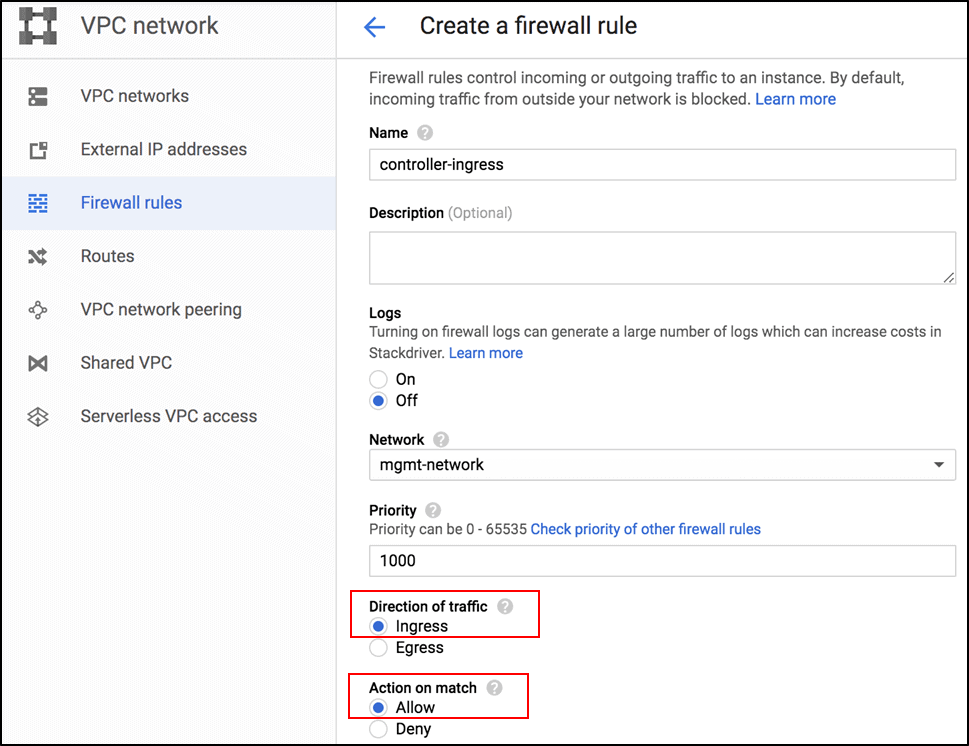
Firewall rules apply to both outgoing (egress) and incoming (ingress) traffic in the network. They manage traffic even if it is entirely within the network, including communication among VM instances.
Virtual Private Cloud firewall rules apply to a given project and network. They allow users to control which packets are allowed to travel to which destinations. Every VPC network has two implied firewall rules that block all incoming connections and allow all outgoing connections.
When you create a VPC firewall rule, a VPC network is specified along with a set of components that define what the rule does. The components enable you to target certain types of traffic, based on the traffic’s protocol, destination ports, sources, and destinations.
5.) Routes
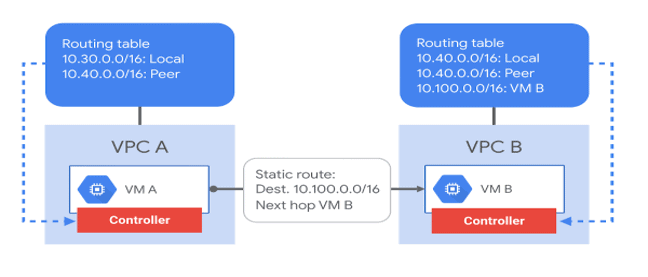
Google Cloud routes define the paths that network traffic takes from a virtual machine (VM) instance to other destinations. These destinations can be inside your Google Cloud Virtual Private Cloud (VPC) network (for example, in another VM) or outside it.
In a VPC network, a route consists of a single destination prefix in CIDR format and a single next hop. When an instance in a VPC network sends a packet, Google Cloud delivers the packet to the route’s next hop if the packet’s destination address is within the route’s destination range. You can create custom static routes to direct some packets to specific destinations.
Also Read: Our previous blog post on Google Cloud Database. Click here
Networks & Subnets
Google Cloud offers three types of VPC networks, determined by their subnet creation mode:
- Default-mode VPC
- Auto-mode VPC
- Custom-mode VPC
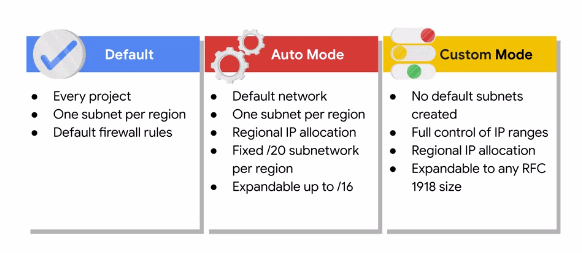
Default Mode VPC: Every project is provided with a Default VPC network with preset subnets and firewall rules. Specifically, a subnet is allocated for each region with non-overlapping CIDR blocks and firewall rules that allow ingress traffic from ICMP, RDP, and SSH traffic from anywhere, as well as ingress traffic from within the default network for all protocols and ports
Auto Mode VPC: In this network, one subnet from each region is automatically created within it. The Default network can be understood as an Auto mode network. These automatically created subnets use a set of predefined IP ranges with a /20 mask that can be expanded to a /16. These subnets fit within the 10.128.0.0/9 CIDR block. So, as new GCP regions become available, new subnets are automatically created in those regions and added to auto mode networks using an IP range from that block.
Custom Mode VPC: A Custom Mode network does not automatically create subnets. This type of network provides the user with complete control over its subnets and IP ranges. The users decide which subnets to create in regions they choose and using IP ranges they specify within the RFC 1918 address space. These IP ranges cannot overlap between subnets of the same network.
Also Read: Our blog post on Google Cloud Free Trial Account. Click here
Benefits Of VPC
- Flexibility to scale and control how workloads connect both regionally and globally
- Bring your own IP addresses to Google’s network infrastructure anywhere
- Access VPCs with no need to replicate connectivity or management policies in each region
- VPC Flow logs: VPC flow logs help with network monitoring, forensics, real-time security analysis, and expense optimization.
- Host globally distributed multi-tier applications by creating a VPC with subnets.
- Disaster Recovery: With application replication, create backup Google Cloud compute capacity, then revert back once the incident is over.
- Packet Mirroring
- Securely connect your existing network to the VPC network over IPsec using VPN
- VPC Peering: Configure private communication across the same or different organizations without bandwidth bottlenecks or single points of failure.
- Shared VPC
Here was a brief introduction to GCP VPC, its components, and its benefits.
Read More: Google Associate Cloud Engineer. Click here
Frequently Asked Questions
Why do we need VPC in GCP?
Google Cloud VPCs let users increase the IP space of any subnets without any workload shutdown or downtime which in return gives them flexibility and growth options to meet their needs.
What is a subnet in the cloud?
Subnets are a logical partition of an IP network into multiple, smaller network segments. The Internet Protocol (IP) is the method for sending data from one computer to another over the internet. Each computer, or host, on the internet, has at least one IP address as a unique identifier.
Which virtual private cloud (vpc) network type allows you to fully control ip ranges and the definition of regional subnets?
With the Custom VPC network, you can define your own IP address ranges and subnets within a region, and you have full control over the network topology, including the ability to create multiple subnets per region.
What are the three types of networks offered in google cloud?
Three Types of networks are offered in GCP – Default network, Auto mode VPC network, and Custom mode VPC network.
Related References
- GCP Professional Cloud Architect: Everything You Need To Know
- Google Professional Cloud Architect: Step-By-Step Hands-On Guide
- Introduction To Google Cloud Platform
- Google Cloud Services & Tools
- Introduction To Google Compute Engine
- Overview of Google App Engine
Next Task For You
We have a complete module dedicated to Virtual Networks in our Google Professional Cloud Architect training where we cover these topics in detail along with hands-on exercises.
Interested in Google Professional Cloud Architect Certification?? Then register now for the FREE CLASS where you will get to know more about this certification.


![Microsoft Agentic AI Business Solutions Architect [AB-100] | K21 Academy](https://test.k21academy.com/wp-content/uploads/2025/11/Microsoft-Agentic-AI-Business-Solutions-Architect-AB-100-Exam-Overview1.png)


