
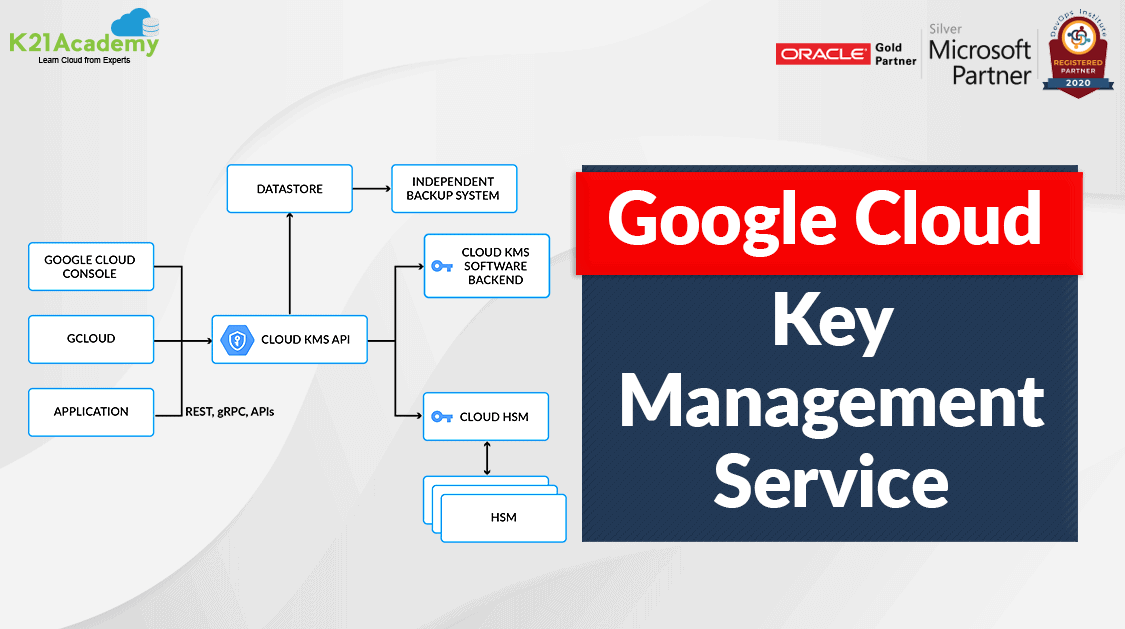



Google Cloud KMS or Key Management Service is a cloud service to manage encryption keys for other Google Cloud services that enterprises can use to implement cryptographic functions. Google Cloud Key Management Service (KMS) is a cloud-based key management system that enables you to create, use, and manage cryptographic keys and perform cryptographic operations in a secure manner.
In this blog we are going to cover:
Google Cloud KMS Overview
When data is stored in Google Cloud, it is encrypted at rest by default. So when users use Cloud Key Management Service (Cloud KMS) platform, they can gain greater control over how their data is encrypted at rest and how their encryption keys are managed. KMS provides a highly secure and scalable key management solution that meets the requirements of a wide range of applications and industries. It allows you to create and use encryption keys for your cloud services and applications and helps you ensure that your data is protected at rest and in transit.
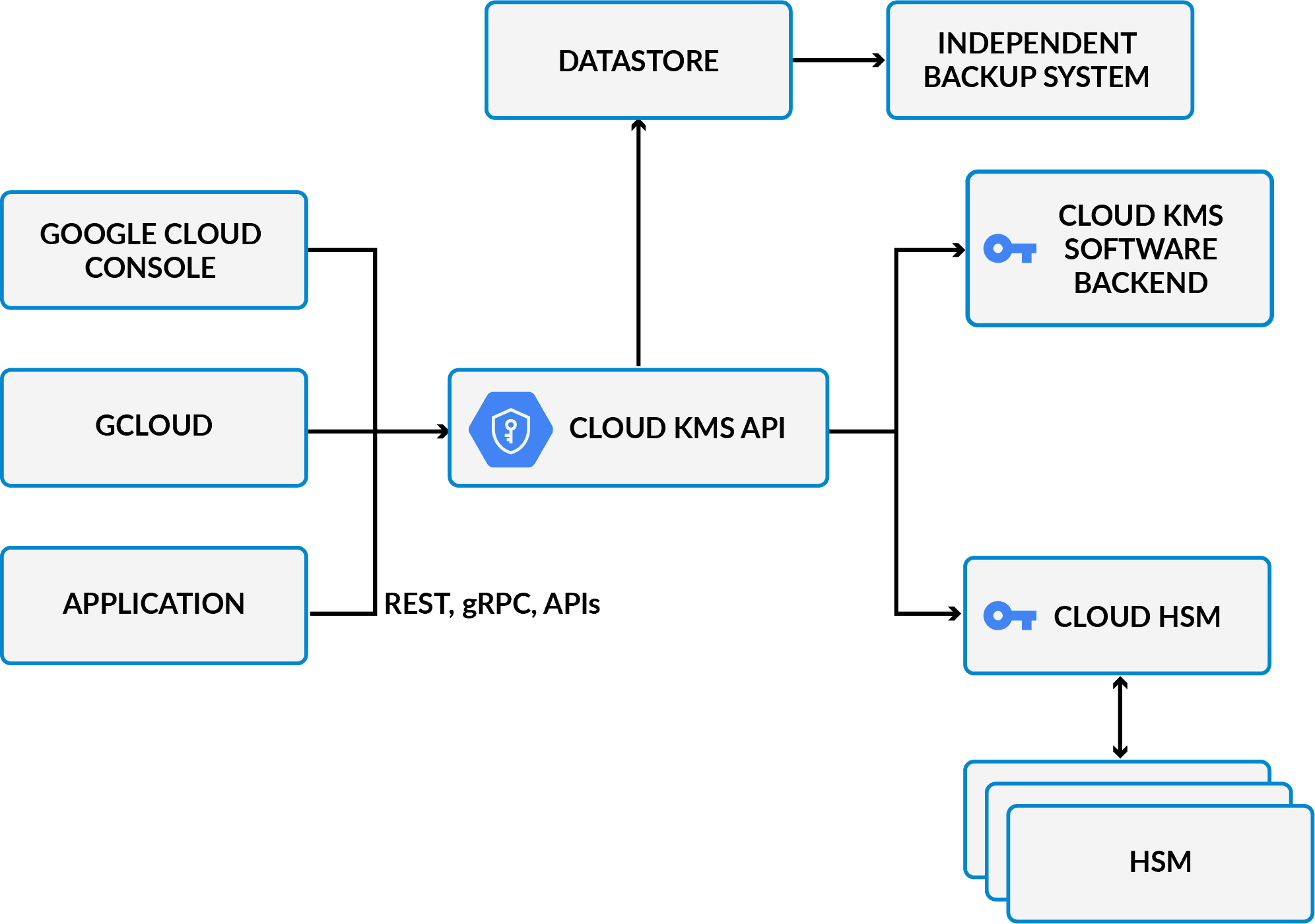
The Cloud KMS platform allows Google Cloud customers to manage cryptographic keys in a central cloud service for either direct use or use by other cloud resources and applications. For the source of keys, Cloud KMS provides the following options:
- The Cloud KMS software backend gives the flexibility to encrypt data with either a symmetric or asymmetric key that can be controlled.
- Cloud Hardware Security Modules (HSM)
- Customer managed-encryption keys (CMEK): Option to select keys generated by Cloud KMS with other Google Cloud services
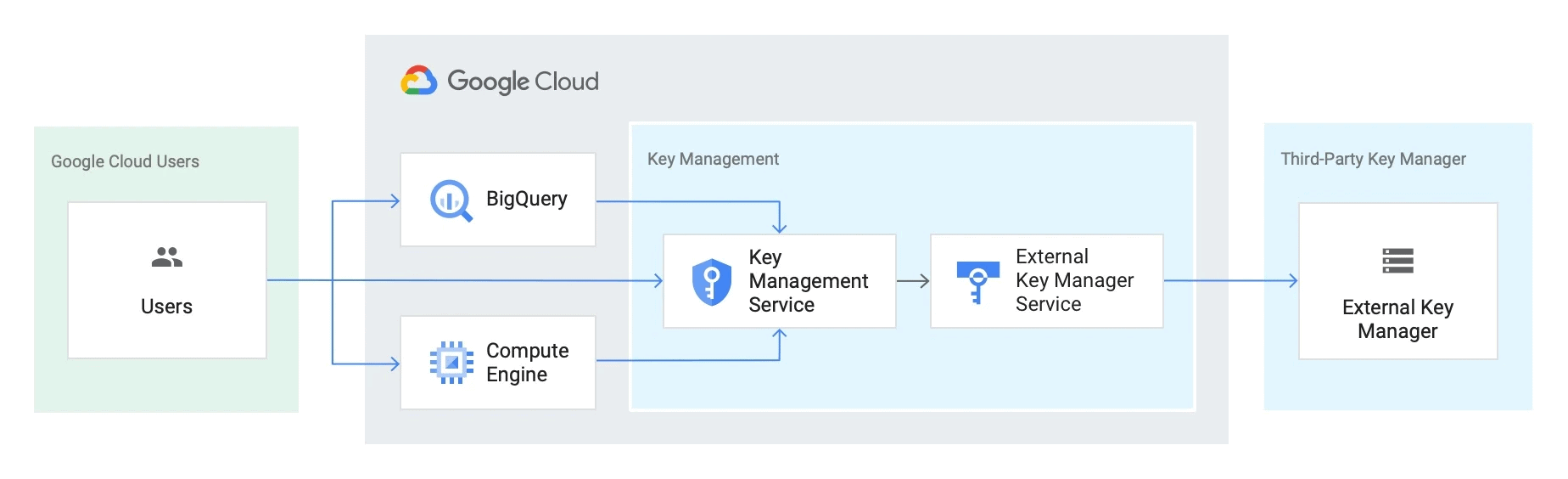
- Cloud External Key Manager (EKM)
- Customer-supplied encryption keys (CSEK)
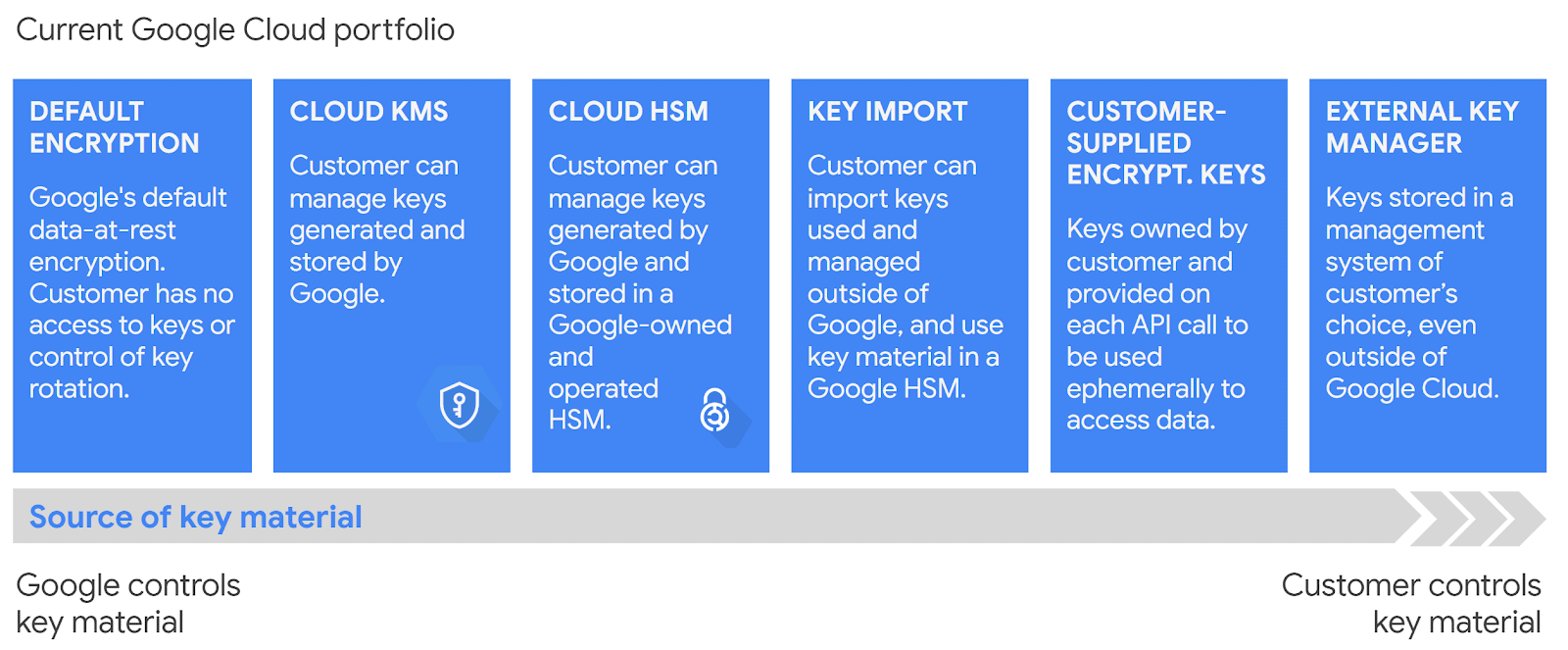
Image Source: Google Cloud
Also, Read Our blog post on Google Cloud VPC. Click here
Five Design Pillars
Google’s main aim is to provide a scalable, reliable, and performant solution, with the widest spectrum of options that can be controlled, on a platform that is easy to use. Cloud KMS is supported by five design pillars:
- Customer control: It allows users to manage software and hardware encryption keys or supply their own keys.
- Access control and monitoring: With Cloud KMS, users can manage permissions on individual keys and monitor their applications.
- Regionality: Cloud KMS offers regionalization. KMS service is configured to create, store, and process software keys selected by the user in the Google Cloud region only.
- Durability: It achieves the highest durability standards on Google Cloud. To help guard against data corruption and to verify that data can be decrypted successfully, it periodically scans and backs up all key material and metadata.
- Security: Cloud KMS offers strong protection against unauthorized access to keys and is fully integrated with Identity and Access Management (IAM) and Cloud Audit Logs controls.

Also Read Our previous blog post on GCP IAM. Click here
Cloud KMS Resources
1.) Keys
It is a named object containing one or more key versions, along with metadata for the key. A key exists on exactly one key ring tied to a specific location.
Users can allow and deny access to keys using IAM permissions and roles. It’s not possible to manage access to a key version.
Cloud KMS supports asymmetric keys and symmetric keys.
- The symmetric key is used for symmetric encryption to protect some corpus of data like using AES-256 in GCM mode to encrypt a block of plaintext.
- An asymmetric key can be used either for asymmetric encryption or to create digital signatures.
2.) Key Versions
Each version of a key contains key material used for encryption or signing. A key’s version is represented by an integer, starting at 1. Users must use the same key version that was used to encrypt or sign the data to decrypt data or verify a signature.
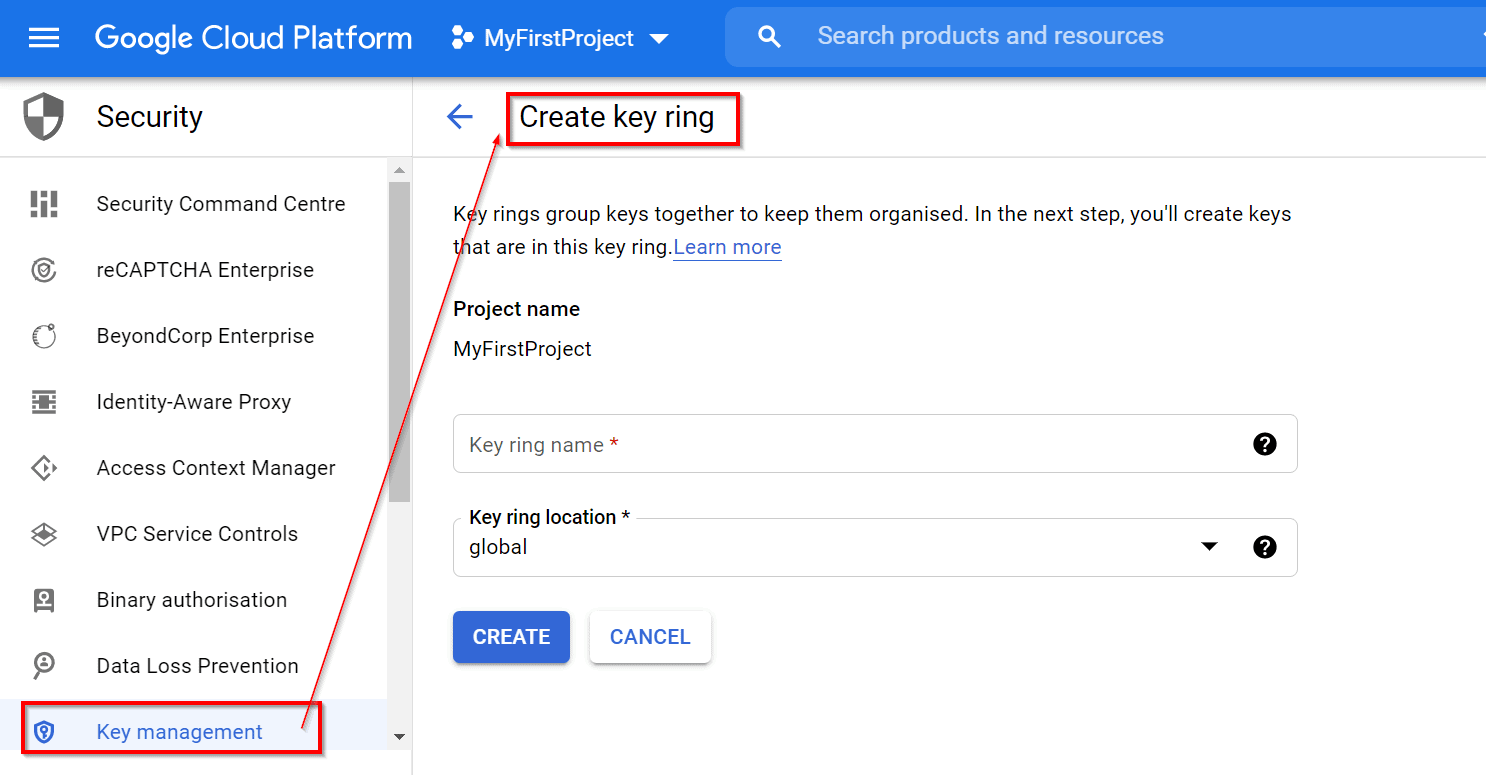
3.) Key Rings
A key ring organizes keys in a specific Google Cloud location and allows users to manage access control on groups of keys. The name does not need to be unique across a Google Cloud project but must be unique within a given location. A key ring cannot be deleted after it is created.
4.) Key Metadata
Resource names, properties of KMS resources such as IAM policies, key type, key size, key state, and any data derived from the above. Key metadata can be managed differently than the key material.
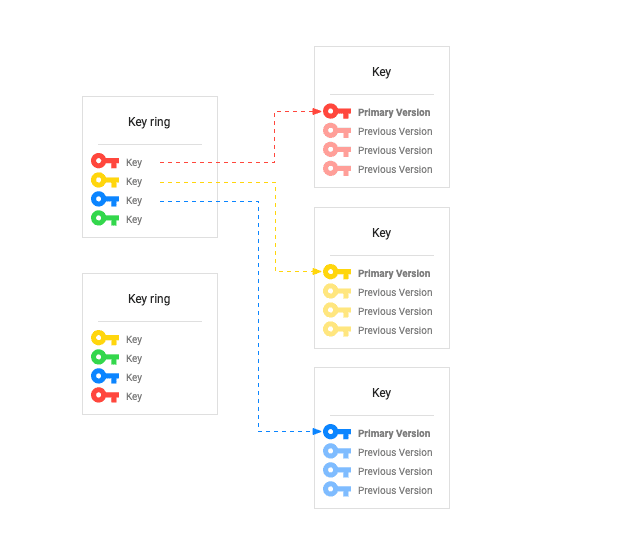
Image Source: Google Cloud
Key Hierarchy
Cloud KMS leverages Google’s internal KMS where the Cloud KMS-encrypted keys are wrapped by Google KMS. It uses the same root of trust as Google KMS. This section covers a brief description of the hierarchy:
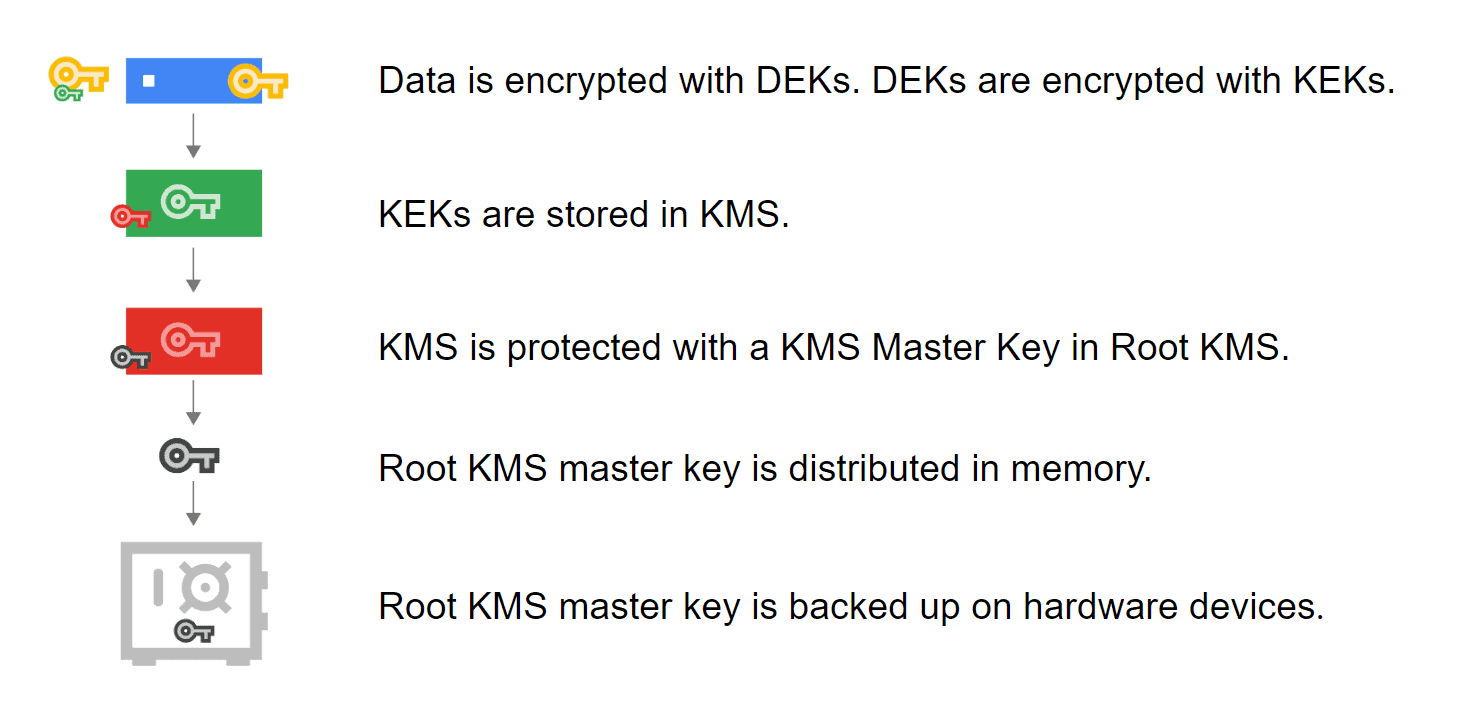
Image Source: Google Cloud
Legend:
- DEK: Data Encryption Key- used to encrypt data.
- KEK: Key Encryption Key – used to encrypt, or wrap, a data encryption key.
- KMS Master Key: The key used to encrypt the KEK. This key is distributed in memory. The KMS Master Key is backed up on hardware devices and is responsible for encrypting users’ keys.
- Root KMS: It is Google’s internal key management service.
Google Cloud KMS Platform
Cloud KMS platform supports multiple cryptographic algorithms, and offers techniques to encrypt and digitally sign using both hardware- and software-backed keys. It is integrated with cloud IAM and Cloud Audit Logs so that users can manage permissions on individual keys and audit how they are used.
Some of the key features of Google Cloud KMS include:
- Key Management: KMS allows you to create, manage, and use encryption keys for your cloud services and applications.
- Key Rotation: KMS provides key rotation policies that help you rotate your keys regularly to improve security.
- Integration: KMS integrates with other Google Cloud Platform services, such as Cloud Storage, BigQuery, and Compute Engine.
- Access Control: KMS provides granular access control, allowing you to control who can create, use, and manage encryption keys.
- Audit Logging: KMS provides audit logging, allowing you to track key usage and ensure compliance with security policies.
Overall, Google Cloud Key Management Service (KMS) provides a robust and scalable solution for managing encryption keys and performing cryptographic operations in the cloud.
Use-Cases
1.) Support regulatory compliance
Together with Cloud HSM and Cloud EKM, Google Cloud KSM supports a wide range of compliance mandates that call for specific key management procedures and technologies.
2.) Manage encryption keys outside the cloud
3.) Key access justification and EKM data flow
The use cases focus on both enforcement and visibility for data access. Key Access Justifications provide customers visibility in
- every request made for an encryption key,
- a justification for that request,
- a mechanism to approve or deny decryption in the context of that request.
Key Features
- Encrypt & decrypt via API
- High global availability
- Integration with GKE
- key data residency
- Integrity Commitment
- Symmetric & Asymmetric key support
Cloud KMS Pricing
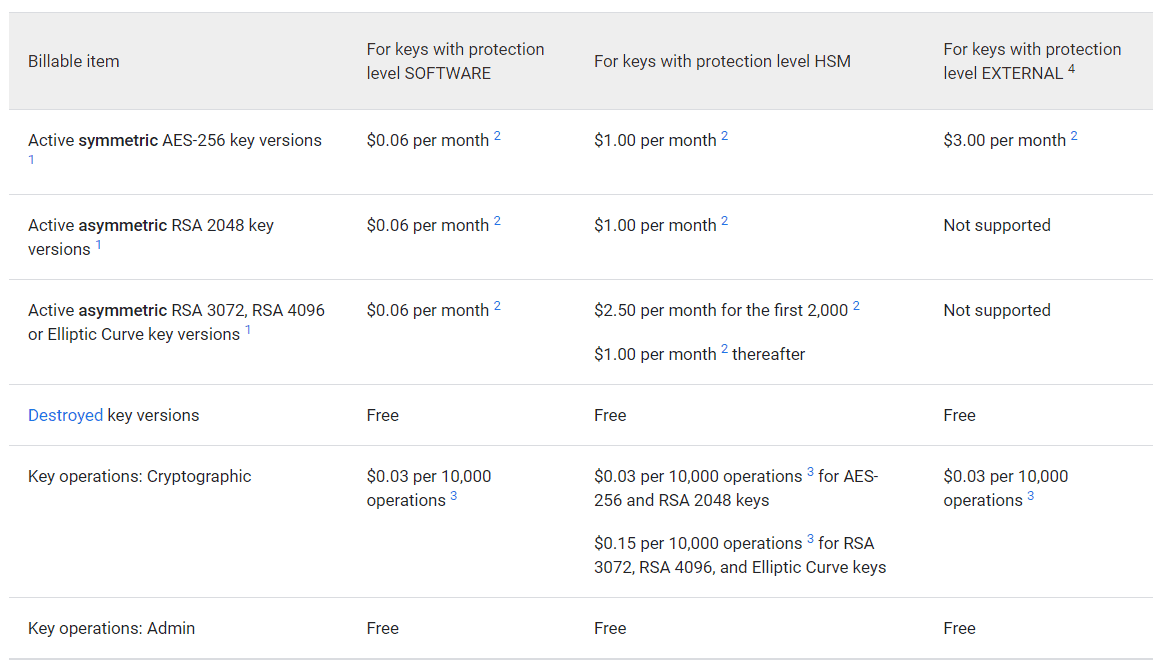
Cloud KMS charges users for usage based on the following products: Cloud Key Management Service, Cloud External Key Manager, and Cloud HSM.
Cloud KMS pricing is based on
- the number of active key versions
- protection level on the key versions
- usage rate for key operations
Frequently Asked Questions
What is CMEK?
Customer-managed encryption keys or CMEK is intended for organizations having sensitive or regulated data that requires them to manage their own encryption key.
Where are customer-managed encryption keys stored?
The encryption key is created and stored on the key management server. The key manager creates the encryption key through the use of a cryptographically secure random bit generator and stores the key, along with all its attributes, in the key storage database.
Next Task For You
Interested in Google Professional Cloud Architect Certification?? Then register now for the FREE CLASS where you will get to know more about this certification.


![Microsoft Agentic AI Business Solutions Architect [AB-100] | K21 Academy](https://test.k21academy.com/wp-content/uploads/2025/11/Microsoft-Agentic-AI-Business-Solutions-Architect-AB-100-Exam-Overview1.png)


